New Laptop?
-
@plot-paris said:
its just a matter of small things that add up, really, like that with Mac OS I can't delete a file by hitting the delete button (I either have to use context click or drag it into the bin) or I haven't got a proper task manager, where I can see how much memory or CPU a program is using... that sort of stuff.
I think Windows Vista would have failed this comparisson. but Windows 7 just got there for me
(although I have to say that I am slightly biased for I've been using Win since 3.11).I don't really follow this - Command-backspace does file delete and Activity Monitor does what the Windows Task Manager does.
Chris
-
@plot-paris said:
for me Windows 7 makes the race. not by far. its just a matter of small things that add up, really, like that with Mac OS I can't delete a file by hitting the delete button (I either have to use context click or drag it into the bin) or I haven't got a proper task manager, where I can see how much memory or CPU a program is using... that sort of stuff.
erm...
By pressing the command and backspace keys, you delete a file. Simple.
If you need to keep an eye on memory or CPU cycles (or even how hot your CPU is getting), you open "Activity Monitor" in the utilities folder.
It is simply untrue that the Mac puts everything on the desktop. YOU choose where files go- everytime. It's almost as if people say they have owned and used these brilliant machines, but actually have only played around with them in their local branch of PC World.
I'm sorry this is turning into another I hate Mac debate. It really depresses me how much those who don't use the Macintosh system are prepared to say what they do and what they don't do.
-
Forgot the screen shot

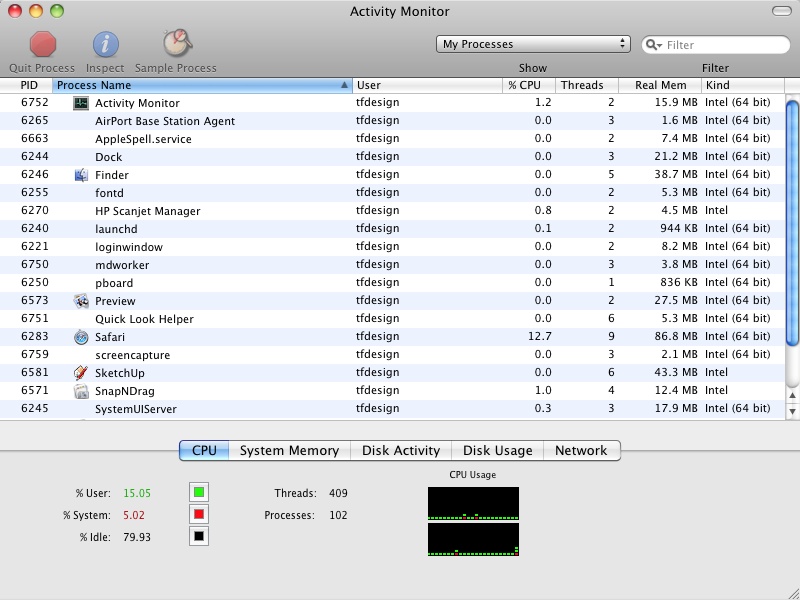
-
@tfdesign said:
Forgot the screen shot :oops:

I was only saying yesterday how nice it was to find a forum where Mac and PC power users don't have to spend the whole thread defending there OS choices
-
cool. both things my colleagues weren't able to tell me. thanks, guys!

is there a keyboard shortcut to open up the activity monitor? and does it start even if all other programs are frozen? that would be perfect -
@plot-paris said:
is there a keyboard shortcut to open up the activity monitor? and does it start even if all other programs are frozen? that would be perfect
not since the invention of wireless keyboards for the iMac, but on my MacBookPro if you toggle caption-lock and the light works, your normally still in business,
if it does [cmd]+[s] usually will save a SU file (even if it's not responding), then clicking on the MenuBar apple/then ForceQuit/SU will 9/10 get you back on track.frozen programs more often only lock themselves, unless your playing with alfa, beta or early release software and some unfriendly SU rubies.
iStatMenus has drop-down menu shortcuts to terminal and console and itself, but most the things you want to keep an eye on are always at the top of the screen and clicking those gives you loads more info.
BTW- Apple don't call them laptops because they can get far to hot, especially the 17" ones. mine lives on a sheet of corrugated ali, and is always on and plugged in when I'm not out and about. MiniBatteryLogger is also worth a look
have fun
john



Advertisement