sketchucation logo sketchucation
    • 登入
    Oops, your profile's looking a bit empty! To help us tailor your experience, please fill in key details like your SketchUp version, skill level, operating system, and more. Update and save your info on your profile page today!
    🔌 Smart Spline | Fluid way to handle splines for furniture design and complex structures. Download

    [Plugin] Milling Tools

    已排程 已置頂 已鎖定 已移動 Plugins
    31 貼文 10 Posters 41.5k 瀏覽 10 Watching
    正在載入更多貼文
    • 從舊到新
    • 從新到舊
    • 最多點贊
    回覆
    • 在新貼文中回覆
    登入後回覆
    此主題已被刪除。只有擁有主題管理權限的使用者可以查看。
    • thomthomT 離線
      thomthom
      最後由 thomthom 編輯

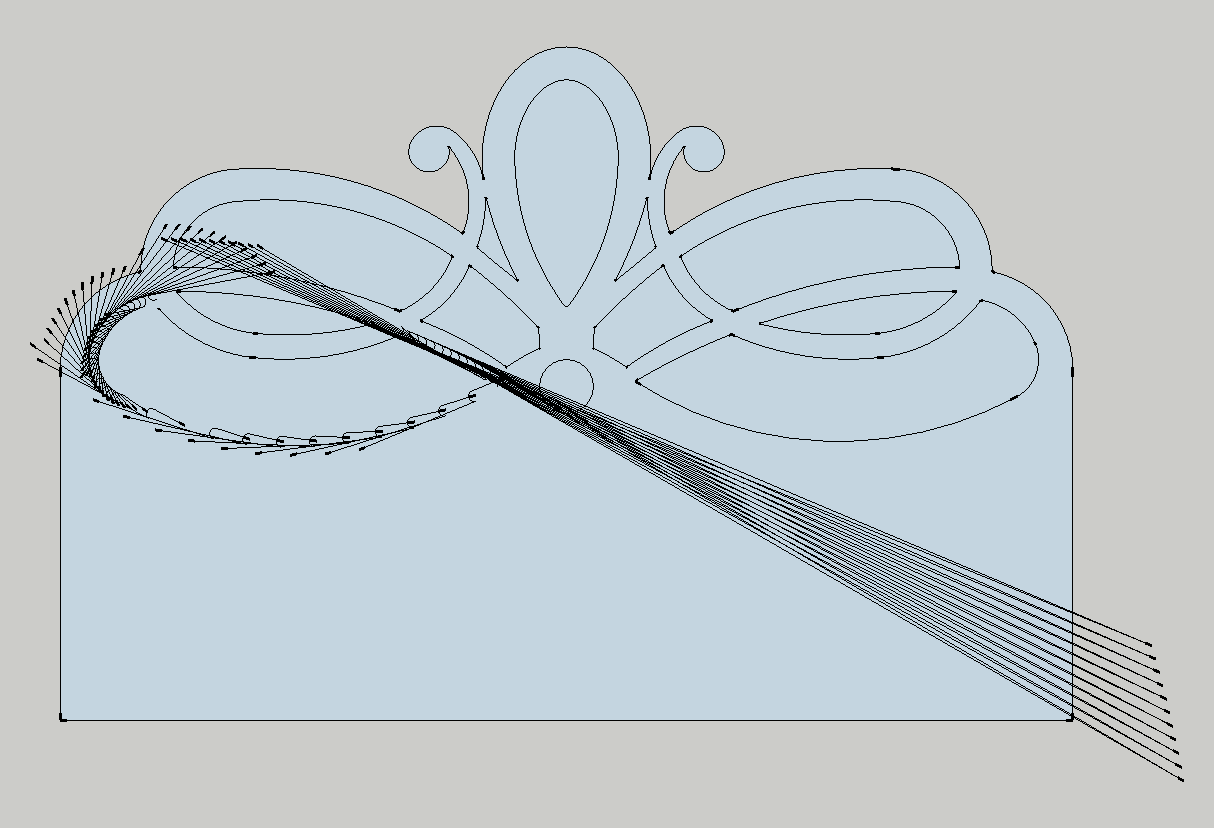
      Work in Progress - Alpha version
      This is just a WIP preview.

      Based a request for a milling tool plugin: http://forums.sketchucation.com/viewtopic.php?f=323%26amp;t=24588

      Creates Dog-Bone fillets on the faces you click on.

      Use VCB to set tool radius.
      Use VCB to set arc segment quality. ("8s" will make arcs based on circles with 8 segments)

      The face clicked on should not be connected to any other faces or edges.

      Version 0.2.1a

      • Better internal processing of existing fillets.
        Version 0.2.0a

      • Handles previously processed faces.

      To do:

      • Validate face before processing.
      • Per-corner processing
      • T-Bone fillets
      • Remember tool settings

      http://forums.sketchucation.com/download/file.php?id=40053&t=1

      http://forums.sketchucation.com/download/file.php?id=40054&t=1

      Link Preview Image
      SketchUp Plugins | PluginStore | SketchUcation

      SketchUp Plugin and Extension Store by SketchUcation provides free downloads of hundreds of SketchUp extensions and plugins

      favicon

      (sketchucation.com)


      Cookieware.png

      Thomas Thomassen — SketchUp Monkey & Coding addict
      List of my plugins and link to the CookieWare fund

      1 條回覆 最後回覆 回覆 引用 0
      • H 離線
        hsjzyangbin
        最後由 編輯

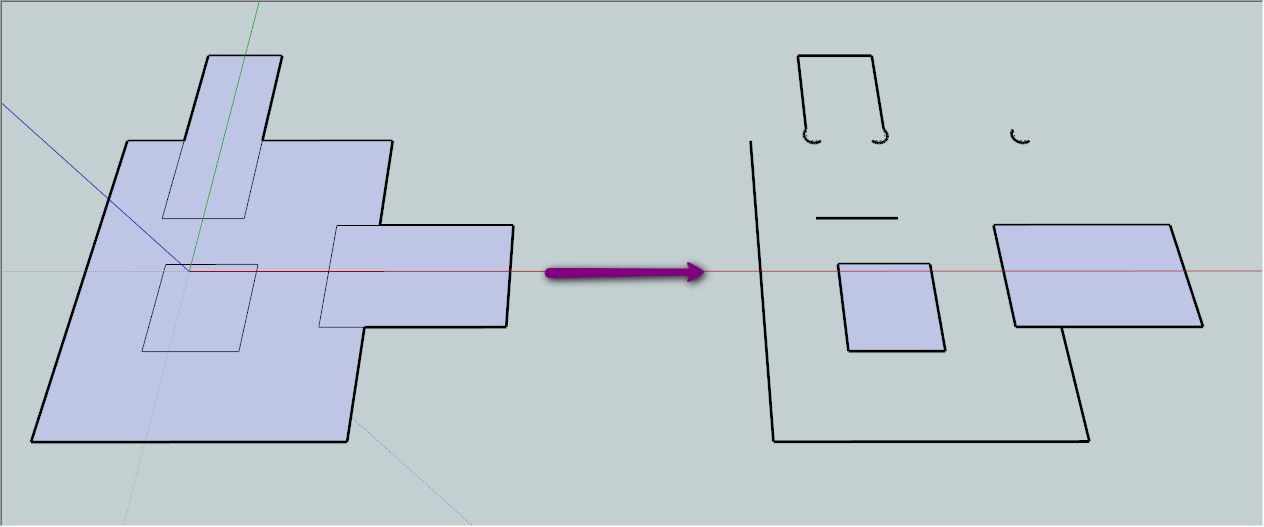
        I have found two omissions:
        1, select the faces necessary for the positive and negative behavior will be crash
        2, two face intersecting must be four points, five points, there will be non-operational status

        2010-01-02_0055.png


        2010-01-02_0130.png

        1 條回覆 最後回覆 回覆 引用 0
        • thomthomT 離線
          thomthom
          最後由 編輯

          @hsjzyangbin said:

          I have found two omissions:
          1, select the faces necessary for the positive and negative behavior will be crash
          2, two face intersecting must be four points, five points, there will be non-operational status
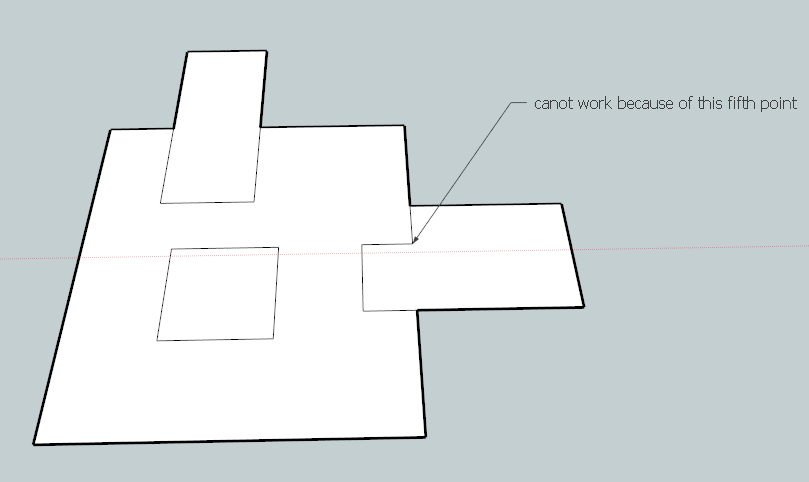
          It does not work on pre-selected faces.
          And as stated in the description:

          @unknownuser said:

          The face clicked on should not be connected to any other faces or edges.

          You should only apply this plugin to single faces that doesn't touch anything else. The face can have holes though.

          @hsjzyangbin said:

          1, select the faces necessary for the positive and negative behavior will be crash

          SU bugsplatted?

          Thomas Thomassen — SketchUp Monkey & Coding addict
          List of my plugins and link to the CookieWare fund

          1 條回覆 最後回覆 回覆 引用 0
          • thomthomT 離線
            thomthom
            最後由 編輯

            Update

            • Edits existing fillets.

            Thomas Thomassen — SketchUp Monkey & Coding addict
            List of my plugins and link to the CookieWare fund

            1 條回覆 最後回覆 回覆 引用 0
            • thomthomT 離線
              thomthom
              最後由 編輯

              Update:

              • Better internal processing of existing fillets.

              Thomas Thomassen — SketchUp Monkey & Coding addict
              List of my plugins and link to the CookieWare fund

              1 條回覆 最後回覆 回覆 引用 0
              • O 離線
                outland86
                最後由 編輯

                Hey Thomthom

                this is looking really good right on track for milling tools for use with sketchup
                can you email me as i would like to talk with you about a really cool project i am working on that may interest you

                info@makecnc.com

                thanks

                keep up the great work!

                Join the Evolution !

                1 條回覆 最後回覆 回覆 引用 0
                • pilouP 離線
                  pilou
                  最後由 編輯

                  A new task! ☀

                  Frenchy Pilou
                  Is beautiful that please without concept!
                  My Little site :)

                  1 條回覆 最後回覆 回覆 引用 0
                  • O 離線
                    outland86
                    最後由 編輯

                    is there no more development for this plugin ?

                    1 條回覆 最後回覆 回覆 引用 0
                    • thomthomT 離線
                      thomthom
                      最後由 編輯

                      I've been ill for more than a week. 😕 All work has been halted.

                      Thomas Thomassen — SketchUp Monkey & Coding addict
                      List of my plugins and link to the CookieWare fund

                      1 條回覆 最後回覆 回覆 引用 0
                      • O 離線
                        outland86
                        最後由 編輯

                        oh sorry

                        hope you get well soon

                        1 條回覆 最後回覆 回覆 引用 0
                        • thomthomT 離線
                          thomthom
                          最後由 編輯

                          I've pretty much recovered - but I now got a bit of backlog of work to do. I'll get back to this plugin - just need to catch up.

                          Thomas Thomassen — SketchUp Monkey & Coding addict
                          List of my plugins and link to the CookieWare fund

                          1 條回覆 最後回覆 回覆 引用 0
                          • dereiD 離線
                            derei
                            最後由 編輯

                            this plugin has a lot of use! please continue development.
                            thanks 😄 👍

                            DESIGNER AND ARTIST DEREI.UK

                            1 條回覆 最後回覆 回覆 引用 0
                            • mitcorbM 離線
                              mitcorb
                              最後由 編輯

                              Just out of curiosity, is this in any way related to Fredo6's Bezier tools added polyline tools for dogbone and t-bone polylines? And was work discontinued for that reason?

                              I take the slow, deliberate approach in my aimless wandering.

                              1 條回覆 最後回覆 回覆 引用 0
                              • thomthomT 離線
                                thomthom
                                最後由 編輯

                                @mitcorb said:

                                Just out of curiosity, is this in any way related to Fredo6's Bezier tools added polyline tools for dogbone and t-bone polylines? And was work discontinued for that reason?

                                The tools where done in parallel - initiated by a request here at the forum.
                                I simply haven't had time to work on this. Since I don't do CNC work myself it'd ended up as low priority.

                                Thomas Thomassen — SketchUp Monkey & Coding addict
                                List of my plugins and link to the CookieWare fund

                                1 條回覆 最後回覆 回覆 引用 0
                                • mitcorbM 離線
                                  mitcorb
                                  最後由 編輯

                                  I don't do CNC work either. I was just thinking maybe Fredo's feature could fill a temporary need? They are obviously different approaches.

                                  I take the slow, deliberate approach in my aimless wandering.

                                  1 條回覆 最後回覆 回覆 引用 0
                                  • dereiD 離線
                                    derei
                                    最後由 編輯

                                    I encounter problems with this model. I also tried on a simple rectangle and I get strange results. Maybe I don't know how to use it?

                                    It would be useful to get the actual contour line and this plugin to create a path (inner/centered/outer) on how the milling head will perform. In the first post, I've seen some images that illustrate exactly this, but my results were bad.
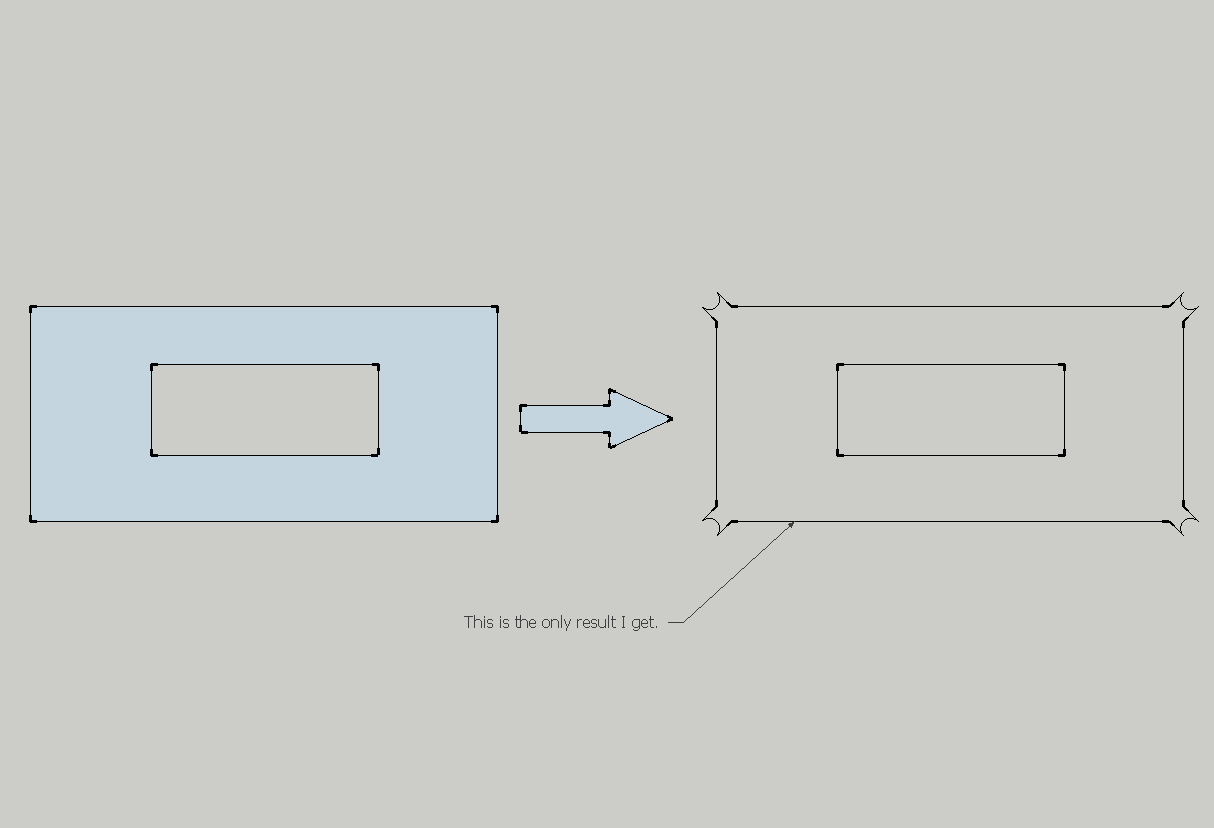
                                    Milling result.png

                                    • I don't know why "Milling result.png" is not shown 😞

                                    This is worse :(


                                    the skp file for headboard.

                                    DESIGNER AND ARTIST DEREI.UK

                                    1 條回覆 最後回覆 回覆 引用 0
                                    • thomthomT 離線
                                      thomthom
                                      最後由 編輯

                                      In your attached model, there are errors listed in the Ruby Console. The plugin has not been tested on such complex and curved shapes.

                                      @unknownuser said:

                                      It would be useful to get the actual contour line and this plugin to create a path (inner/centered/outer) on how the milling head will perform. In the first post, I've seen some images that illustrate exactly this, but my results were bad.

                                      You would like the path you see in the preview as actual geometry?

                                      Thomas Thomassen — SketchUp Monkey & Coding addict
                                      List of my plugins and link to the CookieWare fund

                                      1 條回覆 最後回覆 回覆 引用 0
                                      • thomthomT 離線
                                        thomthom
                                        最後由 編輯

                                        This model if yours has revealed several issues with this plugin... 😕

                                        Thomas Thomassen — SketchUp Monkey & Coding addict
                                        List of my plugins and link to the CookieWare fund

                                        1 條回覆 最後回覆 回覆 引用 0
                                        • dereiD 離線
                                          derei
                                          最後由 編輯

                                          @thomthom said:

                                          You would like the path you see in the preview as actual geometry?

                                          I would like to draw the actual geometry in Sketchup, but the plugin to alter my edges (offset/inset or leave them unaltered, just fillet corners). Because the milling bit can perform on the left, on the right or on the center of the line.

                                          This plugin could be a very powerful one in the future... (offtopic: Now I have some problems with DXF export from SketchUp and importing in CNC software. Some line elements (especially arcs) are mirrored outside of board perimeter). Maybe AutoCAD and SketchUp export DXF in different manners.)

                                          DESIGNER AND ARTIST DEREI.UK

                                          1 條回覆 最後回覆 回覆 引用 0
                                          • dereiD 離線
                                            derei
                                            最後由 編輯

                                            @thomthom said:

                                            This model if yours has revealed several issues with this plugin... 😕

                                            It's my model...actually is something I do now. The curves have a lot of segments because it will be sent to CNC and I have some problems with arcs in DXF export. Polylines are ok, but if there are less segments, it will reflect in manufactured piece.

                                            DESIGNER AND ARTIST DEREI.UK

                                            1 條回覆 最後回覆 回覆 引用 0
                                            • 1
                                            • 2
                                            • 1 / 2
                                            • 第一個貼文
                                              最後的貼文
                                            Buy SketchPlus
                                            Buy SUbD
                                            Buy WrapR
                                            Buy eBook
                                            Buy Modelur
                                            Buy Vertex Tools
                                            Buy SketchCuisine
                                            Buy FormFonts

                                            Advertisement