How to draw a Dome in Sketchup... Not Bowl
-
Hello I'm new here,
I need to draw a geodesic dome for a PRoject that I'm working on. I kind of know how to create a round bowl type dome, but I need one with the triangle/hexagons within the shape.
Thank You

-
Scroll down to Geodesic, this is a ruby to create them.
-
oh, like epcot?
yeah, do what solo said except you may have better luck with the one called 'Geodesic_SketchUp'
i tried the first one called just 'geodesic' and it wouldn't load because i didn't have another file for it to work properly. -
What do I do with all that text/code?
-
yeah,i get that too when i try downloading rubies from there..
try right clicking the link then 'download linked file' (or whatever option your browser may give you) -
you'll end up with a file named 'Geodesic_SketchUp.rb' (whose icon will look like a standard OS X text file)
place that file in the following location --
Macintosh HD/Library/Application Support/Google Sketchup 7/sketchup/plugins
then restart Sketchup an you'll see the new option appear under the plugins menu.
-
right click - save target as- google\sketchup\plugins
just noticed you use a Mac... listen to Jeff.

-
@unknownuser said:
you'll end up with a file named 'Geodesic_SketchUp.rb' (whose icon will look like a standard OS X text file)
place that file in the following location --
Macintosh HD/Library/Application Support/Google Sketchup 7/sketchup/plugins
then restart Sketchup an you'll see the new option appear under the plugins menu.
Which menu is plug-in under in Sketchup.
Thank You
-
it's one of the top menu choices.. see it up there between help & window?
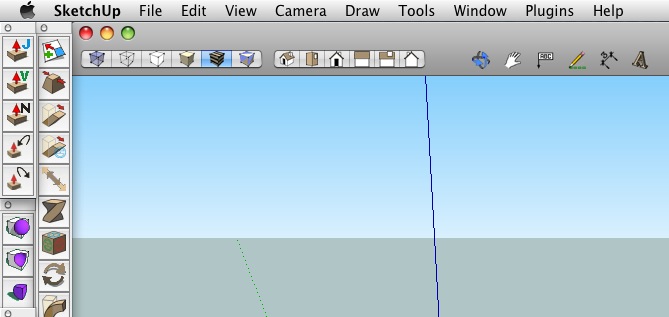
fwiw, if you're learning a new app on a mac and you can't find a certain command, click on the help menu and begin typing the name of the command (in this case, start typing geodesic).. hover over the command that appears in the help menu and it will visually show you the path to the command.. (or you can simply launch the command from the help menu if you choose)
this works on all OSX apps and it's a major help to me right now trying to learn iRhino. -
@unknownuser said:
it's one of the top menu choices.. see it up there between help & window?
[attachment=0:3r03tahm]<!-- ia0 -->screen 2.jpg<!-- ia0 -->[/attachment:3r03tahm]fwiw, if you're learning a new app on a mac and you can't find a certain command, click on the help menu and begin typing the name of the command (in this case, start typing geodesic).. hover over the command that appears in the help menu and it will visually show you the path to the command.. (or you can simply launch the command from the help menu if you choose)
this works on all OSX apps and it's a major help to me right now trying to learn iRhino.No, I haven't go that menu. I types Plugin in Help and it didn't bring anything up either

-
Ouch, I thought that menu was there upon a straight install. I'm on the bus right now so I can't look at my computer but I'll be back in an hour. I'll look into it then.
-
@unknownuser said:
Ouch, I thought that menu was there upon a straight install. I'm on the bus right now so I can't look at my computer but I'll be back in an hour. I'll look into it then.
Ok, I'll be up until 1am ( after midnight ) anyway, trying to work out ArchiCAD as well
 . Got a big project due for Monday
thank You
-
Nathan, are you trying to learn two apps at one time?
-
ok, i completely emptied my plugin folder and found that the 'Plugins' menu will not appear if i do that.. I then dropped only the 'Geodesic_SketchUp.rb' file in there and the menu appear upon relaunching SU and the tool worked fine.
i'm concluding that you're not placing the ruby in the proper location.. here's a visual of the path: (click on the image to see it larger)

there's also a plugin folder located inside the actual app (right clicking on the SU icon then navigating it's contents) but this is the wrong location to place ruby plugins.. that's where all the exporters go and for the most part, stay away from there.. Also, make sure you're not going into the user library instead of the root MacHD library.. if you've done that and added a plugin folder there, remove it. there should not be a plugin folder in the ~user library
so again,
-go to the link solo provided earlier
-scroll down to Geodesic_SketchUp
-right click on the title and choose 'download linked file' (if you're using safari.. if you're in firefox, use the 'Save Link As...' dialogue)
-locate the file named 'Geodesic_SketchUp.rb' which should be in your download folder or on the desktop (or where_ever you have your downloads assigned to)
-follow the path i've shown above and place the .rb file inside the plugin folder
-Launch or relaunch sketchup after the file has been moved and the plugin menu option should appear.report back
-
@solo said:
Nathan, are you trying to learn two apps at one time?
Yes, ArchiCAD is going to be used for a different model as I've seen someone model it for me and I like it. Sketchup is for something else which will take less time than it would in ArchiCAD.
-
@unknownuser said:
ok, i completely emptied my plugin folder and found that the 'Plugins' menu will not appear if i do that.. I then dropped only the 'Geodesic_SketchUp.rb' file in there and the menu appear upon relaunching SU and the tool worked fine.
i'm concluding that you're not placing the ruby in the proper location.. here's a visual of the path: (click on the image to see it larger)
[attachment=0:1blvdqs8]<!-- ia0 -->screen 3.jpg<!-- ia0 -->[/attachment:1blvdqs8]there's also a plugin folder located inside the actual app (right clicking on the SU icon then navigating it's contents) but this is the wrong location to place ruby plugins.. that's where all the exporters go and for the most part, stay away from there.. Also, make sure you're not going into the user library instead of the root MacHD library.. if you've done that and added a plugin folder there, remove it. there should not be a plugin folder in the ~user library
so again,
-go to the link solo provided earlier
-scroll down to Geodesic_SketchUp
-right click on the title and choose 'download linked file' (if you're using safari.. if you're in firefox, use the 'Save Link As...' dialogue)
-locate the file named 'Geodesic_SketchUp.rb' which should be in your download folder or on the desktop (or where_ever you have your downloads assigned to)
-follow the path i've shown above and place the .rb file inside the plugin folder
-Launch or relaunch sketchup after the file has been moved and the plugin menu option should appear.report back
Worked ! I downloaded it and chose Append from the Safari pop-up which made it into a txt file, now it's a .rb it works.
Can I size and scale the object? I need to make it more tent like with a door on it. The project is " Portable Temporary shelters for one person "
Thank You !
-
yeah, after you draw the original shape, you can do what ever you want to it.. delete the bottom half if you choose then scale it, stretch it,squish it, etc.. (all using the scale tool )
i'm not familiar with the ruby but apparently, all of the original dimensions have to be in inches (if you want the original to be 20' diameter, you'll have to enter 120 inches as the radius)the more subdivisions you enter, the more divided up the shape will be and you can delete individual lines or faces from the shape in order to create your door openings.
-
@unknownuser said:
yeah, after you draw the original shape, you can do what ever you want to it.. delete the bottom half if you choose then scale it, stretch it,squish it, etc.. (all using the scale tool )
i'm not familiar with the ruby but apparently, all of the original dimensions have to be in inches (if you want the original to be 20' diameter, you'll have to enter 120 inches as the radius)the more subdivisions you enter, the more divided up the shape will be and you can delete individual lines or faces from the shape in order to create your door openings.
Yep, all is correct. I've not taken it into Hypershot to render ! Very fast. Now I'm wondering wether to try and draw my other model in SU
EDIT: How can I add dimension lines to the model ( if possible ) and do I change the layout unit in preferences ?
Thank You
-
I see there is not much to add here - except maybe the works of TaffGoch. Have a look at his geodesic collection in the 3D Warehouse - there are a good bunch of tutorials there as well.
-
@gaieus said:
I see there is not much to add here - except maybe the works of TaffGoch. Have a look at his geodesic collection in the 3D Warehouse - there are a good bunch of tutorials there as well.
There's some really good ones in there !
How would I go about creating my own ? I want each part and face to be to precise dimensions, and the amount of faces are specific as I will be creating a model too.
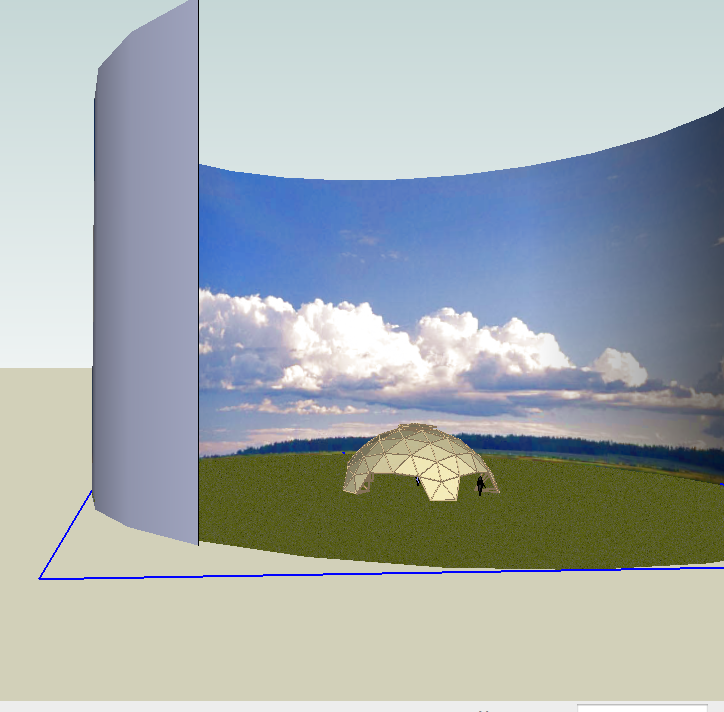
How did the creator of this model I downloaded, get this background in sketchup ? I've downloaded Hypershot, trial but it doesn't really look realistic so far.
Thank You




Advertisement