sketchucation logo sketchucation
    • 登入
    Oops, your profile's looking a bit empty! To help us tailor your experience, please fill in key details like your SketchUp version, skill level, operating system, and more. Update and save your info on your profile page today!
    🔌 Smart Spline | Fluid way to handle splines for furniture design and complex structures. Download

    [Plugin] importDXFtext

    已排程 已置頂 已鎖定 已移動 Plugins
    165 貼文 18 Posters 93.1k 瀏覽 18 Watching
    正在載入更多貼文
    • 從舊到新
    • 從新到舊
    • 最多點贊
    回覆
    • 在新貼文中回覆
    登入後回覆
    此主題已被刪除。只有擁有主題管理權限的使用者可以查看。
    • TIGT 離線
      TIG Moderator
      最後由 編輯

      Here's v4.8
      https://sketchucation.com/pluginstore?pln=importDXFtext
      MTEXT with overly long text strings, but with a predefined 'width-box', now get extra \n's added to split them into shorter strings.
      Thanks for your ideas which helped me crystallize my code...

      TIG

      1 條回覆 最後回覆 回覆 引用 0
      • uwesketchU 離線
        uwesketch
        最後由 編輯

        Instead of assuming an average width of a character, we could also do it precisely without having to change the code sent earlier too much. Just create the 3Dtext for each line and word, get the width and then compare this with the BoxWidth. It takes now more time to calculate the word wrap.

        
        boxwidth= 600
        charheight = 100
        result = ""
        word_array = 'To be or not to be-that is longwordwidest the question'.split(/\s/)
        line = word_array.shift
        word_array.each do |word|
          txt = line + " " + word
          group = Sketchup.active_model.entities.add_group
          group.entities.add_3d_text(txt, TextAlignLeft, "Arial Narrow",true, false, CharHeight, 0.0, 0, false, 0)
          txtwidth=group.bounds.width
          group.erase!
          group = Sketchup.active_model.entities.add_group
          group.entities.add_3d_text(word, TextAlignLeft, "Arial Narrow",true, false, charheight, 0.0, 0, false, 0)
          wordwidth=group.bounds.width
          group.erase!
          if txtwidth <= boxwidth
            line << " " + word
          elsif wordwidth > boxwidth
            result << line + "\n" unless line.empty?
            line = word
          else
            result << line + "\n"
            line = word
          end
        end
        result << line
        puts result
        
        
        1 條回覆 最後回覆 回覆 引用 0
        • uwesketchU 離線
          uwesketch
          最後由 編輯

          OOps, our messages just crossed.
          Cool. I will have a look, thanks.

          1 條回覆 最後回覆 回覆 引用 0
          • TIGT 離線
            TIG Moderator
            最後由 編輯

            That was the type of solution I was originally looking at, but seems long winded...
            The method I used is pretty much like your earlier idea...
            I think - 'sufficient is fit' - to quote someone...

            TIG

            1 條回覆 最後回覆 回覆 引用 0
            • uwesketchU 離線
              uwesketch
              最後由 編輯

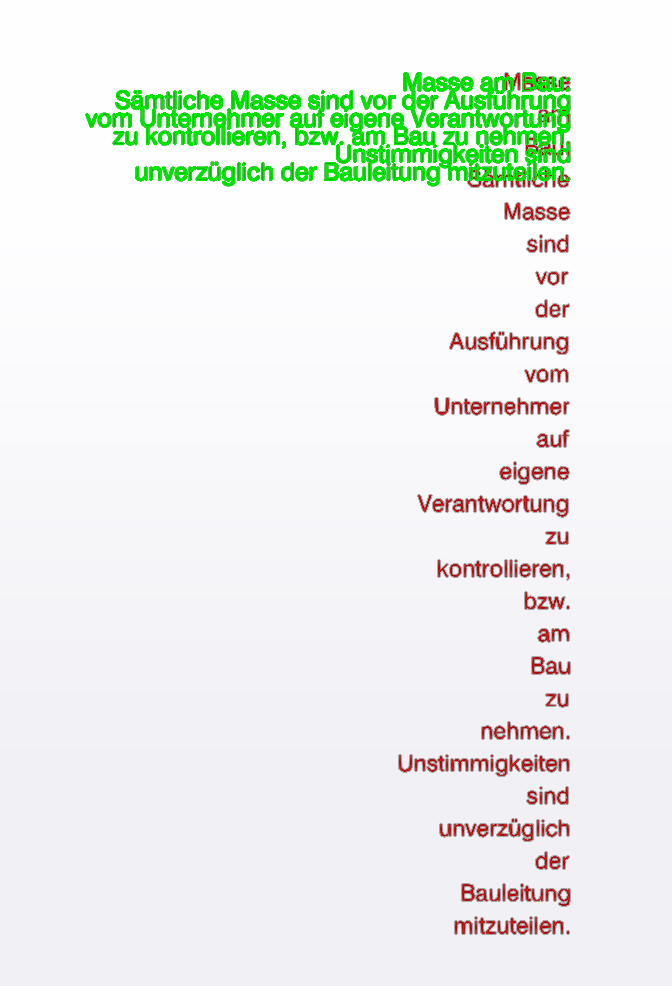
              Somehow the wordwrap is now based on a too narrow box. What is the width you take for below two cases (file "dcf issues with special cahrs.dxf")?
              It seems it is that narrow, that each word is on a new line. Even two short words like "vor der".
              Here the "sufficient" is too tight 😉
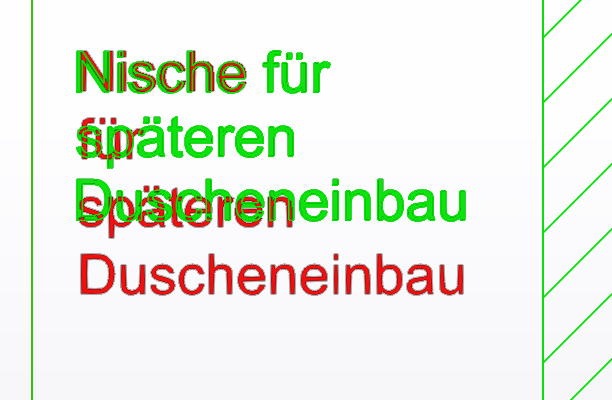
              DXF v4.8 WordWrap Issuse 1 Nische.png

              DXF v4.8 WordWrap Issuse 2 Masse.png

              1 條回覆 最後回覆 回覆 引用 0
              • TIGT 離線
                TIG Moderator
                最後由 編輯

                I don't get that !
                What dxf file & units are you testing ?
                I think I'm using the same one ??
                But I have noticed the \P is not being respected as \n and I'll fix that !
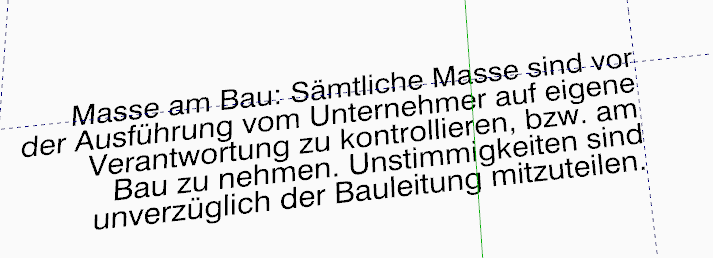
                Capture1.PNG
                Capture2.PNG

                TIG

                1 條回覆 最後回覆 回覆 引用 0
                • uwesketchU 離線
                  uwesketch
                  最後由 編輯

                  I took “m” as import units

                  1 條回覆 最後回覆 回覆 引用 0
                  • TIGT 離線
                    TIG Moderator
                    最後由 編輯

                    With 'inches' it works - I can trap that !?
                    Inches defaults from the DXF's units settings !

                    TIG

                    1 條回覆 最後回覆 回覆 引用 0
                    • TIGT 離線
                      TIG Moderator
                      最後由 編輯

                      Here's v4.9
                      https://sketchucation.com/pluginstore?pln=importDXFtext
                      MTEXT with overly long strings originally with \P v \n addressed, also non-specified units no longer affects the words' wrapping.

                      TIG

                      1 條回覆 最後回覆 回覆 引用 0
                      • uwesketchU 離線
                        uwesketch
                        最後由 編輯

                        Looks good, except that the line spacing for the text "Masse am Bau" is far to big.
                        For the "Nische ..." it is better.

                        In the dxf file, the Text "Nische ..." ha a line spacing defined in Code 44 being 0.9381651742200441
                        The Text "Masse am Bau...." has a line spacing defined with Code 44 being 0.6070814881175318

                        Do you catch this line spacing?

                        Assuming, the line spacing is not considered for the import:

                        It seems the line spacing in the imported text "Nische..." is 1 and in the DXF it is defined as 0.938. So that looks good.
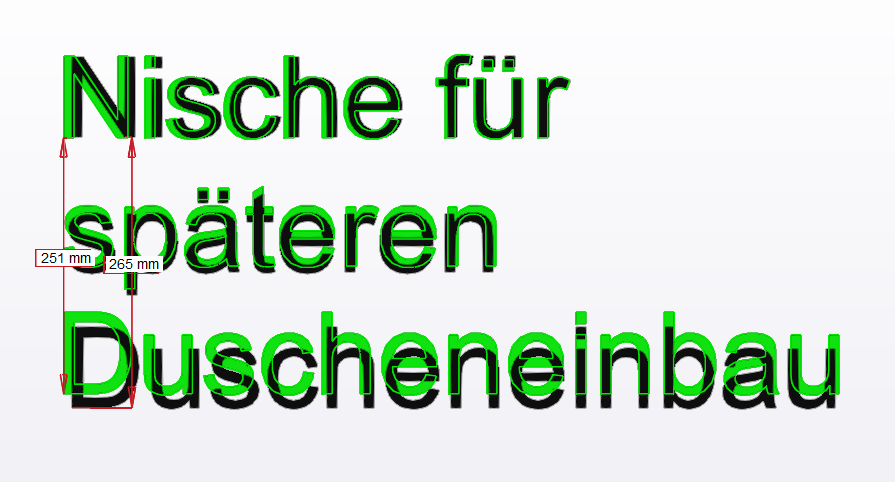
                        DXF v4.9 WordWrap Issuse 1 Nische.png

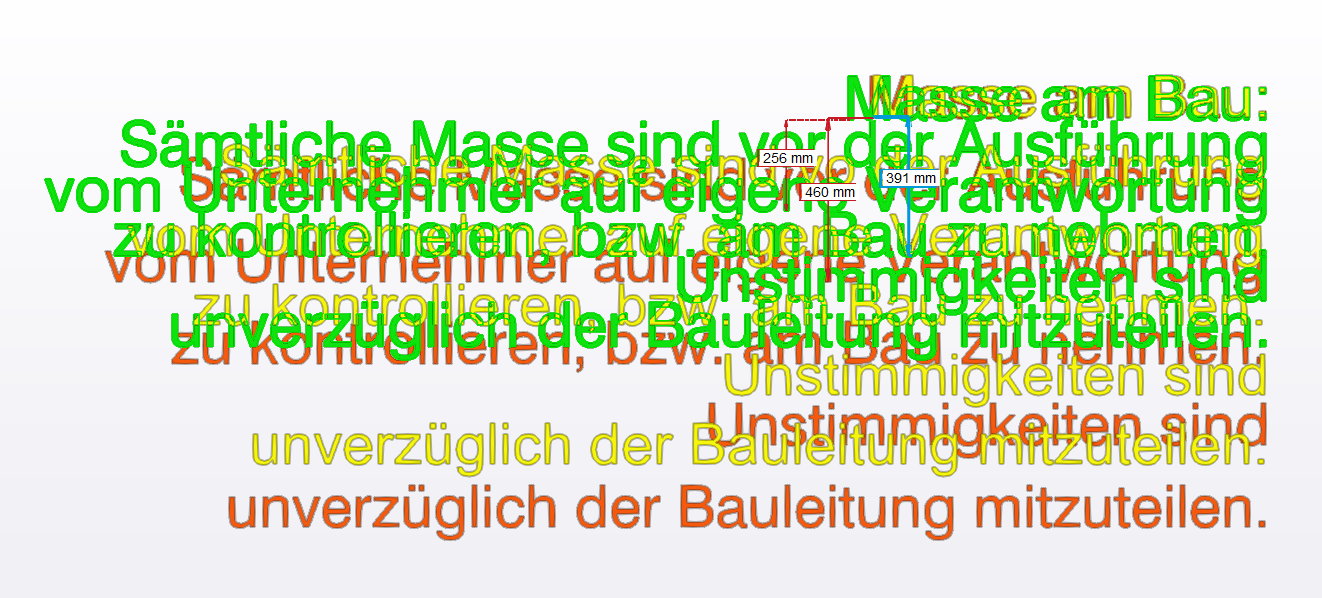
                        But for the long text "Masse ..." the imported line spacing is much more than 1.
                        In below picture, the green text is the text from the DXF with line spacing 0.6.
                        The yellow text I created in SketchUp with the "3DText" tool (line spacing 1, I assume).
                        The red text is the imported text.
                        The letter height of the green text is 125mm, the yellow text is 116mm, the red text 118mm.
                        The numbers in the picture are the distances between two lines
                        green: 256mm ( ~391 * 0.6 )
                        yellow: 391mm
                        red 460mm (line spacing ~1.16 = 460 / 391)

                        As the letter height is not exactly the same for all texts, the measured line spacing values above do not perfectly match the formula. (256 should be 0.6 * 391)

                        My Question: Why is the line spacing of the imported text that big, meaning why is it not 1?
                        Would it be possible to apply the line spacing as defined in the DXF or do you simply generate the whole 3DText using the add_3d_text command and hence there is no way to indicate a line spacing?
                        DXF v4.9 WordWrap Issuse 2 Masse.png

                        1 條回覆 最後回覆 回覆 引用 0
                        • TIGT 離線
                          TIG Moderator
                          最後由 編輯

                          The text's line spacing is set by the 3d-text, and is fixed.
                          Why it's different between the manually made version and this tool's seems very odd though.

                          I see no way of using the dxf's line-spacing setting to adjust the 3d-text in the tool...

                          So this might be as good as it gets...

                          TIG

                          1 條回覆 最後回覆 回覆 引用 0
                          • uwesketchU 離線
                            uwesketch
                            最後由 編輯

                            Yes, seems like it is what it is and indeed strange. But that is fine with me.

                            Meanwhile I have looked at Dimensions and Leaders in DXF and SketchUp and found a straight forward way of implementing these as well in the import.

                            Will send you the notes with examples in the next days.

                            1 條回覆 最後回覆 回覆 引用 0
                            • TIGT 離線
                              TIG Moderator
                              最後由 編輯

                              Thanks for your work on this...
                              I'll look at it as soon as I have some free time and come back to you...

                              TIG

                              1 條回覆 最後回覆 回覆 引用 0
                              • uwesketchU 離線
                                uwesketch
                                最後由 編輯

                                Now I have finally the pieces for importing linear dimensionstogether.
                                If only the dimension lines without text shall be created in SketchUp it is pretty straight forward.
                                To also add the dimension text at he right position to the Sketchup dimension, a bit more is needed.
                                Pls find attached a text document with examples on the DXF codes needed.
                                The samples values are taken from our test file "dxf

                                In order to only create the dimension lines without adding text, the DXF Codes needed are:

                                • 0 DIMENSION
                                • 70 for the type of dimension
                                • 13, 23, 33-- defines the start point of reference line
                                • 14, 24, 34 -- defines the end point of reference line
                                • 10, 20, 30 for the point where the dimension line starts (above the end point of the ref line

                                To also create the dimension text at the right position and orientation:

                                • 11, 21, 31 -- text center position
                                • 1 -- dim user text
                                • 42 -- actual measured value , read only
                                  Codes 50 (angle of extension line to Y axis) and 71 (attachment point are not needed)

                                Structure of the attached text file "_DXF Dimensions to skp.txt":

                                • first there is some introduction and links to DXF dimensions

                                • 4 examples of dimensions from DXF with codes and values along with a ruby code snippet filling variables with the values

                                • extracted DXF codes with values from the test file with comments on the lines

                                  • Ruby code snippet to fill variables with the DXF values
                                • piece of ruby code creating a dimension based on the variables set beforehand

                                I would be very glad, if you could implement the Dimension import!

                                I also have finished analysing what is needed to import the LEADERs (as SketchUp text drawing element).
                                If we only would want the leader line to be imported without text, as this is already being imported, then the needed DXF Codes are:

                                • 0 LEADER
                                • 76 -- number of vertices in leader line
                                • 10, 20, 30 vertices of leader line. There are 2 or more vertices. Number indicated in Code 76

                                To also import the mtext into the SketchUp text object, we need in addition:

                                • 340 -- hard link to MTEXT or block or INSERT handle. Importing MTEXT is probably enough.
                                • 1 -- text from linked MTEXT entity

                                The structure of the attached file "_DXF Leaders to skp.txt" is same as for Dimensions.


                                Proposal how to import dimensions from DXF to SKP


                                Proposal how to import leaders from DXF to SKP

                                1 條回覆 最後回覆 回覆 引用 0
                                • uwesketchU 離線
                                  uwesketch
                                  最後由 編輯

                                  @tig said:

                                  Thanks for your work on this...
                                  I'll look at it as soon as I have some free time and come back to you...

                                  Looking forward to it.
                                  I added the DXF Codes for importing LEADER objects as well in above post, so that I do not loose this work.

                                  1 條回覆 最後回覆 回覆 引用 0
                                  • uwesketchU 離線
                                    uwesketch
                                    最後由 編輯

                                    @TIG,
                                    in a few weeks I am getting again drawings I need to import into Sketchup.
                                    Do you see a chance to get the import of dimensions and leaders (Text) implemented by then?
                                    It would really make my life easier.
                                    Whatever I can do to help, just let me know.

                                    1 條回覆 最後回覆 回覆 引用 0
                                    • TIGT 離線
                                      TIG Moderator
                                      最後由 編輯

                                      I've not had a chance to look at anything yet.
                                      I suspect it'll be some weeks before I clear my existing workload sufficiently...

                                      TIG

                                      1 條回覆 最後回覆 回覆 引用 0
                                      • uwesketchU 離線
                                        uwesketch
                                        最後由 編輯

                                        I doubt that Sketchup is ever doing a dimension import. You are my last hope 😉
                                        Do you see any chance to implement it soon?

                                        1 條回覆 最後回覆 回覆 引用 0
                                        • TIGT 離線
                                          TIG Moderator
                                          最後由 編輯

                                          I'm sorry but my other commitments will almost certainly mess with any significant work on this...
                                          😞

                                          TIG

                                          1 條回覆 最後回覆 回覆 引用 0
                                          • A 離線
                                            abcdaniel
                                            最後由 編輯

                                            Thanks a lot for this extension!
                                            Problem/bug:
                                            When I try to force it to interpret a minimal dxf as being in mm, it forces me to use inches:
                                            "Do NOT choose a unit that is less than
                                            that set in the DXF [inches]
                                            It's best to accept the default offered."
                                            There is no option to proceed anyway, like there is if you choose meters instead.
                                            Can this be fixed?
                                            My use case is spitting out severely minimal dxf:s using different programmatic approaches. I skip header info, but it is still valid dxf. But since there's no unit info in the files, that the extension defaults to inches is a bit sad for a non-inch-using-person.


                                            1 條回覆 最後回覆 回覆 引用 0
                                            • 1
                                            • 2
                                            • 5
                                            • 6
                                            • 7
                                            • 8
                                            • 9
                                            • 7 / 9
                                            • 第一個貼文
                                              最後的貼文
                                            Buy SketchPlus
                                            Buy SUbD
                                            Buy WrapR
                                            Buy eBook
                                            Buy Modelur
                                            Buy Vertex Tools
                                            Buy SketchCuisine
                                            Buy FormFonts

                                            Advertisement