[Plugin] CleanUp
-
Where has the cleanup plugin gone too, says it has been removed?!
-
@brucifier said:
Where has the cleanup plugin gone too, says it has been removed?!
Sorry, I'd forgotten to update the link of the Download button at last update. I fixed it now. The link underneath was always working however.
-
@thomthom said:
@brucifier said:
Where has the cleanup plugin gone too, says it has been removed?!
Sorry, I'd forgotten to update the link of the Download button at last update. I fixed it now. The link underneath was always working however.
cheers!! -
Thomthom
The heading indicates there is a Cleanup (3.1.8) However the file downloaded indicates Cleanup (3.1.7). Just a heads up that maybe you don't have the latest plugin in your first post.
Ken
-
@unknownuser said:
The heading indicates there is a Cleanup (3.1.8) However the file downloaded indicates Cleanup (3.1.7). Just a heads up that maybe you don't have the latest plugin in your first post.

Right, I re-uploaded. with a minor update that adds support for Fredo's update checker.
Thanks for the heads up!
Version 3.1.9
- Support for Fredo's Update checking utility
-
An issue I've had with the past couple version is with the plugin deleting faces. I don't recall having this issue with the first version. Do I have an incorrect setting checked or something?
-Brodie
-
The Merge Faces features should be the most stable ever in this version (3.x).
But maybe it's an issue with Erase Duplicate Faces. It's a very slow feature that can yield unpredictable results. It's why it is off by default and the tooltip has the warning.Ticking all the checkboxes doesn't mean the model gets cleaner - it just does different thing. So it's worth reading what they actually do.
I don't know what settings you have Brodie, so it's hard for me to tell anything more than that. If you have settings and a sample model I can have a look at it.
-
Here's the model and a screenshot of the settings below.
http://dl.dropbox.com/u/384281/Laser%20Printer.skp
The number and location of faces which are deleted seems to have a certain random nature to it. Running the script, undoing the results, and running the script again a few times resulting in different results each time
-Brodie
Edit: the original model is from here and is free http://archive3d.net/?a=download&id=3dfc187e
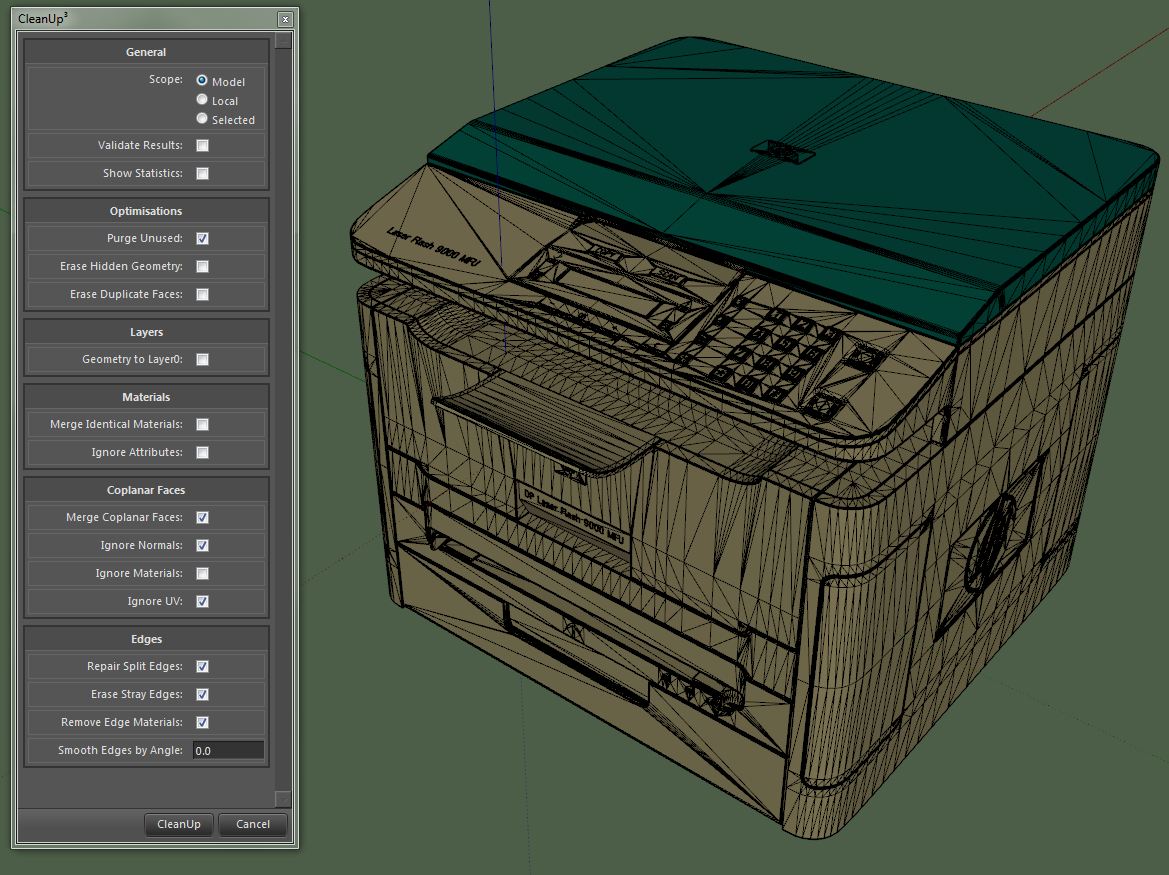
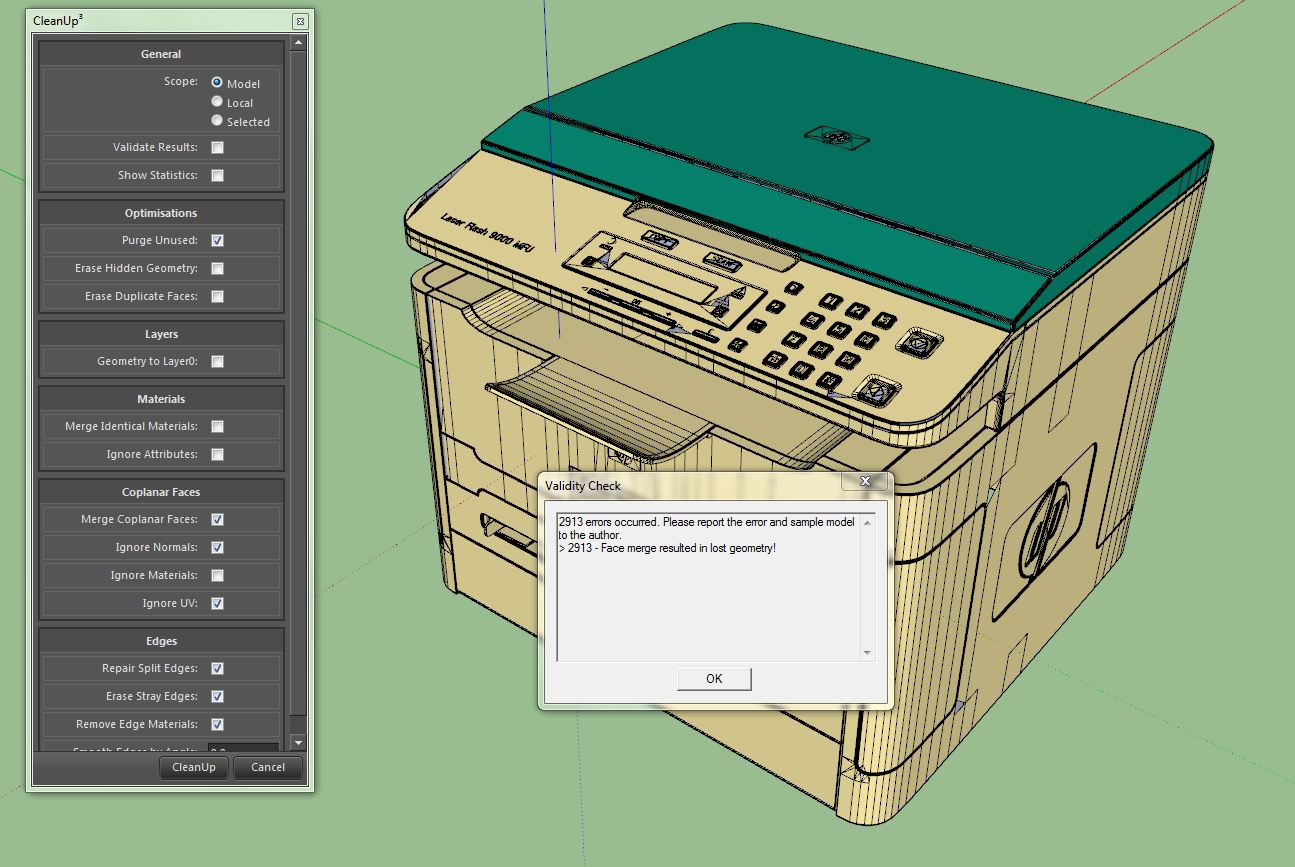
-
Ok, looked at the model.
The first thing I got when I opened the model was a warning:
@unknownuser said:
Results of Validity Check.
The plane equation for CFace (51806) is not valid - fixed
The plane equation for CFace (61254) is not valid - fixed
The plane equation for CFace (145402) is not valid - fixed
The plane equation for CFace (146979) is not valid - fixed
The plane equation for CFace (149505) is not valid - fixed
The plane equation for CFace (230859) is not valid - fixed
The plane equation for CFace (297112) is not valid - fixed
The plane equation for CFace (297293) is not valid - fixed
The plane equation for CFace (299305) is not valid - fixed
The plane equation for CFace (311352) is not valid - fixed
The plane equation for CFace (316611) is not valid - fixed
The plane equation for CFace (333176) is not valid - fixed
The plane equation for CFace (333255) is not valid - fixed
The plane equation for CFace (333707) is not valid - fixed
The plane equation for CFace (395589) is not valid - fixedI did not run the test - SU did that manually.
I then ran CleanUp with these settings:
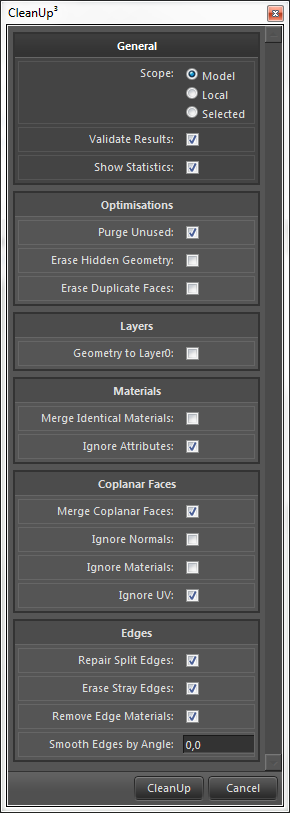
A key setting might be that I didn't tell it to Ignore Normals. (Not sure - I did not compare with other settings.)
I then got a new validity check (because I'd asked for it. it's common to get error like this when the model already was producing errors.)
@unknownuser said:
Results of Validity Check.
CEdge (62898) and CEdge (1380179) connect the same 2 vertices - fixed
The plane equation for CFace (1044) is not valid - fixed
The plane equation for CFace (1425) is not valid - fixed
The plane equation for CFace (2564) is not valid - fixed
The plane equation for CFace (2604) is not valid - fixed
The plane equation for CFace (2954) is not valid - fixed
The plane equation for CFace (3000) is not valid - fixed
The plane equation for CFace (3827) is not valid - fixed
The plane equation for CFace (5067) is not valid - fixed
The plane equation for CFace (5382) is not valid - fixed
The plane equation for CFace (5702) is not valid - fixed
The plane equation for CFace (7542) is not valid - fixed
The plane equation for CFace (92317) is not valid - fixed
The plane equation for CFace (93266) is not valid - fixed
The plane equation for CFace (108967) is not valid - fixed
The plane equation for CFace (212162) is not valid - fixed
The plane equation for CFace (212355) is not valid - fixed
The plane equation for CFace (213151) is not valid - fixed
The plane equation for CFace (213681) is not valid - fixed
The plane equation for CFace (213868) is not valid - fixed
The plane equation for CFace (246903) is not valid - fixed
The plane equation for CFace (271394) is not valid - fixed
The plane equation for CFace (293150) is not valid - fixed
The plane equation for CFace (293557) is not valid - fixed
The plane equation for CFace (484265) is not valid - fixed
The plane equation for CFace (484587) is not valid - fixed
The plane equation for CFace (491934) is not valid - fixed
The plane equation for CFace (542762) is not valid - fixed
The plane equation for CFace (543339) is not valid - fixed
The plane equation for CFace (549098) is not valid - fixed
The plane equation for CFace (549228) is not valid - fixed
The plane equation for CFace (575761) is not valid - fixed
The plane equation for CFace (576252) is not valid - fixed
The plane equation for CFace (576379) is not valid - fixed
The plane equation for CFace (577820) is not valid - fixedThe printer model dropped from ~100K (!!!
 ) faces to "merely" 38K faces...
No error messages about lost geometry.
-
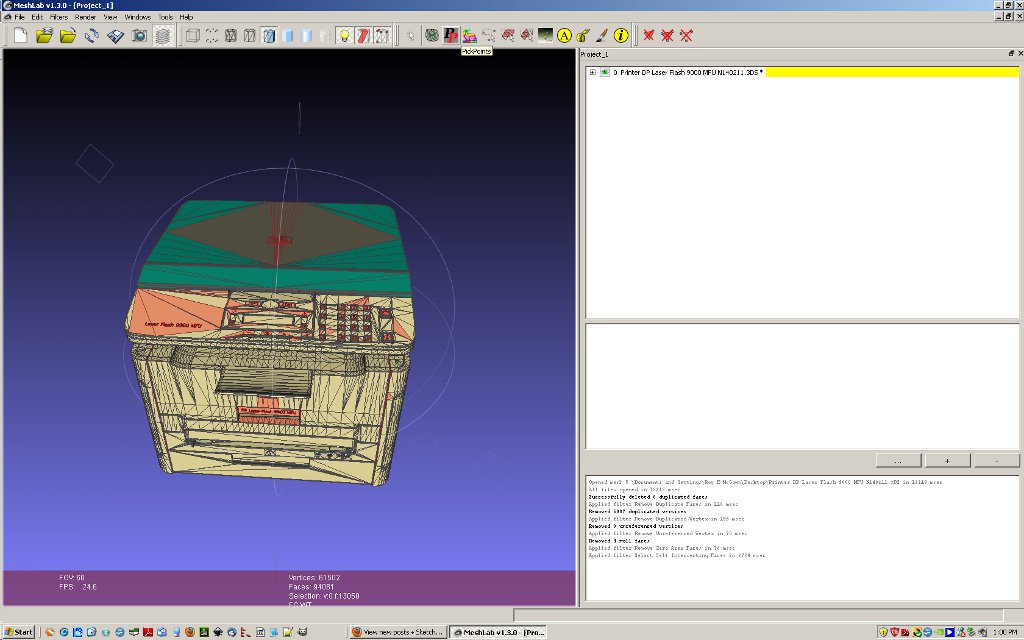 Would like to suggest one item at a time be "cleaned". The results you get can be a function of the action and its sequence and the model may not be good to start with. I imported the printer to mesh lab ( 3ds) and note the things cleaned on the right side ( it corrected some of the bad faces to start) and the jpg shows the self intersecting faces. Deleting those can be destructive to the model and I did not do that. In the past I have had that problem and have not been able to figure out if it is MeshLab or SU.
Just some thoughts -
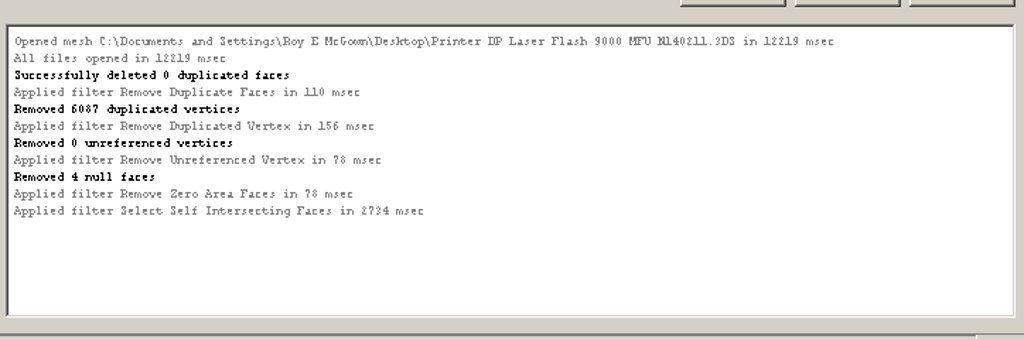
Layer text did not disply wee. Hope this is better. -
Installed the latest version of Cleanup and I am seeing these errors:
undefined method `hidden?' for #Sketchup::Vertex:0xe3d4fc4
/Library/Application Support/Google SketchUp 8/SketchUp/Plugins/tt_cleanup.rb:1142:in
erase_hidden' /Library/Application Support/Google SketchUp 8/SketchUp/Plugins/TT_Lib2/entities.rb:113:ineach_entity'
/Library/Application Support/Google SketchUp 8/SketchUp/Plugins/TT_Lib2/entities.rb:112:ineach' /Library/Application Support/Google SketchUp 8/SketchUp/Plugins/TT_Lib2/entities.rb:112:ineach_entity'
/Library/Application Support/Google SketchUp 8/SketchUp/Plugins/TT_Lib2/entities.rb:119:ineach_entity' /Library/Application Support/Google SketchUp 8/SketchUp/Plugins/TT_Lib2/entities.rb:112:ineach'
/Library/Application Support/Google SketchUp 8/SketchUp/Plugins/TT_Lib2/entities.rb:112:ineach_entity' /Library/Application Support/Google SketchUp 8/SketchUp/Plugins/TT_Lib2/entities.rb:119:ineach_entity'
/Library/Application Support/Google SketchUp 8/SketchUp/Plugins/TT_Lib2/entities.rb:112:ineach' /Library/Application Support/Google SketchUp 8/SketchUp/Plugins/TT_Lib2/entities.rb:112:ineach_entity'
/Library/Application Support/Google SketchUp 8/SketchUp/Plugins/tt_cleanup.rb:772:ineach_entity_in_scope' /Library/Application Support/Google SketchUp 8/SketchUp/Plugins/tt_cleanup.rb:1130:inerase_hidden'
/Library/Application Support/Google SketchUp 8/SketchUp/Plugins/tt_cleanup.rb:568:incleanup!' /Library/Application Support/Google SketchUp 8/SketchUp/Plugins/tt_cleanup.rb:488:inshow_cleanup_ui'
/Library/Application Support/Google SketchUp 8/SketchUp/Plugins/TT_Lib2/inputbox.rb:178:incall' /Library/Application Support/Google SketchUp 8/SketchUp/Plugins/TT_Lib2/inputbox.rb:178:inevent_inputbox_close'
/Library/Application Support/Google SketchUp 8/SketchUp/Plugins/TT_Lib2/inputbox.rb:9:into_proc' /Library/Application Support/Google SketchUp 8/SketchUp/Plugins/TT_Lib2/inputbox.rb:159:incall'
/Library/Application Support/Google SketchUp 8/SketchUp/Plugins/TT_Lib2/inputbox.rb:159:inclose' /Library/Application Support/Google SketchUp 8/SketchUp/Plugins/TT_Lib2/inputbox.rb:159:inevent_inputbox_accept'
/Library/Application Support/Google SketchUp 8/SketchUp/Plugins/TT_Lib2/inputbox.rb:9:into_proc' (eval):110:incall'
(eval):110The model I am cleaning up is very simple and these errors seem to occur after completing one (sometimes two) previous cleanup operations.
I hope this information is of some use ?
I am also experiencing a lot of Sketchup Pro crashes, without any crash reports being generated.
I am using Sketchup Pro 8.0.11751 on Mac OS X 10.7.2. Hardware is a iMac 2.93Ghz Core 2 Duo with 8Gb of DDR3 RAM.
Thanks for the excellent plugin.
Kind regards,
Marek
-
That is a very strange error!

Somehow it iterates over a Vertex entity - I cannot see any reason for that...Can you post the model? Or send it to me privately if you don't want to publicly share?
Also, I need to know the exact settings you used. (A screenshot of the settings window)And I assume you;re using the latest CleanUp? 3.1.9?
And the exact version of TT_Lib2? -
Have sent you a PM about this

-
I looked at the model. Could not reproduce it. But I used a PC. Will have to try on my Mac.
Exactly what version of SketchUp do you have? And TT_Lib2?(btw - I did see that there where many small details - where edges where less than 1mm - which can cause issues with SU. But I'm not sure if that would cause such an error as the one you see...)
-
Specifications of software and hardware...
I am using Sketchup Pro 8.0.11751 on Mac OS X 10.7.2. Hardware is a iMac 2.93Ghz Core 2 Duo with 8Gb of DDR3 RAM. Video card is an Nvidia GT130.
TT_Lib2 is version 2.6.0
Hope that helps.
Marek
-
Another strange error today, not seen this one before:
undefined method `valid?' for #Sketchup::OptionsProvider:0xecc34c8
/Library/Application Support/Google SketchUp 8/SketchUp/Plugins/tt_cleanup.rb:1133:in
erase_hidden' /Library/Application Support/Google SketchUp 8/SketchUp/Plugins/TT_Lib2/model.rb:134:ineach_entity'
/Library/Application Support/Google SketchUp 8/SketchUp/Plugins/TT_Lib2/model.rb:133:ineach' /Library/Application Support/Google SketchUp 8/SketchUp/Plugins/TT_Lib2/model.rb:133:ineach_entity'
/Library/Application Support/Google SketchUp 8/SketchUp/Plugins/TT_Lib2/model.rb:130:ineach' /Library/Application Support/Google SketchUp 8/SketchUp/Plugins/TT_Lib2/model.rb:130:ineach_entity'
/Library/Application Support/Google SketchUp 8/SketchUp/Plugins/tt_cleanup.rb:768:ineach_entity_in_scope' /Library/Application Support/Google SketchUp 8/SketchUp/Plugins/tt_cleanup.rb:1130:inerase_hidden'
/Library/Application Support/Google SketchUp 8/SketchUp/Plugins/tt_cleanup.rb:568:incleanup!' /Library/Application Support/Google SketchUp 8/SketchUp/Plugins/tt_cleanup.rb:488:inshow_cleanup_ui'
/Library/Application Support/Google SketchUp 8/SketchUp/Plugins/TT_Lib2/inputbox.rb:178:incall' /Library/Application Support/Google SketchUp 8/SketchUp/Plugins/TT_Lib2/inputbox.rb:178:inevent_inputbox_close'
/Library/Application Support/Google SketchUp 8/SketchUp/Plugins/TT_Lib2/inputbox.rb:9:into_proc' /Library/Application Support/Google SketchUp 8/SketchUp/Plugins/TT_Lib2/inputbox.rb:159:incall'
/Library/Application Support/Google SketchUp 8/SketchUp/Plugins/TT_Lib2/inputbox.rb:159:inclose' /Library/Application Support/Google SketchUp 8/SketchUp/Plugins/TT_Lib2/inputbox.rb:159:inevent_inputbox_accept'
/Library/Application Support/Google SketchUp 8/SketchUp/Plugins/TT_Lib2/inputbox.rb:9:into_proc' (eval):3713:incall'
(eval):3713Hope this list of problems is of some help ?
-
Can you reproduce it? If so how?
Because I cannot see how on earth that ever should happen.
While iterating the model the plugin ran across an OptionsProviderobject... Never ever should such thing be possible. I don't know if it's an SU glitch or if there is some plugin conflict somewhere that messes with the core classes.I first need to know if it's a reproducible case.
-
I will have a go at reproducing the error. I seem to think it happens after several consecutive runs of the cleanup script. Will get back to you as soon as it happens again.
-
Ok I managed to produce this error:
undefined method `hidden?' for #Sketchup::Vertex:0xea1acbc
/Library/Application Support/Google SketchUp 8/SketchUp/Plugins/tt_cleanup.rb:1142:in
erase_hidden' /Library/Application Support/Google SketchUp 8/SketchUp/Plugins/TT_Lib2/model.rb:134:ineach_entity'
/Library/Application Support/Google SketchUp 8/SketchUp/Plugins/TT_Lib2/model.rb:133:ineach' /Library/Application Support/Google SketchUp 8/SketchUp/Plugins/TT_Lib2/model.rb:133:ineach_entity'
/Library/Application Support/Google SketchUp 8/SketchUp/Plugins/TT_Lib2/model.rb:130:ineach' /Library/Application Support/Google SketchUp 8/SketchUp/Plugins/TT_Lib2/model.rb:130:ineach_entity'
/Library/Application Support/Google SketchUp 8/SketchUp/Plugins/tt_cleanup.rb:768:ineach_entity_in_scope' /Library/Application Support/Google SketchUp 8/SketchUp/Plugins/tt_cleanup.rb:1130:inerase_hidden'
/Library/Application Support/Google SketchUp 8/SketchUp/Plugins/tt_cleanup.rb:568:incleanup!' /Library/Application Support/Google SketchUp 8/SketchUp/Plugins/tt_cleanup.rb:488:inshow_cleanup_ui'
/Library/Application Support/Google SketchUp 8/SketchUp/Plugins/TT_Lib2/inputbox.rb:178:incall' /Library/Application Support/Google SketchUp 8/SketchUp/Plugins/TT_Lib2/inputbox.rb:178:inevent_inputbox_close'
/Library/Application Support/Google SketchUp 8/SketchUp/Plugins/TT_Lib2/inputbox.rb:9:into_proc' /Library/Application Support/Google SketchUp 8/SketchUp/Plugins/TT_Lib2/inputbox.rb:159:incall'
/Library/Application Support/Google SketchUp 8/SketchUp/Plugins/TT_Lib2/inputbox.rb:159:inclose' /Library/Application Support/Google SketchUp 8/SketchUp/Plugins/TT_Lib2/inputbox.rb:159:inevent_inputbox_accept'
/Library/Application Support/Google SketchUp 8/SketchUp/Plugins/TT_Lib2/inputbox.rb:9:in `to_proc'All I did was attempt to cleanup two separate models. I used the default cleanup settings. The only thing I changed was to tell cleanup to clean the model rather than selected. When cleaning the second model the error above appears.





Advertisement