sketchucation logo sketchucation
    • Login
    Oops, your profile's looking a bit empty! To help us tailor your experience, please fill in key details like your SketchUp version, skill level, operating system, and more. Update and save your info on your profile page today!
    ⚠️ Update | Sketchucation Tools 5.0.8 released with licensing improvements and bugfixes Download

    No Color Plugin

    Scheduled Pinned Locked Moved SketchUp Discussions
    sketchup
    15 Posts 7 Posters 1.4k Views 7 Watching
    Loading More Posts
    • Oldest to Newest
    • Newest to Oldest
    • Most Votes
    Reply
    • Reply as topic
    Log in to reply
    This topic has been deleted. Only users with topic management privileges can see it.
    • E
      Ecuadorian
      last edited by

      Try:
      http://forums.sketchucation.com/viewtopic.php?f=180&t=13192
      or
      http://www.smustard.com/script/RemoveMaterials

      If it's just for visualization purposes and you don't need to permanently change your model, also try color by layer.

      -Miguel Lescano
      Subscribe to my house plans YouTube channel! (30K+ subs)

      1 Reply Last reply
      Reply Quote 0
      • X
        xrok1
        last edited by

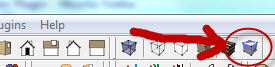
        😲 Capture1.JPG

        “There are three classes of people: those who see. Those who see when they are shown. Those who do not see.”

        http://www.Twilightrender.com try it!

        1 Reply Last reply
        Reply Quote 0
        • E
          Ecuadorian
          last edited by

          I should add this to my Duh! list.

          -Miguel Lescano
          Subscribe to my house plans YouTube channel! (30K+ subs)

          1 Reply Last reply
          Reply Quote 0
          • X
            xrok1
            last edited by

            🤣

            “There are three classes of people: those who see. Those who see when they are shown. Those who do not see.”

            http://www.Twilightrender.com try it!

            1 Reply Last reply
            Reply Quote 0
            • GaieusG
              Gaieus
              last edited by

              Or even the Hidden line mode? 😕

              Gai...

              1 Reply Last reply
              Reply Quote 0
              • J
                Jim
                last edited by

                Yes, but most people are not born with the knowledge - it needs to be learned at some point.

                Hi

                1 Reply Last reply
                Reply Quote 0
                • X
                  xrok1
                  last edited by

                  @gaieus said:

                  Or even the Hidden line mode? 😕

                  toochez` or however you spell too shay? DUH

                  “There are three classes of people: those who see. Those who see when they are shown. Those who do not see.”

                  http://www.Twilightrender.com try it!

                  1 Reply Last reply
                  Reply Quote 0
                  • S
                    skeerc
                    last edited by

                    Thanks for the feedback - using the monochrome setting & editing the style pref to 'White' the model does not print out as white surfaces, choosing the 'No color' from Toolbox does not allow B&W texture to be applied hence the need to Color 'All" white. Any suggestions - the plugins look promising.

                    1 Reply Last reply
                    Reply Quote 0
                    • X
                      xrok1
                      last edited by

                      funny the monochrome thing seems to work here. is this what you're trying to do:
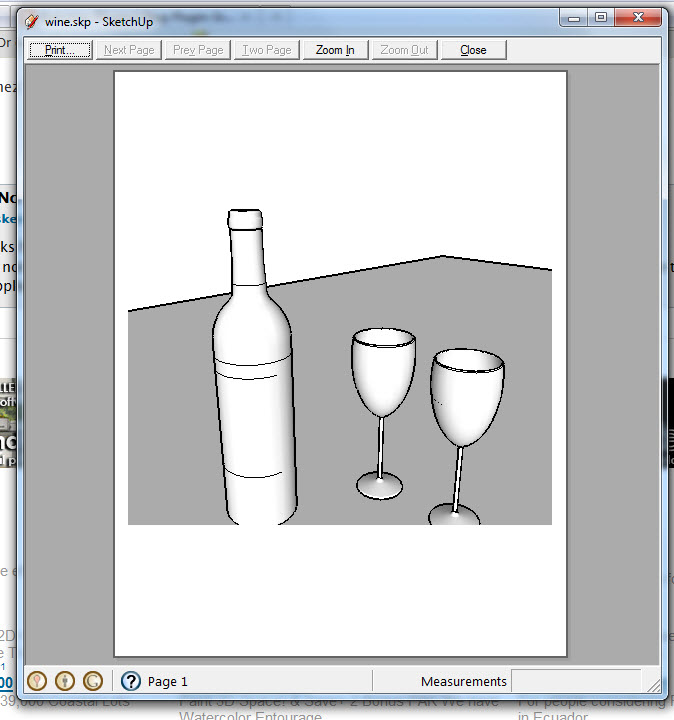

                      Capture.JPG

                      “There are three classes of people: those who see. Those who see when they are shown. Those who do not see.”

                      http://www.Twilightrender.com try it!

                      1 Reply Last reply
                      Reply Quote 0
                      • thomthomT
                        thomthom
                        last edited by

                        @xrok1 said:

                        @gaieus said:

                        Or even the Hidden line mode? 😕

                        toochez` or however you spell too shay? DUH

                        "touché"

                        Thomas Thomassen — SketchUp Monkey & Coding addict
                        List of my plugins and link to the CookieWare fund

                        1 Reply Last reply
                        Reply Quote 0
                        • GaieusG
                          Gaieus
                          last edited by

                          @skeerc said:

                          Thanks for the feedback - using the monochrome setting & editing the style pref to 'White' the model does not print out as white surfaces...

                          True that SU will always "shade" every surface a little bit - even with all kinds of shadows off. This is only for giving it a 3D view but if you really mean to have only pure white (255,255,255 RGB) in your prints, you will need to export it as some image and edit everything out.

                          Gai...

                          1 Reply Last reply
                          Reply Quote 0
                          • thomthomT
                            thomthom
                            last edited by

                            You can set the style to Hidden line and set the Background to white with no Sky or Ground. Then you'll have no shading.

                            Thomas Thomassen — SketchUp Monkey & Coding addict
                            List of my plugins and link to the CookieWare fund

                            1 Reply Last reply
                            Reply Quote 0
                            • GaieusG
                              Gaieus
                              last edited by

                              Yeah, true.
                              (DOH) 😉

                              Gai...

                              1 Reply Last reply
                              Reply Quote 0
                              • AnssiA
                                Anssi
                                last edited by

                                And in the Shadows dialog, check "Use sun for shading". Now the amount of shading can be controlled by the Light and Dark sliders. Dark=100%>no shading.

                                Anssi

                                securi adversus homines, securi adversus deos rem difficillimam adsecuti sunt, ut illis ne voto quidem opus esset

                                1 Reply Last reply
                                Reply Quote 0

                                Hello! It looks like you're interested in this conversation, but you don't have an account yet.

                                Getting fed up of having to scroll through the same posts each visit? When you register for an account, you'll always come back to exactly where you were before, and choose to be notified of new replies (either via email, or push notification). You'll also be able to save bookmarks and upvote posts to show your appreciation to other community members.

                                With your input, this post could be even better 💗

                                Register Login
                                • 1 / 1
                                • First post
                                  Last post
                                Buy SketchPlus
                                Buy SUbD
                                Buy WrapR
                                Buy eBook
                                Buy Modelur
                                Buy Vertex Tools
                                Buy SketchCuisine
                                Buy FormFonts

                                Advertisement