Possible to change default scene and style?
-
When I start a new Sketchup file I'd like to start off with a totally empty scene (no Bryce) and with Profiles turned off (only 'Display Edges' turned on). The repetitive task of deleting Bryce and adjusting the style settings every time I start a new file is getting a little irritating, although by no means a big issue.
So I was wondering if and how I can change the default new scene, and/or permanently change the default style theme.
By the way, I'm using Sketchup 6 Pro.
Thanks.
-
I understand that you can do this (someone with more expierence should help you), but by doing so, certain SU functions behave differently. Ehen importing a dxf file after first opening a new file, with Bryce in or out, affects how the file is imported. Don't know what else may be affected.
-
Set up your file as you want it.
In SU7 you can Save as Template and it'll set up the template for you.
In SU6 I think you have to save to disk as normally and set the template from Window->Preferences. -
@honoluludesktop said:
I understand that you can do this (someone with more expierence should help you), but by doing so, certain SU functions behave differently. Ehen importing a dxf file after first opening a new file, with Bryce in or out, affects how the file is imported. Don't know what else may be affected.
When importing a DXF/DWG - the imported geometry will be grouped if you already have geometry. If the model is empty it'll not be grouped. But has nothing to do with template - if you start with Bryce and delete him before importing you'll see the same thing.
There is no other differences. -
Thought that's what I meant: "with Bryce in or out, affects how the file is imported". Sorry I wasn't clear.
-
@honoluludesktop said:
Thought that's what I meant: "with Bryce in or out, affects how the file is imported". Sorry I wasn't clear.
My bad. I thought you indicated there was other things affected.
-
In SU 7, under Files, there is the "Save as template" item which is practically just a shortcut to your templates folder. In SU 6, you have to navigate there manually and save your "tweaked" file (no profiles, no Bryce but also any kind of changes - you can even add your generally used layers or scenes or anything), save it there and then use it from Preferences > Templates.
This is where this folder is in SU 7 - but that's the same with SU 6 (except for the version number of course)
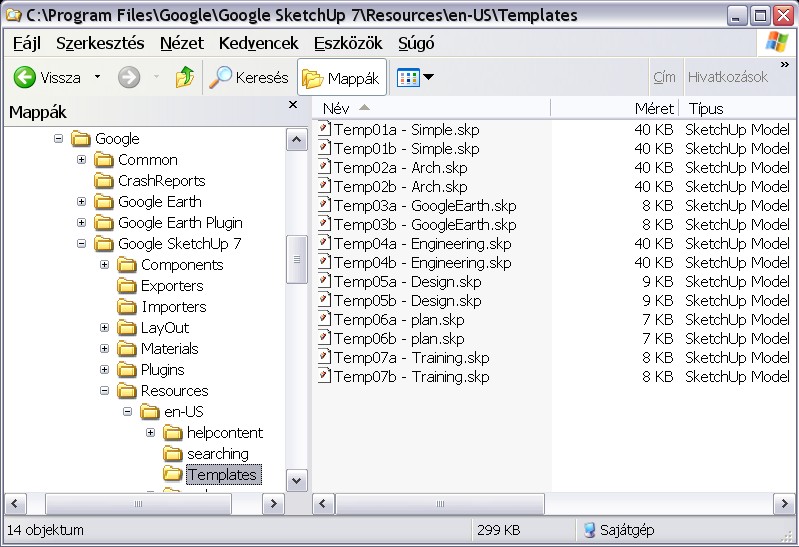
P.s. I guess the "en-US" folder can be different if someone has a non-English SU version but I have never had such versions installed -
Thanks guys, especially Thomthom and Gaieus. Perfect!
I had seen that option, and those template files before, but with all the names being measurement related, I had wrongly assumed it was only for handling the measurement settings.
-
Yeah, they don't have a centimetre template to begin with so I am already used to start with this every time I encounter a new SU version (BTW have you seen the new SU version?
 )
)



Hello! It looks like you're interested in this conversation, but you don't have an account yet.
Getting fed up of having to scroll through the same posts each visit? When you register for an account, you'll always come back to exactly where you were before, and choose to be notified of new replies (either via email, or push notification). You'll also be able to save bookmarks and upvote posts to show your appreciation to other community members.
With your input, this post could be even better 💗
Register Login


Advertisement