sketchucation logo sketchucation
    • 登入
    Oops, your profile's looking a bit empty! To help us tailor your experience, please fill in key details like your SketchUp version, skill level, operating system, and more. Update and save your info on your profile page today!
    🔌 Smart Spline | Fluid way to handle splines for furniture design and complex structures. Download

    [Plugin] extrudeEdgesByLathe

    已排程 已置頂 已鎖定 已移動 Plugins
    104 貼文 43 Posters 72.4k 瀏覽 43 Watching
    正在載入更多貼文
    • 從舊到新
    • 從新到舊
    • 最多點贊
    回覆
    • 在新貼文中回覆
    登入後回覆
    此主題已被刪除。只有擁有主題管理權限的使用者可以查看。
    • TIGT 離線
      TIG Moderator
      最後由 編輯

      OK, now I see the issue.
      You want yes to smooth? not to smooth every edge - for example leave those with only one face or two faces at right-angles of sharper ?

      TIG

      1 條回覆 最後回覆 回覆 引用 0
      • TIGT 離線
        TIG Moderator
        最後由 編輯

        Updated v3.4 so it now only smooths edges with more than one face.
        http://forums.sketchucation.com/viewtopic.php?p=184477#p184477

        TIG

        1 條回覆 最後回覆 回覆 引用 0
        • pbacotP 離線
          pbacot
          最後由 編輯

          I guess in this case I would not smooth edges that are adjoining a face perpendicular to axis of rotation. I wonder if that is a definable parameter or is that a common desired outcome.

          MacOSX MojaveSketchUp Pro v19 Twilight v2 Thea v3 PowerCADD

          1 條回覆 最後回覆 回覆 引用 0
          • TIGT 離線
            TIG Moderator
            最後由 編輯

            It now works exactly the same as the built-in Smooth tool, which ignores perimeter edges in the smoothing. Should you subsequently add faces to these edges the will remain unsmoothed, but a quick use of the built-in smooth tool will merge them if desired. This is surely better than having them auto-smooth as the face is added because then it's harder to unsmooth those edges you want to stay unsmoothed than it is to smooth the edges you don't smooth later on !?

            TIG

            1 條回覆 最後回覆 回覆 引用 0
            • pbacotP 離線
              pbacot
              最後由 編輯

              😍

              Actually I now find that in this application, I can smooth with this ruby and then twiddle the soften smooth edges dialog for the desired effect. I can now really crank these out--if only the project goes forward... 😕

              Thanks a bunch TIG!

              MacOSX MojaveSketchUp Pro v19 Twilight v2 Thea v3 PowerCADD

              1 條回覆 最後回覆 回覆 引用 0
              • TIGT 離線
                TIG Moderator
                最後由 編輯

                Here's an update to EEbyLathe http://forums.sketchucation.com/viewtopic.php?p=184477#p184477
                Use the link to get the zipped set which contains the updated file.
                20111102 v3.5
                Fixed Picked-Angle's messy undo.
                Smoothed-edges now stop @90º.

                TIG

                1 條回覆 最後回覆 回覆 引用 0
                • pbacotP 離線
                  pbacot
                  最後由 編輯

                  Thanks TIG. That's even more perfect. Now you're doing all my work for me and SU is not so fun anymore. 😢

                  Just kiddin. Really, it seems custom made for what I was trying to do. ☀

                  MacOSX MojaveSketchUp Pro v19 Twilight v2 Thea v3 PowerCADD

                  1 條回覆 最後回覆 回覆 引用 0
                  • J 離線
                    jamesyzs
                    最後由 編輯

                    Hi Tig

                    Where is a download link for extrudeEdgesByLathe.rb

                    I can't seem to find it. Thanks

                    -James

                    1 條回覆 最後回覆 回覆 引用 0
                    • TIGT 離線
                      TIG Moderator
                      最後由 編輯

                      James !
                      If you follow the link in the recent post announcing the update it will take you to the first post in this thread, although for most tools this is where the download link is, here it explains at the end of the text that all EEby...tools now come in a single zipped set, which has its own thread. The link to that thread's download page is give at the end of the first page in each of the EEby...tool's threads [including EEbyLathe!].

                      So get the zipped set, and install all of the EEby...tools, files and folders as directed - and you'll get the whole EEby...toolset which includes EEbyLathe 🤓

                      TIG

                      1 條回覆 最後回覆 回覆 引用 0
                      • M 離線
                        mrossk
                        最後由 編輯

                        First off, let me say thank you for all the great tools. I just discovered this EEbyLathe. I seem to have an issue if one of the edges of my face is along the blue axis and is unbroken, and I rotate along the blue axis as well. The extruded shape does not end in a face, it is "hollow." If I change the shape that is along the axis of rotation it ends in a face as expected. Is there something I'm doing wrong?
                        Thanks for your help,
                        Michael
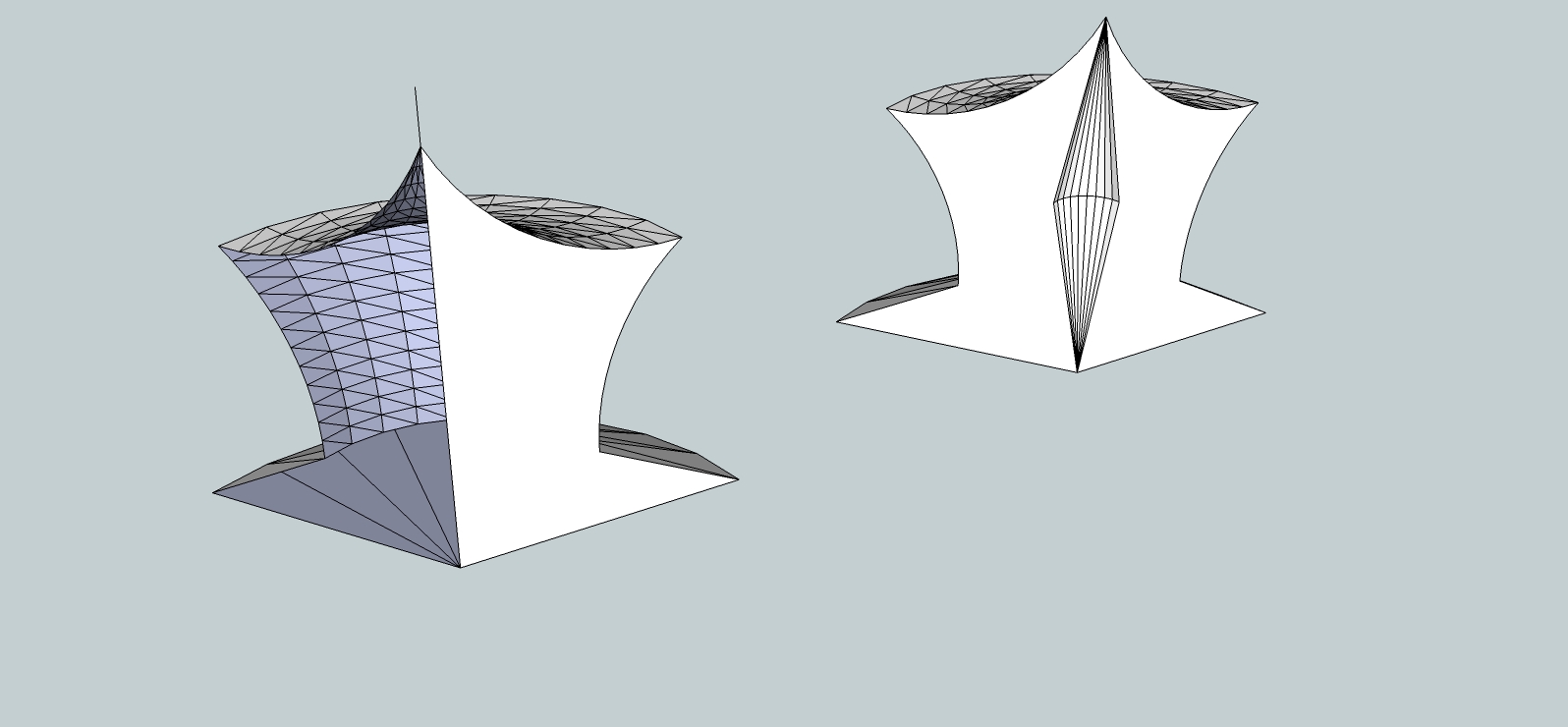

                        eebl exp.jpg

                        https://www.mkaplanfinefurniture.com/

                        1 條回覆 最後回覆 回覆 引用 0
                        • pilouP 離線
                          pilou
                          最後由 編輯

                          Maybe more easy with the SKP file 😉
                          (save as V6) for all users can load it 😉

                          Frenchy Pilou
                          Is beautiful that please without concept!
                          My Little site :)

                          1 條回覆 最後回覆 回覆 引用 0
                          • M 離線
                            mrossk
                            最後由 編輯

                            sure, I just did this real quik, ver. 6


                            EEBL test.skp

                            https://www.mkaplanfinefurniture.com/

                            1 條回覆 最後回覆 回覆 引用 0
                            • TIGT 離線
                              TIG Moderator
                              最後由 編輯

                              Unsure as I can't see exactly what you are doing...
                              However, IF it doesn't form a 'closing face', AND you have picked a true axis etc, you can always edit the extrusion's group and over-draw an edge to force a face to form where you want it... 😕

                              TIG

                              1 條回覆 最後回覆 回覆 引用 0
                              • pilouP 離線
                                pilou
                                最後由 編輯

                                Seems you have better way to make a simple Copy Rotation of the face for close your volume?
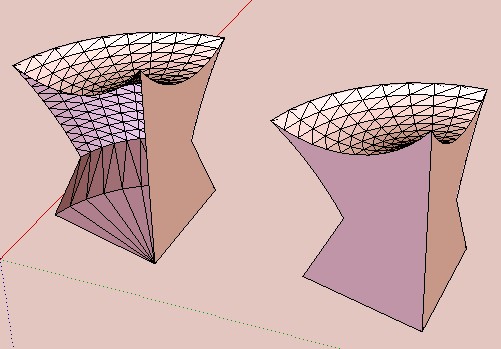
                                better_way.jpg

                                Frenchy Pilou
                                Is beautiful that please without concept!
                                My Little site :)

                                1 條回覆 最後回覆 回覆 引用 0
                                • M 離線
                                  mrossk
                                  最後由 編輯

                                  Thank you for looking. Editing the group and adding the line is certainly easy enough- I was concerned I was doing something wrong or didn't understand something. Thanks again, Michael

                                  https://www.mkaplanfinefurniture.com/

                                  1 條回覆 最後回覆 回覆 引用 0
                                  • P 離線
                                    popfunky
                                    最後由 編輯

                                    LOVE PLUGIN

                                    1 條回覆 最後回覆 回覆 引用 0
                                    • 1
                                    • 2
                                    • 3
                                    • 4
                                    • 5
                                    • 6
                                    • 1 / 6
                                    • 第一個貼文
                                      最後的貼文
                                    Buy SketchPlus
                                    Buy SUbD
                                    Buy WrapR
                                    Buy eBook
                                    Buy Modelur
                                    Buy Vertex Tools
                                    Buy SketchCuisine
                                    Buy FormFonts

                                    Advertisement
