sketchucation logo sketchucation
    • 登入
    Oops, your profile's looking a bit empty! To help us tailor your experience, please fill in key details like your SketchUp version, skill level, operating system, and more. Update and save your info on your profile page today!
    ⚠️ Important | Libfredo 15.6b introduces important bugfixes for Fredo's Extensions Update

    [Plugin] Blend ver 1.12.

    已排程 已置頂 已鎖定 已移動 Plugins
    80 貼文 35 Posters 65.1k 瀏覽 35 Watching
    正在載入更多貼文
    • 從舊到新
    • 從新到舊
    • 最多點贊
    回覆
    • 在新貼文中回覆
    登入後回覆
    此主題已被刪除。只有擁有主題管理權限的使用者可以查看。
    • N 離線
      nankyo
      最後由 編輯

      IT is amazing one indeed..
      Though, I wonder if u think it possible to make a 'reverse engineering' version of that one.. I mean,many times I need to take a "solid" shape and make it with 2D shapes.. what I do is creating many planes and intersecting it all.. THis plugin is so amazing (really I feel I work with Rhino..), and I guess adding the revearse option would make it perfect.
      Thank you for that, kirill. 😎 😎 😍 😍

      mmmm.... mow I found the SliceModeler v1.0 that do more or less what i need 😄 but yet not exactly....


      A StudYo127.jpg

      1 條回覆 最後回覆 回覆 引用 0
      • K 離線
        kirill2008
        最後由 編輯

        @haru said:

        In order to make the blended face right to designer’s intention, each start-point of two figures(①,③) shall be set-up as well as the direction of drawing, that is clockwise(②,④) or counterclockwise.(②,④-a)
        For all, it’s just an idea

        Thank's for great idea. I'll try to implement it as soon as possible.

        @nankyo said:

        Though, I wonder if u think it possible to make a 'reverse engineering' version of that one..

        I think it is posible. I'll try to make it too.

        @nankyo said:

        I mean,many times I need to take a "solid" shape and make it with 2D shapes..

        You may try also 'pnts2mesh.rb'. It can slice a group that contains a set of faces with a number of horizontal planes placed with specified offset (horizontal means relatively to selected group transformation).
        [flash=425,344:uuqblkor]http://www.youtube.com/v/qetoQvcEoic&hl=ru&fs=1" type="application/x-shockwave-flash" allowscriptaccess="always" allowfullscreen="true" width="425" height="344"[/flash:uuqblkor]

        1 條回覆 最後回覆 回覆 引用 0
        • D 離線
          Disrespective
          最後由 編輯

          Just thought i'd say thank you from the southern hemisphere.

          1 條回覆 最後回覆 回覆 引用 0
          • P 離線
            pr0bka
            最後由 編輯

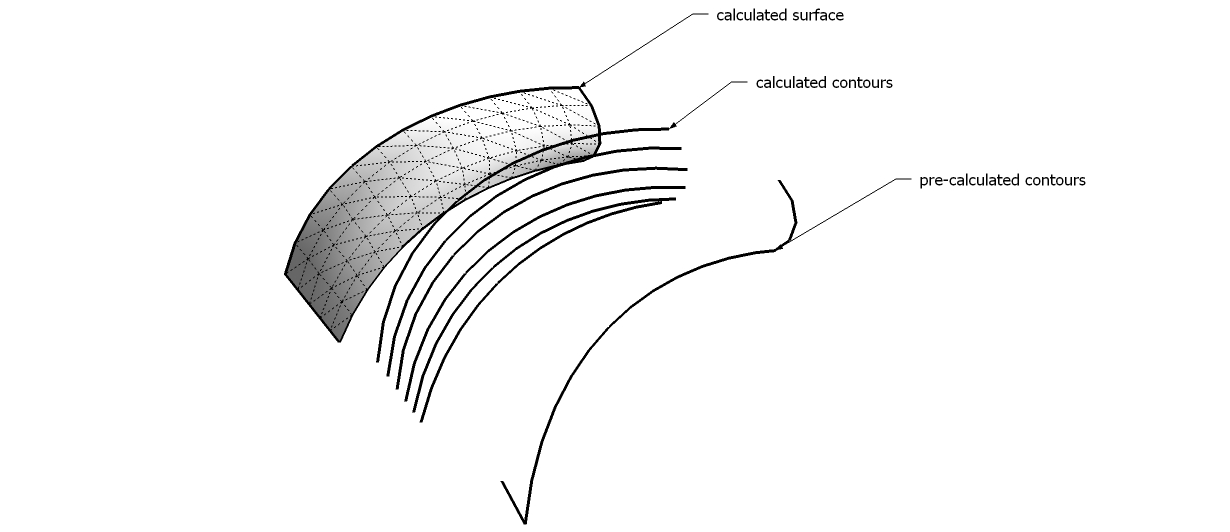
            Kiril, i have a question. I really like both your plugins - blend and path to face. I noticed on a thread that you have the ability to blend segments instead of simply geometry for the blend plugin. Is it possible to do the same with the path blend tool - i.e. blend 2 paths along another path?

            just for reference, here's an example 😄

            example.jpg

            1 條回覆 最後回覆 回覆 引用 0
            • pilouP 離線
              pilou
              最後由 編輯

              Seems there is a little bug when you Blend 2 closed curves 😮
              (here 2 circles)
              sublend.jpg

              Frenchy Pilou
              Is beautiful that please without concept!
              My Little site :)

              1 條回覆 最後回覆 回覆 引用 0
              • M 離線
                Momac
                最後由 編輯

                Hi Krill
                Is the plugin Windows only
                In Mac version the dialog / Input box does not get active

                1 條回覆 最後回覆 回覆 引用 0
                • R 離線
                  ricklaney
                  最後由 編輯

                  Where can we download the latest version of sublend.rb
                  Does it work with SketchUp Pro 7?
                  I am trying to make Pipe fittings like 3/4" 90 degree Street Elbow. Do you know where to download pipe, hose and tube fittings?

                  Thank you for a reply,
                  Rick

                  1 條回覆 最後回覆 回覆 引用 0
                  • R 離線
                    ricklaney
                    最後由 編輯

                    Where can we download Blend ver 1.9 and 'pathface.rb'

                    1 條回覆 最後回覆 回覆 引用 0
                    • D 離線
                      dedmin
                      最後由 編輯

                      Link Preview Image
                      Purged Account

                      Purged Account

                      favicon

                      (lss2008.livejournal.com)

                      1 條回覆 最後回覆 回覆 引用 0
                      • K 離線
                        kirill2008
                        最後由 編輯

                        Hi, Rick.

                        @ricklaney said:

                        Where can we download Blend ver 1.9 and 'pathface.rb'

                        pathface.rb: http://dl.dropbox.com/u/4885828/pathface.rb
                        sublend.rb: http://dl.dropbox.com/u/4885828/sublend.rb
                        I also sent a reply to your private message, so check your inbox for more information.

                        1 條回覆 最後回覆 回覆 引用 0
                        • EarthMoverE 離線
                          EarthMover
                          最後由 編輯

                          Kirill, just downloaded the new toolbar set from your site. Great idea and it works great. One suggestions would be to add the name of each tool when you hover over the toolbar icon. Thanks again...it makes life easier!

                          3D Artist at Clearstory 3D Imaging
                          Guide Tool at Winning With Sketchup
                          Content Creator at Skapeup

                          1 條回覆 最後回覆 回覆 引用 0
                          • K 離線
                            kirill2008
                            最後由 編輯

                            @earthmover said:

                            One suggestions would be to add the name of each tool when you hover over the toolbar icon.

                            Ok, I'll add tooltips.
                            Note that there is a bug in prerelease version of lss_toolbar.rb: zoom-in/zoom-out clears selection. I already fixed it, but did not published the release version, because I want to make some other enhancements and bug fixes before release. I'll try to finalize lss_toolbar.rb in the coming days.

                            1 條回覆 最後回覆 回覆 引用 0
                            • EarthMoverE 離線
                              EarthMover
                              最後由 編輯

                              @ricklaney said:

                              I am trying to make Pipe fittings like 3/4" 90 degree Street Elbow. Do you know where to download pipe, hose and tube fittings?

                              Thank you for a reply,
                              Rick

                              Rick, have you checked out Skeng 3D? - http://www.3skeng.com/en/index.htm

                              3D Artist at Clearstory 3D Imaging
                              Guide Tool at Winning With Sketchup
                              Content Creator at Skapeup

                              1 條回覆 最後回覆 回覆 引用 0
                              • K 離線
                                Keith Benson
                                最後由 編輯

                                @unknownuser said:

                                Seems there is a little bug when you Blend 2 closed curves 😮
                                (here 2 circles)
                                [attachment=0:2ghmer31]<!-- ia0 -->sublend.jpg<!-- ia0 -->[/attachment:2ghmer31]

                                I recently downloaded the latest version of Bland, but only occasionally can I get it to blend two shapes without "twisting" them. Am I missing something? I am just trying to blend a rectangle (12"x5") and a circle (12" diameter) over a 6 inch distance.

                                I have used every combination of choices from the drop down box that pops up and I must be setting it up wrong or something.

                                Any help would be appreciated, thanks!

                                Keith

                                1 條回覆 最後回覆 回覆 引用 0
                                • EarthMoverE 離線
                                  EarthMover
                                  最後由 編輯

                                  Keith, it's because each shape has a defined start and end point to SU. The plugin is set to read those points and align the new mesh to the existing segments in successive order. With the Blend plugin, Kirill added post operative capabilities so you can rotate either shape until you align the start/end points and the mesh straightens out. So after the plugin is finished, it is still waiting to receive user input to correct the errant shape, as long as you don't explode the created group.

                                  3D Artist at Clearstory 3D Imaging
                                  Guide Tool at Winning With Sketchup
                                  Content Creator at Skapeup

                                  1 條回覆 最後回覆 回覆 引用 0
                                  • K 離線
                                    Keith Benson
                                    最後由 編輯

                                    @earthmover said:

                                    Keith, it's because each shape has a defined start and end point to SU. The plugin is set to read those points and align the new mesh to the existing segments in successive order. With the Blend plugin, Kirill added post operative capabilities so you can rotate either shape until you align the start/end points and the mesh straightens out. So after the plugin is finished, it is still waiting to receive user input to correct the errant shape, as long as you don't explode the created group.

                                    Ahhh - thank you. That helps me understand why some were more twisted than others.

                                    Keith

                                    1 條回覆 最後回覆 回覆 引用 0
                                    • H 離線
                                      hgdn
                                      最後由 編輯

                                      Krill,
                                      All your tutorial videos seem have been deleted on youtube strange??? Could you tell us an alternative source to find as a lot of people try to look for it as well. Thanks...

                                      1 條回覆 最後回覆 回覆 引用 0
                                      • S 離線
                                        sbergstedt
                                        最後由 編輯

                                        Krill,

                                        I somehow cannot access the videos that you posted? could you repost them and let me know? I would really like to know the proper way to utilize these utilities you've created. They're awesome!

                                        Thanks

                                        1 條回覆 最後回覆 回覆 引用 0
                                        • A 離線
                                          atek
                                          最後由 編輯

                                          Great plugin what i was thinking i got it. Its not working with group and component. Is there any option i want to use with group or components. Plz reply

                                          1 條回覆 最後回覆 回覆 引用 0
                                          • Dave RD 離線
                                            Dave R
                                            最後由 編輯

                                            Did you read the author's first post in this thread? He says this plugin is obsolete.

                                            Etaoin Shrdlu

                                            %

                                            (THERE'S NO PLACE LIKE)

                                            G28 X0.0 Y0.0 Z0.0

                                            M30

                                            %

                                            1 條回覆 最後回覆 回覆 引用 0
                                            • 1
                                            • 2
                                            • 3
                                            • 4
                                            • 4 / 4
                                            • 第一個貼文
                                              最後的貼文
                                            Buy SketchPlus
                                            Buy SUbD
                                            Buy WrapR
                                            Buy eBook
                                            Buy Modelur
                                            Buy Vertex Tools
                                            Buy SketchCuisine
                                            Buy FormFonts

                                            Advertisement