sketchucation logo sketchucation
    • Login
    Oops, your profile's looking a bit empty! To help us tailor your experience, please fill in key details like your SketchUp version, skill level, operating system, and more. Update and save your info on your profile page today!
    ⚠️ Important | Libfredo 15.6a introduces important bugfixes for Fredo's Extensions Update

    [Plugin] Scale2Face.rb

    Scheduled Pinned Locked Moved Plugins
    27 Posts 10 Posters 43.4k Views 10 Watching
    Loading More Posts
    • Oldest to Newest
    • Newest to Oldest
    • Most Votes
    Reply
    • Reply as topic
    Log in to reply
    This topic has been deleted. Only users with topic management privileges can see it.
    • TIGT Offline
      TIG Moderator
      last edited by

      Very busy - maybe next week ? 😐

      TIG

      1 Reply Last reply Reply Quote 0
      • D Offline
        dtrarch
        last edited by

        Hi All
        Didier's [Project_faces_vector.rb] will put selected face on inclined plane.
        Just draw a reference line vector in the direction wanted for projection path.

        dtr


        SCALE TO FACE.png

        1 Reply Last reply Reply Quote 0
        • S Offline
          su30
          last edited by

          @tig said:

          Very busy - maybe next week ? 😐

          Sure TIG, in no hurry πŸ˜„

          su30

          1 Reply Last reply Reply Quote 0
          • J Offline
            j_forrester
            last edited by

            Great Plugin btw,
            Just wondered if there are any developments of a version that takes into account a sloped surface instead of a flat plane?

            Many thanks

            1 Reply Last reply Reply Quote 0
            • utilerU Offline
              utiler
              last edited by

              @j_forrester said:

              Great Plugin btw,
              Just wondered if there are any developments of a version that takes into account a sloped surface instead of a flat plane?

              Many thanks

              Ditto.
              I think this would be neat!!!

              Just Curious...

              1 Reply Last reply Reply Quote 0
              • J Offline
                j_forrester
                last edited by

                TIG,

                Tried and tested.

                Works absolutely perfect! Many thanks this will be a great help.

                1 Reply Last reply Reply Quote 0
                • TIGT Offline
                  TIG Moderator
                  last edited by

                  At long last version v1.2 is now available.
                  Link: http://forums.sketchucation.com/viewtopic.php?p=173374#p173374

                  It Scales any Selected Component-instances/Groups up in Z to Selected Faces above them. It works for curved Surfaces, but remember that it Scales to all Selected Faces... so if you select a horizontal cylinder its whole curved Face gets Selected (which is actually Face facets) and therefore it Scales to the lower [nearer] Faces and then the upper Faces - if you want to Scale to just the lower [nearer] Faces you must first switch on Hidden Geometry and them Select just the lower Face facets required and it then Scales things just to those...

                  Feedback please

                  TIG

                  1 Reply Last reply Reply Quote 0
                  • olisheaO Offline
                    olishea
                    last edited by

                    nice plugin, thank you

                    oli

                    1 Reply Last reply Reply Quote 0
                    • R Offline
                      rv1974
                      last edited by

                      Tig it doesn't work within groups 😒
                      And maybe clicking 3 points instead of face would be better solution?
                      Thank you (I mean it!)

                      1 Reply Last reply Reply Quote 0
                      • TIGT Offline
                        TIG Moderator
                        last edited by

                        Here's a Ruby that'll do it [please change the original post's title to [Plugin]...]

                        . scale2face.rb

                        Usage:
                        Select face(s) & group/component-instance(s) located below face(s).

                        Unacceptable selections produce error dialogs.

                        Pick 'Scale2Face' off the Plugins Menu
                        or type scale2face in the Ruby Console.

                        The selected items will be
                        scaled upwards [in the Z] until their CLs meet the face or faces.

                        Any intermediate faces etc are ignored; the scaling passes through them.

                        It has a one step un-do.

                        To Do: Alternative orientations to just the UP in Z.
                        E.G. down and in XY

                        Version: 1.0 20090717 First Release.
                        1.1 20090721 Tweaked to avoid height glitches.
                        1.2 20090811 Multi-face support added. Error msgs disabled.
                        1.3 20090819 Now works within groups/component edits.

                        Put in Plugins Folder...PayPalButton

                        TIG

                        1 Reply Last reply Reply Quote 0
                        • TIGT Offline
                          TIG Moderator
                          last edited by

                          @rv1974 said:

                          Tig it doesn't work within groups 😒
                          And maybe clicking 3 points instead of face would be better solution?
                          Thank you (I mean it!)

                          It does work inside groups etc now !

                          See here for v1.3 http://forums.sketchucation.com/viewtopic.php?p=173374#p173374

                          Easy fix ray[1] .last gives face if in group/component edit mode... πŸ˜„ πŸ€“ πŸ€“

                          TIG

                          1 Reply Last reply Reply Quote 0
                          • X Offline
                            xrok1
                            last edited by

                            don't know how i missed this one 😳
                            Thankyou! πŸ˜„

                            β€œThere are three classes of people: those who see. Those who see when they are shown. Those who do not see.”

                            http://www.Twilightrender.com try it!

                            1 Reply Last reply Reply Quote 0
                            • X Offline
                              xrok1
                              last edited by

                              @j_forrester said:

                              Great Plugin btw,
                              Just wondered if there are any developments of a version that takes into account a sloped surface instead of a flat plane?

                              Many thanks

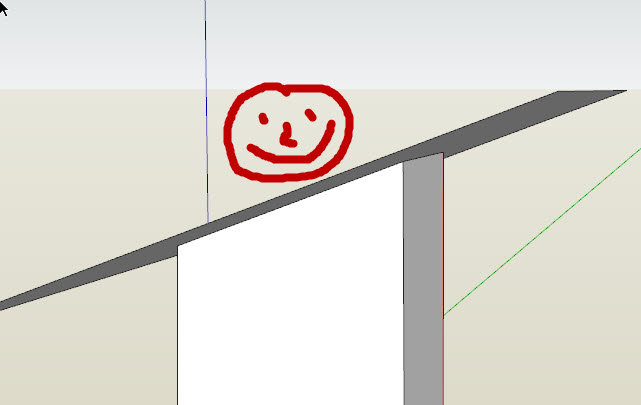
                              it would be awsome if the scaled face matched the shape/angle of the scaled to face. any plans?
                              http://twilightrender.com/phpBB3/images/smilies/think.gif


                              Capture1.JPG

                              β€œThere are three classes of people: those who see. Those who see when they are shown. Those who do not see.”

                              http://www.Twilightrender.com try it!

                              1 Reply Last reply Reply Quote 0
                              • 1
                              • 2
                              • 2 / 2
                              • First post
                                Last post
                              Buy SketchPlus
                              Buy SUbD
                              Buy WrapR
                              Buy eBook
                              Buy Modelur
                              Buy Vertex Tools
                              Buy SketchCuisine
                              Buy FormFonts

                              Advertisement