[Plugin] SectionCutFace
-
Hi, I am using SketchUp 7.1.6 on Snow Leopard. I downloaded the plugin at the top of he page but when I try to drag it into the plugins folder it does nothing and will not appear at all. Can you please provide a possible link so I can get the correct plugin and maybe some info on how to activate it if? I would appreciate any help. Thanks
-
Hi Jonathan,
The plugin (if correctly installed) will register into the context menu of the section plane. Have you tried there?
-
When you say "it won't appear" I assume that you mean you can't see it in the Plugins menu ??? that's because it doesn't appear there

Like several other tools that rely on a specific 'context' to work, SectionCutFace ONLY appears as a right-click [or whatever you do on a MAC] context-menu item, and then ONLY IF you have just ONE Section-Plane selected - then that is the one that'll get the 'faces'.
Also remember that lots of tools can appear in menus other than the Plugins one - e.g. File, Draw, Tools, Camera etc!
As with any Ruby script please read the accompanying posts and guidance notes before using the tool...
Note: you can simply read any .rb file by opening it in a plain-text editor and its guidance text is almost always at the start of the code...

-
Hi to All and really many thanks to you Tig for your great plugins!
....Unfortunately i have the same problem that it happens to PatD:
Over recent years I use this your most important one (for me... ) plugin but often SketchUp goes in crash; In this moment I am on SU8 and SnowLeopard but it happened to me also with 7, etc.
I've noticed that it's able to create the new layer, then adding the face but, after an anomalous consumption of the RAM till to use it all (4gb. .sic), he goes in crash repeatedly, even if I close layers and maintain only the walls and little more.
it is also true that I use it on rather complex and detailed models of architecture (many groups and components and of dimension, from 10mb up…) but...
What I can say if not ..... please, please HELP TIG!
Thanks in advance to you and to this great forum and many salutes from Italy -
Why not use this tricky tip ?
By Bob Pineo
[flash=480,385:3k3htox2]http://www.youtube.com/v/FfGwVwkR7yE?fs=1&hl[/flash:3k3htox2] -
That's more or less what it does - but adds faces, materials layer etc automatically...
-
Hello!!!
I need a help. I can´t donwload de plug-ins in my pc when they are rb. what i have to do?
-
@monispcaumo said:
Hello!!!
I need a help. I can´t donwnload de plug-ins in my pc when they are rb. what i have to do?
With ANY script you use Save_as... 'plugin.rb' to your normal download location.
Read the notes in the download's page.
Also read the notes at the start of the script itself - you can open it with Notepad.exe.
Then put move the file[s] to the appropriate folder - in the case of 'SectionCutFace.rb' it's ../Plugins/.
Restart Sketchup for the script to be loaded.I the case of 'SectionCutFace' it only becomes usable when you have just ONE section-plane selected: then it appears in the right-click context-menu... Read the instructions...

-
I can't install SectionCutFace plugin, can you help me please?
-
@crb900 said:
I can't install SectionCutFace plugin, can you help me please?
No much help in your post
I suspect you haven't read or understood the instructions...
The .rb file goes into your ../Plugins/ folder.
Let's assume we've sorted that step...
Restart SUp so it loads.
Now you want to run the tool...
Select a SectionCutPlane that you want to 'face'.
Do not include anything else in the selection.
Right-click to get the context-menu.
IF you have just one SectionCutPlane selected then you will get a context-menu option, near the end of the list = 'Add Section Cut Face'.
Pick it and it runs the tool.
A dialog then asks you for various settings, like color etc.
Click on 'OK' and the faced cut is added to the model, grouped, named, colored and layered etc as desired... -
Here's v2.5 http://forums.sketchucation.com/viewtopic.php?p=172583#p172583
'<No_Face>' option added, so you get just lines without faces.
'Lock Cut' option added so you can't accidentally move the group.
A class test replaces typename, optimizing speed. -
Thank you TIG.
-
@tig said:
Here's v2.5 http://forums.sketchucation.com/viewtopic.php?p=172583#p172583
'<No_Face>' option added, so you get just lines without faces.
'Lock Cut' option added so you can't accidentally move the group.
A class test replaces typename, optimizing speed.That was quick! Thanks TIG. Still looking forward to the time when S.U. lets you remove that 0.2mm offset
-
poche is finally my friend
thanks tig! -
TIG, 2.5 works fine here. Thank you.
POSSIBLE ENHANCEMENT:
A way to toggle the visibility of the the SU Section Cuts and the visibility of its SectionCutFace geometry automatically.
Advantage would be to eliminate the need for the user of digging into nested sections, turning on and off section plane display, selecting a different section plane, turning on and off its active mode, etc.Scenario: User goes to the Outliner, searches for "CUT.", clicks on a SectionCutFace group, right-clicks for A context menu and has a choice to toggle the visibility. If the SectionCutFace geometry is visible then it is hidden (if it is locked, it is unlocked) and the SU Section Cut associated with it is no longer active and vice versa if the SectionCutFace is not visible. Possibly a warning (or a listing of other SectionCutFaces) if there is more than one SU Section Plane in the active context when activating an SU Section Cut?
I guess for something like this to work, there would have to be someway (when the SectionCutFace geometry is created) to associate the internal object number assign to it by SU with that of the SU Section Plane.
John
-
thanks!! you just save me a lot of precious time filling the spaces in photoshop!!!
-
I like this plugin because it is stable
 had no crashes so far. Only when I tried to render with twilightrender inside SU everything rendered like a whole model without cut. Is there a possibility to render a cut model with filled faces?
 -
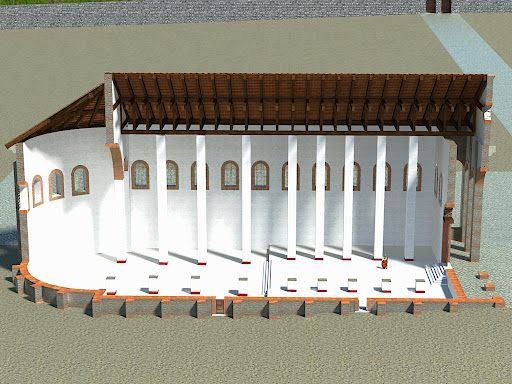
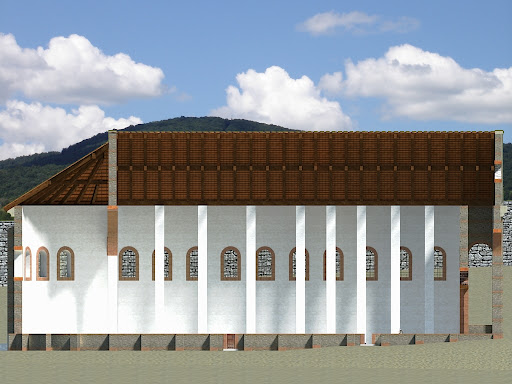
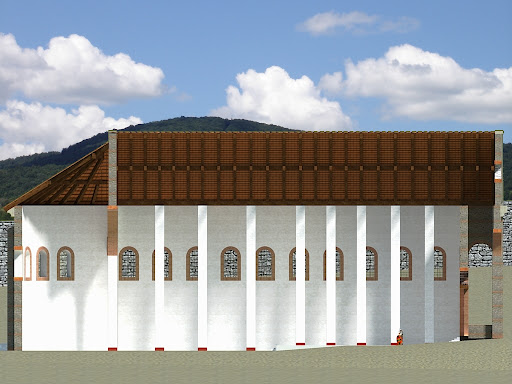
You also need to cut the "rest" of your model away with Zorro 2 (which writes itself into the section plane context menu).
Note however that it will irreversibly modify your model so always only work on a copy or make a backup before.
These are Twilight renders made this way:
-
Thanks a lot,it helped me, now I'll use both plugins
 . It is the coolest feature in sketchup to be able to make pictures with section cuts.
 -
I put the file in plugin folder and shows this error:
Error Loading File SectionCutFace.rb
C:/Program Files/Google/Google SketchUp 7/Plugins/SectionCutFace.rb:1: syntax error
<!DOCTYPE html PUBLIC "-//W3C//DTD XHTML 1.0 Strict//EN" "http://www.w3.org/TR/xhtml1/DTD/xhtml1-strict.dtd">
^
C:/Program Files/Google/Google SketchUp 7/Plugins/SectionCutFace.rb:2: syntax error
<html xmlns="http://www.w3.org/1999/xhtml" dir="ltr" lang="en-gb" xml:lang="en-gb">
^
C:/Program Files/Google/Google SketchUp 7/Plugins/SectionCutFace.rb:2: syntax error
<html xmlns="http://www.w3.org/1999/xhtml" dir="ltr" lang="en-gb" xml:lang="en-gb">
^what can i do?






Advertisement