sketchucation logo sketchucation
    • 登入
    Oops, your profile's looking a bit empty! To help us tailor your experience, please fill in key details like your SketchUp version, skill level, operating system, and more. Update and save your info on your profile page today!
    🔌 Smart Spline | Fluid way to handle splines for furniture design and complex structures. Download

    [Plugin][$] RoundCorner - v3.4a - 31 Mar 24


    已排程 已置頂 已鎖定 已移動 Plugins
    1.5k 貼文 473 Posters 3.4m 瀏覽 472 Watching
    正在載入更多貼文
    • 從舊到新
    • 從新到舊
    • 最多點贊
    回覆
    • 在新貼文中回覆
    登入後回覆
    此主題已被刪除。只有擁有主題管理權限的使用者可以查看。
    • Dave RD 離線
      Dave R
      最後由 編輯

      @ericchan74 said:

      I am on mac os X (10.8.4)

      EDIT - I have found a way to fix this. Change the .zip file downloaded from here and change the parameter to .rbz and then copy/place the file to sketchup plugin folder. Open sketchup and from Preference / Extensions / Install extension - locate .rbz file from plugin folder and woala!! RoundCorner tick box should appear which means installed! From there, go to View/ tool palettes/ RoundCorner to open up tool bar.

      Not sure if this is the proper way to install but worked for me on MAC.

      You could have skipped the part about placing the rbz file into the Plugins folder and used Install Extension just the same. Better would be to install the Sketcucation PluginStore and install it automatically. Did you make sure to also get the most recent LibFredo6 files?

      Etaoin Shrdlu

      %

      (THERE'S NO PLACE LIKE)

      G28 X0.0 Y0.0 Z0.0

      M30

      %

      1 條回覆 最後回覆 回覆 引用 0
      • D 離線
        dorindranca
        最後由 編輯

        hello
        please help
        round corner not working
        I installed libfredo6-49 but asked me to create a folder but still working out DEFPARAM_DIR
        thanks
        sorry my English
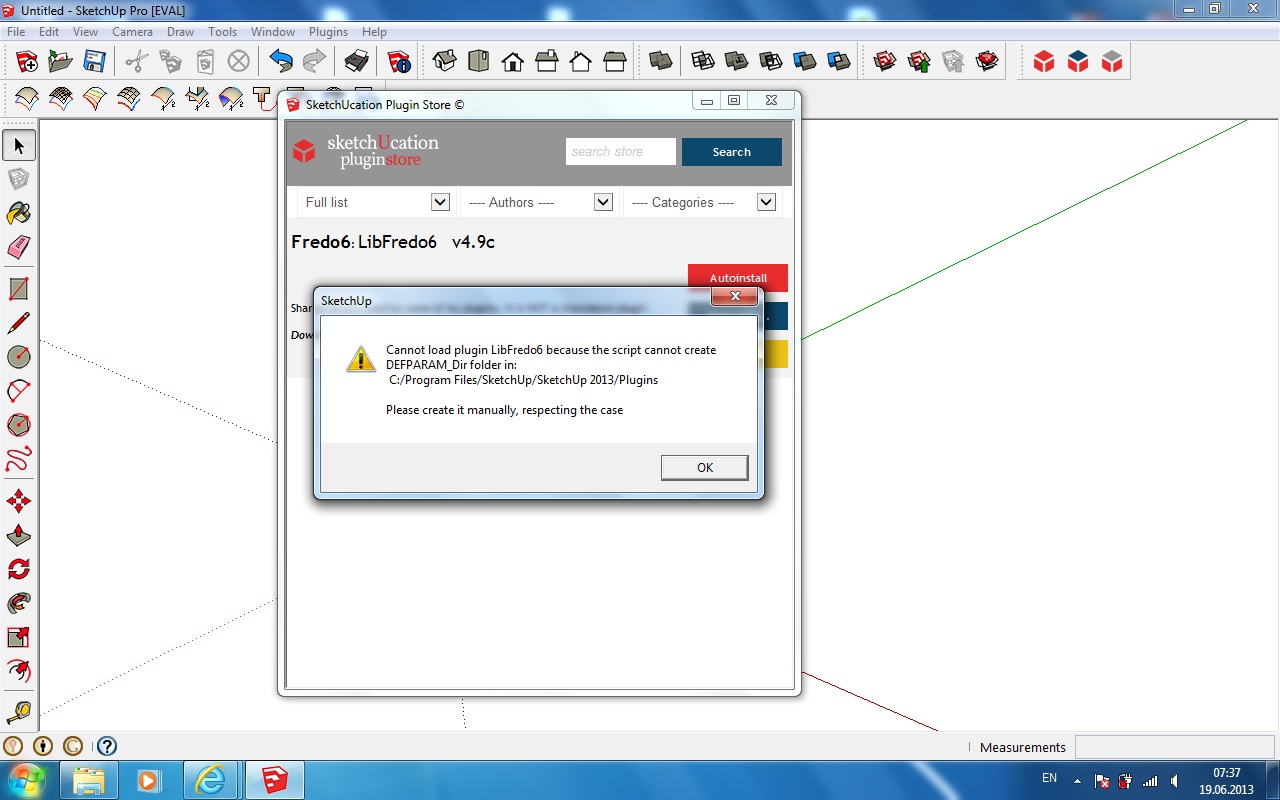

        aaaa.jpg


        bbbb.jpg

        1 條回覆 最後回覆 回覆 引用 0
        • Dave RD 離線
          Dave R
          最後由 編輯

          Please read the first three lines of the first post of this thread. It tells you exactly why you are getting this error. You need to set full permissions for the Plugins folder.

          Etaoin Shrdlu

          %

          (THERE'S NO PLACE LIKE)

          G28 X0.0 Y0.0 Z0.0

          M30

          %

          1 條回覆 最後回覆 回覆 引用 0
          • A 離線
            antoineb89
            最後由 編輯

            Hey there sketchupers,

            I am trying to use the roundcorners plugin, but it doesnt seem to work. I can see the icons and everything but when i click on it nothing happens. Hopefully one of u have a solution for this!

            Thanks in advance!

            1 條回覆 最後回覆 回覆 引用 0
            • thomthomT 離線
              thomthom
              最後由 編輯

              If you open the Ruby Console, do you get any errors?

              Thomas Thomassen — SketchUp Monkey & Coding addict
              List of my plugins and link to the CookieWare fund

              1 條回覆 最後回覆 回覆 引用 0
              • D 離線
                dannykil
                最後由 編輯

                @dave r said:

                Please read the first three lines of the first post of this thread. It tells you exactly why you are getting this error. You need to set full permissions for the Plugins folder.

                Many on work computers do not have the user permissions to modify the Plugins folder to "full permissions", and company policy will not allow the IT Administrator to grant this level of permissions.

                On my work computer / network, just copy / pasting into the plugins folder requires that I type in a once per occurence User Account Control username and password (but this works for installing many plugins).
                Same for any rbz plugin installation from within Sketchup.

                Round Corner appears not to work unless you truly have the User Permissions modify the permississions of the plugin folder.

                I don't and can't get this permissions level, and so Round Corner doesn't work for me.

                Many other plugins install and work just fine without this permissions requirement.

                1 條回覆 最後回覆 回覆 引用 0
                • Dave RD 離線
                  Dave R
                  最後由 編輯

                  That's not the fault of the plugin. The plugin requires user inputs that must be written to a file for the script to use when it does its thing. The reason the plugin won't work is that it needs to write that file into a folder within the Plugins folder which is closed to it.

                  Etaoin Shrdlu

                  %

                  (THERE'S NO PLACE LIKE)

                  G28 X0.0 Y0.0 Z0.0

                  M30

                  %

                  1 條回覆 最後回覆 回覆 引用 0
                  • thomthomT 離線
                    thomthom
                    最後由 編輯

                    Fredo is looking into alternative places to write these preference files. Windows makes it hard to write to the Program Files folder because it wants only application installers to write there.

                    Thomas Thomassen — SketchUp Monkey & Coding addict
                    List of my plugins and link to the CookieWare fund

                    1 條回覆 最後回覆 回覆 引用 0
                    • A 離線
                      am2222
                      最後由 編輯

                      Hi,
                      Today I tried your plugin ..It is great but I face problems with it.When I use your plugin it works fine and make round corners but after when I click on another tool (no matters which tool..Some times after deselected object) SU crashes and show bug screen..I cant see what is written in rubby console ..I really need your plugin please help me about that
                      I am on win 7 and SU 2013.Is there any Chance to have confilict with other plugins?

                      1 條回覆 最後回覆 回覆 引用 0
                      • Dave RD 離線
                        Dave R
                        最後由 編輯

                        Yes, there are some plugins that have been known to cause SketchUp to crash. Do you have the V-ray plugin? That is a common culprit. Also some of the BIM plugins create problems.

                        Etaoin Shrdlu

                        %

                        (THERE'S NO PLACE LIKE)

                        G28 X0.0 Y0.0 Z0.0

                        M30

                        %

                        1 條回覆 最後回覆 回覆 引用 0
                        • A 離線
                          am2222
                          最後由 編輯

                          @dave r said:

                          Yes, there are some plugins that have been known to cause SketchUp to crash. Do you have the V-ray plugin? That is a common culprit. Also some of the BIM plugins create problems.

                          Yes I have vray 1.6 installed..Is there any way to findout which plugin makes problem?

                          1 條回覆 最後回覆 回覆 引用 0
                          • Dave RD 離線
                            Dave R
                            最後由 編輯

                            Well, considering that the Vray plugin has been notorious for causing SketchUp to crash, I'd start with it. Disable it by either changing its extension (maybe to .rb!) or removing it altogether from the Plugins folder. Then try running SketchUp and especially RoundCorner. If SketchUp doesn't crash, you've found the cause.

                            Etaoin Shrdlu

                            %

                            (THERE'S NO PLACE LIKE)

                            G28 X0.0 Y0.0 Z0.0

                            M30

                            %

                            1 條回覆 最後回覆 回覆 引用 0
                            • thomthomT 離線
                              thomthom
                              最後由 編輯

                              VfS is known to cause problems. And VfS 1.6 is in active beta - so one can expect bugs to be present. Disable it while you model and enable it when you need to render.

                              Thomas Thomassen — SketchUp Monkey & Coding addict
                              List of my plugins and link to the CookieWare fund

                              1 條回覆 最後回覆 回覆 引用 0
                              • A 離線
                                am2222
                                最後由 編輯

                                Thanks a lot for your helps.I disabled it and works great

                                1 條回覆 最後回覆 回覆 引用 0
                                • thomthomT 離線
                                  thomthom
                                  最後由 編輯

                                  I use my V-Ray Tools plugin to load it on deman when I need it for that session.

                                  Thomas Thomassen — SketchUp Monkey & Coding addict
                                  List of my plugins and link to the CookieWare fund

                                  1 條回覆 最後回覆 回覆 引用 0
                                  • A 離線
                                    am2222
                                    最後由 編輯

                                    @thomthom said:

                                    I use my V-Ray Tools plugin to load it on deman when I need it for that session.

                                    Thanks for your sugestion..I will test your plugin..
                                    Why this forum doesnt have any thanks button? 😐

                                    1 條回覆 最後回覆 回覆 引用 0
                                    • caculoC 離線
                                      caculo
                                      最後由 編輯

                                      Finally I did it!!!! It's working on my Sketchup 2013. You must grant full access to ALL user but also to "ALL APPLICATION PACKAGES".
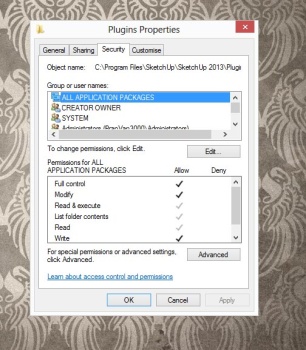
                                      http://t.imgbox.com/adbHazv0.jpg

                                      1 條回覆 最後回覆 回覆 引用 0
                                      • Dave RD 離線
                                        Dave R
                                        最後由 編輯

                                        Perhaps if you have "ALL APPLICATION PACKAGES" as a user. I don't have that on any of the three machines I use for SketchUp.

                                        Etaoin Shrdlu

                                        %

                                        (THERE'S NO PLACE LIKE)

                                        G28 X0.0 Y0.0 Z0.0

                                        M30

                                        %

                                        1 條回覆 最後回覆 回覆 引用 0
                                        • thomthomT 離線
                                          thomthom
                                          最後由 編輯

                                          Me neither.

                                          Thomas Thomassen — SketchUp Monkey & Coding addict
                                          List of my plugins and link to the CookieWare fund

                                          1 條回覆 最後回覆 回覆 引用 0
                                          • thomthomT 離線
                                            thomthom
                                            最後由 編輯

                                            Or maybe it's a Windows 8 thing...?

                                            Thomas Thomassen — SketchUp Monkey & Coding addict
                                            List of my plugins and link to the CookieWare fund

                                            1 條回覆 最後回覆 回覆 引用 0
                                            • 1
                                            • 2
                                            • 70
                                            • 71
                                            • 72
                                            • 73
                                            • 74
                                            • 72 / 74
                                            • 第一個貼文
                                              最後的貼文
                                            Buy SketchPlus
                                            Buy SUbD
                                            Buy WrapR
                                            Buy eBook
                                            Buy Modelur
                                            Buy Vertex Tools
                                            Buy SketchCuisine
                                            Buy FormFonts

                                            Advertisement