[Plugin][$] RoundCorner - v3.4a - 31 Mar 24




-
@mechblack,
Maybe you could post the model so I see what is the problem. It might be that the dimension of the rounding are too big for the geometry to close nicely.Fredo
-
This is the reason I'm trying to find a 3d fillet tool.Trouble connecting the flats and the circles.
It is great to find so much help!
Fredo6, here is the model.
gilles, your solution is elegant. My trouble with the 2d fillets has been getting them to join the circle with the line, as shown on the block model. I'm also coming up against issues like filleting the webs on the hub. Fredo6's tool almost works like Solid Works's (Dassault Systèmes). I plan on practicing more with SketchUp this semester. I want to know if there is a cost effective alternative to the giant programs with the giant price tags. It may come down to practice, practice, practice, and just learning to effectively use the simple tools that Google provides. Of course, it helps to have amazing programmers, plugins and contributors (like are found on this site).
Thank you all!
-
@mechblack said:
Fredo6, here is the model.
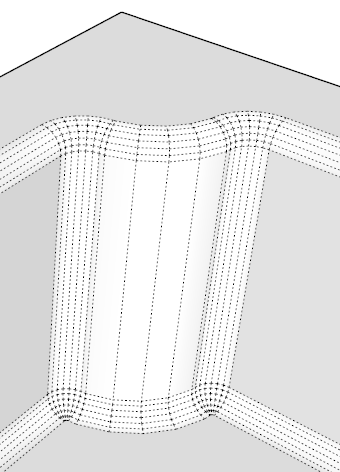
As evoked, the issue is purely geometrical. The radius of your rounding is too large compared to the shape, so that you will necessarily have overlaps. I could make it work for a rounding of 0.2cm max.
@mechblack said:
Fredo6's tool almost works like Solid Works's (Dassault Systèmes). I plan on practicing more with SketchUp this semester. I want to know if there is a cost effective alternative to the giant programs with the giant price tags.
Solid Works is based on Nurbs. This gives much more flexibility to merge curved surfaces. RoundCorner is purely geometrical and cannot manage the overlap cases.
Have a good practice
Fredo
-
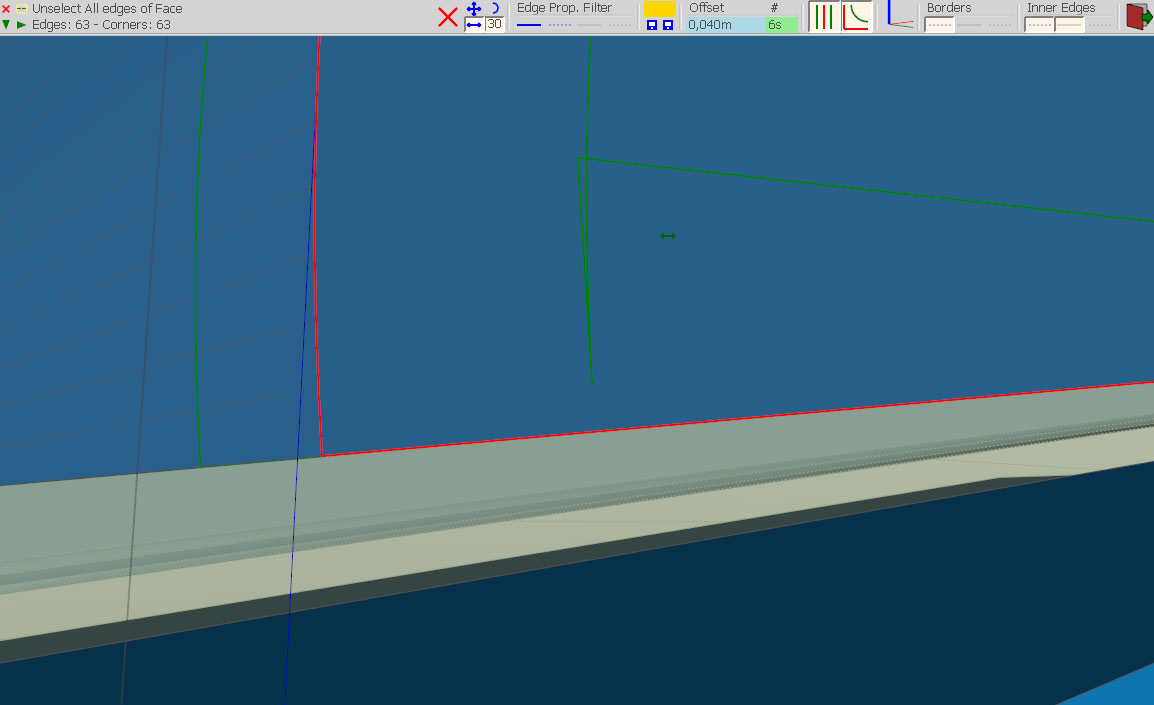
Fredo, this was probably asked before, but I didnt find it in this very long thread. Neither I found the answer in the quick manual.
Check the image attached... the offset somehow overlaps itself. It happens quite often when I try to use your tool. And when the offset overlaps, it usually results in problems in the end.
How do I solve this issue?
-
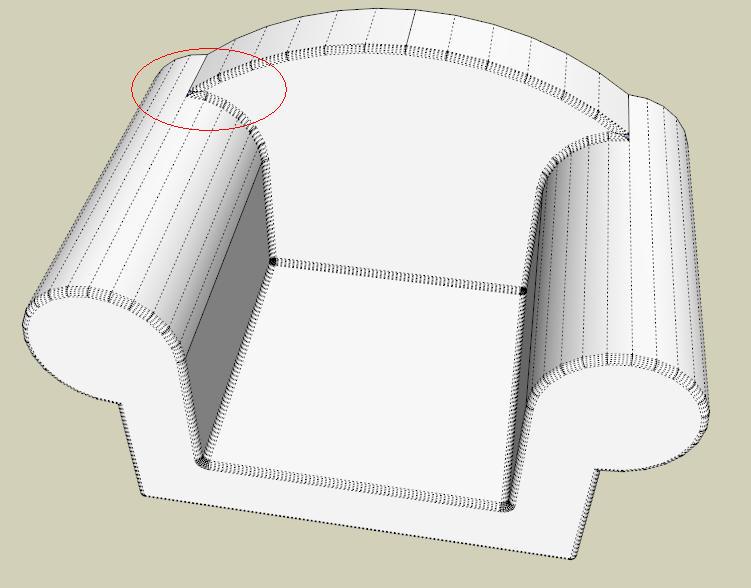
How do I get round corner to do this? I thought it would be easy but there are problems.
-
@lapx said:
How do I get round corner to do this? I thought it would be easy but there are problems.
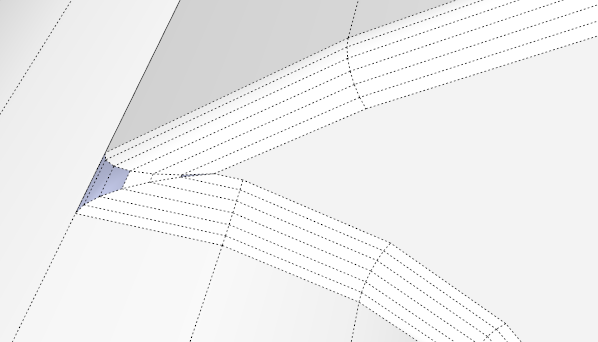
Not sure where you want to have the roundings. But it globally works for me (with 1/2"), except in the sharp angle where you may need to reshape locally a la mano.
Fredo
-
@lapx said:
Thanks Fredo! I was tring to do a 1" radius initially them gave up. I selected the entire chair because I want all edges to be 1" radius. I see you back edge is not rounded. How did you get it to work? I get the red dot in the corner. How do you fix this?
Most probably, 1" is too large for the rounding in the sharp angle. Remember that this is pure geometry. If you wish to round the edges with any size, you should use another method, for instance Smooth & Divide in Artisan (by Whaat).
Fredo
-
I keep getting this error message.
Error Loading File __loader.rb
undefined method `effective_load' for nil:NilClass -
Thanks Fredo! I was tring to do a 1" radius initially them gave up. I selected the entire chair because I want all edges to be 1" radius. I see your back edge is not rounded. How did you get it to work? I get the red dot in the corner. How do you fix this?
-
This is what i was trying to attempt.
http://www.youtube.com/watch?v=3niDglARXdg&feature=related -
im on a mac. i put it into the plugins folder also downloaded the Libfredo but still didnt have the panels even in s7 or s8.
pls help, where is the problem?
thx -
@tituskraken said:
im on a mac. i put it into the plugins folder also downloaded the Libfredo but still didnt have the panels even in s7 or s8.
pls help, where is the problem?
thxsame issue for me on skp pro 6 & 7... any solutions ?
-
finally worked for me. I unzipped files in the wrong folder
@unknownuser said:
Unzip the folder you downloaded.
Move both things inside that folder (another folder called ROUNDCORNER_Dir_xx and a file called ZLoader_Roundcorner.rb) into your Plugins folder.
Make sure you have the latest version of LibFredo6 installed, too (there should be a link to it on the same download page.) It contains things that all of Fredo6’s scripts need to work. Download and unzip it, then move its contents (a folder called LIBFREDO6_Dir_xx and a file called LibFredo6.rb) into your Plugins folder. -
How can i see the lines after rounding edges? Here in the pic i've rounded the circle edge but can't see the lines so i have no orientation.

-
These edges get automatically softened. You can see (and manipulate) softened (and hidden) edges if you turn on hidden geometry under the View menu.
-
Thanks a lot

Really an excellent plugin!
-
HI! I recently downloaded your plugin but cant seem to get it to work. the icons show in the menu and i can click them but i get an error in the ruby console. I have windows and sketchup 8.3117. I made sure i put the folders where they belong as I have with other plugins. is their a compatability issue? thanks!
Error: #<NoMethodError: undefined method
+' for nil:NilClass> C:/PROGRA~2/Google/GOOGLE~2/Plugins/MatchboxPlugin/Population.rb:174:in+'
C:/PROGRA~2/Google/GOOGLE~2/Plugins/LIBFREDO6_Dir_43/Lib6Config.rb:148:inselected_folders' C:/PROGRA~2/Google/GOOGLE~2/Plugins/LIBFREDO6_Dir_43/Lib6Plugin.rb:432:inpicture_selected_folders'
C:/PROGRA~2/Google/GOOGLE~2/Plugins/LIBFREDO6_Dir_43/Lib6Plugin.rb:1095:increate_cursor' C:/PROGRA~2/Google/GOOGLE~2/Plugins/ROUNDCORNER_Dir_23/RoundCorner_Tool.rb:66:ininitialize'
C:/PROGRA~2/Google/GOOGLE~2/Plugins/ROUNDCORNER_Dir_23/RoundCorner_Tool.rb:42:innew' C:/PROGRA~2/Google/GOOGLE~2/Plugins/ROUNDCORNER_Dir_23/RoundCorner_Tool.rb:42:inlaunch'
C:/PROGRA~2/Google/GOOGLE~2/Plugins/ROUNDCORNER_Dir_23/RoundCorner_Tool.rb:33:inaction__mapping' C:/PROGRA~2/Google/GOOGLE~2/Plugins/LIBFREDO6_Dir_43/Lib6Plugin.rb:132:incall'
C:/PROGRA~2/Google/GOOGLE~2/Plugins/LIBFREDO6_Dir_43/Lib6Plugin.rb:132:inlaunch_action' C:/PROGRA~2/Google/GOOGLE~2/Plugins/ROUNDCORNER_Dir_23/bootstrap_RoundCorner.rb:143:inlaunch_action'
C:/PROGRA~2/Google/GOOGLE~2/Plugins/ROUNDCORNER_Dir_23/bootstrap_RoundCorner.rb:159:instartup' C:/PROGRA~2/Google/GOOGLE~2/Plugins/LIBFREDO6_Dir_43/Lib6Plugin.rb:973:incall'
C:/PROGRA~2/Google/GOOGLE~2/Plugins/LIBFREDO6_Dir_43/Lib6Plugin.rb:973:incommand_invoke' C:/PROGRA~2/Google/GOOGLE~2/Plugins/LIBFREDO6_Dir_43/Lib6Plugin.rb:955:inbuild_config_commands'
C:/PROGRA~2/Google/GOOGLE~2/Plugins/LIBFREDO6_Dir_43/Lib6Traductor.rb:948:incall' C:/PROGRA~2/Google/GOOGLE~2/Plugins/LIBFREDO6_Dir_43/Lib6Traductor.rb:948:inadd_command'
C:/PROGRA~2/Google/GOOGLE~2/Plugins/MatchboxPlugin/Population.rb:174:in `call'
C:/PROGRA~2/Google/GOOGLE~2/Plugins/MatchboxPlugin/Population.rb:174 -
There is a known conflict between Matchbox and other plugins (among which mine), because Matchbox redefines some basic Ruby classes.
There may be a version of Matchbox correcting this issue.Fredo
-
Hi there. I installed what I believe to be the most up to date version of the plugin. I'm using Sketchup 8 pro on a Mac Lion. I tried the plugin on what something that had around 50 edges. Sketchup froze. Tried it a few times actually and every time, it would get to a different point. 90%, 10%, 40% complete. I then tried it on a simple cube. Same problem. I then tried it on one face. 4 edges. same problem. sketch up freezes. does any one have any idea what the problem is and how i can fix it? thanks in advance?
-
What version of LibFredo6 are you running?
In which folders have you installed the plugin and library?



Advertisement