Style Bug - Texture shows when it shouldn't
-
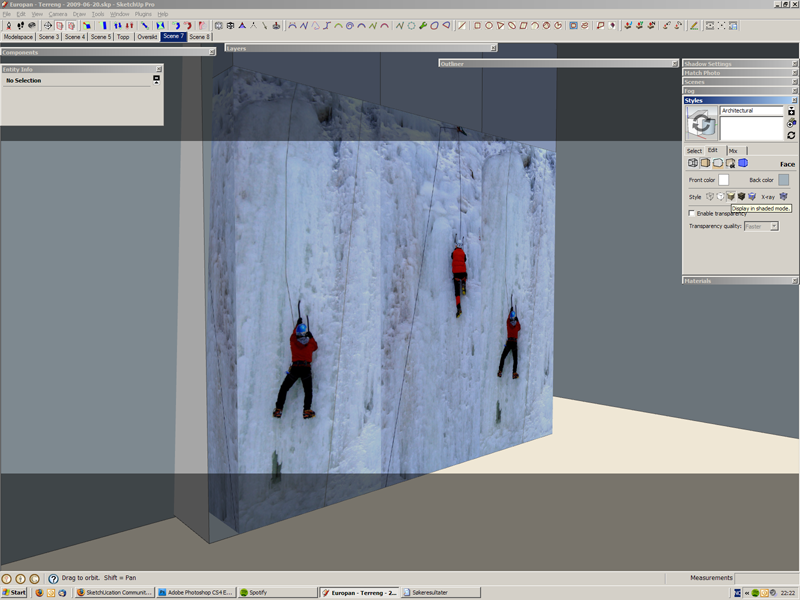
I was looking around in a model where I'd set the Style to show only colours - no textures. To my surprise I suddenly saw one of the textures visible.
No idea how to reproduce this. None of t he other textures in the model did this.
-
Is that not an image entity by any chance, Thom?
(I'm not sure however if it should show the image in shaded mode however even if it were). -
Ah, yes. They are images. But still... not what I expected.
-
All the Face Style modes display the images - with exception of Wireframe with X-ray enabled.
-
It was actually just a guess - I never use images just textures. Therefore I didn't know (wasn't sure) it displays as an image either.


Hello! It looks like you're interested in this conversation, but you don't have an account yet.
Getting fed up of having to scroll through the same posts each visit? When you register for an account, you'll always come back to exactly where you were before, and choose to be notified of new replies (either via email, or push notification). You'll also be able to save bookmarks and upvote posts to show your appreciation to other community members.
With your input, this post could be even better 💗
Register Login


Advertisement