Unexpected lines
-
I have purged everything in the file, checked Hidden Geometry, set the file to Wireframe, but nothing I do can seem to get rid of the two thin lines that you see emanating from the center at about 7 o'clock.
I'm not sure if this is a problem in V-Ray or in SketchUp.
Any thoughts on where else I might look to track them down will be very appreciated.
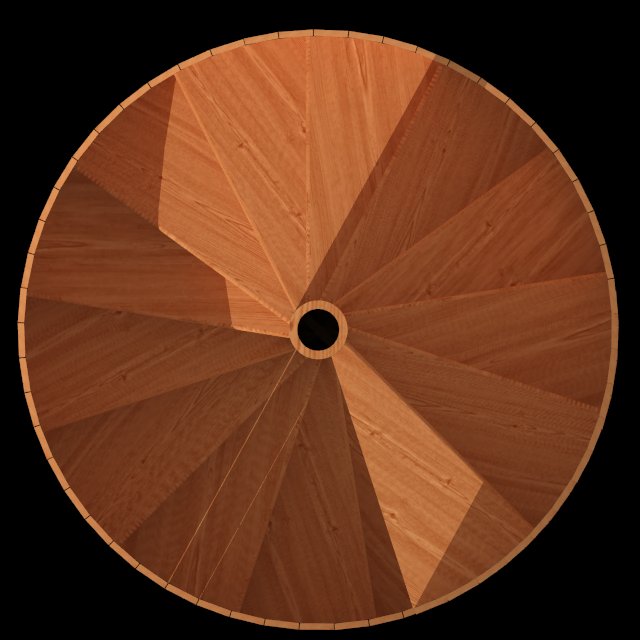
-
Seeing as nobody else has jumped in, check out this post:
http://forums.sketchucation.com/viewtopic.php?f=180&t=13711&start=0
Im not sure if this is the right way to put a link, if it doesnt work, search for a recent post by Jackson called
[PLUGIN] Remove group materials, leave geometry materials?It seems there is an issue with su materials annd Vray.
baz
-
Thanks baz -
I think somewhere in that long thread is the answer I'm looking for, and this is my starting point (I'm quoting from the thread) -
"while on the subject of helping out vray, vray SR1 creates vray materials of all materials in the scene even the materials on lines (multi-coloured from CAD imports) could there also be a script to remove all materials from lines? that way vray wouldnt create any unnecessary materials"
Only after reading that comment did I realize that the two offending lines only exist in the original CAD file.


Hello! It looks like you're interested in this conversation, but you don't have an account yet.
Getting fed up of having to scroll through the same posts each visit? When you register for an account, you'll always come back to exactly where you were before, and choose to be notified of new replies (either via email, or push notification). You'll also be able to save bookmarks and upvote posts to show your appreciation to other community members.
With your input, this post could be even better 💗
Register Login


Advertisement