[Plugin] Point Merger tools v1.2 UPDATED@ 23/06/09
-
@unknownuser said:
BTM, is there a way to have the unzip process work smoother? When I extracted the files I only had two folders in my Plugins menu. I had to grab the two rb files and move them into the main Plugins folder. I believe JClements had the same problem Here
Or maybe I did it wrong.Oh, and the toolbar... I noticed it was checked as on but was not on my screen anywhere. I could not use it and ultimately removed the files from my plugins folder.
And upon loading SU after installing the script my toolbars wacked out again. Rearranged all over the screen.

Please Google, fix the toolbar prob... oh forget it. They are not listening anymore.
That's strange
 … First, the unzipped file should be a folder called btm_Point_Merger_Files, and it should contain
 btm_Point_Merger_Loader.rband a folder called btm_Point_Merger_Tools. These should both go in the plugins folder. I know that it works fine with Archive Utility on my mac, and the files in btm_Point_Merger_Files should look like this:
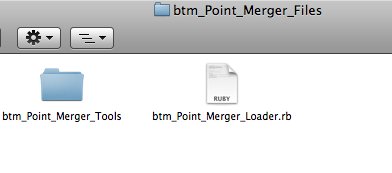
As for your toolbar problem, I have no idea why it would be doing that
 . It is possible that another ruby might have broken it, but from what you've described, I doubt it. All I can think of is that the files might not be in the right place, or are duplicated, or that another plugin is breaking it somehow. Other than that, my knowledge is very limited.
 -
Macs like to add extra files to everything they do. So when PCs get Mac files, they always come attached with unnecessary files. So your zip files has all this inside it when opened on a PC
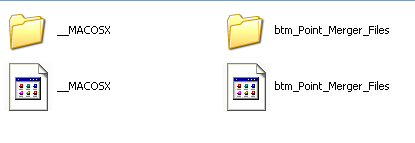
So its just a matter of deleting the Mac system files, then its like a regular plugin install.
Chris
-
Nope, I take it back. I forgot that is worse than just that. You have to double click on the "btm_Point_Merger_Files" to get taken to the actual root of the zip file. But it still has extra files floating around in it.
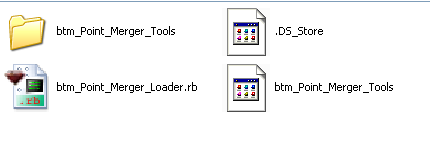
So you have to ignore the top level, double click on the "btm_Point_Merger_Files" folder, then delete the Mac system files and then copy and paste the rest into the plugins folder.

Chris
-
Okay, is there any way for me to make zip files with my mac, that work properly on Windows too?
-
That is a good question. Does your zip file maker have any settings you can change? If you find anything to tweak, upload a test version here and we'll let you know if it is any smoother.
Chris
-
… I use the built-in "compress" feature under the right click menu to compress files on my mac. I've been looking through System Preferences, and in quite a few other places, but can't find where to change any settings
. -
thanks for the plugin...

i will have a try on it... -
@unknownuser said:
… I use the built-in "compress" feature under the right click menu to compress files on my mac. I've been looking through System Preferences, and in quite a few other places, but can't find where to change any settings
.fwiw, those extra files are all over the place on your mac but are kept hidden.. they're finder settings and resource forks which are basically used for remembering icon positioning and such (and maybe something to do with why osxSU doesn't have toolbar freakouts).. for instance, you could send me a folder with a bunch of pictures arranged in a certain order and i could see them in that order.. a windows user would see them alphabetically/numerically etc..
the standard compressor will include these files but there are others you can get (for free) that won't include them (pretty much all of the mac archive apps have this option)
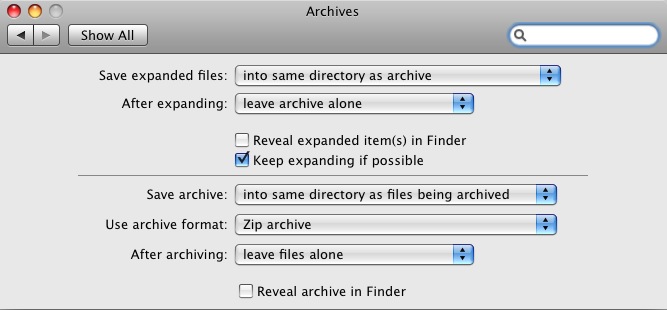
[also] if you want to have easier access to the archive utility's preferences by placing them in the system prefs, do this..
go:
Macintosh HD/System/Library/CoreServicesin there you'll see the Archive Utility.app.. you can either launch the app and change it's prefs as you would a normal app -or- unlock a hidden feature by right clicking the icon and choosing 'show package contents'.. go into the contents folder then into the resources folder and you'll see a file called 'Archives.prefPane'.. doubleclick that and you'll be given the option to add it to the standard system preferences..
there's not many options and nothing to keep the mac only files out but you might like some of the choices..
-
Hi everyone,
The plugin seems like a very nice tool, but it is quite hard to control, or maybe I am not familiar with it yet.
Anyway, I tried to merge some vertices but could not make it happen the way I want.
Does anyone know if the Point Merger is able to do something like the attachment below?
Thanks!
_KN
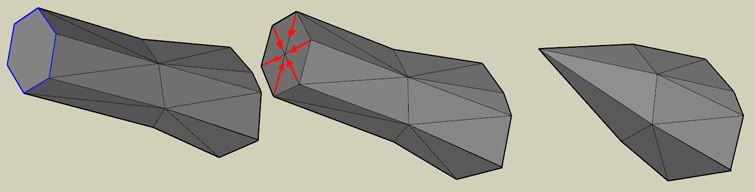
-
thanks!Point Merger tools v1.2 UPDATED@ 23/06/09





Advertisement