sketchucation logo sketchucation
    • 登入
    Oops, your profile's looking a bit empty! To help us tailor your experience, please fill in key details like your SketchUp version, skill level, operating system, and more. Update and save your info on your profile page today!
    ⚠️ Important | Libfredo 15.6b introduces important bugfixes for Fredo's Extensions Update

    [Plugin] Simple Loft alpha 0.1b -- UPDATED May-15-09

    已排程 已置頂 已鎖定 已移動 Plugins
    251 貼文 88 Posters 154.9k 瀏覽 88 Watching
    正在載入更多貼文
    • 從舊到新
    • 從新到舊
    • 最多點贊
    回覆
    • 在新貼文中回覆
    登入後回覆
    此主題已被刪除。只有擁有主題管理權限的使用者可以查看。
    • Chris FullmerC 離線
      Chris Fullmer
      最後由 編輯

      I think it should work on a Mac Oscar. The #1 error is normally that you need to make sure that both lines have the same amount of segments. That and they can not be connected to any faces.

      Its a bit picky on what it wants so that it will work.

      If none of that helps, open the Ruby Console (Window > Ruby Console) and then try running the script. See if it sends any messages to the console. If it does, copy and paste them here and I'll see if I can get to the bottom of it,

      Chris

      Lately you've been tan, suspicious for the winter.
      All my Plugins I've written

      1 條回覆 最後回覆 回覆 引用 0
      • gillesG 離線
        gilles
        最後由 編輯

        @unknownuser said:

        Just wondering if anyone has gotten this to work on SU7 Pro for Mac Version 10.5.7?

        I would like to know too, for me the plugin does not even appears.
        SU6 OSX 4

        " c'est curieux chez les marins ce besoin de faire des phrases "

        1 條回覆 最後回覆 回覆 引用 0
        • O 離線
          Oaht
          最後由 編輯

          THANKS FOR YOUR SUPERB RUBY!!!

          1 條回覆 最後回覆 回覆 引用 0
          • honoluludesktopH 離線
            honoluludesktop
            最後由 編輯

            Great tool. I made the attached drapery (left side of fixture), an improvement over the previous ones (right side, and left of new drapery material) as I was able to pinch the row below the top (as it commonly is), and have the folds fall naturally. Thanks Chris.

            Sorry about the dark render, didn't want to spend the time adjusting the lights. Anyone know if there is away to edit this surface? Can it be exploded?
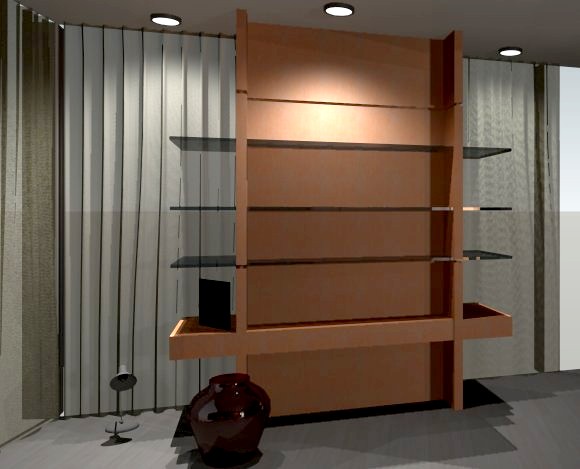
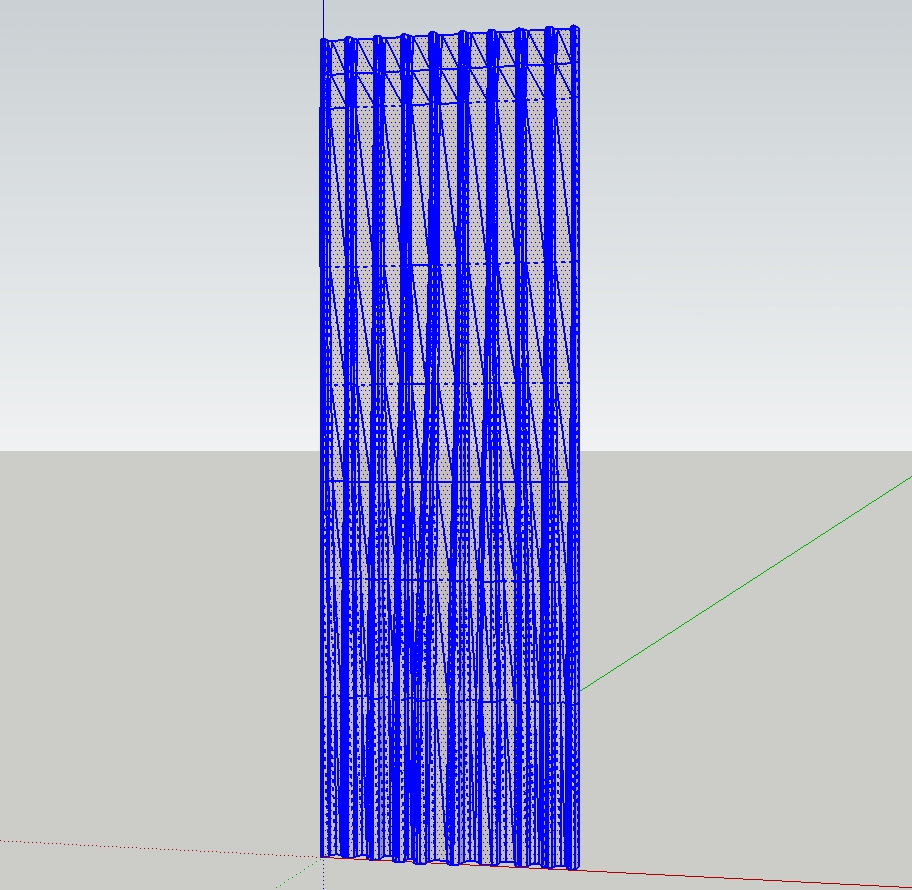
            temp01.jpg


            temp04.jpg


            Drapery05.skp

            1 條回覆 最後回覆 回覆 引用 0
            • A 離線
              Archibum
              最後由 編輯

              This tool is amazing. Definitely helped on some of my school projects. I do have one problem and dont know if its the tool or the system.
              So I am on a mac. Leopard updated and all that.
              I noticed that on starting sketchup, the red dot in the corner would indicate that the file had not yet been saved. Usually, this only happens when you actually start drawing. So, i removed all my plugins, downloaded sketchup fresh, and went back and added the plugins again one at a time. Found out that it was this tool that was causing sketchup to think that the file needed to be saved, even if nothing had been drawn. This wouldnt be a problem as i could just click "dont save," but doing that caused sketchup to crash every time.

              So thats my dilemma. Does it make sense? Am i the only one with this problem?

              1 條回覆 最後回覆 回覆 引用 0
              • Chris FullmerC 離線
                Chris Fullmer
                最後由 編輯

                That is very interesting Kyle. I'll have to look into it. Does anyone else see this?

                Chris

                Lately you've been tan, suspicious for the winter.
                All my Plugins I've written

                1 條回覆 最後回覆 回覆 引用 0
                • A 離線
                  agamemnus
                  最後由 編輯

                  I'm trying to use this tool to create a valley curve-- a cross between a bell and an oval. I am having a problem using this tool with closed loops. =(

                  I did it manually but it was annoying.

                  1 條回覆 最後回覆 回覆 引用 0
                  • Chris FullmerC 離線
                    Chris Fullmer
                    最後由 編輯

                    Hi, the script does not work with closed loops. Sorry about that.

                    And think how much more annoying it would have been to connect those shapes if the script didn't exist at all 😄

                    Chris

                    Lately you've been tan, suspicious for the winter.
                    All my Plugins I've written

                    1 條回覆 最後回覆 回覆 引用 0
                    • A 離線
                      agamemnus
                      最後由 編輯

                      @chris fullmer said:

                      Hi, the script does not work with closed loops. Sorry about that.

                      And think how much more annoying it would have been to connect those shapes if the script didn't exist at all 😄

                      Chris

                      I did try to split up the loops but I couldn't get an even split... I had to do it manually!!

                      Actually, I think I could possibly use a different tool but I am not sure what it would be exactly. I had two circles. The bottom and smaller circle already had a quarter sphere inverted and oval in shape that I would later attach to it. The top circle would be attached to a flat surface. The object is to have a smooth transition between the two.

                      What I did is made a Bezier curve from one segment (on the big circle) to another (on the small circle) (with a perpendicular slant to the blue axis).. there were 24 segments, so I cut out a quarter from the circles. I copied the curve 5 times, then changed the angle and resized so that each curve start/end matched the smaller (and lower) /bigger (and higher) circle. Then it was just a matter of exploding the Bezier curves and drawing lines between them, forming rectangles of various inclines. I then copied this thing 4 times and hid the line segments with smoothing.

                      Your tool is pretty good but there is no way to specify exactly what type of curve I want... that would be troublesome for anything but a symmetrical spherical or oval shape, though!

                      I have a suspicious feeling I could have just used the follow-me tool and then stretched the result, though. 😆

                      1 條回覆 最後回覆 回覆 引用 0
                      • F 離線
                        Fletch
                        最後由 編輯

                        sandbox tools work on closed curves. 😐 😕

                        Fletch
                        Twilight Render Cross-platform Plugin for SketchUp on PC or Mac

                        1 條回覆 最後回覆 回覆 引用 0
                        • K 離線
                          kwistenbiebel
                          最後由 編輯

                          Hi Chris,

                          I am experiencing trouble using your nice Loft plugin.
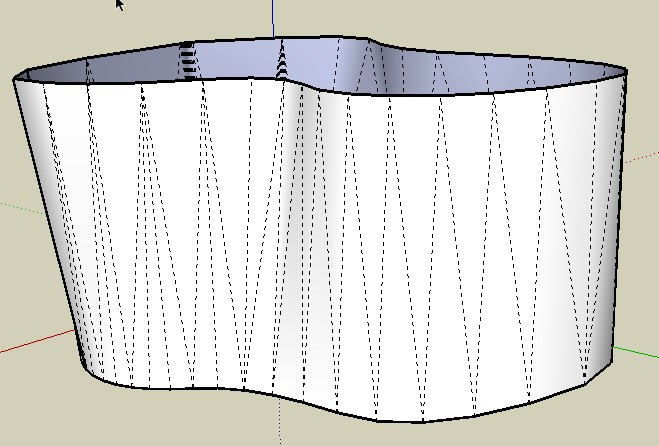
                          Below, I attached what is happening. I am trying to connect two closed curves to form a solid. I was hoping the loft tool would connect the points of the two curves with 'the smallest distance between points' as if it was a tensile structure.
                          Unfortunately I get an error.
                          First I thought I needed to do this with the soap skin bubble plugin, but that doesn't seem to work.

                          Any help would be welcome.

                          [Edit]: the blend.rb seems to 'almost' do this, although it connects existing points on the curves one after the other. That means it generates unwanted diagonals.
                          I think I would need a loft tool or 'skin tool'for it, as that would work independantly from the location of the control points on the curve and makes a skin (= by smallest distance between curves).....It seems though that the skin.rb is not being further developed.
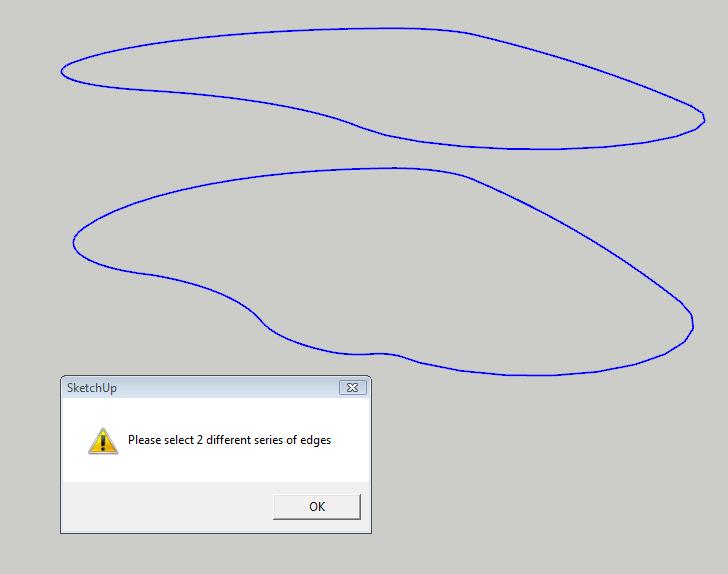

                          loft error.jpg

                          1 條回覆 最後回覆 回覆 引用 0
                          • K 離線
                            kwistenbiebel
                            最後由 編輯

                            This is what the blend.rb spits out (starting curves are slightly different than above).
                            It looks ok, but I am not sure if the newly generated blend surface follows the shortest distance between the two polylines.
                            I would like to see it connected independant from the curve's existing control points (skin?) .Does that make sense?
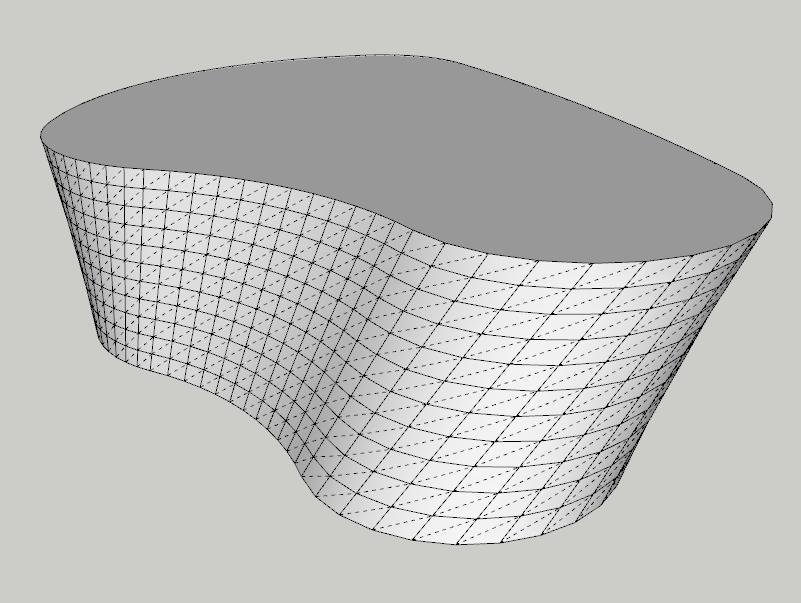

                            blend rb.jpg

                            1 條回覆 最後回覆 回覆 引用 0
                            • massimoM 離線
                              massimo Moderator
                              最後由 編輯

                              Kwist, I think that skin.rb could do the job. I use the 2.2 version which, in my opinion, is the best.

                              ScreenHunter_01 Oct. 31 07.57.jpg

                              1 條回覆 最後回覆 回覆 引用 0
                              • K 離線
                                kwistenbiebel
                                最後由 編輯

                                Thanks Massimo,
                                I already have the skin22 in my plugins folder but somehow it never worked. I enabled it in the Preferences panel...but the skin ruby never appeared as icons nor in the tools/plugins menu. A lot of people seem to have trouble with it.

                                1 條回覆 最後回覆 回覆 引用 0
                                • massimoM 離線
                                  massimo Moderator
                                  最後由 編輯

                                  Hmmm, that's strange. I have it disabled in the preferences>extentions panel, but the icons are there and the plugin works fine!

                                  1 條回覆 最後回覆 回覆 引用 0
                                  • K 離線
                                    kwistenbiebel
                                    最後由 編輯

                                    I do have 'D.B.tools' in the Tools menu. Is that the one? (it has a skin option) and that seems to work.. sort of.

                                    1 條回覆 最後回覆 回覆 引用 0
                                    • massimoM 離線
                                      massimo Moderator
                                      最後由 編輯

                                      Just checked and yes, i think that you're right. And it works also via icons.

                                      1 條回覆 最後回覆 回覆 引用 0
                                      • K 離線
                                        kwistenbiebel
                                        最後由 編輯

                                        Thanks for the help.
                                        I think either skin22.rb or blend.rb will do for now.
                                        Hopefully the Loft.rb will be further developed so it can loft between closed polylines as that seems impossible for now (only open curves seem to work).
                                        I might try it in Rhino to get it right later on.

                                        1 條回覆 最後回覆 回覆 引用 0
                                        • Chris FullmerC 離線
                                          Chris Fullmer
                                          最後由 編輯

                                          Hi Kwist, yeah, loft only works on open splines (non-closed) for now. Plus, it currently forces a curve surface, even if its just on 2 splines like your example is. It would not directly connect, but it would squeeze the walls in a little I think.

                                          Eventually loft will work on closed loops and also with loops with different amount of vertices. But for now, its only sort of half a plugin. missing those very important functions.

                                          Chris

                                          Lately you've been tan, suspicious for the winter.
                                          All my Plugins I've written

                                          1 條回覆 最後回覆 回覆 引用 0
                                          • F 離線
                                            Foun10Head-X
                                            最後由 編輯

                                            I like the concept to this. I'll be checking back for updates

                                            1 條回覆 最後回覆 回覆 引用 0
                                            • 1
                                            • 2
                                            • 3
                                            • 4
                                            • 5
                                            • 6
                                            • 12
                                            • 13
                                            • 4 / 13
                                            • 第一個貼文
                                              最後的貼文
                                            Buy SketchPlus
                                            Buy SUbD
                                            Buy WrapR
                                            Buy eBook
                                            Buy Modelur
                                            Buy Vertex Tools
                                            Buy SketchCuisine
                                            Buy FormFonts

                                            Advertisement


