sketchucation logo sketchucation
    • 登入
    Oops, your profile's looking a bit empty! To help us tailor your experience, please fill in key details like your SketchUp version, skill level, operating system, and more. Update and save your info on your profile page today!
    ⚠️ Important | Libfredo 15.6b introduces important bugfixes for Fredo's Extensions Update

    Making a SketchUp tool - incorporating the mouse & keyboard

    已排程 已置頂 已鎖定 已移動 Developers' Forum
    55 貼文 6 Posters 2.7k 瀏覽 6 Watching
    正在載入更多貼文
    • 從舊到新
    • 從新到舊
    • 最多點贊
    回覆
    • 在新貼文中回覆
    登入後回覆
    此主題已被刪除。只有擁有主題管理權限的使用者可以查看。
    • Chris FullmerC 離線
      Chris Fullmer
      最後由 編輯

      Excellent 😄

      Lately you've been tan, suspicious for the winter.
      All my Plugins I've written

      1 條回覆 最後回覆 回覆 引用 0
      • B 離線
        BTM
        最後由 編輯

        ... Now I need to figure out where in the class to put that 😒 . I'm still not that fond of what defs do what exactly.

        1 條回覆 最後回覆 回覆 引用 0
        • Chris FullmerC 離線
          Chris Fullmer
          最後由 編輯

          I think you'll probably put it in its own method.

          If you want it to be the first thing run every time the user begins the script, then you can call that method at the bottom of the activate method.

          And then call other methods from the onReturn method probably (though onLbuttonUp is common too). So it works like this, if you want your script to advance when the user hits enter, then call all YOUR methods from the onReturn method. It only gets triggered when the user hits enter/return. So only call your method from within onReturn and it will only get run once they hit enter. Here's an example of how it could flow

          Your "add cpoint" method gets run from the activate method because that is run everytime the user starts the tool. So that will run your construction point right off the bat. Then the user should click on a vertex to specify that vertex as the center of operations. So you would have code in the onLbuttonUp method that yould trigger when they click the mouse. It should take the InputPoint and store it as some @centerPoint variable, assuming its a vertex they clicked on).

          Once the cpoint is set and the centerpoint is selected, you could pop up a UI.inputbox asking what radius to use. When they hit enter, then you run a method that does all the calculation and drawing/transforming.

          The way I described it there did not require the user to hit enter, so all that would be run from the onLButtonUp method then.

          Seriously a tool with the mouse, and with transformations. Nearly as hard as it gets, but do-able. Good luck!

          Chris

          Lately you've been tan, suspicious for the winter.
          All my Plugins I've written

          1 條回覆 最後回覆 回覆 引用 0
          • B 離線
            BTM
            最後由 編輯

            One problem i'm having is not knowing what to enter in the grayed in area. I thought that Pinchmover, the name of the class, would work, but it doesn't. What does?
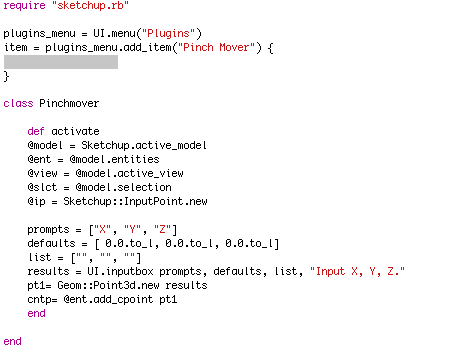
            I put in a bunch of variables at the start, just incase I'll need them, so I won't forget what they are.

            1 條回覆 最後回覆 回覆 引用 0
            • Chris FullmerC 離線
              Chris Fullmer
              最後由 編輯

              Sketchup.active_model.select_tool Pinchmover.new

              And you will also need to move that to the bottom of the script. You can't instantiate the class until after it has been defined. Just put all your menu work at the bottom of the script.

              Chris

              Lately you've been tan, suspicious for the winter.
              All my Plugins I've written

              1 條回覆 最後回覆 回覆 引用 0
              • Chris FullmerC 離線
                Chris Fullmer
                最後由 編輯

                Just the name of the class doesn't work, because with "tools" you are making special classes that Sketchup watches. So you have to tell sketchup to start your class as a tool.

                Lately you've been tan, suspicious for the winter.
                All my Plugins I've written

                1 條回覆 最後回覆 回覆 引用 0
                • B 離線
                  BTM
                  最後由 編輯

                  Okay 👍
                  Man, I've got a LOT to learn 😆

                  1 條回覆 最後回覆 回覆 引用 0
                  • B 離線
                    BTM
                    最後由 編輯

                    ` require "sketchup.rb"

                    class Pinchmover
                    
                    	def activate
                    	@model = Sketchup.active_model
                    	@ent = @model.entities
                    	@view = @model.active_view
                    	@slct = @model.selection
                    	@slct.clear
                    	end
                    
                    	def onLButtonUp(flags, x, y, view)
                    	ip = view.inputpoint x,y
                    	pt = ip.position
                    	pt2 = Geom::Point3d.new pt
                    	@cpoint = @ent.add_cpoint pt2
                    	end
                    
                    end
                    

                    plugins_menu = UI.menu("Plugins")
                    item = plugins_menu.add_item("Pinch Mover") {
                    Sketchup.active_model.select_tool Pinchmover.new
                    }`

                    I like mouse interaction and inferencing better than a dumb little inputbox 💚
                    ... Now to get it to make only ONE cont.point ...
                    ... And THEN a way to select an endpoint for the tool to use as the centerpoint of the pinch 😒

                    1 條回覆 最後回覆 回覆 引用 0
                    • B 離線
                      BTM
                      最後由 編輯

                      ; But now I think I know how to tackle both issues at once 😎

                      1 條回覆 最後回覆 回覆 引用 0
                      • Chris FullmerC 離線
                        Chris Fullmer
                        最後由 編輯

                        Hey, that's great! Its adding the construction point really well. Once its added, you have its position so you know where the pinch is going to. The second cpoint should indicate the vertex to be used.

                        I agree, you have to figure out those things, so I'm interested to hear how you do it!

                        Chris

                        Lately you've been tan, suspicious for the winter.
                        All my Plugins I've written

                        1 條回覆 最後回覆 回覆 引用 0
                        • Chris FullmerC 離線
                          Chris Fullmer
                          最後由 編輯

                          That works great! You have two separate points defined and stored for later use. Perfect. Now you have to decide how you want your script to move forward. Does it just begin automatically once the 2nd construction point is set? Or does it pop up a radius input box immediately after the 2nd point is added. Or does it just sit there until the user hits enter? Once they hit enter then it beings running. etc.

                          So far so good. You've gotten past much of the mouse implementation. Now its on to transformations! WooHoo!

                          Chris

                          Lately you've been tan, suspicious for the winter.
                          All my Plugins I've written

                          1 條回覆 最後回覆 回覆 引用 0
                          • B 離線
                            BTM
                            最後由 編輯

                            **` require "sketchup.rb"

                            class Pinchmover
                            
                            	def activate
                            	
                            	@model = Sketchup.active_model
                            	@ent = @model.entities
                            	@view = @model.active_view
                            	@slct = @model.selection
                            	@ip = Sketchup::InputPoint.new
                            	@slct.clear
                            	@first = 0
                            	@second = 0
                            	end
                            
                            	def onLButtonUp(flags, x, y, view)
                            	
                            		if @first == 0
                            		ip1 = view.inputpoint x,y
                            		pt1 = ip1.position
                            		pt2 = Geom::Point3d.new pt1
                            		@cpoint = @ent.add_cpoint pt2
                            		@first = 1
                            		@second = 1
                            		
                            		elsif @second == 1
                            		ip2 = view.inputpoint x,y
                            		pt3 = ip2.position
                            		pt4 = Geom::Point3d.new pt3
                            		@cpoint2 = @ent.add_cpoint pt4
                            		@second = 2
                            		end
                            	end
                            	
                            	def onReturn(view) #Unnecessary, I just want to see if it's working.
                            	UI.messagebox @cpoint
                            	UI.messagebox @cpoint2
                            	end
                            end
                            

                            plugins_menu = UI.menu("Plugins")
                            item = plugins_menu.add_item("Pinch Mover") {
                            Sketchup.active_model.select_tool Pinchmover.new
                            }`**
                            😄
                            ... So?

                            1 條回覆 最後回覆 回覆 引用 0
                            • B 離線
                              BTM
                              最後由 編輯

                              I edited that last post about 30 seconds ago, so that it would have different variables to repeat. I don't know if it'll help, but I thought it would be a good idea.

                              1 條回覆 最後回覆 回覆 引用 0
                              • ely862meE 離線
                                ely862me
                                最後由 編輯

                                i don t know where to ask so i ll ask here...is there any chance to make a small code or plugin for deselecting a line or something else without zooming out and click away from model..
                                i was thinking to rewrite the esc key sketchup function (..if u are in a group or is selected a group by pressing esc the group is deselected or is closed )...i would like by hitting the esc key to deselect the selected geometry

                                Sorry for bad phrases 😄
                                Thanks!

                                Elisei

                                Elisei (sketchupper)


                                Before no life was done on Earth it was THE LIFE ITSELF...GOD
                                Come and See EliseiDesign

                                1 條回覆 最後回覆 回覆 引用 0
                                • Chris FullmerC 離線
                                  Chris Fullmer
                                  最後由 編輯

                                  You can go ahead and start a new thread generally for questions like that... 😄

                                  The answer is ctrl-t. Deselect is already built into SketchUp, and that is the default shortcut key. If it doesn't work, then you've probably mapped it to something else. Go re-map it to they key that you want.

                                  Chris

                                  Lately you've been tan, suspicious for the winter.
                                  All my Plugins I've written

                                  1 條回覆 最後回覆 回覆 引用 0
                                  • B 離線
                                    BTM
                                    最後由 編輯

                                    Well, first of all, the plugin would be easy. Unfortunately though, you'd have to add a shortcut key to cet plugin, because, as far as I know, plugins seem to work only when they are in use. Unless it's somehow possible with initialize. 😕

                                    1 條回覆 最後回覆 回覆 引用 0
                                    • ely862meE 離線
                                      ely862me
                                      最後由 編輯

                                      U re the MAN ..it works..
                                      I asked some time ago and the answer was zooming out and click away..
                                      Thanks for the tip..
                                      Btw you are doing a great job with all these plugins ..Thanks for that too!

                                      Elisei

                                      Elisei (sketchupper)


                                      Before no life was done on Earth it was THE LIFE ITSELF...GOD
                                      Come and See EliseiDesign

                                      1 條回覆 最後回覆 回覆 引用 0
                                      • B 離線
                                        BTM
                                        最後由 編輯

                                        ... For me, shift alt a.

                                        1 條回覆 最後回覆 回覆 引用 0
                                        • B 離線
                                          BTM
                                          最後由 編輯

                                          Okay. Here's my big issue, I knew I'd end up having.

                                          this is the part I added to the end of the elsif in onLButtonUp:
                                          prompts = ["Radius="] defaults = [ 0.0.to_l] list = [""] results = UI.inputbox prompts, defaults, list, "Please input desired radius." @rad= results

                                          Now, HOW can I go through all the active points in the model**(to see which ones are within the distance of @rad from @cpoint2 in the future)**? I can't use .typename, because endpoints aren't really entities, so I'm stuck.

                                          1 條回覆 最後回覆 回覆 引用 0
                                          • Chris FullmerC 離線
                                            Chris Fullmer
                                            最後由 編輯

                                            This is what I use to iterate through a model for vertices.

                                            
                                            ents = Sketchup.active_model.active_entities
                                            verts = []
                                            
                                            ents.each do |e|
                                             if e.typename == "Edge"
                                              verts << e.start
                                              verts << e.end
                                             end
                                            end
                                            
                                            verts.uniq!
                                            

                                            That adds every start vert and every end vert to the array, then .uniq! removes all duplicates.

                                            Now you have an array of all vertices in an array. This is the transformation method you will need to use in this script:

                                            http://code.google.com/apis/sketchup/docs/ourdoc/entities.html#transform_by_vectors

                                            There's lots of ways to transform things, but most of them transform one object at a time, which won't work for what your doing (I don't think it will at least). So this transform is cool because it does it all at once. What you need to create is an array of vectors that correspond to your array of vertices. The vector should be the vector that your vertex will move. Hope that helps with the next step,

                                            Chris

                                            Lately you've been tan, suspicious for the winter.
                                            All my Plugins I've written

                                            1 條回覆 最後回覆 回覆 引用 0
                                            • 1
                                            • 2
                                            • 3
                                            • 2 / 3
                                            • 第一個貼文
                                              最後的貼文
                                            Buy SketchPlus
                                            Buy SUbD
                                            Buy WrapR
                                            Buy eBook
                                            Buy Modelur
                                            Buy Vertex Tools
                                            Buy SketchCuisine
                                            Buy FormFonts

                                            Advertisement
