Call to Mac users for script portability
-
@unknownuser said:
i couldn't find where you added the things that santiago wrote a few posts back. what would be the easiest way for me to describe the problem/solution to GOHCH @ 1001bit?
Jeff,
If you find a line where a toolbar
tlbis shown, for instancetlb.show, then transform the code into:case tlb.get_last_state when 1 tlb.restore when -1 tlb.show endThis is the modif I did in my script, based on Santiago's suggestion, and it seems to do the job on Mac.
Fredo
PS: What about my last change concerning the display of web dialog boxes? Did it change anything?
-
@unknownuser said:
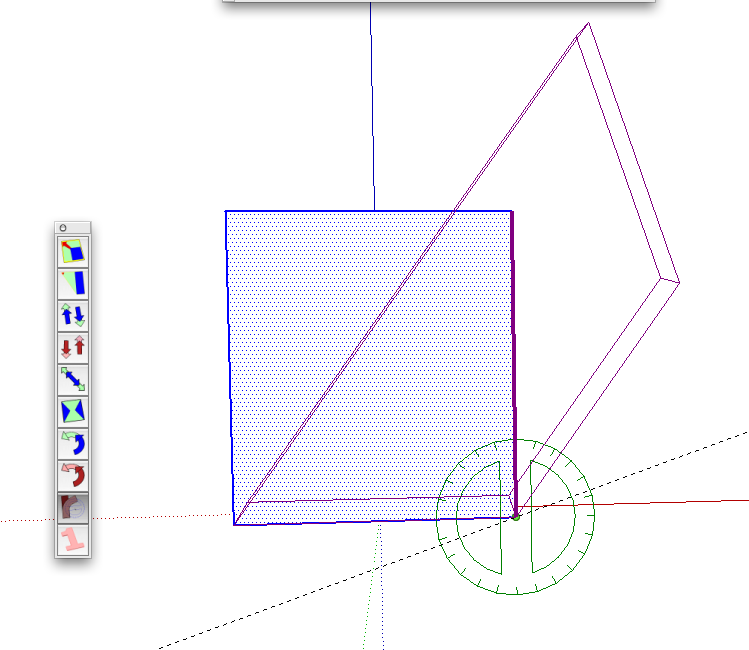
I don't seem to get the expected result on my iMac when using the Radial Bending function: the object just "leans" instead of bending (see attached picture)
Bob,
You just need to activate the slicer (via the contextual menu, and key fn F4 when it works on Mac).
Fredo
-
I don't seem to get the expected result on my iMac when using the Radial Bending function: the object just "leans" instead of bending (see attached picture)
All other functions work great!
-
Great! Thanks for the quick answer.
In your U-Tube demo you stretch a sphere into a cylinder.
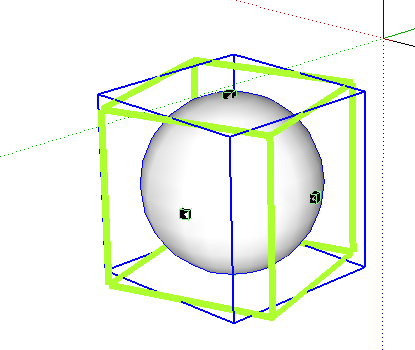
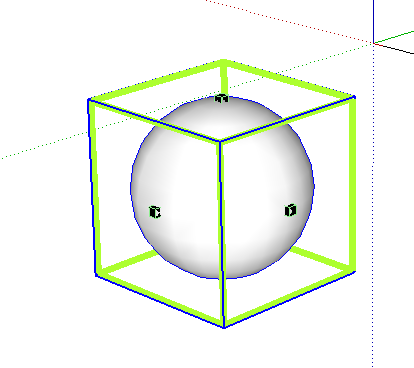
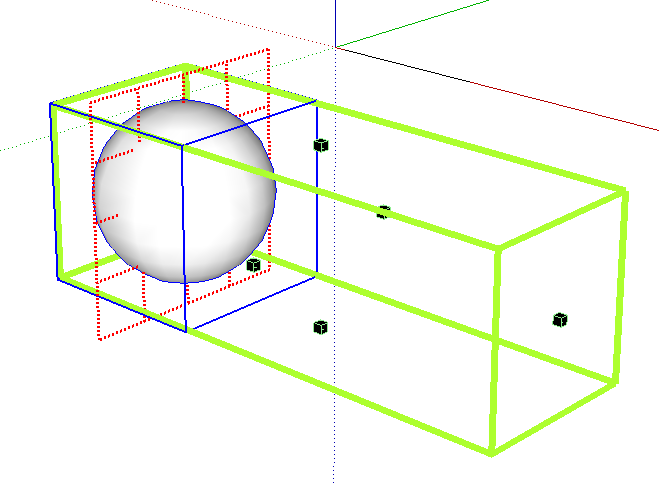
I clicked on the Stretching Tool, oriented the grid by clicking on a line in another part of the screen, but when I stretch it I don't get the cylinder.
Obviously, this is the first time I've tried this incredible tool.
-
@unknownuser said:
Great! Thanks for the quick answer.
In your U-Tube demo you stretch a sphere into a cylinder.
I clicked on the Stretching Tool, oriented the grid by clicking on a line in another part of the screen, but when I stretch it I don't get the cylinder.
Obviously, this is the first time I've tried this incredible tool.It depends how you built the sphere. Yours seems to be made of 'Sketchup Curves', which as indicated in the video are never stretched in the current version (I have to work on a more flexible approach, because sometimes this is what the user wants, and sometimes it's not, as in your current case).
Fredo
-
@unknownuser said:
i use two of the tools and it's a slight annoyance to see that big toolbar everytime i open sketchup

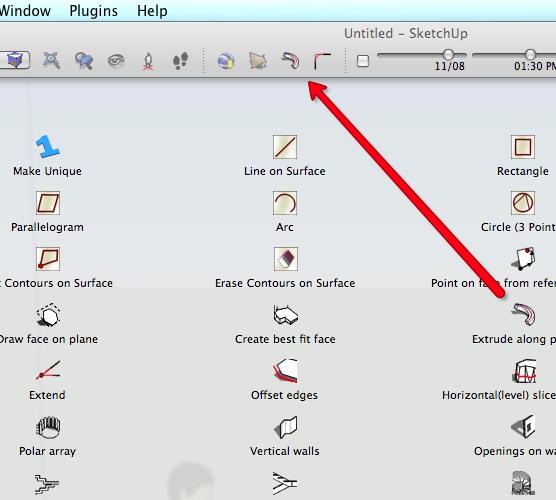
How about dragging two of icons from 1001bit toolbat to the top of the window? [menu]-[view]-[customize toolbar]
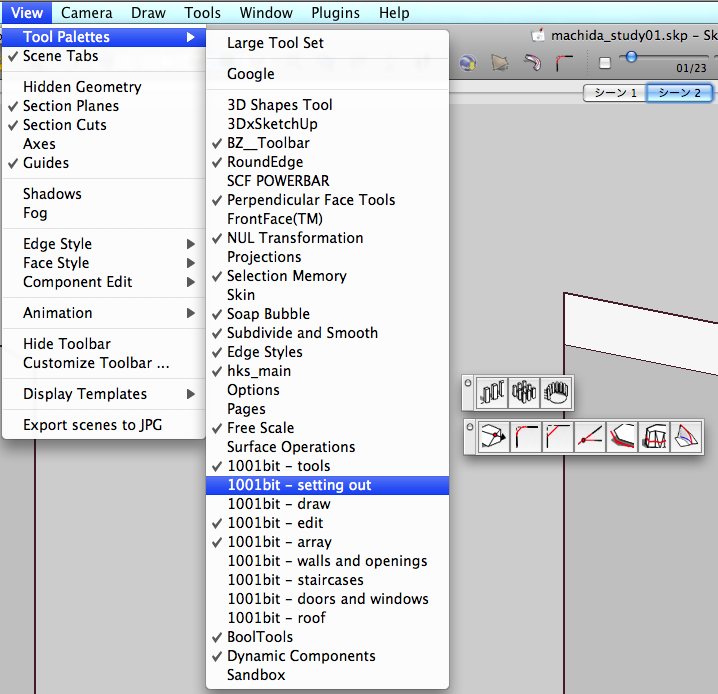
If you go to [menu]-[view]-[tool pallets], you should see other smller toolbars for 1001bit tools.
Yet another solution is assigning shortcuts to those two rubies you use and hide 1001bit toolbar altogether.
-
@unknownuser said:
@unknownuser said:
i couldn't find where you added the things that santiago wrote a few posts back. what would be the easiest way for me to describe the problem/solution to GOHCH @ 1001bit?
Jeff,
If you find a line where a toolbar
tlbis shown, for instancetlb.show, then transform the code into:> case tlb.get_last_state > when 1 > tlb.restore > when -1 > tlb.show > end >This is the modif I did in my script, based on Santiago's suggestion, and it seems to do the job on Mac.
oh, ok. thanks.. i did a system search for "tb.restore" and "toolbar.restore" and only the sandbox rubies showed up as containing those lines.. didn't realize 'tlb' would work..
@unknownuser said:
PS: What about my last change concerning the display of web dialog boxes? Did it change anything?
now it looks like this:

so now, the red outline isn't fully visible but the title is.. you can see that the window also shows the title so it's redundant in that regard.
-
@unknownuser said:
oh, ok. thanks.. i did a system search for "tb.restore" and "toolbar.restore" and only the sandbox rubies showed up as containing those lines.. didn't realize 'tlb' would work..
Jeff,
tlbis a variable name. It can be anything, foo, bar and other. If you search in files, just search on ".show" and ".restore".For the display of dialog box, I am aparently stuck with the problem that either SU or Safari does not want to show the whole page. Still need to think about it.
Thanks for your valuable support.
Fredo
-
@takesh h said:
@unknownuser said:
i use two of the tools and it's a slight annoyance to see that big toolbar everytime i open sketchup
How about dragging two of icons from 1001bit toolbat to the top of the window? [menu]-[view]-[customize toolbar]
If you go to [menu]-[view]-[tool pallets], you should see other smller toolbars for 1001bit tools.
Yet another solution is assigning shortcuts to those two rubies you use and hide 1001bit toolbar altogether.thanks takesh,
what you are suggesting is exactly what i want to do. i want to put two of the icons in the top of the window and keep the rest of the tool bars hidden. i can do most of it except for the part of hiding the 1001bit toolbar.. i can close it upon launching sketchup but my whole thing here is that i'd like for it to stay closed.. if i do what you're suggesting, it's great as long as i don't quit sketchup because when i relaunch, it won't stay the same.
i've also tried unloading the toolbar: sketchup->preferences->extension but that turns off the tools all-together..with my job, i use sketchup on up to four different computers.. i like to put my template, plugin folder, shortcuts, etc on a memory card prior to me leaving town and sync with the other computers i'll be using.. that way, everything is always the same regardless of the computer and i can concentrate on modeling instead of trying to get the workspace how i want it.. the only thing holding me back from a painless sync is the fact that some of the toolbars can't remember their status.
-
@unknownuser said:
so now, the red outline isn't fully visible but the title is.. you can see that the window also shows the title so it's redundant in that regard.
Jeff,
Would you mind to try another one, when you have time.
Fredo
-
@unknownuser said:
@unknownuser said:
so now, the red outline isn't fully visible but the title is.. you can see that the window also shows the title so it's redundant in that regard.
Jeff,
Would you mind to try another one, when you have time.
Fredo

:heart_eyes:very nice Fredo, very nice!
-
Jeff,
Thanks. This is related to the registry keys in Web Dialog which creates a bad problem on Mac.
One other problem I have is about the small button images not showing. Would you mind to display the source code (via right click), store it in a txt file and post it. It may be related to the file path.
Again thanks very much for your invaluable contribution.
Fredo.
-
@unknownuser said:
Jeff,
Thanks. This is related to the registry keys in Web Dialog which creates a bad problem on Mac.
One other problem I have is about the small button images not showing. Would you mind to display the source code (via right click), store it in a txt file and post it. It may be related to the file path.
i can't view the source code on a web dialog such as this.. only on internet web pages etc.. the only option a right click will give me on your dialog is 'reload'
i did just notice if i right click on one of the little boxes, i have an option to 'open image in new window' and if i select that, the icon pops up in a new window.. (factory icon, green check, red X )i don't have any of the OS X developer tools installed on my computers and if i did, i might have more options available to help you in this dept.
any other way i might be able to view the source code?
@unknownuser said:
Again thanks very much for your invaluable contribution.
Fredo.
oh man, it's nothing for me to help out.. i'm glad to do it and i'm glad you're getting things sorted for us mac users.
-
@unknownuser said:
@unknownuser said:
Would you mind to try another one, when you have time.
FredoFredo,
Thanks for the new version, Default Setting Window seems to be working normally now.
But you left out Translation window... please fix translation windows as well when you have time.Jeff,
I see what you mean.
I talk to Goh a lot by emails, so I'll point him to this thread.
With the information provided in this thread, it should be a matter of minutes for him to fix the issue. -
@takesh h said:
Jeff,
I see what you mean.
I talk to Goh a lot by emails, so I'll point him to this thread.
With the information provided in this thread, it should be a matter of minutes for him to fix the issue.thank you.
much appreciated! -
@unknownuser said:
i can't view the source code on a web dialog such as this.. only on internet web pages etc.. the only option a right click will give me on your dialog is 'reload'
i did just notice if i right click on one of the little boxes, i have an option to 'open image in new window' and if i select that, the icon pops up in a new window.. (factory icon, green check, red X )i don't have any of the OS X developer tools installed on my computers and if i did, i might have more options available to help you in this dept.
any other way i might be able to view the source code?
Jeff,
Don't bother with the source code any longer. Since you can see the pictures in a separate window, it means the file paths should be OK. It is probably a problem with the Safari browser.
Fredo
-
@takesh h said:
te]
Fredo,
Thanks for the new version, Default Setting Window seems to be working normally now.
But you left out Translation window... please fix translation windows as well when you have time.Takeshi,
I hope the attached file would improve the display for all web dialog boxes. On the remaining problem of small button pictures not displaying, can you tell me if there is any improvement.
Thanks again
Fredo
-
hi Jeff, Takeshi,
I've included a toolbar manager function in the latest update (version 1.1.4)of 1001bit tools.
(now ready for download.)
You can use it to manage what to show and hide. You'll need to restart SU once for the settings to take effect, after that it remains persistent for future sessions.
http://www.sketchucation.com/forums/scf/viewtopic.php?f=180&t=15927&p=148542#p148542
Please try it out
cheers! -
Mr Fredo, sincere thanks, in fact their work has value for my very special ..!
Thank you very much to include people who use OSX ...! -
Hi again, dear Mac users,
If any of you can post a screenshot of a Default Parameter dialog box, it would help me to continue sorting out some of the issues. As far as I know, the little icon buttons still do not show their associated picture, and I need to check the question of Height dimensioning for table rows.
Thanks in advance
Fredo
PS: I checked that I cannot do anything for the Color picker combo box. Background colors won't show up with Safari, due to the Mac implementation of the browser. At least the color name is shown!






Advertisement