Problem with groups
-
Hi, I'm currently working on a model created by someone who has recently left my office. My problem is that when I select a group to edit, all the other exterior entities disappear. It's a major issue when I'm trying to stretch a wall to match an ajacent one in another group or move a column to match an imported autocad elevation in another group.
Usually, the way I've experienced working with groups before, the other outside entities just become grey, but are still visible. I'm assuming that this must be some sort of drawing preference, but I can't seem to locate it. I'm using Sketchup 6. Does anyone know how I can turn off this setting?
-
if you go view->component edit->hide rest of model that should solve your problem.
-
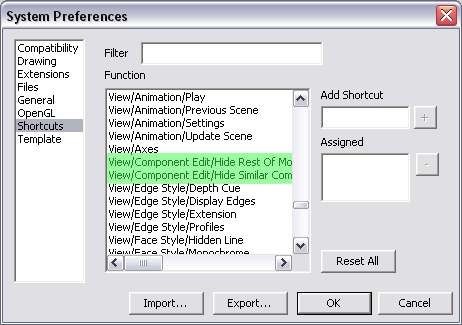
You can also set it and "Hide Similar Components" as keyboard shortcuts:
I use these constantly.Go to Window > Preferences:
-
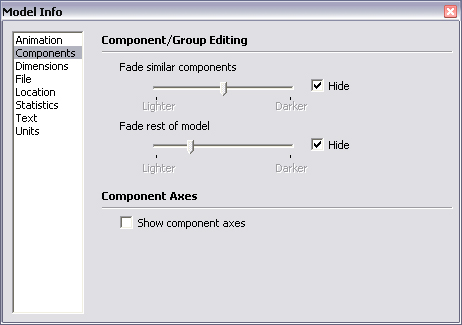
And to change how "Grey" you want them to view;
Go to Window > Model Info:
-
I'd also "vote" for this as the identification of the problem. Also note that this is a "model level" setting (like applied styles for instance) so when you receive a file from someone else who uses these settings, it will be "in the file", not in your "general SketchUp settings" (that would be the Preferences window, not the Model info window).


Hello! It looks like you're interested in this conversation, but you don't have an account yet.
Getting fed up of having to scroll through the same posts each visit? When you register for an account, you'll always come back to exactly where you were before, and choose to be notified of new replies (either via email, or push notification). You'll also be able to save bookmarks and upvote posts to show your appreciation to other community members.
With your input, this post could be even better 💗
Register Login


Advertisement