Lost script: help needed
-
a couple of months ago someone made available a very useful plugin that would perform a lot of intersect operations and would clean up afterwards. i cannot remember its name or who its author is. can anyone help me remember that?
-
Would that have been "BoolTools"? Commercial plugin $10 smustard.com
See Must Have plugins here in this forum.
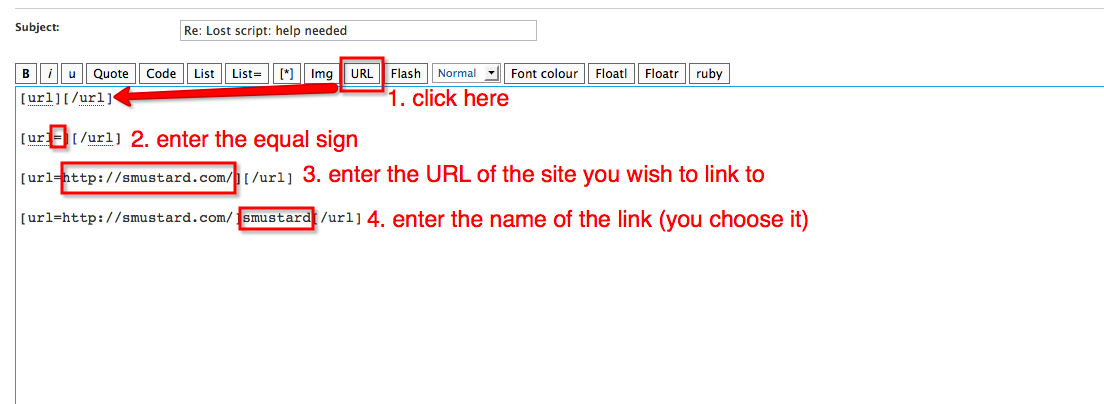
I still don't know how to attach or insert a link. -
-
What attached instructions?
You have an smustard link and your personal website link.
No instructions for inserting "viewtopic..." or urls.
My enlightenment will probably go in the Duh forum. -
Sorry, Edson:
Apparently the page needed refreshing and I didn't see your attachment.
mitcorb -
Edson:
Does this method produce the same result where I see in some posts "viewtopic..."? -
You can just Copy and Paste an URL as well. The forum automatically creates a link out of it.
for instance, I copy and paste the URL of a random thread:
http://www.sketchucation.com/forums/scf/viewtopic.php?f=80&t=17781And the result is: http://www.sketchucation.com/forums/scf/viewtopic.php?f=80&t=17781
-
mitcorb,
you can also just post the link with no bbcode and it will come up as a hotlink
otherwise, when you're replying to a thread, look above the box you're typing in.. there's a bunch of buttons up there for bold, italic, underline, etc.. if you hover your mouse over the button for a second, a popup will show you examples on how to make it appear in your message..
[edit]. yeah, what thomas said

-
Thanks, folks:
It never occurred to me to copy/paste the url in the top of the browser page. This is an elementary windows thing, and I act like I just turned on a computer for the first time. Anyway, I am glad I could assist Edson.
mitcorb -
@mitcorb said:
Edson:
Does this method produce the same result where I see in some posts "viewtopic..."?this method allows you to make any word into a link, without really showing what can be a very large URL. what you mention is the result of a simple copy/paste operation.




Hello! It looks like you're interested in this conversation, but you don't have an account yet.
Getting fed up of having to scroll through the same posts each visit? When you register for an account, you'll always come back to exactly where you were before, and choose to be notified of new replies (either via email, or push notification). You'll also be able to save bookmarks and upvote posts to show your appreciation to other community members.
With your input, this post could be even better 💗
Register Login


Advertisement