I am starting modeling in detail. I need help!
-
first off some may be surprised i am asking for help. If you have an account and use the plugin sketchyphysics, you most likely will know me. I excel in programing mechanicals doo-dads and the like with sketchyphysics, but i have taken in other interests, like airplane design. I need help. Normally i use a push and pull technique, which does work well, but after comparing my outputs to other models, i look like i started new. I don't get how they model them perfectly! I tried using plans and arranging them in the order so you can draw an outline on the three axes, like other modelers, but it ends up looking strange. I am forced to create my own designs, partly because I don't want to embarrass myself uploading a famous plane that looks like a mutated pig(that was a bit over-exaggerated, but you hopefully get the idea).
-
Here is one model that i should show that i had to build from my mind. While, in my opinion, the mechanics and the whole inside is outstanding, but the fuselage shape looks terrible!
-
I've done a couple of airplane models, and this is the method I used:
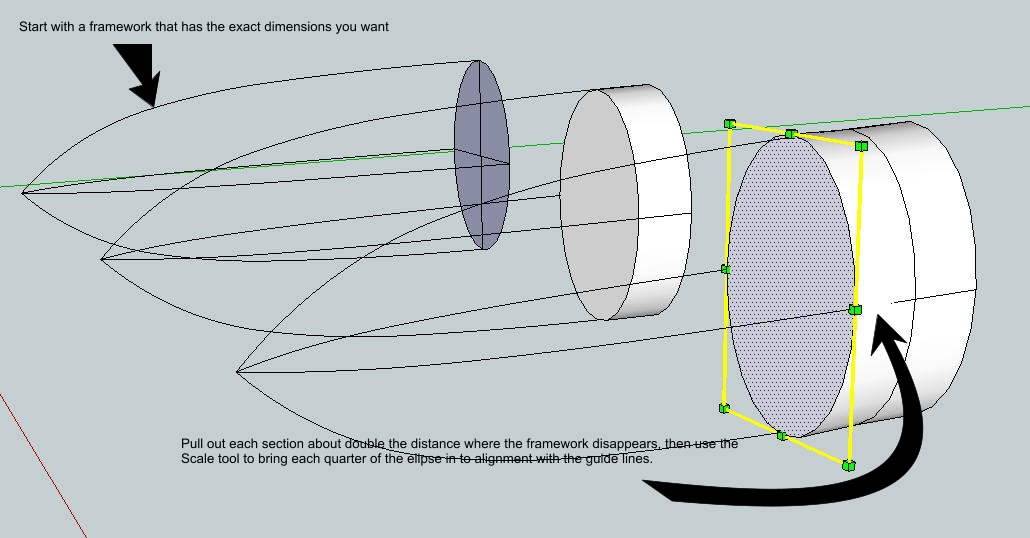
Make the guidelines a group so your built-up fuselage doesn't stick. As the curves get sharper, your pulled sections will be smaller. Make them small enough to give you a smooth curve.
Here's where I posted my (sailplane) models: http://www.sketchucation.com/forums/scf/viewtopic.php?f=81&t=9647
-
I have tried it before. The real trouble is around the canopy. i have to project the curve , which is annoying. And if you notice, the models on the warehouse have the "nice" lines. I mean like all the details that are outlined which cannot be modeled. If you notice all the panels on aircraft of older times, that is what i mean. i have tried intersection, Nut the warehouse models always look better. I will see.
-
If you're trying for accuracy for the recurved areas around the canopy, you just have to draw the detail curves by hand. If you're not duplicating a model exactly, Whaat's Subsmooth ruby will make things easier.
Not sure what you mean by "details that are outlined that can't be modeled," unless you're trying to keep things low-poly.
-
I'm sorry. I meant like outlining panels.
-
use toolsonsurface to draw panels on the fusalage then jointpushpull to extrude them.

-
Huh? those tools don't sound familiar
-
when you discover scripts you'll discover the true power of sketchup grass hopper.

here are the links: http://www.sketchucation.com/forums/scf/viewtopic.php?f=180&t=11212
http://www.sketchucation.com/forums/scf/viewtopic.php?f=180&t=6708ENJOY!
Hello! It looks like you're interested in this conversation, but you don't have an account yet.
Getting fed up of having to scroll through the same posts each visit? When you register for an account, you'll always come back to exactly where you were before, and choose to be notified of new replies (either via email, or push notification). You'll also be able to save bookmarks and upvote posts to show your appreciation to other community members.
With your input, this post could be even better 💗
Register Login


Advertisement