sketchucation logo sketchucation
    • Login
    Oops, your profile's looking a bit empty! To help us tailor your experience, please fill in key details like your SketchUp version, skill level, operating system, and more. Update and save your info on your profile page today!
    โš ๏ธ Important | Libfredo 15.6b introduces important bugfixes for Fredo's Extensions Update

    Need help: get length of arc/spline

    Scheduled Pinned Locked Moved Developers' Forum
    12 Posts 4 Posters 782 Views 4 Watching
    Loading More Posts
    • Oldest to Newest
    • Newest to Oldest
    • Most Votes
    Reply
    • Reply as topic
    Log in to reply
    This topic has been deleted. Only users with topic management privileges can see it.
    • thomthomT Offline
      thomthom
      last edited by

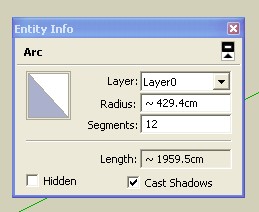
      If you select edges and arches the Entity info will give you the total length.

      Thomas Thomassen โ€” SketchUp Monkey & Coding addict
      List of my plugins and link to the CookieWare fund

      1 Reply Last reply Reply Quote 0
      • pilouP Offline
        pilou
        last edited by

        You must explode "arc" before else you have only radius ๐Ÿ˜‰

        Frenchy Pilou
        Is beautiful that please without concept!
        My Little site :)

        1 Reply Last reply Reply Quote 0
        • jeff hammondJ Offline
          jeff hammond
          last edited by

          @unknownuser said:

          You must explode "arc" before else you have only radius ๐Ÿ˜‰

          no, there's a drop down button in the entitiy info window that you can push which will give more info on the selected entity. i can easily find the length of an unexploded arc.

          [this is at least capable on macs though i can't imagine it not working on windows]

          http://homepage.mac.com/jeffhammond/.Public/scf/entityinfo.jpg

          http://homepage.mac.com/jeffhammond/.Public/scf/entityinfo1.jpg

          dotdotdot

          1 Reply Last reply Reply Quote 0
          • pilouP Offline
            pilou
            last edited by

            @unknownuser said:

            though i can't imagine it not working on windows

            Thx! Never used for arcs! ๐Ÿ˜ณ
            That is the Duhduh of my day! โ˜€ (added to the Duh list ๐Ÿ˜„ duhduh.jpg

            Frenchy Pilou
            Is beautiful that please without concept!
            My Little site :)

            1 Reply Last reply Reply Quote 0
            • H Offline
              huyvuvn
              last edited by

              thanks all , I know this way. But I wanna "GET" the length , not "KNOW" the length. It means have a "dim".

              happiness on the way, not in the destination.

              1 Reply Last reply Reply Quote 0
              • jeff hammondJ Offline
                jeff hammond
                last edited by

                @huyvuvn said:

                thanks all , I know this way. But I wanna "GET" the length , not "KNOW" the length. It means have a "dim".

                ok huyvu, you're obviously asking something but it's probably above me..
                to me, getting the length means finding out how long the arc is.
                maybe "get" is a calculus term that i've never heard of but i really can't figure out what you're wanting to achieve.
                the only thing i can think you may be wanting to do is enter a radius and desired length of arc and sketchup will draw it. if that's the case, i personally don't know of any method to achieve this in SU.

                do you have a visual example which may show the difference between getting the length and knowing the length?

                dotdotdot

                1 Reply Last reply Reply Quote 0
                • pilouP Offline
                  pilou
                  last edited by

                  ๐Ÿ˜„
                  before a plug
                  just use the tape measure tool on a segment of the arc and enter
                  length of a side / (existing length / length wished) (given by the Info)
                  Your drawing will be resized with the good length of the arc ๐Ÿ˜„

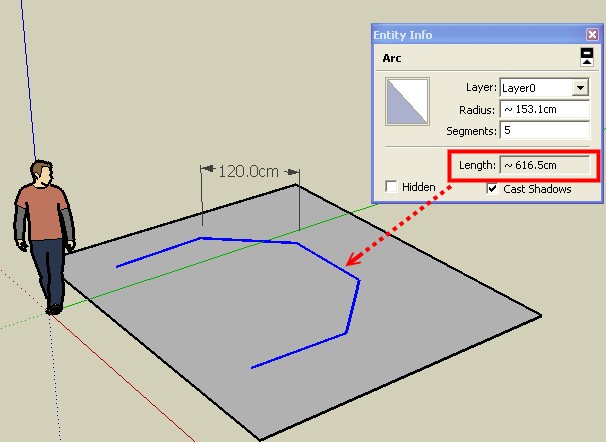
                  Example : you have an arc of 5 sides for a length of 600 cm so a side = 600/5 = 120 cm
                  you want your arc = 100 cm
                  you will enter 120 / (600 / 100) = 20 cm ๐Ÿ˜„

                  As all will resize, you must export in a new session your arc apply the resize above and import it after the redraw ๐Ÿ˜„

                  Seems not many more difficult for a plug ๐Ÿ˜‰

                  Frenchy Pilou
                  Is beautiful that please without concept!
                  My Little site :)

                  1 Reply Last reply Reply Quote 0
                  • thomthomT Offline
                    thomthom
                    last edited by

                    @huyvuvn said:

                    thanks all , I know this way. But I wanna "GET" the length , not "KNOW" the length. It means have a "dim".

                    Ok, you want a Dimension tool for arches and splines.

                    Thomas Thomassen โ€” SketchUp Monkey & Coding addict
                    List of my plugins and link to the CookieWare fund

                    1 Reply Last reply Reply Quote 0
                    • pilouP Offline
                      pilou
                      last edited by

                      Can anybody can say why the length is false with this big % of error ??? (2.75%) ๐Ÿ˜ฎ
                      must be
                      5 * 120 = 600 and not 616.5... โ“ โ“ โ“why.jpg

                      why.skp

                      Frenchy Pilou
                      Is beautiful that please without concept!
                      My Little site :)

                      1 Reply Last reply Reply Quote 0
                      • thomthomT Offline
                        thomthom
                        last edited by

                        @unknownuser said:

                        Can anybody can say why the length is false with this big % of error ??? (2.75%) ๐Ÿ˜ฎ
                        must be
                        5 * 120 = 600 and not 616.5... โ“ โ“ โ“[attachment=1:h1pwt2lb]<!-- ia1 -->why.jpg<!-- ia1 -->[/attachment:h1pwt2lb]

                        Because SU calculate the length as if it is a perfectly round arch. I bet that it gives the 'correct' length if you explode it.

                        Thomas Thomassen โ€” SketchUp Monkey & Coding addict
                        List of my plugins and link to the CookieWare fund

                        1 Reply Last reply Reply Quote 0
                        • pilouP Offline
                          pilou
                          last edited by

                          @unknownuser said:

                          if you explode it

                          Yes but it's dangerous to manipulate TNT ๐Ÿ’š

                          Frenchy Pilou
                          Is beautiful that please without concept!
                          My Little site :)

                          1 Reply Last reply Reply Quote 0
                          • 1 / 1
                          • First post
                            Last post
                          Buy SketchPlus
                          Buy SUbD
                          Buy WrapR
                          Buy eBook
                          Buy Modelur
                          Buy Vertex Tools
                          Buy SketchCuisine
                          Buy FormFonts

                          Advertisement