Outliner....any perspectives
-
Okay, I am doing my work now in groups and components...
and I have a few, "How do you do that" questions.- When I try to select a group within the Outliner, I click on it and it expands the outline and I lose where I was trying to highlight? anyone had similar experiences?
- Okay, some geometry did not get into a "group", now how exactly do I get it (this errant geometry) into that specific, "original" group, I can highlight it, but it seems that first I have to make a new "group" and nest that within the original group as a new subgroup. So I end up with groups of groups of groups.....
am I doing this all wrong?
thanks
aloha
red
-
this could be the answer to #1, if i understand you correctly, uncheck it:
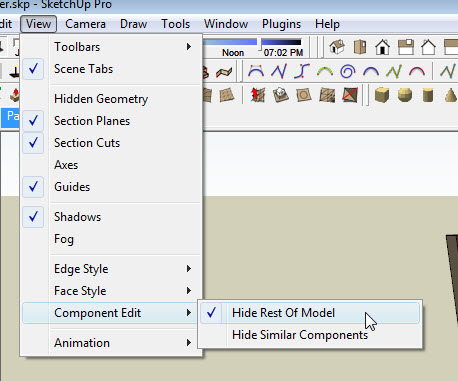
#2 you need to select everything outside the group that you want to put inside and cut it, then go inside the group and >edit>Paste In Place

-
Thanks,
I could have labored for hours trying to figure those out.
Much appreciated.
I have yet to do the "paste in place" function, I will endeavor to research it.
and post any further questions.
aloha
red -
You can get so addicted to it that you will soon assign a shortcut to it.

-
i, and most users i believe, map paste in place to ctrl+shift+v. you won't get much done (efficiently anyway) without paste in place, so its nice to have it handy.
-
I also have Shift+Ctrl+V for paste-in-place. It seems to be so obvious that indeed I've heard a lot of people having this setup.
-
@xrok1 said:
i, and most users i believe, map paste in place to ctrl+shift+v. you won't get much done (efficiently anyway) without paste in place, so its nice to have it handy.
 Stupid me!
seem so obvious -
I use Illustrator a lot and its default is ctrl-F. Thats what I use. I think ctrl-shift-v is more logical though,
Chris
-
@gaieus said:
I also have Shift+Ctrl+V for paste-in-place. It seems to be so obvious that indeed I've heard a lot of people having this setup.
you must have your ctrl & shift crossed on your keyboard




Hello! It looks like you're interested in this conversation, but you don't have an account yet.
Getting fed up of having to scroll through the same posts each visit? When you register for an account, you'll always come back to exactly where you were before, and choose to be notified of new replies (either via email, or push notification). You'll also be able to save bookmarks and upvote posts to show your appreciation to other community members.
With your input, this post could be even better 💗
Register Login


Advertisement