sketchucation logo sketchucation
    • 登入
    Oops, your profile's looking a bit empty! To help us tailor your experience, please fill in key details like your SketchUp version, skill level, operating system, and more. Update and save your info on your profile page today!
    ⚠️ Important | Libfredo 15.6b introduces important bugfixes for Fredo's Extensions Update

    Curved Walls

    已排程 已置頂 已鎖定 已移動 Newbie Forum
    sketchup
    55 貼文 8 Posters 5.1k 瀏覽 8 Watching
    正在載入更多貼文
    • 從舊到新
    • 從新到舊
    • 最多點贊
    回覆
    • 在新貼文中回覆
    登入後回覆
    此主題已被刪除。只有擁有主題管理權限的使用者可以查看。
    • R 離線
      Rudbeckia
      最後由 Rudbeckia 編輯

      Hello SU folks,

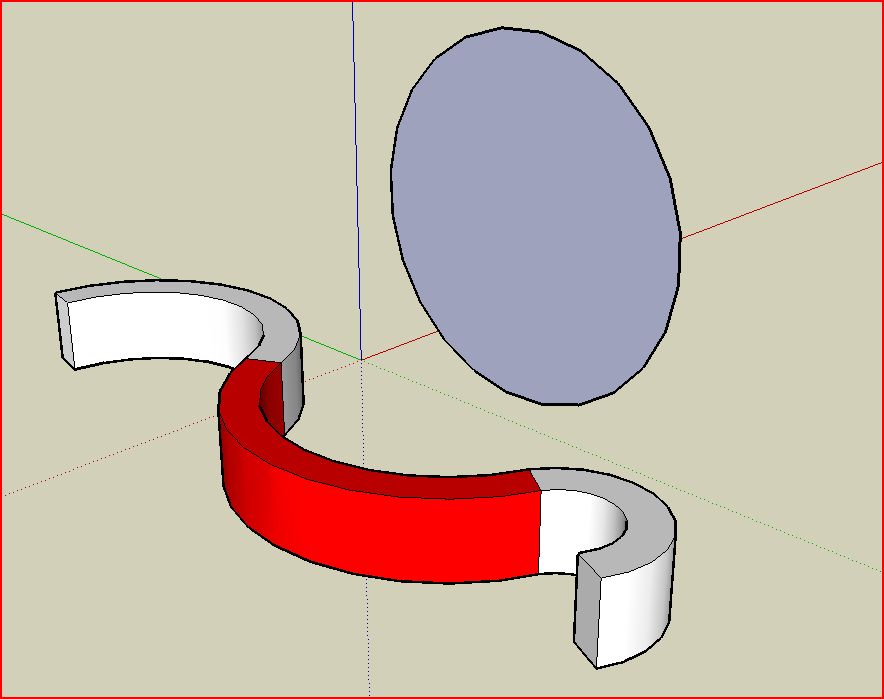
         I need to draw a curved wall, that smoothly dips up and down. i tried downloading the toolonsurface ruby, b/c I thought I would be able to push and pull curved surfaces but  it only let me draw on them, not push and pull.
      

      See the attached SU drawing, I need the red area in the wall to smoothly dip lower and then come back up, any thoughts on how i would draw that? Thanks for the help!


      cuvedwall.skp

      1 條回覆 最後回覆 回覆 引用 0
      • E 離線
        Ecuadorian
        最後由 編輯

        To push pull curved surfaces, try the Joint Push Pull plug-in by Fredo6:
        http://www.sketchucation.com/forums/scf/viewtopic.php?f=180&t=6708&st=0&sk=t&sd=a&hilit=joint+push+pull

        If you need something more specific, please draw a sketch by hand so we can help you.

        -Miguel Lescano
        Subscribe to my house plans YouTube channel! (30K+ subs)

        1 條回覆 最後回覆 回覆 引用 0
        • R 離線
          Rudbeckia
          最後由 編輯

          @ecuadorian said:

          301 Moved Permanently

          favicon

          (www.sketchucation.com)

          i tried the joint push pull ruby too, it didnt work either, it wont push all the way through a curved surface, meaning all the way through the wall, or maybe i am just using it wrong

          i want to basically be able to draw an arc on the curved surface and push it throuh so the top part of the wall i want to dip would disappear where I pushed it through

          1 條回覆 最後回覆 回覆 引用 0
          • GaieusG 離線
            Gaieus
            最後由 編輯

            Yes, that's JointPushPull. But how about another simple solution?
            http://www.sketchucation.com/?p=18

            Gai...

            1 條回覆 最後回覆 回覆 引用 0
            • X 離線
              xrok1
              最後由 編輯

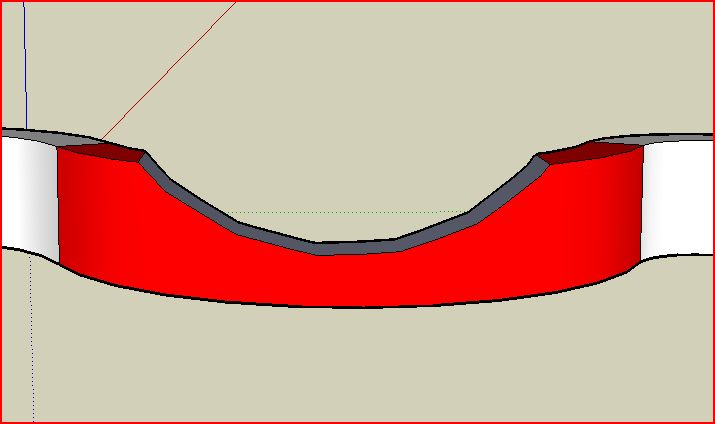
              is this what your trying to do.Capture.JPGCapture2.JPGCapture3.JPGCapture4.JPG

              there is also a plugin called jointpushpull that can push/pull curved surfaces.

              “There are three classes of people: those who see. Those who see when they are shown. Those who do not see.”

              http://www.Twilightrender.com try it!

              1 條回覆 最後回覆 回覆 引用 0
              • R 離線
                Rudbeckia
                最後由 編輯

                also, how do I make the cut out part a face, or the top of the wall closed again

                and the curve smoother

                1 條回覆 最後回覆 回覆 引用 0
                • R 離線
                  Rudbeckia
                  最後由 編輯

                  @xrok1 said:

                  is this what your trying to do.[attachment=3:pv23l4ng]<!-- ia3 -->Capture.JPG<!-- ia3 -->[/attachment:pv23l4ng][attachment=2:pv23l4ng]<!-- ia2 -->Capture2.JPG<!-- ia2 -->[/attachment:pv23l4ng][attachment=1:pv23l4ng]<!-- ia1 -->Capture3.JPG<!-- ia1 -->[/attachment:pv23l4ng][attachment=0:pv23l4ng]<!-- ia0 -->Capture4.JPG<!-- ia0 -->[/attachment:pv23l4ng]

                  there is also a plugin called jointpushpull that can push/pull curved surfaces.

                  Yes! you guys are the best, would not have made it through school with out this forum 😄

                  now is there a way to make the transition where the dip starts a little smoother using that interset model method?

                  1 條回覆 最後回覆 回覆 引用 0
                  • jeff hammondJ 離線
                    jeff hammond
                    最後由 編輯

                    i'm not certain you've described your shape yet.. the one i uploaded is level when pulling from the centerpoint. is that what you want? the tops could also be rounded out so it's not an abrupt dip..

                    this one is quickly roughed out but it will hopefully get the idea across..


                    cuvededwall.skp

                    dotdotdot

                    1 條回覆 最後回覆 回覆 引用 0
                    • R 離線
                      Rudbeckia
                      最後由 編輯

                      @unknownuser said:

                      i'm not certain you've described your shape yet.. the one i uploaded is level when pulling from the centerpoint. is that what you want? the tops could also be rounded out so it's not an abrupt dip..

                      this one is quickly roughed out but it will hopefully get the idea across..

                      that is exactly what I want to do, how did you do that? and can the dip be more exaggerated but still smooth like you have it

                      did you use sand box tools?

                      1 條回覆 最後回覆 回覆 引用 0
                      • X 離線
                        xrok1
                        最後由 編輯

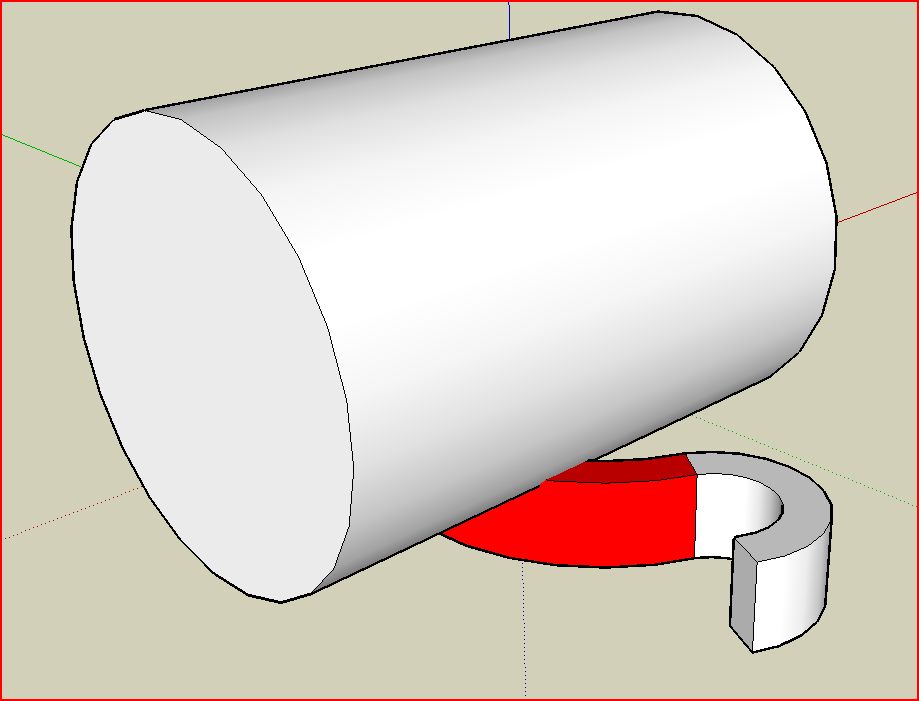
                        make the cylinder bigger and rotate it slightly before intersecting.
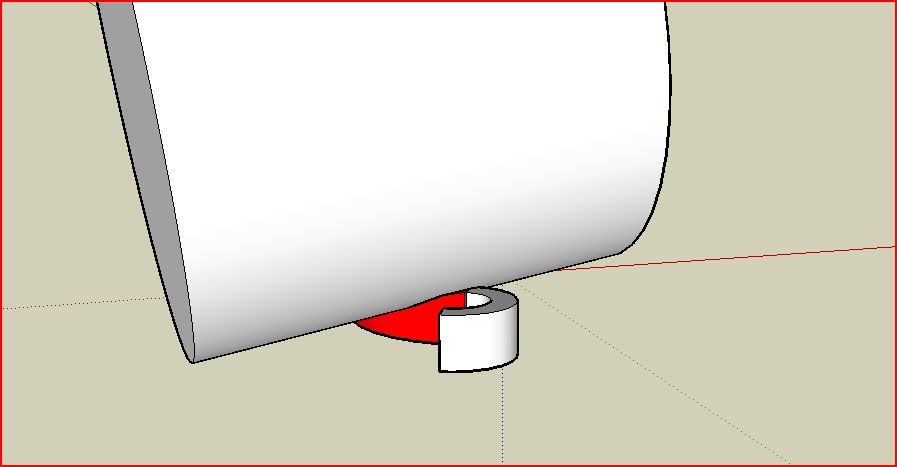
                        Capture.JPG
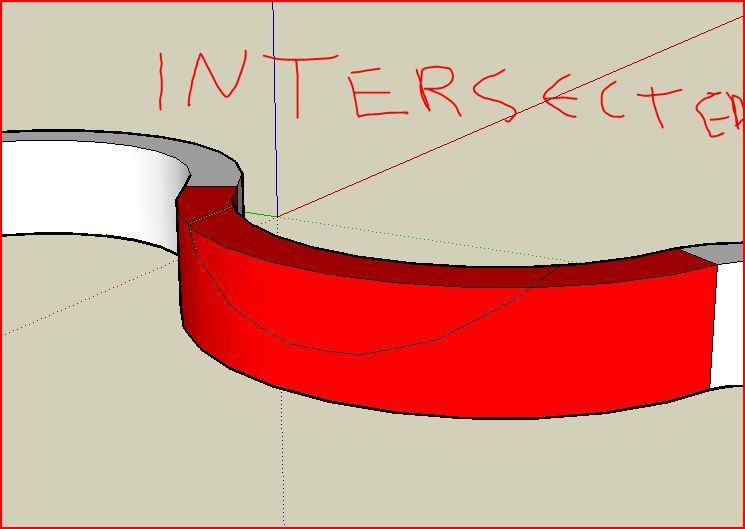
                        select everything (wall and cylinder) before intersecting with model, that way there will be a face left behind where the cutout is.Capture2.JPG
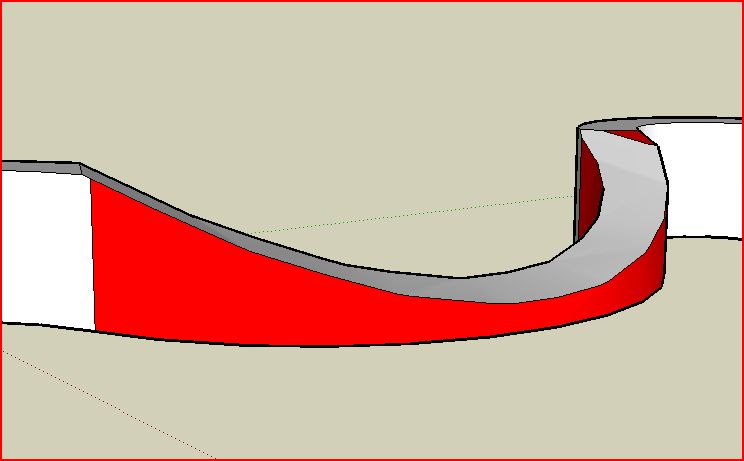
                        “There are three classes of people: those who see. Those who see when they are shown. Those who do not see.”

                        http://www.Twilightrender.com try it!

                        1 條回覆 最後回覆 回覆 引用 0
                        • R 離線
                          Rudbeckia
                          最後由 編輯

                          @xrok1 said:

                          make the cylinder bigger and rotate it slightly before intersecting.

                          [attachment=1:3an4xhbc]<!-- ia1 -->Capture.JPG<!-- ia1 -->[/attachment:3an4xhbc]
                          select everything (wall and cylinder) before intersecting with model, that way there will be a face left behind where the cutout is.[attachment=0:3an4xhbc]<!-- ia0 -->Capture2.JPG<!-- ia0 -->[/attachment:3an4xhbc]

                          okay I got this to work, thanks!!! would also love to know how Jeff did it with the sand box tools

                          1 條回覆 最後回覆 回覆 引用 0
                          • jeff hammondJ 離線
                            jeff hammond
                            最後由 編輯

                            @rudbeckia said:

                            @unknownuser said:

                            okay I got this to work, thanks!!! would also love to know how Jeff did it with the sand box tools

                            i used tools on surface and joint push pull.. the resulting geometry is messy though and i probably wouldn't use it for anything important.. i also tried FAK.rb (follow me and keep) but didn't have much luck with that either..

                            if i had to draw this shape, i'd concentrate on building the knife which has to cut through your wall.. that's a bit of a process and i don't really have the time right now but i'll think about it throughout the day and if i 'see' it, i'll sketch it for you..

                            dotdotdot

                            1 條回覆 最後回覆 回覆 引用 0
                            • X 離線
                              xrok1
                              最後由 編輯

                              just take these techniques and run with them you can refine it as much as you like but the principle concept remains the same. for example you could soapskinbubble (plugin) the top edge.
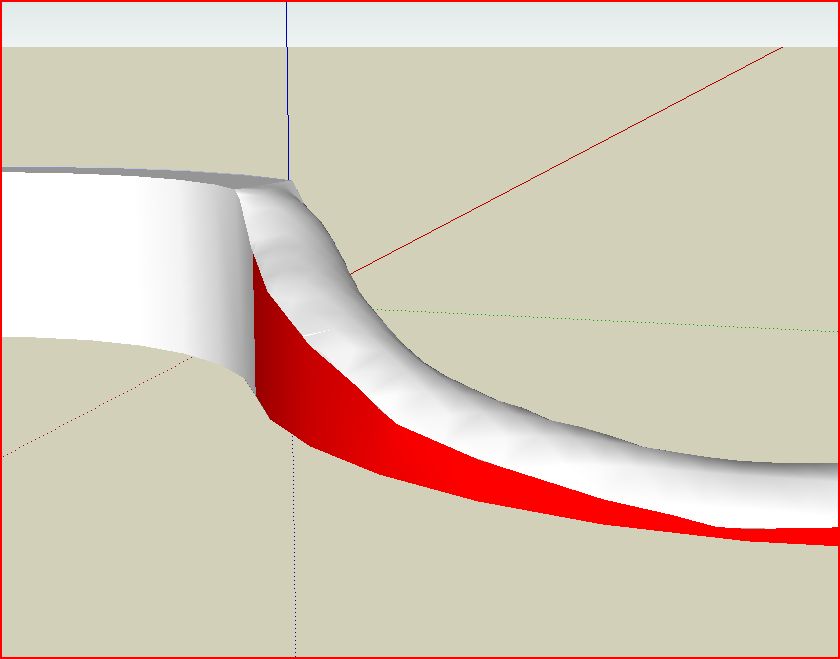
                              Capture.JPG

                              but you're the only one that knows exactly what you want. 😉

                              “There are three classes of people: those who see. Those who see when they are shown. Those who do not see.”

                              http://www.Twilightrender.com try it!

                              1 條回覆 最後回覆 回覆 引用 0
                              • R 離線
                                Rudbeckia
                                最後由 編輯

                                thanks so much everyone

                                i want it to look exactly like the one that jeff did, but with a little more dip, very smooth and very clean, not sure what he means by it not being clean geometry, looks clean to me 😄 now i just have to figure out how to do what he did

                                i will definitley play with the soapskinbubble plugin though, that looks like a cool plugin

                                1 條回覆 最後回覆 回覆 引用 0
                                • X 離線
                                  xrok1
                                  最後由 編輯

                                  how about this:


                                  cuvedwall-1.skp

                                  “There are three classes of people: those who see. Those who see when they are shown. Those who do not see.”

                                  http://www.Twilightrender.com try it!

                                  1 條回覆 最後回覆 回覆 引用 0
                                  • pbacotP 離線
                                    pbacot
                                    最後由 編輯

                                    Look for Earthmover's Garden Wing wall tutorial a page or two down in the tuts section. I could look it up and post the link for you but... It's good.

                                    There should be a permanent sticky(?) on how to do curved walls, ramps etc. in this Newbie section. Isn't that one of the most FAQ's. Heck, a "curved wall tool" should be added to Sketchup along with a "circular stair tool."

                                    MacOSX MojaveSketchUp Pro v19 Twilight v2 Thea v3 PowerCADD

                                    1 條回覆 最後回覆 回覆 引用 0
                                    • R 離線
                                      Rudbeckia
                                      最後由 編輯

                                      @xrok1 said:

                                      how about this:
                                      quote="xrok1"]how about this:
                                      @xrok1 said:

                                      how about this:
                                      /quote

                                      almost perfect, i need the transition where the dip starts to be smooth, an arc not an angle see the attached drawing where i drew an arc on your wall you did on one side, if i could make that transition smooth, that would would great

                                      kind of like the wall is smoothly undulating up and down


                                      cuvedwallwitharc-1.skp

                                      1 條回覆 最後回覆 回覆 引用 0
                                      • X 離線
                                        xrok1
                                        最後由 編輯

                                        see if you can take it from here:


                                        cuvedwall-1.skp

                                        “There are three classes of people: those who see. Those who see when they are shown. Those who do not see.”

                                        http://www.Twilightrender.com try it!

                                        1 條回覆 最後回覆 回覆 引用 0
                                        • R 離線
                                          Rudbeckia
                                          最後由 編輯

                                          @xrok1 said:

                                          see if you can take it from here:

                                          thank you so much, do you mind briefly explaining what you did?

                                          1 條回覆 最後回覆 回覆 引用 0
                                          • X 離線
                                            xrok1
                                            最後由 編輯

                                            @rudbeckia said:

                                            @xrok1 said:

                                            see if you can take it from here:

                                            thank you so much, do you mind briefly explaining what you did?

                                            well i've been trying to do this with no scripts, and it can easily be done, but alas i ran out of patience. 😞 so i use ToolsOnSurface to draw the arcs, then i used extrudelinetool to stretch it out ,using the top edge that you where trying to get rid of as a guide. then of course you took it from there, selecting everything, doing a intersect model and deleting the junk you don't want. 😄

                                            “There are three classes of people: those who see. Those who see when they are shown. Those who do not see.”

                                            http://www.Twilightrender.com try it!

                                            1 條回覆 最後回覆 回覆 引用 0
                                            • 1
                                            • 2
                                            • 3
                                            • 1 / 3
                                            • 第一個貼文
                                              最後的貼文
                                            Buy SketchPlus
                                            Buy SUbD
                                            Buy WrapR
                                            Buy eBook
                                            Buy Modelur
                                            Buy Vertex Tools
                                            Buy SketchCuisine
                                            Buy FormFonts

                                            Advertisement