[Plugin] Three Line Tools (Updated March 9th, 2009)
-
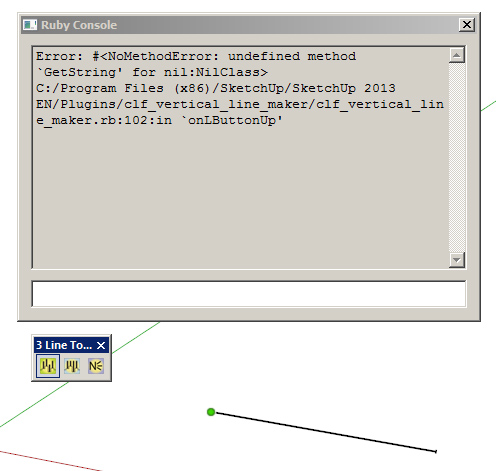
I've got this error...
-
hi there,
same for me!
three lines tool used with sketchup pro v2013 (mac) doesn't work.
i installed the plugin via sketchucation plugin store.can someone helo?
-
Same thing with the 3 tools:
Error; #<NoMethodError; undefined method `GetString' for nil;NilClass> /Library/Application Support/Google SketchUp 8/SketchUp/Plugins/clf_vertical_line_maker/clf_vertical_line_maker.rb;102;in `onLButtonUp' /Library/Application Support/Google SketchUp 8/SketchUp/Plugins/clf_vertical_line_maker/clf_vertical_line_maker.rb;286 Error; #<NoMethodError; undefined method `GetString' for nil;NilClass> /Library/Application Support/Google SketchUp 8/SketchUp/Plugins/clf_vertical_line_maker/clf_vertical_line_maker.rb;182;in `onLButtonUp' /Library/Application Support/Google SketchUp 8/SketchUp/Plugins/clf_vertical_line_maker/clf_vertical_line_maker.rb;102 Error; #<NoMethodError; undefined method `GetString' for nil;NilClass> /Library/Application Support/Google SketchUp 8/SketchUp/Plugins/clf_vertical_line_maker/clf_vertical_line_maker.rb;286;in `onLButtonUp' /Library/Application Support/Google SketchUp 8/SketchUp/Plugins/clf_vertical_line_maker/clf_vertical_line_maker.rb;182 -
Any news on this problem with it not working in SU 2013 (and probably 2014 too?) ?
It is a really useful plugin, which I'm really missing..
-
@bjornkn said:
Any news on this problem with it not working in SU 2013 (and probably 2014 too?) ?
It is a really useful plugin, which I'm really missing..
I just installed it and it works just fine for me on SU2014. Did you try getting the current version via the Extension Warehouse?
-
@dave r said:
@bjornkn said:
Any news on this problem with it not working in SU 2013 (and probably 2014 too?) ?
It is a really useful plugin, which I'm really missing..
I just installed it and it works just fine for me on SU2014. Did you try getting the current version via the Extension Warehouse?
I re-installed using the rbz file, which caused no lines to be drawn.
When installing via Extension warehouse it works fine in both 2013 and 2014 - to my big surprise.
Would that be a newer version than the one available here for download then? -
Yes. It is a newer version. In fact I would expect all of Chris Fullmer's plugins to be newer in the Extension Warehouse. You can see that the version uploaded here is 2.1 while the version in the EW is 2.2.
-
@dave r said:
Yes. It is a newer version. In fact I would expect all of Chris Fullmer's plugins to be newer in the Extension Warehouse. You can see that the version uploaded here is 2.1 while the version in the EW is 2.2.
I guess one shouldn't complain when you get such great tools for free, but it is a bit confusing when there are different versions around. I have used the Extension warehouse very little, as it seems to often be the other way around; the old version on EW and the newer one posted here. ?
-
That's strange. The plugins shown in the EW have to go through quality testing by someone to ensure they meet standards before they are made available. Your first stops for plugins should be the Sketchucation Plugin Store and the Extension Warehouse. And both show the date and version number of the latest version of the plugin.
-
@dave r said:
That's strange. The plugins shown in the EW have to go through quality testing by someone to ensure they meet standards before they are made available. Your first stops for plugins should be the Sketchucation Plugin Store and the Extension Warehouse. And both show the date and version number of the latest version of the plugin.
Well, you know when you try a new tool and it doesn't work like expected right away you tend to shy away from it until the tool starts getting some applause (like now ...
... -
Hey guys!
I use 2014 version and found the solution. Thanks for Didier Bur on the following link:
http://sketchucation.com/forums/viewtopic.php?f=323%26amp;t=27019#p311954Open clf_vertical_line_maker.rb with Notepad++ and add the code below at line 46:
require 'LangHandler.rb'
$uStrings = LanguageHandler.new("clf_menu_loader")Now works like a charm.
-
@greenskp said:
Hey guys!
I use 2014 version and found the solution. Thanks for Didier Bur on the following link:
http://sketchucation.com/forums/viewtopic.php?f=323%26amp;t=27019#p311954Open clf_vertical_line_maker.rb with Notepad++ and add the code below at line 46:
require 'LangHandler.rb'
$uStrings = LanguageHandler.new("clf_menu_loader")Now works like a charm.
Or, if you want to take the easy path, just download and install it automatically through Window>Extension Warehouse. It's called CLF Vertical Line Tools.






Advertisement