sketchucation logo sketchucation
    • Login
    Oops, your profile's looking a bit empty! To help us tailor your experience, please fill in key details like your SketchUp version, skill level, operating system, and more. Update and save your info on your profile page today!
    Mac User? | Join the Rayscaper Beta for Mac Learn More

    [Plugin] Three Line Tools (Updated March 9th, 2009)

    Scheduled Pinned Locked Moved Plugins
    117 Posts 43 Posters 88.5k Views 43 Watching
    Loading More Posts
    • Oldest to Newest
    • Newest to Oldest
    • Most Votes
    Reply
    • Reply as topic
    Log in to reply
    This topic has been deleted. Only users with topic management privileges can see it.
    • S
      shawnkelly
      last edited by

      This does not seem to work in V2013 pro. I was able to activate the toolbar and even interact with it, as well as enter a value but no line appears when a position for one is clicked on a model. Thought you would like to know.
      Take care.

      1 Reply Last reply
      Reply Quote 0
      • thomthomT
        thomthom
        last edited by

        There is no difference in the API between SU8 and SU2013 - it should be working. If you open the Ruby Console (under the Windows menu) when you use the plugin, are there any errors?

        Thomas Thomassen β€” SketchUp Monkey & Coding addict
        List of my plugins and link to the CookieWare fund

        1 Reply Last reply
        Reply Quote 0
        • cottyC
          cotty
          last edited by

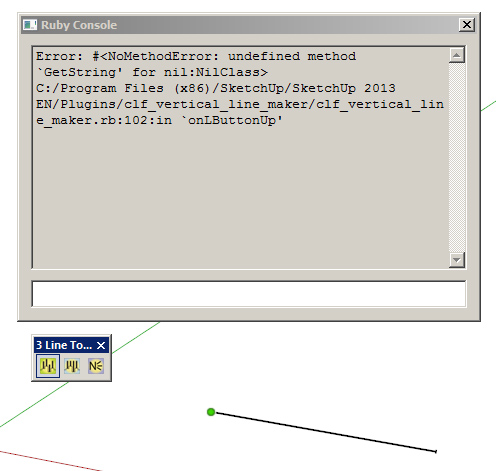
          I've got this error...


          clf.jpg

          my SketchUp gallery

          1 Reply Last reply
          Reply Quote 0
          • J
            johnnygitarr
            last edited by

            hi there,

            same for me!
            three lines tool used with sketchup pro v2013 (mac) doesn't work.
            i installed the plugin via sketchucation plugin store.

            can someone helo?

            1 Reply Last reply
            Reply Quote 0
            • gillesG
              gilles
              last edited by

              Same thing with the 3 tools:

              Error; #<NoMethodError; undefined method `GetString' for nil;NilClass>
              /Library/Application Support/Google SketchUp 8/SketchUp/Plugins/clf_vertical_line_maker/clf_vertical_line_maker.rb;102;in `onLButtonUp'
              /Library/Application Support/Google SketchUp 8/SketchUp/Plugins/clf_vertical_line_maker/clf_vertical_line_maker.rb;286
              Error; #<NoMethodError; undefined method `GetString' for nil;NilClass>
              /Library/Application Support/Google SketchUp 8/SketchUp/Plugins/clf_vertical_line_maker/clf_vertical_line_maker.rb;182;in `onLButtonUp'
              /Library/Application Support/Google SketchUp 8/SketchUp/Plugins/clf_vertical_line_maker/clf_vertical_line_maker.rb;102
              Error; #<NoMethodError; undefined method `GetString' for nil;NilClass>
              /Library/Application Support/Google SketchUp 8/SketchUp/Plugins/clf_vertical_line_maker/clf_vertical_line_maker.rb;286;in `onLButtonUp'
              /Library/Application Support/Google SketchUp 8/SketchUp/Plugins/clf_vertical_line_maker/clf_vertical_line_maker.rb;182
              

              " c'est curieux chez les marins ce besoin de faire des phrases "

              1 Reply Last reply
              Reply Quote 0
              • B
                bjornkn
                last edited by

                Any news on this problem with it not working in SU 2013 (and probably 2014 too?) ?

                It is a really useful plugin, which I'm really missing..

                1 Reply Last reply
                Reply Quote 0
                • Dave RD
                  Dave R
                  last edited by

                  @bjornkn said:

                  Any news on this problem with it not working in SU 2013 (and probably 2014 too?) ?

                  It is a really useful plugin, which I'm really missing..

                  I just installed it and it works just fine for me on SU2014. Did you try getting the current version via the Extension Warehouse?

                  Etaoin Shrdlu

                  %

                  (THERE'S NO PLACE LIKE)

                  G28 X0.0 Y0.0 Z0.0

                  M30

                  %

                  1 Reply Last reply
                  Reply Quote 0
                  • B
                    bjornkn
                    last edited by

                    @dave r said:

                    @bjornkn said:

                    Any news on this problem with it not working in SU 2013 (and probably 2014 too?) ?

                    It is a really useful plugin, which I'm really missing..

                    I just installed it and it works just fine for me on SU2014. Did you try getting the current version via the Extension Warehouse?

                    I re-installed using the rbz file, which caused no lines to be drawn.
                    When installing via Extension warehouse it works fine in both 2013 and 2014 - to my big surprise.
                    Would that be a newer version than the one available here for download then?

                    1 Reply Last reply
                    Reply Quote 0
                    • Dave RD
                      Dave R
                      last edited by

                      Yes. It is a newer version. In fact I would expect all of Chris Fullmer's plugins to be newer in the Extension Warehouse. You can see that the version uploaded here is 2.1 while the version in the EW is 2.2.

                      Etaoin Shrdlu

                      %

                      (THERE'S NO PLACE LIKE)

                      G28 X0.0 Y0.0 Z0.0

                      M30

                      %

                      1 Reply Last reply
                      Reply Quote 0
                      • B
                        bjornkn
                        last edited by

                        @dave r said:

                        Yes. It is a newer version. In fact I would expect all of Chris Fullmer's plugins to be newer in the Extension Warehouse. You can see that the version uploaded here is 2.1 while the version in the EW is 2.2.

                        I guess one shouldn't complain when you get such great tools for free, but it is a bit confusing when there are different versions around. I have used the Extension warehouse very little, as it seems to often be the other way around; the old version on EW and the newer one posted here. ?

                        1 Reply Last reply
                        Reply Quote 0
                        • Dave RD
                          Dave R
                          last edited by

                          That's strange. The plugins shown in the EW have to go through quality testing by someone to ensure they meet standards before they are made available. Your first stops for plugins should be the Sketchucation Plugin Store and the Extension Warehouse. And both show the date and version number of the latest version of the plugin.

                          Etaoin Shrdlu

                          %

                          (THERE'S NO PLACE LIKE)

                          G28 X0.0 Y0.0 Z0.0

                          M30

                          %

                          1 Reply Last reply
                          Reply Quote 0
                          • B
                            bjornkn
                            last edited by

                            @dave r said:

                            That's strange. The plugins shown in the EW have to go through quality testing by someone to ensure they meet standards before they are made available. Your first stops for plugins should be the Sketchucation Plugin Store and the Extension Warehouse. And both show the date and version number of the latest version of the plugin.
                            Well, you know when you try a new tool and it doesn't work like expected right away you tend to shy away from it until the tool starts getting some applause (like now πŸ˜‰ ...

                            1 Reply Last reply
                            Reply Quote 0
                            • greenskpG
                              greenskp
                              last edited by

                              Hey guys!

                              I use 2014 version and found the solution. Thanks for Didier Bur on the following link:
                              http://sketchucation.com/forums/viewtopic.php?f=323%26amp;t=27019#p311954

                              Open clf_vertical_line_maker.rb with Notepad++ and add the code below at line 46:

                              require 'LangHandler.rb'
                              $uStrings = LanguageHandler.new("clf_menu_loader")

                              Now works like a charm.

                              1 Reply Last reply
                              Reply Quote 0
                              • Dave RD
                                Dave R
                                last edited by

                                @greenskp said:

                                Hey guys!

                                I use 2014 version and found the solution. Thanks for Didier Bur on the following link:
                                http://sketchucation.com/forums/viewtopic.php?f=323%26amp;t=27019#p311954

                                Open clf_vertical_line_maker.rb with Notepad++ and add the code below at line 46:

                                require 'LangHandler.rb'
                                $uStrings = LanguageHandler.new("clf_menu_loader")

                                Now works like a charm.

                                Or, if you want to take the easy path, just download and install it automatically through Window>Extension Warehouse. It's called CLF Vertical Line Tools. πŸ˜‰

                                Etaoin Shrdlu

                                %

                                (THERE'S NO PLACE LIKE)

                                G28 X0.0 Y0.0 Z0.0

                                M30

                                %

                                1 Reply Last reply
                                Reply Quote 0

                                Hello! It looks like you're interested in this conversation, but you don't have an account yet.

                                Getting fed up of having to scroll through the same posts each visit? When you register for an account, you'll always come back to exactly where you were before, and choose to be notified of new replies (either via email, or push notification). You'll also be able to save bookmarks and upvote posts to show your appreciation to other community members.

                                With your input, this post could be even better πŸ’—

                                Register Login
                                • 1
                                • 2
                                • 3
                                • 4
                                • 5
                                • 6
                                • 5 / 6
                                • First post
                                  Last post
                                Buy SketchPlus
                                Buy SUbD
                                Buy WrapR
                                Buy eBook
                                Buy Modelur
                                Buy Vertex Tools
                                Buy SketchCuisine
                                Buy FormFonts

                                Advertisement