sketchucation logo sketchucation
    • Login
    Oops, your profile's looking a bit empty! To help us tailor your experience, please fill in key details like your SketchUp version, skill level, operating system, and more. Update and save your info on your profile page today!
    Mac User? | Join the Rayscaper Beta for Mac Learn More

    Construction & Working Drawings - Discussion

    Scheduled Pinned Locked Moved LayOut Discussions
    layout
    453 Posts 114 Posters 519.2k Views 114 Watching
    Loading More Posts
    • Oldest to Newest
    • Newest to Oldest
    • Most Votes
    Reply
    • Reply as topic
    Log in to reply
    This topic has been deleted. Only users with topic management privileges can see it.
    • S
      sonder
      last edited by

      @seasdes said:

      I do not know whether there is a answer to this. However, is it much slower to use Layout for construction drawings compared to CAD?
      Sorry if I am pushing in here. But my question relates to construction drawings.
      Walter

      For me it is faster, but I have developed my whole detail library in SU over the past 5 years. Once you get used to how LO works, I think it is faster. If you are just learning, then count on a learning curve which will be slower at first. The key is setting up all your scrapbooks for standard notation and graphics. Keep you SU models tight and maintain your scenes. I just finished producing 3 sets of construction documents for 3 different custom homes. All three were completed over the last 3-4 months with each set having between 45-55 sheets of architectural drawings. This was my first time utilizing LayOut, so there was some time involved in setting up standards / experimentation.

      1 Reply Last reply
      Reply Quote 0
      • S
        seasdes
        last edited by

        Thank you Sonder
        I am working on a project that is a bit rough around the edges. I think that I used the wrong style.
        I will pay more attention to your recommendations on the next project.
        Walter

        Using Sketchup Pro 2019

        1 Reply Last reply
        Reply Quote 0
        • bmikeB
          bmike
          last edited by

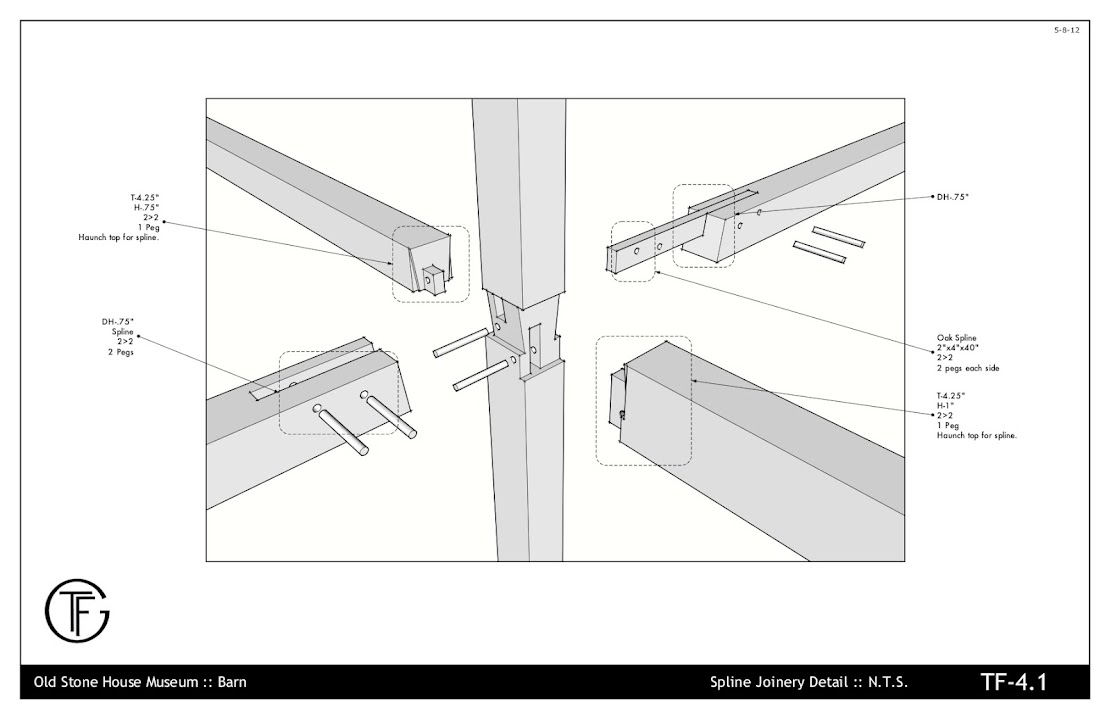
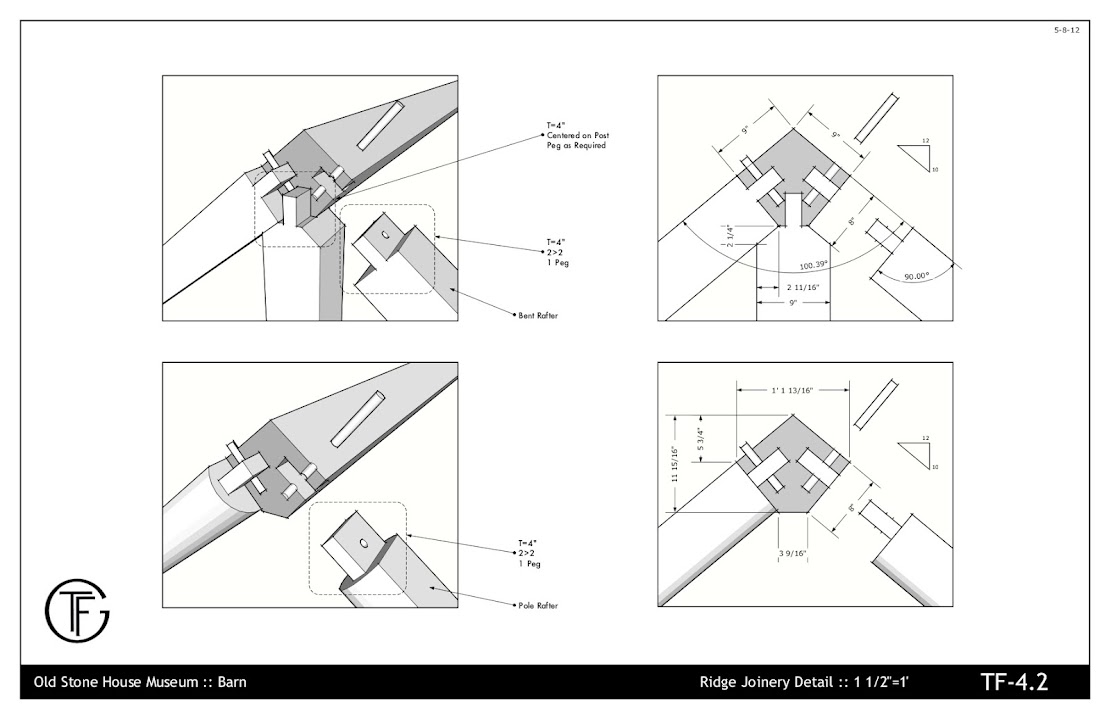
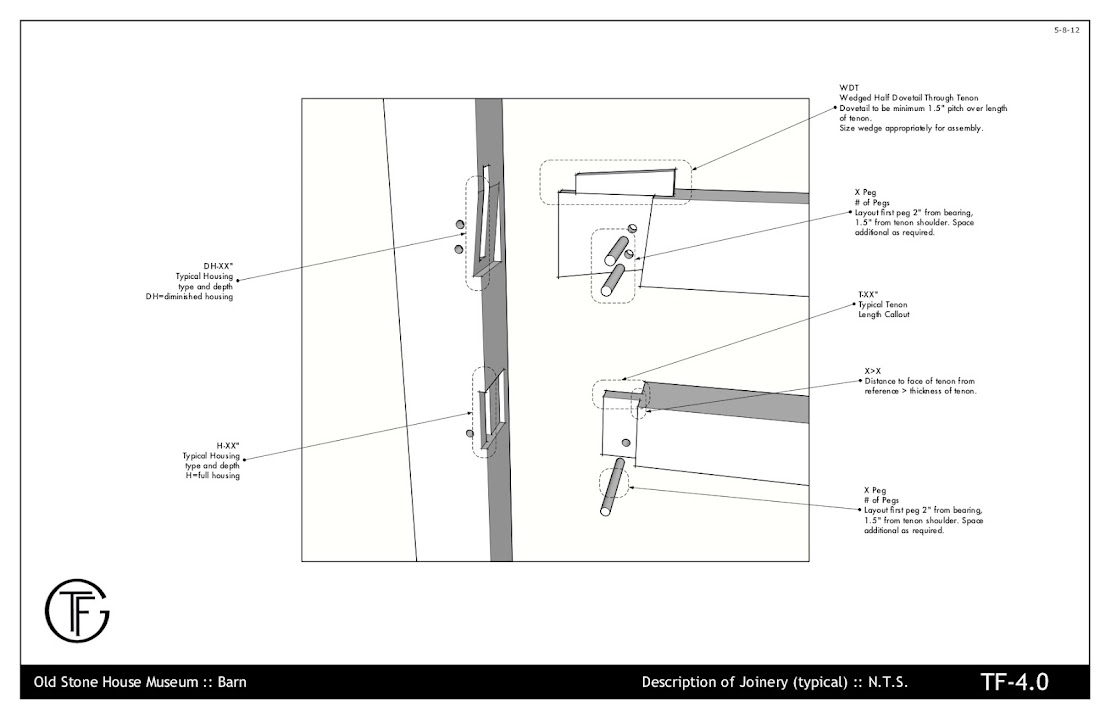
          Another small project for a workshop.
          https://lh3.googleusercontent.com/-M9q773YwJH8/T6p8LKfkUMI/AAAAAAAASwY/doQR7UawG4s/s1111/oldstonebarn-3-22-11_01.jpg

          https://lh4.googleusercontent.com/-yLUqMkN0uhk/T6p8Lm0pT1I/AAAAAAAASwc/pYLzFNPq-9A/s1111/oldstonebarn-3-22-11_14.jpg

          https://lh5.googleusercontent.com/-g0JVrNLkqXo/T6p8MJ-W7aI/AAAAAAAASws/3NtM1N1e1rA/s1111/oldstonebarn-3-22-11_15.jpg

          https://lh4.googleusercontent.com/-B0tHwN6dO_I/T6p8M5AslGI/AAAAAAAASw0/LaGqNH2fnHo/s1111/oldstonebarn-3-22-11_16.jpg

          On deck are 2 small buildings - I'm taking the entire process through SU and LO, as well as another small timber frame workshop project (similar in scope to these drawings).

          Here's hoping Trimble sees the value in LayOut and ups the development of it. It is my go to tool now for taking 3d to 2d.

          mike beganyi design + consulting llc

          1 Reply Last reply
          Reply Quote 0
          • P
            pirun14
            last edited by

            working drawing Layout sketchup for interior architecture http://www.facebook.com/pages/Layout-sketchup-Thailand/142833949164127

            http://a3.sphotos.ak.fbcdn.net/hphotos-ak-snc7/475149_227919923988862_514627023_o.jpg

            http://a4.sphotos.ak.fbcdn.net/hphotos-ak-ash4/463546_227920020655519_736370999_o.jpg

            http://a6.sphotos.ak.fbcdn.net/hphotos-ak-ash4/469696_227920083988846_803786330_o.jpg

            1 Reply Last reply
            Reply Quote 0
            • P
              pirun14
              last edited by

              build-in TV in Bedroom
              http://www.facebook.com/media/set/?set=a.233361276778060.50387.142833949164127&type=3

              1 Reply Last reply
              Reply Quote 0
              • pbacotP
                pbacot
                last edited by

                Pirun! that's wonderful crisp pictures and fresh format.

                I don't know if I commented on your last project bmike. All your stuff is really great. What can I say? It gives me hope for LO (and the human race....for that matter)! πŸ‘ πŸ‘ πŸ‘

                Pirun (or anyone). It would be great if you could comment:

                What was difficult in presenting this project in LO? Did you learn anything new? Any good tips on dimensions or any other tools? Is this output in vector? to png?

                THANKS for posting. Peter

                MacOSX MojaveSketchUp Pro v19 Twilight v2 Thea v3 PowerCADD

                1 Reply Last reply
                Reply Quote 0
                • M
                  mwm5053
                  last edited by

                  This is really great stuff 😍 😍 😍 I've been getting to know LO in the past week or so reading Bonnie Roskes's ebook and looking for examples of layout in LO so I'm awe struck by these examples.

                  Thanks to all the contributors.

                  2011 iMac
                  SU 2015 Pro, 2017 Make
                  V2 Twilight
                  macOS Sierra 10.12.5

                  1 Reply Last reply
                  Reply Quote 0
                  • beginnerB
                    beginner
                    last edited by

                    I like the font...and symbols...

                    Regards, SU 'beginner'

                    1 Reply Last reply
                    Reply Quote 0
                    • T
                      tim
                      last edited by

                      Pirun - lovely, stylish, clear drawings. Nice. I've made plenty of good, solid, descriptive drawings but - like Sonder - you've made something positively artistic as well.

                      I'm going to toot my own horn a little here because I've just released a plugin intended to help with getting things set up to make doing the LO pages for components easier. See http://forums.sketchucation.com/viewtopic.php?f=323&t=45790

                      1 Reply Last reply
                      Reply Quote 0
                      • S
                        sonder
                        last edited by

                        Beautiful drawings Pirun! Really like that style.

                        1 Reply Last reply
                        Reply Quote 0
                        • daleD
                          dale
                          last edited by

                          @tim said:

                          I'm going to toot my own horn a little here because I've just released a plugin intended to help with getting things set up to make doing the LO pages for components easier. See http://forums.sketchucation.com/viewtopic.php?f=323&t=45790

                          Tim this looks like a really helpful tool. Thanks

                          Just monkeying around....like Monsanto

                          1 Reply Last reply
                          Reply Quote 0
                          • T
                            tim
                            last edited by

                            @dale said:

                            Tim this looks like a really helpful tool. Thanks

                            Thanks - do please add any problems or suggestions to the relevant thread -http://forums.sketchucation.com/viewtopic.php?f=323&t=45790&p=410067#p410067

                            1 Reply Last reply
                            Reply Quote 0
                            • K
                              khintanar
                              last edited by

                              Pirun,
                              Fantastic use of LayOut. I would like to hear about your workflow from Su to LO.
                              Thanks for sharing...

                              1 Reply Last reply
                              Reply Quote 0
                              • Dave RD
                                Dave R
                                last edited by

                                Mike, that's pretty good. πŸ‘

                                Etaoin Shrdlu

                                %

                                (THERE'S NO PLACE LIKE)

                                G28 X0.0 Y0.0 Z0.0

                                M30

                                %

                                1 Reply Last reply
                                Reply Quote 0
                                • GaieusG
                                  Gaieus
                                  last edited by

                                  Yes, indeed! +1 πŸ‘

                                  Gai...

                                  1 Reply Last reply
                                  Reply Quote 0
                                  • HumpmetwiceH
                                    Humpmetwice
                                    last edited by

                                    Very nice work indeed,but and this may be a stupid question but how to you combine two sketch-up models into one layout file?

                                    1 Reply Last reply
                                    Reply Quote 0
                                    • bmikeB
                                      bmike
                                      last edited by

                                      @unknownuser said:

                                      Very nice work indeed,but and this may be a stupid question but how to you combine two sketch-up models into one layout file?

                                      Just insert another from the file menu. I've had 3-4 in a single LO drawing.

                                      I'll do another vid next week on getting started.

                                      mike beganyi design + consulting llc

                                      1 Reply Last reply
                                      Reply Quote 0
                                      • bmikeB
                                        bmike
                                        last edited by

                                        Thanks all. I have a few more video ideas to come.

                                        mike beganyi design + consulting llc

                                        1 Reply Last reply
                                        Reply Quote 0
                                        • pbacotP
                                          pbacot
                                          last edited by

                                          That's excellent Mike! Thank you. πŸ‘

                                          The idea of the whiteout mask: feels like a candidate for a plugin, or perhaps sections should have a built-in, definable "limit". I use fog often in detail shots to filter out complicated backgrounds and give depth & emphasis. Good ideas.

                                          Peter

                                          MacOSX MojaveSketchUp Pro v19 Twilight v2 Thea v3 PowerCADD

                                          1 Reply Last reply
                                          Reply Quote 0
                                          • bmikeB
                                            bmike
                                            last edited by

                                            @pbacot said:

                                            That's excellent Mike! Thank you. πŸ‘

                                            The idea of the whiteout mask: feels like a candidate for a plugin, or perhaps sections should have a built-in, definable "limit". I use fog often in detail shots to filter out complicated backgrounds and give depth & emphasis. Good ideas.

                                            Peter

                                            Yes, I wish that section could show to infinity or to limit back to some distance. I haven't had luck with fog.

                                            I should note I only use that whiteout technique when I do shop drawings, as i need to isolate each bent or section for the shop crew. Very rarely when I do a typical building section, as I want to show what is goIng on throughout.

                                            A nice feature of the whiteout block is that they are all the same size for each direction of the building - so when I set up my scenes I can zoom extents each one and when I place them in LayOut when I go from one to the next they stay in the same place. Very cool bonus that tends to keep my grid lines and floor lines and height callouts in the same location from page to page.

                                            I'll have to contact TIG. Man that would be sweet to have built in. It could take the raw width and height of the sectioned area , add a user defined margin, and then offset back a chosen distance. Create a white plane, hide edges, place on same layer (or layername-WO) and get it all done.

                                            mike beganyi design + consulting llc

                                            1 Reply Last reply
                                            Reply Quote 0

                                            Hello! It looks like you're interested in this conversation, but you don't have an account yet.

                                            Getting fed up of having to scroll through the same posts each visit? When you register for an account, you'll always come back to exactly where you were before, and choose to be notified of new replies (either via email, or push notification). You'll also be able to save bookmarks and upvote posts to show your appreciation to other community members.

                                            With your input, this post could be even better πŸ’—

                                            Register Login
                                            • 1
                                            • 2
                                            • 5
                                            • 6
                                            • 7
                                            • 8
                                            • 9
                                            • 22
                                            • 23
                                            • 7 / 23
                                            • First post
                                              Last post
                                            Buy SketchPlus
                                            Buy SUbD
                                            Buy WrapR
                                            Buy eBook
                                            Buy Modelur
                                            Buy Vertex Tools
                                            Buy SketchCuisine
                                            Buy FormFonts

                                            Advertisement