How do you draw a shape with a hole in it?
-
I'm creating a special text block in Layout. It is white text outlined in black. I don't have a font for it, so the text consist of a bunch of simple shapes and lines.
I'm having particular difficulties with an "O". I'd like to make with as little as two shapes - an inner and an outer "O" where the inner "O" cuts out the center. But the best I can do is to create 3 shapes. An inner and outer "O" with a sliced filled shape that overlaps with itself.
Is there a better way?
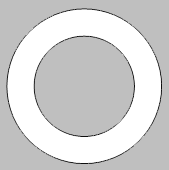
 -
Matt,
Perhaps better to create all of the text in Sketchup using styles etc for the body & outlines of the text, and then insert to Layout.
Then arrange the order in Layout front to back etc as required.see attched
C
-
Thanks! I'll try that.
Hello! It looks like you're interested in this conversation, but you don't have an account yet.
Getting fed up of having to scroll through the same posts each visit? When you register for an account, you'll always come back to exactly where you were before, and choose to be notified of new replies (either via email, or push notification). You'll also be able to save bookmarks and upvote posts to show your appreciation to other community members.
With your input, this post could be even better 💗
Register Login


Advertisement