sketchucation logo sketchucation
    • Login
    Oops, your profile's looking a bit empty! To help us tailor your experience, please fill in key details like your SketchUp version, skill level, operating system, and more. Update and save your info on your profile page today!
    Mac User? | Join the Rayscaper Beta for Mac Learn More

    [Plugin] V-Ray Tools

    Scheduled Pinned Locked Moved Plugins
    238 Posts 80 Posters 301.9k Views 80 Watching
    Loading More Posts
    • Oldest to Newest
    • Newest to Oldest
    • Most Votes
    Reply
    • Reply as topic
    Log in to reply
    This topic has been deleted. Only users with topic management privileges can see it.
    • P
      penumbra
      last edited by

      TT,

      Thanks for the awesomeness, this one is a beauty. Put another beer on the map if in Baltimore.

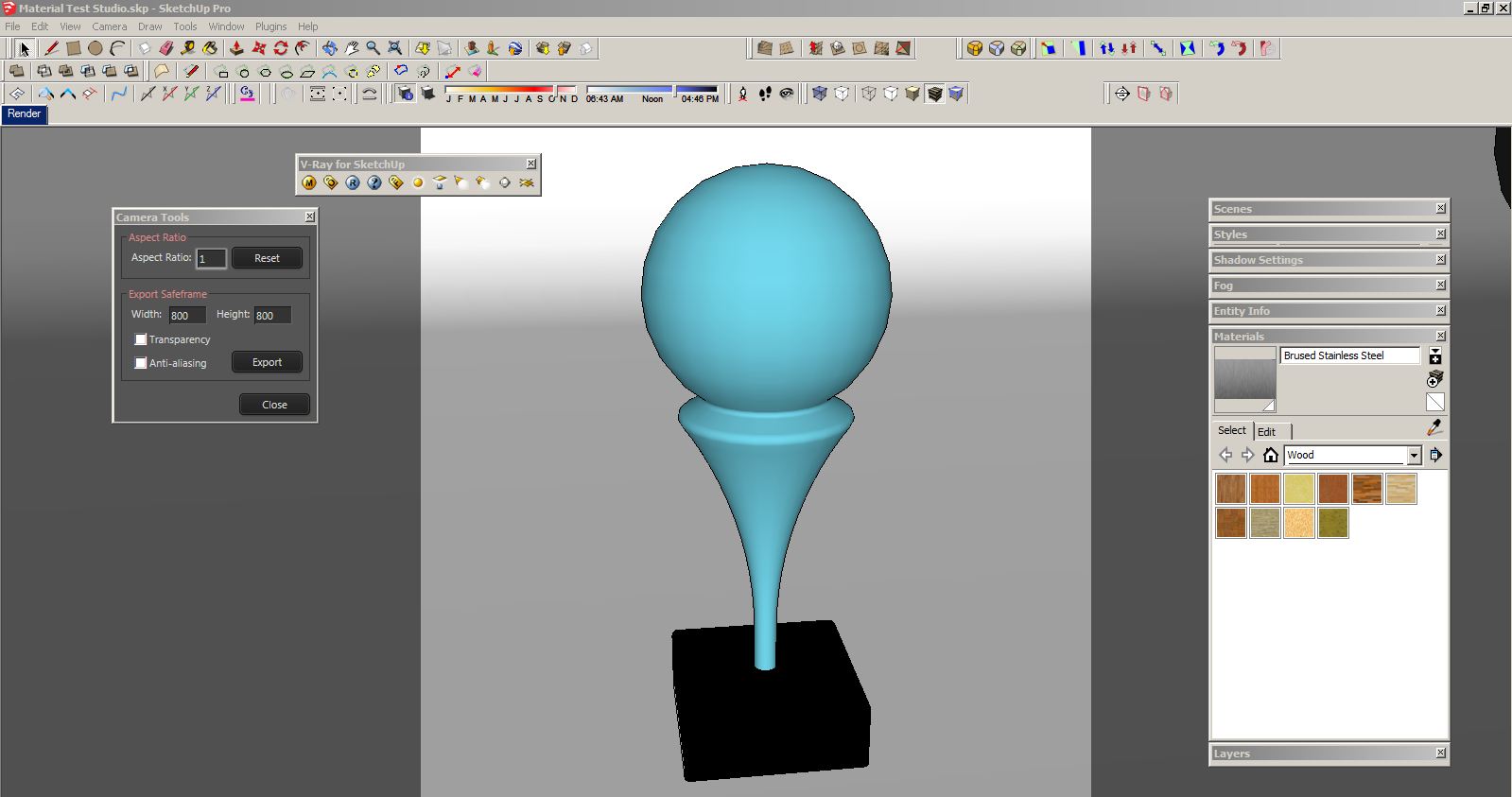
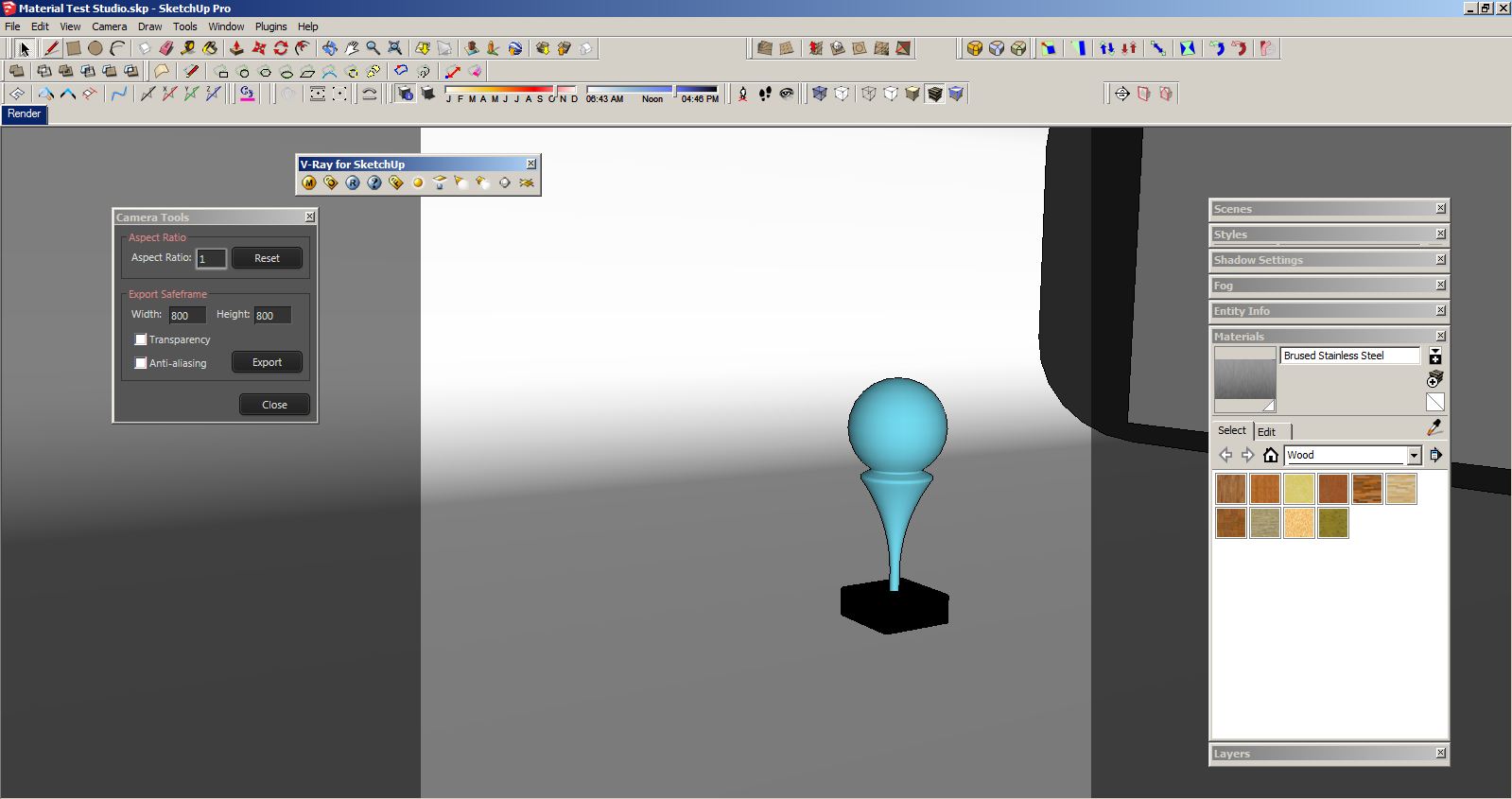
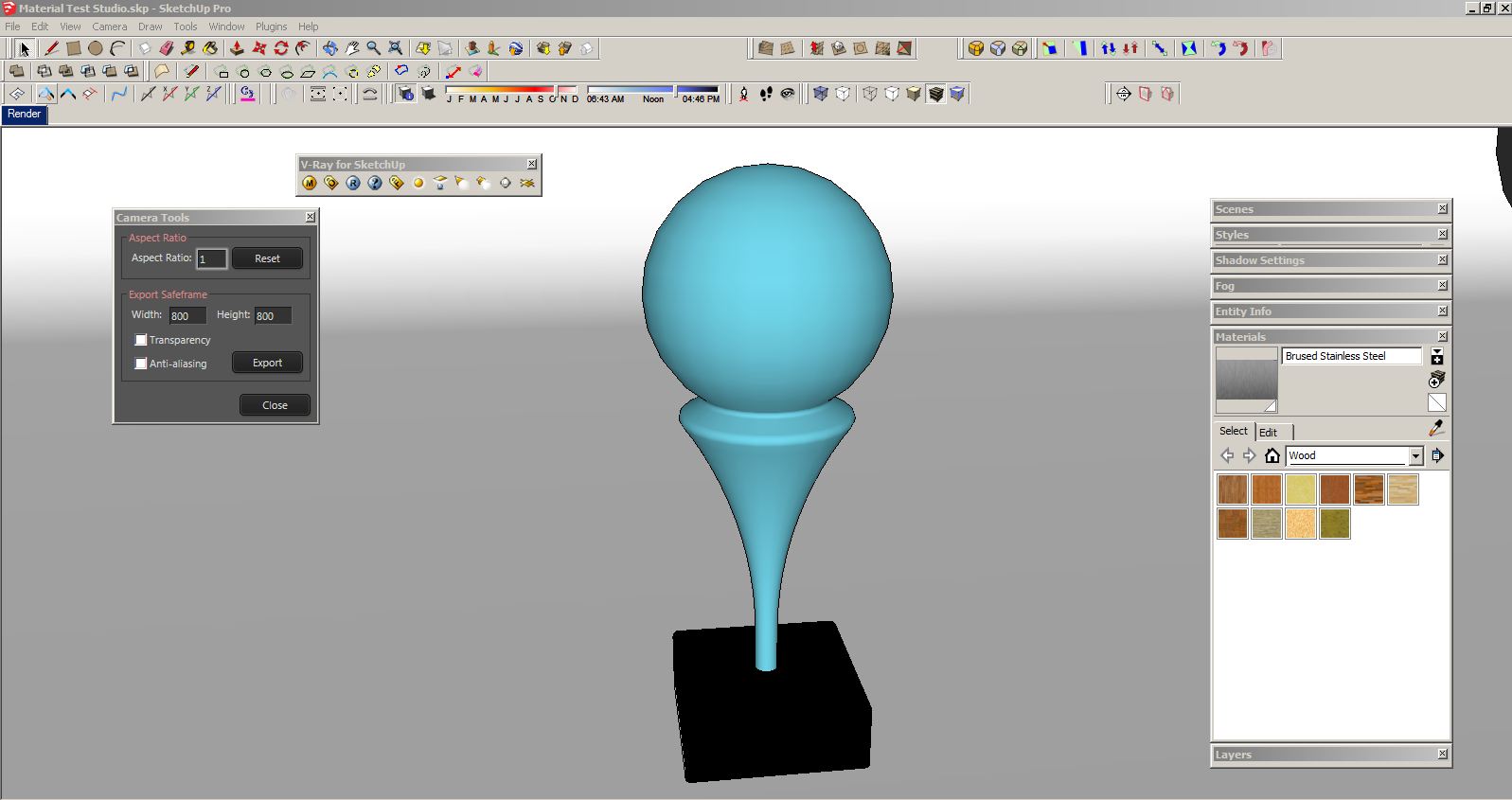
      I am experiencing some odd behavior, perhaps others are also. I have a simple studio scene set up. After running the plugin and applying aspect ratio I see the familiar safe frame bars on either side of the viewport just fine. If I orbit around the scene and then try to return the scene to its view point by hitting the scene tab, the bars disappear. The only way I can get them back is by clicking off the TT vray camera tools and then running the script again. not a big deal but wish it weren't so. Any thoughts?
      Attached are some pics if it helps.
      My office still runs version 1.48 on Windows 7 64 bit machine.

      Omar


      Desired Setup


      Orbiting around


      return to scene, bars gone

      1 Reply Last reply
      Reply Quote 0
      • thomthomT
        thomthom
        last edited by

        @broomstick said:

        The zoom value of the Vray camera is set to 1,0

        Not sure what it is. But I've had some issues occationally myself. Trouble is that SU doesn't expose everything. Might be that.

        @penumbra said:

        If I orbit around the scene and then try to return the scene to its view point by hitting the scene tab, the bars disappear.

        After you set the aspect ratio you need to Update the scene. (Right-click Scene Tab > Update)

        Thomas Thomassen β€” SketchUp Monkey & Coding addict
        List of my plugins and link to the CookieWare fund

        1 Reply Last reply
        Reply Quote 0
        • P
          penumbra
          last edited by

          TT
          Thanks, sure enough that did the trick. Now i am embarrassed.

          O

          1 Reply Last reply
          Reply Quote 0
          • broomstickB
            broomstick
            last edited by

            @thomthom said:

            @broomstick said:

            The zoom value of the Vray camera is set to 1,0

            Not sure what it is. But I've had some issues occationally myself. Trouble is that SU doesn't expose everything. Might be that.

            Thanks for taking the time to follow me through. Let's hope a new version of VfSU is on its way soon!

            1 Reply Last reply
            Reply Quote 0
            • SupumanS
              Supuman
              last edited by

              Thanks!!!very useful!!!

              1 Reply Last reply
              Reply Quote 0
              • S
                sp33d1984
                last edited by

                http://t2.pixhost.org/thumbs/4648/16531774_error.jpg

                1 Reply Last reply
                Reply Quote 0
                • S
                  sezarx
                  last edited by

                  Hello Thomas,
                  Thanks for the brilliant and very needed idea behind this plug-in!
                  I'm having a difficulty installing it (using windows 7 64x , SU8 and vray 1.49)
                  as it seems , all other plug-ins for sketchup have a folder that comes with the zip file , in the forum page here , I couldnt find anything more than the .rb file
                  am I missing something?
                  I'm really sure I copied the .rb file to the right location and still sketchup wont recognize any new plug-ins

                  sincerely.
                  Arch. Qais Tabib

                  1 Reply Last reply
                  Reply Quote 0
                  • thomthomT
                    thomthom
                    last edited by

                    Note that the file you down load here is an RBZ files - not just RB. Right above the download in the red box there is a link to instructions to how you install RBZ files.

                    Thomas Thomassen β€” SketchUp Monkey & Coding addict
                    List of my plugins and link to the CookieWare fund

                    1 Reply Last reply
                    Reply Quote 0
                    • M
                      Missy_X
                      last edited by

                      Hmmm, does the on demand loader work for anyone with the new v-ray 1.6 beta ? Or did i do something wrong ? lol. I disabled v-ray from extensions, but when i reload sketchup and click "start v-ray" from this plugin, it says in bottom left that it's loading v-ray but nothing happens.

                      1 Reply Last reply
                      Reply Quote 0
                      • thomthomT
                        thomthom
                        last edited by

                        It has worked for me...

                        If you open the Ruby Console, do you get any errors?

                        Also, could you please fill your your profile information with SketchUp version and OS?

                        Thomas Thomassen β€” SketchUp Monkey & Coding addict
                        List of my plugins and link to the CookieWare fund

                        1 Reply Last reply
                        Reply Quote 0
                        • M
                          Missy_X
                          last edited by

                          When i press "Start V-ray" i get :

                          Error: #<LoadError: no such file to load -- C:/Program Files (x86)/Google/Google SketchUp 8/plugins/VRayForSketchup.rb.disabled>
                          C:/Program Files (x86)/Google/Google SketchUp 8/Plugins/VRayToys/vr_loader.rb:101:in load' C:/Program Files (x86)/Google/Google SketchUp 8/Plugins/VRayToys/vr_loader.rb:101:in load_vray'
                          C:/Program Files (x86)/Google/Google SketchUp 8/Plugins/VRayToys/vr_loader.rb:37

                          When i press "Load V-Ray on demand" i get :

                          Toggle
                          activating...
                          Could not activate loader. File not found.

                          1 Reply Last reply
                          Reply Quote 0
                          • M
                            Missy_X
                            last edited by

                            Whoops ok, i was still running an old version of V-Ray tools, installed last version and it works fine now !

                            1 Reply Last reply
                            Reply Quote 0
                            • thomthomT
                              thomthom
                              last edited by

                              Yea - that error was an odd one. Glad it's working now. πŸ˜„

                              Thomas Thomassen β€” SketchUp Monkey & Coding addict
                              List of my plugins and link to the CookieWare fund

                              1 Reply Last reply
                              Reply Quote 0
                              • M
                                macmac12
                                last edited by

                                Thanks for this plugin thom. I don't see your toolbar after installation, already check the toolbar in view menu but it's already enabled. Im using sketchup2013 do you have solutions for this?

                                1 Reply Last reply
                                Reply Quote 0
                                • thomthomT
                                  thomthom
                                  last edited by

                                  @macmac12 said:

                                  Thanks for this plugin thom. I don't see your toolbar after installation, already check the toolbar in view menu but it's already enabled. Im using sketchup2013 do you have solutions for this?

                                  That's a bad bug in SketchUp 2013. The toolbar is there - it's just that it's hidden underneath your existing docked toolbars. Undock them and you should find it. In order to unstick it you must double-click it. I hope the SU team comes with a patch quickly.

                                  Thomas Thomassen β€” SketchUp Monkey & Coding addict
                                  List of my plugins and link to the CookieWare fund

                                  1 Reply Last reply
                                  Reply Quote 0
                                  • M
                                    macmac12
                                    last edited by

                                    Thanks thom, it's all good now. thats a very nasty bug in su 2013.

                                    1 Reply Last reply
                                    Reply Quote 0
                                    • thomthomT
                                      thomthom
                                      last edited by

                                      Aye. 😞

                                      Thomas Thomassen β€” SketchUp Monkey & Coding addict
                                      List of my plugins and link to the CookieWare fund

                                      1 Reply Last reply
                                      Reply Quote 0
                                      • V
                                        vojo
                                        last edited by

                                        ok...so some genius suggested that this VRAY plugin was better than export 2d. So I loaded it (and as with the mess this whole plugin family indicates....newer versions of supporting plugins create errors). Got that fixed....got Vray installed. Now says cant load and asks if installed correctly. Since I get the menus and such...appears to be installed in some state.

                                        Forget this

                                        Going to use export 2d from now on!!!!!!!!!!!!!!

                                        1 Reply Last reply
                                        Reply Quote 0
                                        • thomthomT
                                          thomthom
                                          last edited by

                                          @vojo said:

                                          ok...so some genius suggested that this VRAY plugin was better than export 2d. So I loaded it (and as with the mess this whole plugin family indicates....newer versions of supporting plugins create errors). Got that fixed....got Vray installed. Now says cant load and asks if installed correctly. Since I get the menus and such...appears to be installed in some state.

                                          Forget this

                                          Going to use export 2d from now on!!!!!!!!!!!!!!

                                          Again, as I mentioned in the other thread - you're not really helping yourself much by not describing exactly what isn't working.

                                          What version of V-Ray do you have installed?

                                          But you say you wanted to use it as a replacement for export 2d... do you even have V-Ray installed? In which case you should ignore the Load V-Ray button and just use the Camera Tools button.

                                          Thomas Thomassen β€” SketchUp Monkey & Coding addict
                                          List of my plugins and link to the CookieWare fund

                                          1 Reply Last reply
                                          Reply Quote 0
                                          • R
                                            redsteel
                                            last edited by

                                            @thomthom said:

                                            That's a bad bug in SketchUp 2013. The toolbar is there - it's just that it's hidden underneath your existing docked toolbars.

                                            I knew that I wasn't crazy. Thanks for the answer πŸ˜›

                                            1 Reply Last reply
                                            Reply Quote 0

                                            Hello! It looks like you're interested in this conversation, but you don't have an account yet.

                                            Getting fed up of having to scroll through the same posts each visit? When you register for an account, you'll always come back to exactly where you were before, and choose to be notified of new replies (either via email, or push notification). You'll also be able to save bookmarks and upvote posts to show your appreciation to other community members.

                                            With your input, this post could be even better πŸ’—

                                            Register Login
                                            • 1
                                            • 2
                                            • 8
                                            • 9
                                            • 10
                                            • 11
                                            • 12
                                            • 11 / 12
                                            • First post
                                              Last post
                                            Buy SketchPlus
                                            Buy SUbD
                                            Buy WrapR
                                            Buy eBook
                                            Buy Modelur
                                            Buy Vertex Tools
                                            Buy SketchCuisine
                                            Buy FormFonts

                                            Advertisement