How do you make an grey object with a black outline???
-
Heres an easy one for you guys that im stuck on......attached image is my dilemma.
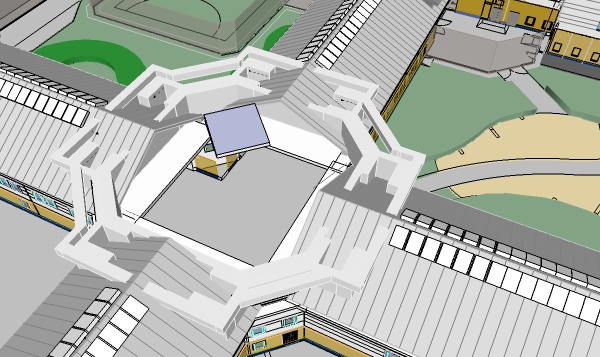
How do i make the "Grey Gutter" and "Grey Internal wall structure" have a black outline similar to the surrounding cubes???
-
I am not sure what you did here, the image is small but one way is to hide all the lines
except the ones you want to retain visible. -
Hi Joe
Your image doesn't make clear what it is that you are wanting to do. I see lots of grey faces that have the edges hidden. If you want to see selective ones again the general way to do it is as follows: Turn on the display of hidden geometry using the command in the 'View' menu. Note that previously hidden edges will show up as tightly dashed lines. Select the ones you want to see as regular edges and from the right-click context menu choose 'unhide'. Turn off the display of hidden geometry ('View' menu) and you'll see the edges you had changed and the ones you didn't change will stay as they were.Is this what you were trying to do?
Regards, Ross
-
I am not sure either what I see. By default, edges are not hiden and are displayed as thin, black lines (just like elsewhere in your model).
How did you come to this state of them?
-
HI guys sorry to confuse you. On the image there is an octagon shaped object which is grey. This is the gutter.
Problem is that the faces are grey but they have no black outline to define the object.
How do i add a black outline?
-
What I am saying is that the edges SHOULD be there. So what did you do that they don't display?
Just a guess:
Go to your styles dialog (Window menu) > In model (little house icon) > Edit tab and under the leftmost icon, make sure that edges are set to display "all the same" (and not coloured by material for instance) and the colour is black.This setting is the bottom most and you may need to resize your dialog if it is covered by its edge.
-
The way I see it is that 'octagon shaped object' is either grouped or a component, so right click to get to edit mode of the group/component and then on tools menu left click on edit and scroll down to unhide and select 'unhide all'. that should sort that out.
-
@gaieus said:
What I am saying is that the edges SHOULD be there. So what did you do that they don't display?
Just a guess:
Go to your styles dialog (Window menu) > In model (little house icon) > Edit tab and under the leftmost icon, make sure that edges are set to display "all the same" (and not coloured by material for instance) and the colour is black.This setting is the bottom most and you may need to resize your dialog if it is covered by its edge.
THANKS MATE THAT HELPED! i dont know how i got rid of the lines i just realised that they had gone and had to amend them. Thanks again!
-
Hi ive just notice that every single line has turned black.
How do i keep some lines black and others another colour?
Attached is an image of the roof. I wanted the roof lines to be light grey but keep the rest of the model outlined in black.
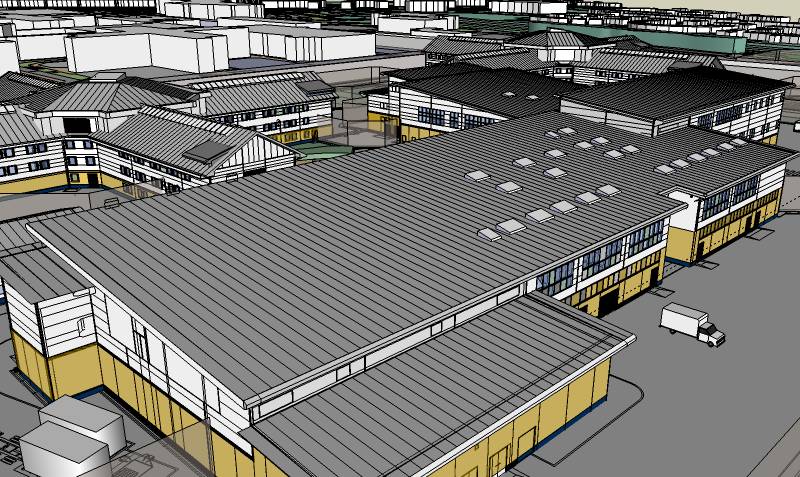
Regards.
-
Then go back to coloured by material mode, then your grey parts which you want to have the edge black, go to wireframe mode (faces not displayed), selet all edges and paint them black. Now go back to shaded moe.
-
@gaieus said:
Then go back to coloured by material mode, then your grey parts which you want to have the edge black, go to wireframe mode (faces not displayed), selet all edges and paint them black. Now go back to shaded moe.
Im confused by this....by "coloured by material mode" do you mean use the "Entity Info" to change the colour or change the colour by using the "Paint Bucket" tool????
These are the ways i have been trying to change the colour but the roof seams will not change coloyr they just stay black unless i change it through the styles box as youve said before but that changes every single line in the whole model.
P.S why is it that in this program you have to go around in circles to get to a simple POA?
I have used 3d max and vectorworks 3d but sketchup is sush a pain! -
No. I meant to go back to the Styles dialog > In model > Edit tab > Edge settings.
You can either have ALL edges coloured by the same colour (in this case black - but you can change that) OR by material (or by axis but you don't wnt that now).
So if you need different colours, you have to paint your edges so and at the same time use that setting.
-
@gaieus said:
No. I meant to go back to the Styles dialog > In model > Edit tab > Edge settings.
You can either have ALL edges coloured by the same colour (in this case black - but you can change that) OR by material (or by axis but you don't wnt that now).
So if you need different colours, you have to paint your edges so and at the same time use that setting.
ive just done that .....i have selected the seams which needed to be grey and then "Color by material" was selected. However as i did this the seams did turn grey but other parts in my model turned grey also when the should have stayed black!!!!!
-
This method indeed has the drawback that you need to paint every edge with a colour/material (it will also display as a colour) individually - or at least select a bunch of them and apply the colour.
-
Thanks for the help but This program is shit.
-
Quite rash opinion based on your unexperiences with it...
-
well simple things such as changing the colour of a line should be blindingly obviuos but it isnt. you have to go to here, then there, then click on another option just to do basic commands. And even then the problem isnt solved completely. I have been told that this program was the easiest of all 3d programns to pick up yet i disagree. Ive used 4 other 3d programs and they are by FAR easier! My judgement comes from the picking up the program and using it for a month......so i dont think my statement was rash.
-
Look, there are altogether two things here:
-
setting it up to display edges by material/colour
-
applying a colour to the edges.
What is so difficult in this? How would you expect SU to automatically know what colour you wish the edges to diplay?
-
-
-
All of the lines in the whole model change colour, (which i have stated before)
-
the colour does not change if i select the lines and change the colour. they are components and if i change the colour of one line they should all change BUT they do not.
I do not expect SU to mind read. Im telling you your methods do not work.
-
-
Okay, if they are components, even better.
So you are set now to display the edges by material, right?- Now double click on your component the colour of whose lines you want to change
- go to wireframe mode (this will hide faces so they won't be affected)
- select all the lines with a simple selection box - make sure they are all seleted
- use the Paint bucket tool to colour them as you want.
- Now you can go back to shaded (with colours or with textures) mode to check out the result.
- Apply this technique to all your components or whatever you want to paint.
Note that if you paint a component from outside its editing context, everything (front and back faces as well as edges) will be painted that colour.
Once you have applied any colour/material to a face/edge inside the editing context of a component however, it will retain that colur/material whenever you change it from outside.
This is the basis of a simple trick also described in the SU Guide (scroll the very bottom of this page) where you paint the windshields/windows and the tyres of a car from inside the editing context of a component like this:

And later on you paint the cars with different colours from outside like this - notice that the windows and the tyres don't change colour:

Now apparently first you painted your component from outside - thus you are unable to paint the edges with a different colour from the faces. You will need to edit that component (double click on it).
I hope this helps.


Advertisement