Where do the templates go?
-
i have created a few templates for use with SU7. they show up at the opening window and at template preferences but i cannot locate the damned files in my HD.
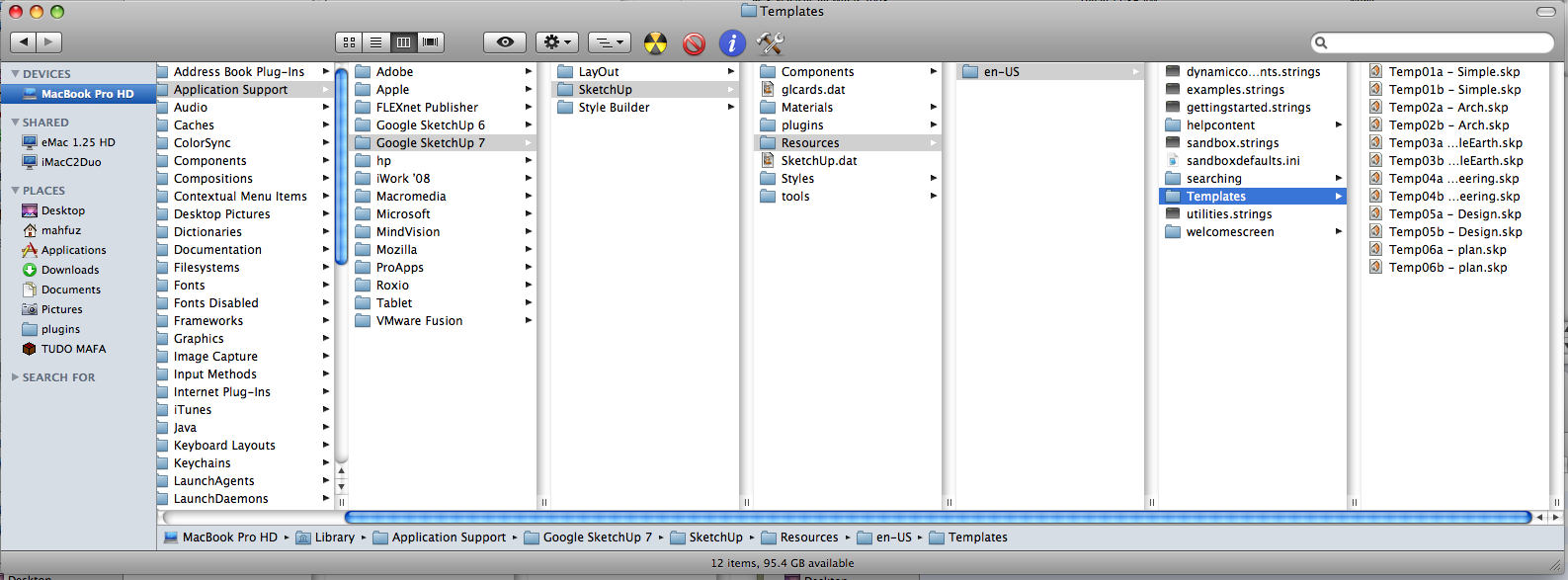
the attached pict shows the template folder. in it there are just the templates that shipped with SU7, but not the ones i created. the strangest thing is that i cannot find them anywhere through the search feature of mac os!
what happens with templates in SU7? where have my dear templates gone???????
-
Your using SU7

Don't save as a template, use "save as" and save directly to the template location shown in the screen capture you posted. Quit and restart SketchUp. Look under SketchUp> preferences> templates and you should see the file name, select that as default. Quit and restart SU. It worked for me. They changed things in SU7.
Larry -
this worked fine. i thought saving as template would cause the file to appear in the templates folder but they do not.
another question would be: how to get rid of a template created earlier if it does not show up on that folder?
-
Edson,
At the moment I don't have a Mac to test, but if the templates you created can be selected from the Preferences pane, and they are not in the program folder as you showed, I would guess that SU puts them somewhere in your personal folders (perhaps somewhere near the preferences files). Just a stab in the dark. I would guess that on a Mac, users without admin rights would not be allowed to add files into the program folders.
Anssi
-
anssi,
you nailed it!!! the templates are located in user/library/app support/sketchup 7/sketchup/templates. i was looking for them in the program folder. thanks!
one problem solved. now i am left with the problem of how to get the same toolbars to open whenever i start SU7 up.
regards.


Hello! It looks like you're interested in this conversation, but you don't have an account yet.
Getting fed up of having to scroll through the same posts each visit? When you register for an account, you'll always come back to exactly where you were before, and choose to be notified of new replies (either via email, or push notification). You'll also be able to save bookmarks and upvote posts to show your appreciation to other community members.
With your input, this post could be even better 💗
Register Login


Advertisement