sketchucation logo sketchucation
    • Login
    Oops, your profile's looking a bit empty! To help us tailor your experience, please fill in key details like your SketchUp version, skill level, operating system, and more. Update and save your info on your profile page today!
    ⚠️ Important | Libfredo 15.6b introduces important bugfixes for Fredo's Extensions Update

    Scaling 2D DC components

    Scheduled Pinned Locked Moved SketchUp Bug Reporting
    sketchup
    6 Posts 3 Posters 1.1k Views 3 Watching
    Loading More Posts
    • Oldest to Newest
    • Newest to Oldest
    • Most Votes
    Reply
    • Reply as topic
    Log in to reply
    This topic has been deleted. Only users with topic management privileges can see it.
    • thomthomT Offline
      thomthom
      last edited by

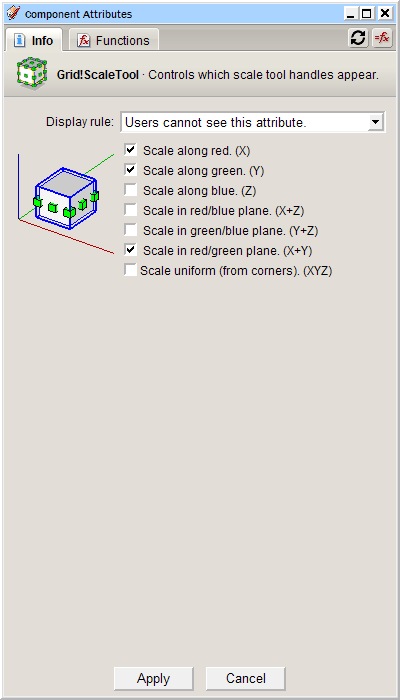
      I noticed when I created a 2D component, (A grid: http://www.sketchucation.com/forums/scf/viewtopic.php?f=15&t=14353) and restricted scaling to only X and Y axis the scale points only appear on the sides, not in the corners. I would have expected it to have scale points in each corner as well.

      Thomas Thomassen — SketchUp Monkey & Coding addict
      List of my plugins and link to the CookieWare fund

      1 Reply Last reply Reply Quote 0
      • GaieusG Offline
        Gaieus
        last edited by

        How did you restrict it?

        Gai...

        1 Reply Last reply Reply Quote 0
        • thomthomT Offline
          thomthom
          last edited by

          Like this:
          ScaleDC2D.PNG

          Thomas Thomassen — SketchUp Monkey & Coding addict
          List of my plugins and link to the CookieWare fund

          1 Reply Last reply Reply Quote 0
          • GaieusG Offline
            Gaieus
            last edited by

            Hm. Did you leave the red/green plane on as well?
            Actually, in 2D you shouldn't have set anything since the Z axis is not involved at all.

            Now I tried and it does not display those corner grips (only if I select the scale uniform from the bottom most)

            Gai...

            1 Reply Last reply Reply Quote 0
            • thomthomT Offline
              thomthom
              last edited by

              You're right, removing the scale handle restriction leaves handles on the sides as corners. So no need to set this attribute.

              But there's still something odd though, if you wanted to restrict 2D elements to certain scale. If you only leave XY enabled you never get any scale handles.

              Thomas Thomassen — SketchUp Monkey & Coding addict
              List of my plugins and link to the CookieWare fund

              1 Reply Last reply Reply Quote 0
              • Chris FullmerC Offline
                Chris Fullmer
                last edited by

                Sometimes I've found that I have to click on the component with the scale tool to get the scale handles to appear. Does that help in the example in your last post ThomThom?

                Chris

                Lately you've been tan, suspicious for the winter.
                All my Plugins I've written

                1 Reply Last reply Reply Quote 0
                • 1 / 1
                • First post
                  Last post
                Buy SketchPlus
                Buy SUbD
                Buy WrapR
                Buy eBook
                Buy Modelur
                Buy Vertex Tools
                Buy SketchCuisine
                Buy FormFonts

                Advertisement