Icon definations?
-
I would like to someone to epxlain to me the meaning of the different icons in this forum as I dont want to use my brain to figure it out for myself. (sound familar)

. blank page with (i) = locked
. blank page with nothing = no new posts
. page with su pencil = new post
. blank page with black left pointing arrow = moved topic
. page with black "s" in middle = no new post?
. page with black star top left = ?
. page with su pencil and red star top left = ?
. blank page with tag at bottom right = ?etc, etc.
Maybe the newbies can have this explained on there section?
Cheers Jeff.

-
In the other version of the forum software (wwe used until about a year ago), there was an explanation at the bottom. I don't know why they left it out but we couldn't rewrite the code without messing it up too much.
Here is the explanation:
- blank page with (i) = locked No; announcement. It can be only in that particular forum or "global" it can be blank or with a pencil if you haven't read it yet.
- (any kind of) page with a little padlock in its bottom right corner; locked
- blank page with nothing = no new posts Yes
- page with su pencil = new post Yes
- blank page (or with pencil) with black left pointing arrow = moved topic Yes
- page with black "s" in middle = no new post? No; "sticky" topic (always stays on top)
- page with black star top left = means you have posted in it.
- page with su pencil and red star top left = the same but there are new posts in it.
- blank page with tag at bottom right = maybe that's the padlock I am referring to above?

@idraft said:
Maybe the newbies can have this explained on there section?
Good idea; I will post it in the "Getting started" (or what) sticky.

-
@gaieus said:
Good idea; I will post it in the "Getting started" (or what) sticky.
Hm... I just need time to "collect" the icons; all forums and topics and posts are in a "read" mode to me at the moment.
Found out a better way.
Here is the amandment of my sticky above:
http://www.sketchucation.com/forums/scf/viewtopic.php?p=6236#p6236 -
Thanks Gaieus. Your quick off the mark today!
PS: This is a great siteWhats on the Horizon may I ask, or are you guys still drinking the water at the hole?
-
What horizon do you mean (and I haven't heard this expresion "drinking the water at the hole" before but would love to know the meaning)
-
Hello,
what do the post definitions mean. I don't get any text when I hover over them? Does the green smiley square mean question answered?

-
Those are topic icons and will be placed before the topic subject in forum view. Like mine now in my post (I hope - I never use them)

-
Hi Gai,
thanks, it's just that it doesn't say what they mean....I'm wondering how to say that my question has been answered. I think there used to be a green tick you could add....I wondered if that's what the green smile was?
best rgds, Sally
-
You can do it with the icon in the screenshot.
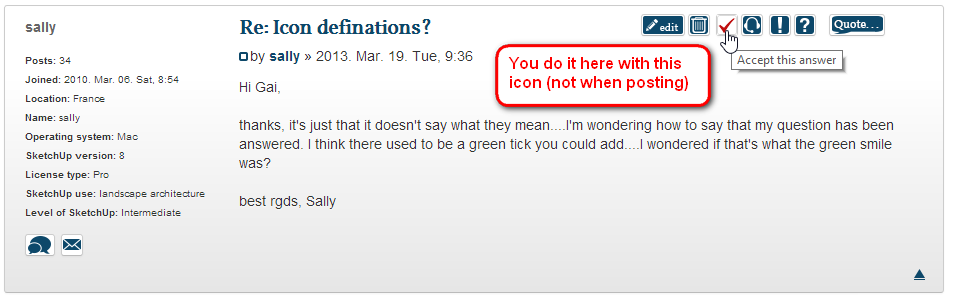
However you can only see this icon when you are in a topic that you started (i.e. you asked something). Moderators can see the icon everywhere - so I can mark any answer as solving the problem. I am not sure where the settings are now but I guess we should somehow hack the plugin so that at least "Top SketchUcators" could also mark answers best.


Hello! It looks like you're interested in this conversation, but you don't have an account yet.
Getting fed up of having to scroll through the same posts each visit? When you register for an account, you'll always come back to exactly where you were before, and choose to be notified of new replies (either via email, or push notification). You'll also be able to save bookmarks and upvote posts to show your appreciation to other community members.
With your input, this post could be even better 💗
Register Login


Advertisement