sketchucation logo sketchucation
    • Login
    Oops, your profile's looking a bit empty! To help us tailor your experience, please fill in key details like your SketchUp version, skill level, operating system, and more. Update and save your info on your profile page today!
    โš ๏ธ Update | Sketchucation Tools 5.0.8 released with licensing improvements and bugfixes Download

    Making Curved Shapes

    Scheduled Pinned Locked Moved Newbie Forum
    sketchup
    14 Posts 4 Posters 1.1k Views 4 Watching
    Loading More Posts
    • Oldest to Newest
    • Newest to Oldest
    • Most Votes
    Reply
    • Reply as topic
    Log in to reply
    This topic has been deleted. Only users with topic management privileges can see it.
    • M
      mrdamon
      last edited by

      Thanks Gaieus for your response. ๐Ÿ‘
      I'm still having a little trouble as you can see below. Any more tips??
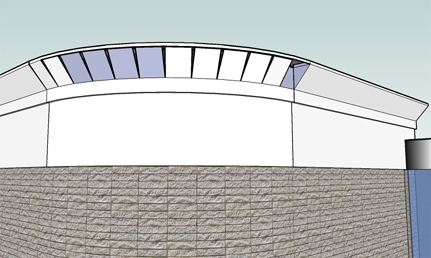

      Cornice Detail 2.png

      1 Reply Last reply
      Reply Quote 0
      • GaieusG
        Gaieus
        last edited by

        Well, from this image I don't exactly know what the problem might be. Could you upload the file (or at least this part of the model) here?

        Gai...

        1 Reply Last reply
        Reply Quote 0
        • M
          mrdamon
          last edited by

          Here is part of the model I'm doing.


          Modern Convenience Cornice.skp

          1 Reply Last reply
          Reply Quote 0
          • GaieusG
            Gaieus
            last edited by

            Well, I don't know what went so wrong with your model but here it is. There were a couple of extra (unneded) geometry that I deleted in it.

            Only zwo faces didn't seem to be created but they were on the two ends of the curve and this was due to some limitations of the Follow me tool.


            Modern Convenience Cornice.skp

            Gai...

            1 Reply Last reply
            Reply Quote 0
            • R
              remus
              last edited by

              I had a quick look at the problem area, and im not entirely sure what was going on, there was quite a lot of weird stuff going on.

              I think ive found an easier way of constructing the piece, though.

              step one:

              http://farm4.static.flickr.com/3241/2950475021_5c8eb63973_o.jpg

              Delete everything except the end profile and the inside line.

              Step 2:

              http://farm4.static.flickr.com/3217/2950475085_81e4b0433e_o.jpg

              Select the line, select the follow me tool and then hit the profile.

              Edit: your too quick for me gai!

              http://remusrendering.wordpress.com/

              1 Reply Last reply
              Reply Quote 0
              • GaieusG
                Gaieus
                last edited by

                But your solution is way more straightforward (and also eliminates the glitch that the Follow me tool has) ๐Ÿ‘

                Gai...

                1 Reply Last reply
                Reply Quote 0
                • M
                  mrdamon
                  last edited by

                  WOW remus! ๐Ÿ˜ฎ I still don't know what you just did, but I'm going to try that.
                  Thanks to both of you (remus & Gaieus)!

                  1 Reply Last reply
                  Reply Quote 0
                  • M
                    mrdamon
                    last edited by

                    Remus you ar the best! The cornice work great. Thank you soooo much! ๐Ÿ˜

                    1 Reply Last reply
                    Reply Quote 0
                    • R
                      remus
                      last edited by

                      No worries.

                      http://remusrendering.wordpress.com/

                      1 Reply Last reply
                      Reply Quote 0
                      • M
                        mrdamon
                        last edited by

                        Do either of you know if it is possible to hide just the outlines of objects in SketchUP?

                        1 Reply Last reply
                        Reply Quote 0
                        • GaieusG
                          Gaieus
                          last edited by

                          What do you mean by "outlines"? Those fat lines?

                          If so, open the Style dialog (Window menu), go to "In model" tab > Edit > Edge settings and uncheck profiles.

                          If you want to hide the edges totally on the outlines only, that's not possible although you can uncheck them there as well to turn them off globally.

                          Gai...

                          1 Reply Last reply
                          Reply Quote 0

                          Hello! It looks like you're interested in this conversation, but you don't have an account yet.

                          Getting fed up of having to scroll through the same posts each visit? When you register for an account, you'll always come back to exactly where you were before, and choose to be notified of new replies (either via email, or push notification). You'll also be able to save bookmarks and upvote posts to show your appreciation to other community members.

                          With your input, this post could be even better ๐Ÿ’—

                          Register Login
                          • 1 / 1
                          • First post
                            Last post
                          Buy SketchPlus
                          Buy SUbD
                          Buy WrapR
                          Buy eBook
                          Buy Modelur
                          Buy Vertex Tools
                          Buy SketchCuisine
                          Buy FormFonts

                          Advertisement