sketchucation logo sketchucation
    • Login
    Oops, your profile's looking a bit empty! To help us tailor your experience, please fill in key details like your SketchUp version, skill level, operating system, and more. Update and save your info on your profile page today!
    ⚠️ Update | Sketchucation Tools 5.0.8 released with licensing improvements and bugfixes Download

    What's your beginners tip?

    Scheduled Pinned Locked Moved Newbie Forum
    sketchup
    305 Posts 169 Posters 442.1k Views 169 Watching
    Loading More Posts
    • Oldest to Newest
    • Newest to Oldest
    • Most Votes
    Reply
    • Reply as topic
    Log in to reply
    This topic has been deleted. Only users with topic management privileges can see it.
    • Dave RD
      Dave R
      last edited by

      That's scaling with Cardinal Points and it is is both handy and it seems, little known. You won't get a perfect cone but it'll be close. It works for polygons, too.

      Etaoin Shrdlu

      %

      (THERE'S NO PLACE LIKE)

      G28 X0.0 Y0.0 Z0.0

      M30

      %

      1 Reply Last reply
      Reply Quote 0
      • BlastfurnaceB
        Blastfurnace
        last edited by

        @dave r said:

        That's scaling with Cardinal Points and it is is both handy and it seems, little known. You won't get a perfect cone but it'll be close. It works for polygons, too.

        Scaling with cardinal points is certainly a more accurate term than mine. πŸ˜„ Wanna try something difficult? Try to find it explained without knowing what its called! Takes a bit of googling.

        i didn't know about the polygon part. I'll have to play with that.

        Thanks

        M

        1 Reply Last reply
        Reply Quote 0
        • dukejazzD
          dukejazz
          last edited by

          Tip_dj no 15
          Plugins - InputBox type

          The opening of a ruby plug-in with a InputBox usually opens in the center of SU window.

          But if you open a sub window of SU like Outliner and select the top bar.

          Then running a plug-in with a InputBox again, now center on the sub window of the outliner

          Why is this important to know?

          Some times a plug-in cover up what you need to see especially a large InputBox

          πŸ˜› -dj

          1 Reply Last reply
          Reply Quote 0
          • J
            jerrymich
            last edited by

            Best tip came from Dave R. (moderator). Change your styles to where the back face is a contrasting color, i.e. green or something similar to make it much easier to see when you have faces that are reversed. Thanks Dave.

            1 Reply Last reply
            Reply Quote 0
            • mortenstorgaardM
              mortenstorgaard
              last edited by

              @chris fullmer said:

              Always use a 3 button mouse with SketchUp. None of those single button Mac mice....stupidest invention ever.

              And use shortcut keys.

              Chris

              Thanks πŸ˜„ love my mac stuff, but guess youre right πŸ˜„ πŸ˜•

              Morten
              //nordiskspil boardgames

              1 Reply Last reply
              Reply Quote 0
              • L
                local
                last edited by

                Hi!
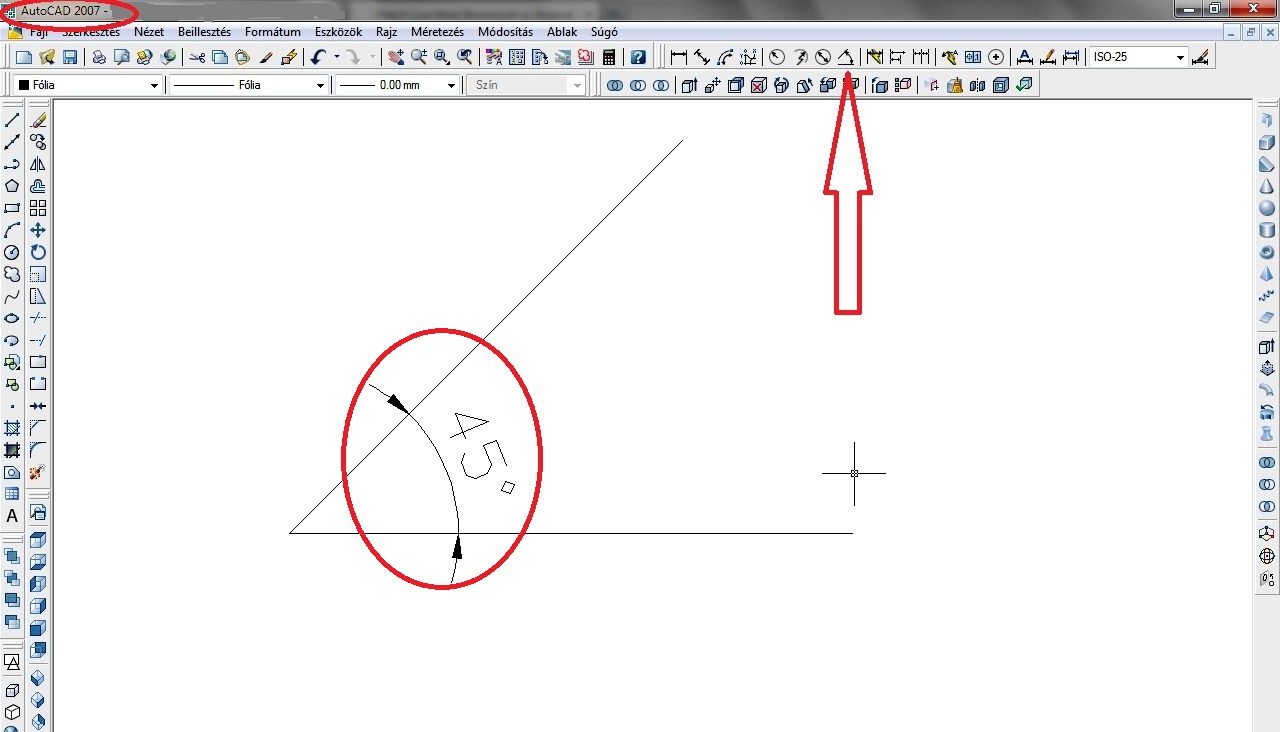
                How can I size an angle formed by two lines?
                There is this video?

                (Sorry, google translator)

                1 Reply Last reply
                Reply Quote 0
                • Rafferty94R
                  Rafferty94
                  last edited by

                  @local do you mean how to measure the angle between two lines?

                  1 Reply Last reply
                  Reply Quote 0
                  • L
                    local
                    last edited by

                    @rafferty94 said:

                    @local do you mean how to measure the angle between two lines?

                    Can be measured by the 'Protractor' tools, but is not scaled.

                    1 Reply Last reply
                    Reply Quote 0
                    • Rafferty94R
                      Rafferty94
                      last edited by

                      Measure using the protractor and then using the rotate tool, rotate the line you wish to move around to match the construction line given by the protractor tool? :-S

                      1 Reply Last reply
                      Reply Quote 0
                      • L
                        local
                        last edited by

                        @rafferty94 said:

                        Measure using the protractor and then using the rotate tool, rotate the line you wish to move around to match the construction line given by the protractor tool? :-S

                        It's Okay.

                        How to scaled (Dimensions)?

                        1 Reply Last reply
                        Reply Quote 0
                        • L
                          local
                          last edited by

                          In AutoCAD:

                          MWSnap246.jpg

                          1 Reply Last reply
                          Reply Quote 0
                          • Rafferty94R
                            Rafferty94
                            last edited by

                            Anyone can jump in on this but I don't think there is a way to input angle dimensions in SU.

                            Chris Fullmer has created a free plugin called ShapeBender that seems quite good at shaping text to a curve or arc.

                            If whatever you need this for is just going to be used to see the dimension then I would suggest drawing and arc between the two points and then curving the text (The dimensions of the angle) to the curve.

                            404 Not Found

                            favicon

                            (sketchucation.com)

                            1 Reply Last reply
                            Reply Quote 0
                            • L
                              local
                              last edited by

                              I understand. I think there is a faster way.

                              thanks

                              1 Reply Last reply
                              Reply Quote 0
                              • BoxB
                                Box
                                last edited by

                                There is an Angular Dimension tool available.
                                http://sketchucation.com/forums/viewtopic.php?p=376893#p376893

                                1 Reply Last reply
                                Reply Quote 0
                                • C
                                  CL
                                  last edited by

                                  My tip would be to make sure you know what scale you are working in. If you start with something downloaded from the warehouse that is a random size, everything else can go pearshaped. You start adjusting things by eye to look right and then find there is nothing you can actually put a tapemeasure on, no known dimensions.

                                  1 Reply Last reply
                                  Reply Quote 0
                                  • GarethG
                                    Gareth
                                    last edited by

                                    My tip is :

                                    Be patient, or become one...!

                                    1 Reply Last reply
                                    Reply Quote 0
                                    • dlscapeD
                                      dlscape
                                      last edited by

                                      I've tried reading through a lot of these "Beginners Tips" posts, but there are a LOT, so please excuse me if this has already been posted...

                                      Imagine you want to delete a large number of small objects, like the segments to a curved line for example. If they are isolated from other parts of your model it's easy to group select and mass delete. If they are tucked away amongst other objects it can get pretty tedious clicking each one with the eraser tool or trying to select and hide the rest of your model.

                                      My tip is; did you know you can click and hold the eraser tool to paint multiple objects, easily selecting lots of fiddly objects, then when you release the mouse button they all delete πŸ˜„

                                      This has saved me thousands of mouse clicks cleaning up models, I hope it does the same for you!

                                      Merry Christmas!

                                      James

                                      1 Reply Last reply
                                      Reply Quote 0
                                      • B
                                        billkeck
                                        last edited by

                                        After creating your first object learn the value of placing it within a container (group or component).

                                        1 Reply Last reply
                                        Reply Quote 0
                                        • DanielD
                                          Daniel
                                          last edited by

                                          @cl said:

                                          My tip would be to make sure you know what scale you are working in. If you start with something downloaded from the warehouse that is a random size, everything else can go pearshaped. You start adjusting things by eye to look right and then find there is nothing you can actually put a tapemeasure on, no known dimensions.

                                          I would suggest always working at full scale. If you download something from the warehouse that is not sized properly (been there!), resize it the best you can to make it so (done that!).

                                          My avatar is an anachronism.

                                          1 Reply Last reply
                                          Reply Quote 0
                                          • BoxB
                                            Box
                                            last edited by

                                            Full scale isn't always correct, for example if you are making parts for a watch or something very small it pays to work at a larger scale to avoid the tiny face issue and scale down when complete.


                                            1 Reply Last reply
                                            Reply Quote 0

                                            Hello! It looks like you're interested in this conversation, but you don't have an account yet.

                                            Getting fed up of having to scroll through the same posts each visit? When you register for an account, you'll always come back to exactly where you were before, and choose to be notified of new replies (either via email, or push notification). You'll also be able to save bookmarks and upvote posts to show your appreciation to other community members.

                                            With your input, this post could be even better πŸ’—

                                            Register Login
                                            • 1
                                            • 2
                                            • 7
                                            • 8
                                            • 9
                                            • 10
                                            • 11
                                            • 15
                                            • 16
                                            • 9 / 16
                                            • First post
                                              Last post
                                            Buy SketchPlus
                                            Buy SUbD
                                            Buy WrapR
                                            Buy eBook
                                            Buy Modelur
                                            Buy Vertex Tools
                                            Buy SketchCuisine
                                            Buy FormFonts

                                            Advertisement