This is just weird
-
Dik, select a face then get the scale tool and scale it by a factor of -1.
Gai, im guessing SU still thinks it is all the same face because it was to start with, still pretty weird though.
p.s. whats meant to happen when you save? i didnt notice anything.
-
That is what I did, this is what I got...
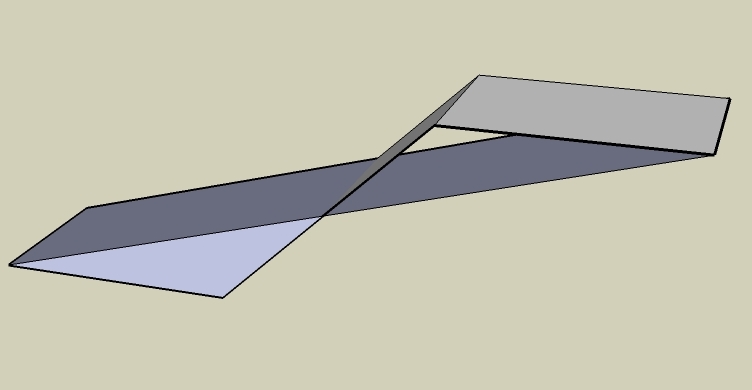
-
The mystery deepens...

-
Hmm, I'm not getting that Gaieus. Mine comes out as I would expect. See my pic.
Dik, what you're getting is a reported bug. You dragged the face to a certain distance, then typed in -1. And it actually scaled it to whatever you scaled it plus -1. So it really scaled itself to like -1.5 or something. That is why the bottom face did not do a true -1 scale.
That is odd though that Dick and I are unable to reproduce it. Remus you'rs came out looking just like Gaieus's? Your on Vista, right? Me too. odd.
But I do get the invalid geometry when checking or saving the model. So it is at least a stable way to produce invalid geometry.
Chris
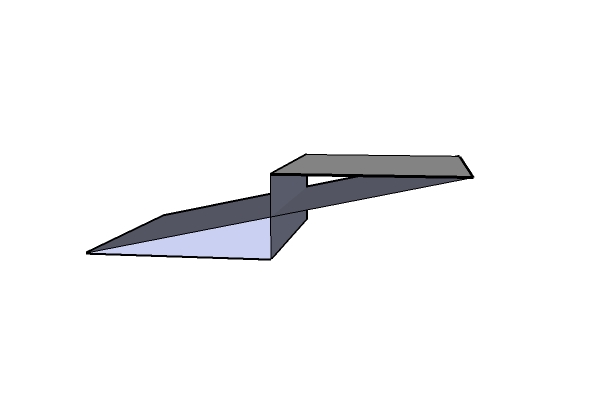
-
OK,so what happens when I save it, that two faces get deleted.Just by saving the file. It is probably because it was set to fix problems - I'll try some other ways (yesterday I didn't really have time to fiddle around and elaborate the glitch).
-
The last picture I posted was not created correctly, I drug the face beyond the far side before entering the -1. This time I just drug it in that direction and then entered -1. The second picture is what it change to when I saved the file. I'm running XP-pro.
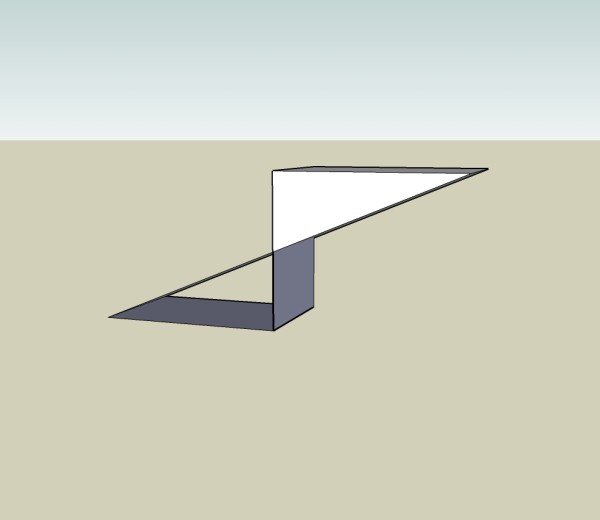
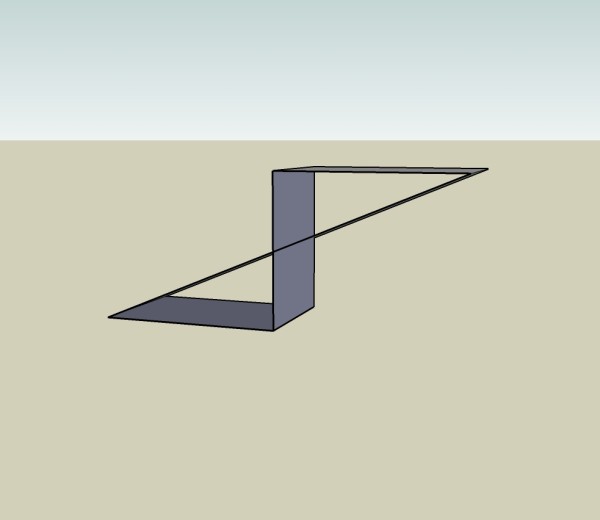
-
Yes, that's it.
(the fact that it "jumps" by a same amount as the size of the scaled thing is indeed a bug that Chris mentioned above - it cannot be seen in your model).
-
I see, and the two triangular faces disappear when you save because the diagonal edges don't intersect with the two remaining vertical edges, thus there cannot be a face. Like I said earlier, I'm being dense...
-
Gaieus, do you have SU set to automatically check AND fix models on saving? Maybe thats why it delets stuff on saving. Sometimes fixing a model will delete a few bad faces, so maybe it is checking and fixing it without tell u.
Chris
-
@dik harrison said:
I see, and the two triangular faces disappear when you save because the diagonal edges don't intersect with the two remaining vertical edges, thus there cannot be a face. Like I said earlier, I'm being dense...
They wouldn't intersect by themselves but I selected all and went to > intersect with model. I can even select all the lines separately but when I delete one of the bottom lines, the top triangle is deleted as well although its bounding edges remain.
@chris fullmer said:
Gaieus, do you have SU set to automatically check AND fix models on saving? Maybe thats why it delets stuff on saving. Sometimes fixing a model will delete a few bad faces, so maybe it is checking and fixing it without tell u.
Chris
I also thought of that so I unchecked it but still it deletes on save.
In general, it does not really bug me since I'd probably not get into a situation to do things like this - it's rather just a bit of fun and bug hunting.
-
Another page for the book of SketchUp quirks...
-
You can reproduce the bug even in 2D:
draw a rectangle,
move a point of the rectangle so that two edges cross,
you'll get a triangular face and an emtpy triangle: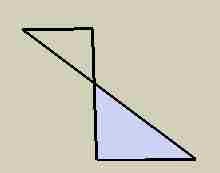
now select all and intersect,
if you delete any side of the empty triangle
the triangular face that has apparently nothing to do
gets deleted too.I think that SU still considers all those edges
as bounding edges of the face.
SU still considers all the edges as a single polygon
that just happens to have a point that gets used twice.
Try for instance to place the point you moved to its initial position
and then select the face: you'll notice that there is just one face: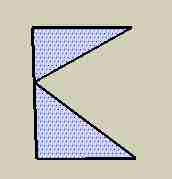
hope this helps somehow.



Hello! It looks like you're interested in this conversation, but you don't have an account yet.
Getting fed up of having to scroll through the same posts each visit? When you register for an account, you'll always come back to exactly where you were before, and choose to be notified of new replies (either via email, or push notification). You'll also be able to save bookmarks and upvote posts to show your appreciation to other community members.
With your input, this post could be even better 💗
Register Login


Advertisement