PLEASE HELP
-
guys you know what would be super awesome... like those set of surface tools... but maybe for say move. You make a box and you want to put it on a curved surface. So activating this tool you move the box to the surface and it snaps BAM, the base of the box sits on the surface, now if you move it ANYWHERE on that surface.. it still snape to it untill you click again to release it. Im drooling over my dreams here hee hee

-
Dear Silver_shadow,
Could you post the skippy please.
Regards,
Bob -
ok i blew my top for nothing lol. I found out that you draw your rivit first,on a surface...them you move it to the surface you build and it sticks to it like glue perpendicular to it, only downfall is you need to place that manually
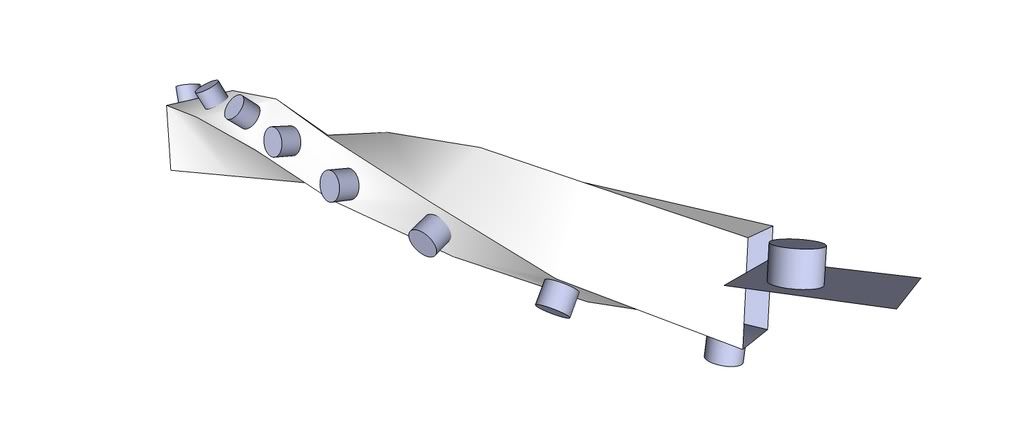
-
cool, didn't know that SU can do that by itself.
@silver_shadow said:
guys you know what would be super awesome... like those set of surface tools... but maybe for say move.
and here we are again with the idea of this overall "OnSurface-Toggle-Button" that switches all the native SketchUp tools to an OnSurface mode (all the tools like, line, circle, rectange, polygon, even push/pull (which is basically the jpp script), and now move, rotate, scale too (with array-capability))
-
what does line-projection do? I am not familiar with it. what is the difference to the drape-tool?
-
its a set of tool called projection
i only like the last one the most..usefulldoing glass balaustrades ect.
you just need a line...click on the tool and specify where the line needs to be extruded...very simple and effective tool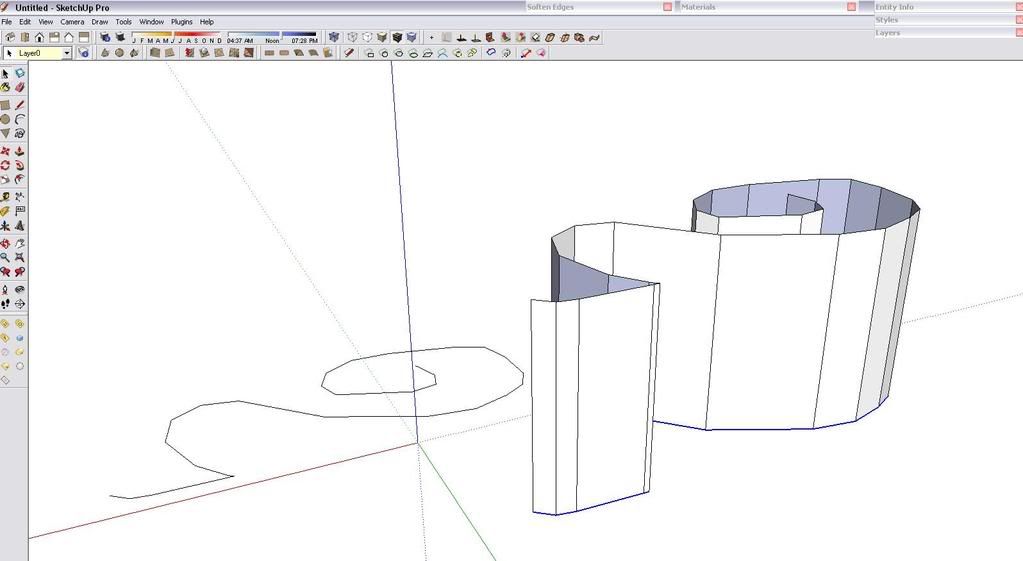
-
ah, I see. so it has the same functionality as the "extrude line" script (which I use).
still have the dream for SU7, that you simply select the lines and then use the push/pull tool to extrude them... -
@silver_shadow said:
guys you know what would be super awesome... like those set of surface tools... but maybe for say move. You make a box and you want to put it on a curved surface. So activating this tool you move the box to the surface and it snaps BAM, the base of the box sits on the surface, now if you move it ANYWHERE on that surface.. it still snape to it untill you click again to release it. Im drooling over my dreams here hee hee
A small issue is how you fit the planarbase face of your box on a curvedsurface. Would it be an 'intersection', or would it go 'through' the surface?
Fredo
-
@silver_shadow said:
ok i blew my top for nothing lol. I found out that you draw your rivit first,on a surface...them you move it to the surface you build and it sticks to it like glue perpendicular to it, only downfall is you need to place that manually
For the life of me I can't reproduce this. I am trying to put windows into a sloped and curved face as in the example here. Would really love to know the trick to this.
-
-
from my side, the technique i used will prob not work what you want to do.
See if you make a face (not grouped) and build a thing on it you want to use to put on a sloped surface, copy the new element you made and paste it on a sloped face.It will connect to the sloped face. If you do a sphere, and want to put a window on it, it wont work like youve planned. It choose a face and snap to that, and not cut into the full area you want it to cut into. I cant go into the link that was posted, so i cant comment on that, but, other solution is...yea it is the long way, to intersect a block into the curved surface, take the cutted face and use a plugin called push pull along a vector, and do a setback, and build your window in that. So yea, seems like a bit of a dead end and ong way to do it, so hopefully the link might help you.
-
yea im doing a high poly model at the moment, but without his tools, this would have been such an headache to do cool stuff.
My most favourite tool ive got in my collection is:
This tools on surface,havent used sub divide a lot, dont really like it that much,
joint push pull, vector push pull.
and another cool tool is line projectionThose ones i use SO much, i kinda think my sketchup will be boring without it.
-
@unknownuser said:
@unknownuser said:
I can't reproduce this
Maybe this script can help you

How does a follow path tool like that possibly help me put objects on a curved face?
NM, I found a way by making my object a component and set it to snap to any surface.




Advertisement