Computer cleaning
-
@glenn said:
How often do you remove the case & dust inside your computer?
I've aligned my PC cleaning regime with Haley's Comet.
-

I try to do mine every other month or so... I guess I need to do it soon.
-
I tend to do mine whene ever i can be bothereed really, so every few months i suppose.
On a slightly related note, my friend didnt clean his for 3-4 years, when i went to clean out their old graphics card their were solid lumps of 'dust'.
-
Everytime I smell something melting in there - or when the computer slows down. Whichever comes first! That works out to about once a year. Not good since the tower is sitting on the floor that only gets a vacuum once-a-week.
I know - I know - I should clean the case (and the floor) more frequently. I also shouldn't have the case on the floor and I should exercise more and drink less. I know - I know.
-
I clean my Notebook every 2 weeks. After every cleaning there is a noticeably faster spindown of the ventilators after a hot job. But take care not to let fans spin from the airflow of the vacuum cleaner or the compressor(<-my preferred method). The induced tension may damage some parts on the board...
Happy cleaning
Marne -
every time I get a new piece of hardware, I open my computer. is is allways a shock and I promise myself to clean it properly soon, then take out the grown dust carpets, put them to the used clothes collection pile and start testing the new hardware...

I know, I should exercise a bit more discipline with my new laptop (going to arrive in a view days
 )
)
by the way: how do you clean your notebook, marne? you don't actually open it, do you? -
Its easy Jakob,
only every second time i open the nb. Mine has two clips below the display, if i release them i get direct access to the fans and could clean them without screwing around. But i think there are not much nbs which make it so easy to the user.
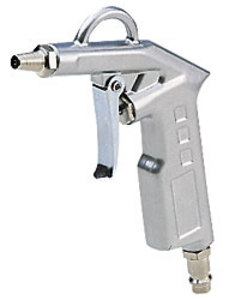
The other times i just use a compressor with a kind of pistol (like the one in the attachment). This makes the cleaning procedure very comfortable and you can see the dusty-loads streaming out of the ventilation slots when pressing the air through the nbcough. It only takes a few seconds.
But be aware: first as already said, you have to avoid that the fans start spinning from the airflow (i use a bend up paper clip for fixing), because they will generate electricity that may blow up some sensitive parts on your mainboard! Your computer won't be the first one, died on a cleaning. And second you may take care that this strong air-beam(?) doesn't hit the fixed fan directly - it may buckle the shaft drive.Try to monitor the temperatures of your components if you don't already do this. I use this one http://www.pbus-167.com/ or speedfan.
You may compare the temps while working with it now (brand new ) and after 4 weeks of usage. For me it makes a 5°C difference while rendering f.e. (CPU around 73°C before and 68°C after cleaning while running on 2 of 2 cores, nevertheless both temps are way too hot
  ).
).for a cleaner environment

-
I know, I know; I only wear one pair of shoes, and that for a whole year!
this post would have slipped my attention in another thread in the corner barcould someone remove this spam-bot?
-
done! i deleted the post

-
thanks, Eeva.
somehow they seem to have found a small hole in the defence the last days -
Well, anyone can find those holes (called 'registration') but as I see the team never leaves a spammer to me (if you knew what a nice feeling is to press the 'Ban' button on them)




Hello! It looks like you're interested in this conversation, but you don't have an account yet.
Getting fed up of having to scroll through the same posts each visit? When you register for an account, you'll always come back to exactly where you were before, and choose to be notified of new replies (either via email, or push notification). You'll also be able to save bookmarks and upvote posts to show your appreciation to other community members.
With your input, this post could be even better 💗
Register Login


Advertisement