sketchucation logo sketchucation
    • 登入
    Oops, your profile's looking a bit empty! To help us tailor your experience, please fill in key details like your SketchUp version, skill level, operating system, and more. Update and save your info on your profile page today!
    🔌 Smart Spline | Fluid way to handle splines for furniture design and complex structures. Download

    [Plugin] Align tool 3D (bug fix)

    已排程 已置頂 已鎖定 已移動 Plugins
    58 貼文 38 Posters 144.7k 瀏覽 38 Watching
    正在載入更多貼文
    • 從舊到新
    • 從新到舊
    • 最多點贊
    回覆
    • 在新貼文中回覆
    登入後回覆
    此主題已被刪除。只有擁有主題管理權限的使用者可以查看。
    • john2J 離線
      john2
      最後由 編輯

      couldn't understand 4m the pdf. 😞 is there any video tutorial 😒

      Sketchup Make 2017 (64-bit), Vray 4.0 , Windows 10 – 64 bit, corei7-8750H, 16GB RAM, Nvidia GeForce GTX 1050Ti 4GB

      1 條回覆 最後回覆 回覆 引用 0
      • Didier BurD 離線
        Didier Bur
        最後由 編輯

        Yes here: http://sketchuppluginreviews.com/2010/06/01/align-tool-google-sketchup-plugin-review-2/

        Google is your friend 😉

        DB

        1 條回覆 最後回覆 回覆 引用 0
        • kenK 離線
          ken
          最後由 編輯

          @didier bur said:

          Yes here: http://sketchuppluginreviews.com/2010/06/01/align-tool-google-sketchup-plugin-review-2/

          Google is your friend 😉

          Didier

          Not asking anything to be changed, however it took me some time to determine that what you call the "X axis" and "Y axis" can be any particular orientation. I was always trying to determine what the "X and Y axis" were while using the plugin. Lead to much frustration.

          I always wanted to be able to get inside the plugin and change the "X" to "1" and the "Y" to "2". To me that would have been more logical to remember, I wanted the "1's" and "2's" to align with each other.

          Thank you for your contribution.

          Ken

          Fight like your the third monkey on Noah's Ark gangway.

          1 條回覆 最後回覆 回覆 引用 0
          • Didier BurD 離線
            Didier Bur
            最後由 編輯

            Hi Ken,
            You can also think that X represent the red axis, Y the green axis, just as when you locate/translate/rotate the SU axis system.

            DB

            1 條回覆 最後回覆 回覆 引用 0
            • R 離線
              raineysky
              最後由 編輯

              Ken,

              👍

              I really like your idea too because I'm not use to the "x,y,z" language yet. Just now getting orientated in the 3d space 😄

              Thank You for the plugin Mr. Didier Bur.

              1 條回覆 最後回覆 回覆 引用 0
              • K 離線
                kevinbearshu
                最後由 編輯

                Thank you very mach!

                1 條回覆 最後回覆 回覆 引用 0
                • W 離線
                  wodur
                  最後由 編輯

                  it's an impressive plugin, almost equal to the Autocad's align tool. Autocad can scale the objet as it aligns, is it possible to do that with this plugin?
                  Thanks for your work, all of you are making sketchup a very advanced tool.

                  1 條回覆 最後回覆 回覆 引用 0
                  • S 離線
                    seebe
                    最後由 編輯

                    Thank you so much for this tool. You have saved me so much time.

                    1 條回覆 最後回覆 回覆 引用 0
                    • Didier BurD 離線
                      Didier Bur
                      最後由 編輯

                      @seebe: you're welcome

                      DB

                      1 條回覆 最後回覆 回覆 引用 0
                      • T 離線
                        Trogluddite
                        最後由 編輯

                        D'oh moment for me! 😳
                        I spent so long trying to align things using the rotate/protractor tools - when all I needed to do was type "Align" into the search box and intall this super plugin!

                        Many thanks Didier, you have made my Sketchuping so much easier!

                        1 條回覆 最後回覆 回覆 引用 0
                        • B 離線
                          bonzi_ses
                          最後由 編輯

                          Thank you very mauch

                          1 條回覆 最後回覆 回覆 引用 0
                          • Z 離線
                            ZyberCool
                            最後由 編輯

                            thanks bro..

                            1 條回覆 最後回覆 回覆 引用 0
                            • R 離線
                              redgray
                              最後由 編輯

                              i like align tool just like in autocad command, thanks a lot for this tool.

                              1 條回覆 最後回覆 回覆 引用 0
                              • D 離線
                                desunvn
                                最後由 編輯

                                @didier bur said:

                                Hi,
                                Here is an updated version of my align tool with a bug fix (components were deformed when non orthogonal axis were clicked). User guide also added.
                                Regards,

                                thank for sharing

                                1 條回覆 最後回覆 回覆 引用 0
                                • R 離線
                                  rv1974
                                  最後由 編輯

                                  Didier, could you please add 'multiple copy' and 'preserve original instance' options (may be with say CNTRL key pressed once)?
                                  P.S. I hope I post in the right topic: is it Tools\Align command?
                                  (Align, align tool, align 2D, align 3D.. I'm confused a bit).

                                  1 條回覆 最後回覆 回覆 引用 0
                                  • irwanwrI 離線
                                    irwanwr
                                    最後由 編輯

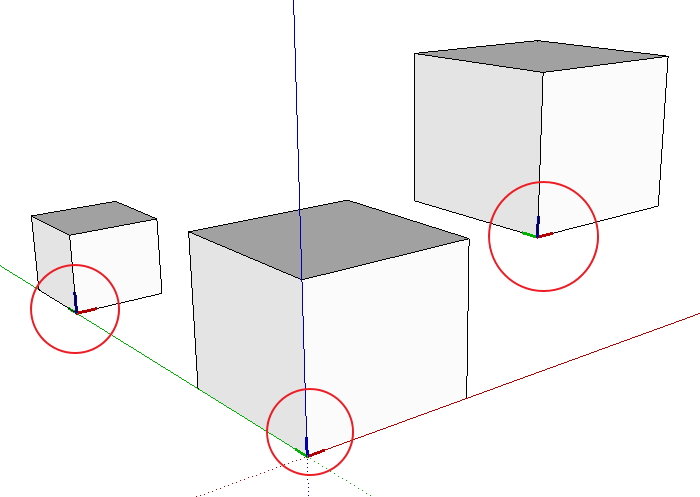
                                    Anyone experienced groups/components axes that cannot be hidden or erased?
                                    I've this plugin for quite long. But lately just realise that axes cannot be hidden or removed from the groups/components on the screen.
                                    How should i clear those axes after aligning groups/components?
                                    Thank you.

                                    align plugin test.jpg

                                    1 條回覆 最後回覆 回覆 引用 0
                                    • cottyC 離線
                                      cotty
                                      最後由 編輯

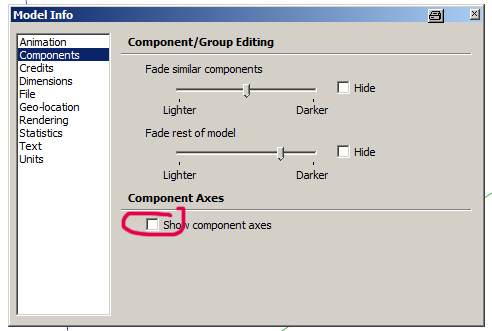
                                      You can change the visibility of the component axes here:

                                      caxes.jpg

                                      my SketchUp gallery

                                      1 條回覆 最後回覆 回覆 引用 0
                                      • irwanwrI 離線
                                        irwanwr
                                        最後由 編輯

                                        I forgot to check that 😳
                                        Checked Window - Preference only several times.
                                        Seems that I forgot how to read and use SketchUp.

                                        Thanks a lot, Cotty.

                                        1 條回覆 最後回覆 回覆 引用 0
                                        • J 離線
                                          JPC2j3
                                          最後由 編輯

                                          I recently down loaded and installed the plug-in in the zip file. I have been experimenting with the plug-in to learn how it works. When I try to use the tool, my SketchUp crashes every time. Let me explain as best as I can what happens.
                                          I create two objects (usually two cubes or rectangles; I’m just experimenting). I pick a corner of one object and create an X and Y axis (should there be a Z axis showing at this point?). When I try to connect the origin point of the first object to the corner of the second object, I get a crash.
                                          I have viewed the training video numerous times so I believe I am using the plug-in correctly. I’m seeking some help in understanding what I am doing wrong.
                                          Thanks

                                          1 條回覆 最後回覆 回覆 引用 0
                                          • robertWanR 離線
                                            robertWan
                                            最後由 編輯

                                            Could you add an option to copy (Ctrl) for plugin ALIGN 3D? Now objects are moved.

                                            Robert

                                            1 條回覆 最後回覆 回覆 引用 0
                                            • 1
                                            • 2
                                            • 3
                                            • 2 / 3
                                            • 第一個貼文
                                              最後的貼文
                                            Buy SketchPlus
                                            Buy SUbD
                                            Buy WrapR
                                            Buy eBook
                                            Buy Modelur
                                            Buy Vertex Tools
                                            Buy SketchCuisine
                                            Buy FormFonts

                                            Advertisement



