Message for Fredo6
-
Dear Frodo6,
I have downloaded your XraySelection script, but cannot work out how to toggle between the X-ray and plain texture modes. Would you please explain how to do this. This script would be even more useful with a toolbar icon as I often need to use X-ray mode when aligning groups and/or components.
Kind regards,
Bob
-
For toggling, just recall the menu, without selection.
For the icon, I remember I have published an ugly one, with name IconXraySelection.png.
If you can't find it, create whatever icon with this name and it should appear in the toolbar.If this script is useful, then I may document it and release it properly (and add an option for wireframe as well).
Fredo
-
Watkins:
You can try Jim Foltz's Custom Toolbar:
http://sketchuptips.blogspot.com/2008/05/custom-toolbars-beta-1.html?showComment=1214692860000After installing it you can copy the below txt file into the Plugins\Toolbars directory.
It includes an Xray toggle:Color Display.txtYou can edit the .txt file to delete out icons don't want to use (even rename it).
-
Dear Fredo,
Would you please post your ugly icon as I have no idea how to make one. A possible icon might be a cube with the surfaces of the top half shown as one colour (say a light magenta) and the surfaces of the bottom half in plain texture, the colours being split about the mid horizontal plane. The edges of the upper half could also be a little heavier or shown through the surfaces (wireframe isometric). I will let you know how I get on with the script, but initial thoughts suggest a user selected transparency would be a nice extra feature (perhaps through a double click action on the icon).
Dear John (?),
I have been considering downloading Jim Foltz's Custom Toolbar, but have been concerned that I might make a mess of what is currently a stable and usable configuration. I will hold off on that one for a while, but thank you for your interest.
Kind regards,
Bob -
Here is one, very ugly.
Just drop it in the Plugins folder and it should appear in the toolbar when you restart Sketchup.
By the way, the script keeps memory of the selection, so that you can toggle between Xray and Plain as you wish after you made the initial selection.

-
Dear Fredo,
Thank you for the icon. I will try out the script with some construction work and see how I get on. Presumably, I can go into the script and change the transparent factor from 0.25 to some other factor. The colour of the ghost surfaces looks to be the default front colour. Can it be set to the default back colour, or some other colour?
Thanks once again.
Regards,
Bob -
Dear Fredo,
A few observations:
It is very useful for illustrations (see the attached), and for checking alignment.
Unlike the X-Ray face setting style, one cannot work inside the component/group when using this script. For example, the line tool detects the outer surface of the component/group and won't allow the selection of internal points.
If you select a second component/group while the first is still transparent then the script will make the second component/group transparent too, but you can only toggle the last selected group between the X-ray and plain view modes. It 'forgets' about the first group and one has to use undo to reset the first back to plain view.
If the component/group is textured first (painted blue say) the x-ray view will be shown with tinted transparent surfaces (see the attached), but when the script is toggled to get back the plain view all the textures are replaced with the default front face material (white).
Regards,
Bob
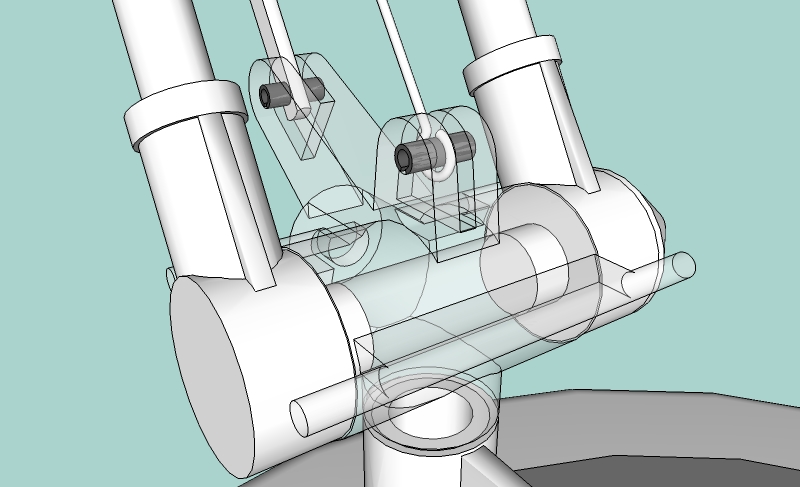
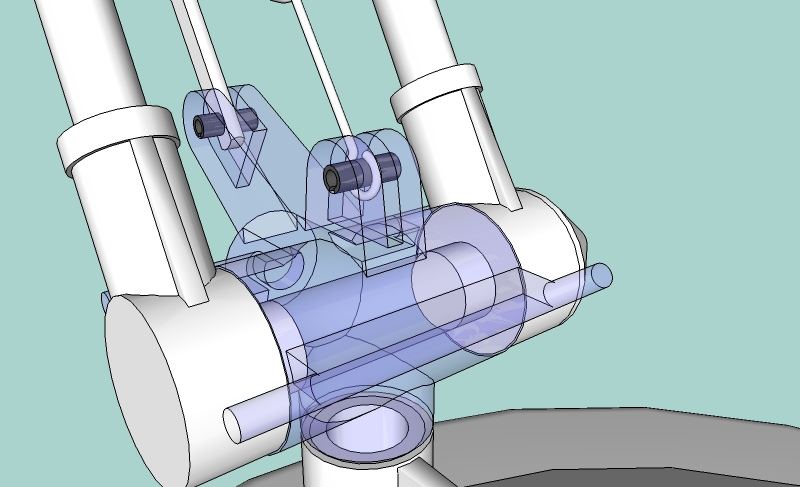
-
Watkins,
This script was written in one hour for someone who asked for this in the French section of the forum (the idea was just to Xray a selection). So, it is not polished and there is no documentation. True, the current version only handle one selection, as the objective was mainly to generate pictures from the model.
However, if you think it is useful, I can pour more time into it and come up with something that would be more useful and handle many selections.
In your case, I simply recommend you restore the model and then select your two components.
Also, note that I found no way to Xray bitmap textures (as the Ruby API does not give the capability to duplicate textures!). The bitmap texture does not appear when Xrayed.
Fredo
-
Dear Fredo,
I like your script very much, and my observations were merely 'thinking aloud' and a way of passing on to others the functionality of your script. I'm not sure that you should spend more time on this script as its primarily an aid to visualisation. My wish would be to work inside the x-rayed component so that I could add alignment features etc, but I can do this using Sketchup's native x-ray face style, albeit having to x-ray the whole model.
Thank you for all your efforts.
Kind regards,
Bob -
Hi Fredo6
xrayselection is a big help - it would be great to add your xrayselection-icon to my Toolbar - but how or where can it be downloaded ??
thanks again for xrayselection
Uli

-
It's a couple of posts up, Fredo attached it to a post.
-
Hi fredo6, can u update XRaySelection ? ty !



Hello! It looks like you're interested in this conversation, but you don't have an account yet.
Getting fed up of having to scroll through the same posts each visit? When you register for an account, you'll always come back to exactly where you were before, and choose to be notified of new replies (either via email, or push notification). You'll also be able to save bookmarks and upvote posts to show your appreciation to other community members.
With your input, this post could be even better 💗
Register Login


Advertisement