sketchucation logo sketchucation
    • Anmelden
    Oops, your profile's looking a bit empty! To help us tailor your experience, please fill in key details like your SketchUp version, skill level, operating system, and more. Update and save your info on your profile page today!
    ⚠️ Important | Libfredo 15.6b introduces important bugfixes for Fredo's Extensions Update

    [Plugin] Face Flattener 0.19

    Geplant Angeheftet Gesperrt Verschoben Plugins
    50 Beiträge 29 Kommentatoren 55.0k Aufrufe 29 Watching
    Lade mehr Beiträge
    • Älteste zuerst
    • Neuste zuerst
    • Meiste Stimmen
    Antworten
    • In einem neuen Thema antworten
    Anmelden zum Antworten
    Dieses Thema wurde gelöscht. Nur Nutzer mit entsprechenden Rechten können es sehen.
    • D Offline
      dylan
      zuletzt editiert von

      Thanks Zack.
      This could prove really useful for the bad AutoCad imports I sometimes get.

      http://dmdarchitecture.co.uk/

      1 Antwort Letzte Antwort Antworten Zitieren 0
      • M Offline
        matteo
        zuletzt editiert von

        Thank you. This may become one of the most used scripts in my daily work.

        hire me: http://www.nonsolo3d.it/ !

        1 Antwort Letzte Antwort Antworten Zitieren 0
        • K Offline
          kwistenbiebel
          zuletzt editiert von

          I love the idea!
          Can it also remove the unneeded edges afterwards , so we have clean geometry to push pull?

          1 Antwort Letzte Antwort Antworten Zitieren 0
          • cerevellumC Offline
            cerevellum
            zuletzt editiert von

            No problem, glad it could be useful to some!

            So, in fact there is more functionality to this script, but a lot of the methods are not being used currently. I need to get it up to speed, maybe over the weekend. Basically, if you intersect with model you can erase the inside edges, and I'm working on getting them to remove automatically. The methods are all in the script, they just need to be called, and in the right order (what I have been struggling with).

            Anyway, feel free to play around with the script. I'll do my best to update it, too.

            Thanks again,
            Zach

            1 Antwort Letzte Antwort Antworten Zitieren 0
            • Mike LuceyM Offline
              Mike Lucey
              zuletzt editiert von

              Thanks Zach,

              This looks like the Ruby that we talked about at the
              Hotel Avante, very useful indeed.

              Be sure to get your Avatar up there soon and don't be
              a stranger 😄

              Best,

              Mike

              Support us so we can support you! Upgrade to Premium Membership!

              1 Antwort Letzte Antwort Antworten Zitieren 0
              • RayOchoaR Offline
                RayOchoa
                zuletzt editiert von

                Dang, Sketchup is starting to look more and more like CAD programs like Wings3d and Rhino. he he its going to end up as complicated too. All it needs now is faster control over high poly models

                CaR DeSiGnS bY mE
                http://ray-ochoa.com

                1 Antwort Letzte Antwort Antworten Zitieren 0
                • R Offline
                  rv1974
                  zuletzt editiert von

                  @Rayochoa:
                  This is a PLUG-IN. If you don't need it simply don't plug it.
                  IMHO it has a good potential. And if this tool will help me to save a couple of hours per year so why not?

                  1 Antwort Letzte Antwort Antworten Zitieren 0
                  • C Offline
                    cyan.archnet
                    zuletzt editiert von

                    thanks a lot for the plug-in, sure a big help!!

                    1 Antwort Letzte Antwort Antworten Zitieren 0
                    • J Offline
                      Jackson
                      zuletzt editiert von

                      Zach- thanks for this ingenius ruby, can't wait to give it a try!

                      Jackson

                      1 Antwort Letzte Antwort Antworten Zitieren 0
                      • plot-parisP Offline
                        plot-paris
                        zuletzt editiert von

                        nice tool. I am definittely in danger of flattening every model I can lay my hands on (my colleagues won't like that 😉 ).

                        I am looking forward to the "auto-cleanup" version.

                        cheers,

                        Jakob

                        1 Antwort Letzte Antwort Antworten Zitieren 0
                        • RayOchoaR Offline
                          RayOchoa
                          zuletzt editiert von

                          @rv1974 said:

                          @Rayochoa:
                          This is a PLUG-IN. If you don't need it simply don't plug it.
                          IMHO it has a good potential. And if this tool will help me to save a couple of hours per year so why not?

                          I didin't say i didn't like it i said that all these plugins are taking sketchup very far. But hey i like this better, rather than learning everything at the same time little by little is way better

                          CaR DeSiGnS bY mE
                          http://ray-ochoa.com

                          1 Antwort Letzte Antwort Antworten Zitieren 0
                          • RayOchoaR Offline
                            RayOchoa
                            zuletzt editiert von

                            U maybe wan't to take a look at this


                            cleanup.rb

                            CaR DeSiGnS bY mE
                            http://ray-ochoa.com

                            1 Antwort Letzte Antwort Antworten Zitieren 0
                            • MALAISEM Offline
                              MALAISE
                              zuletzt editiert von

                              😄 Thanks a lot

                               What a waste of time I got, trying to understand why theses blood... lines didn't made a surface.
                              

                              friendly 😍 MALAISE
                              ( sorry for my approximative english )

                              La Connaissance n'a de valeur que partagée

                              1 Antwort Letzte Antwort Antworten Zitieren 0
                              • W Offline
                                watkins
                                zuletzt editiert von

                                Dear Ray,

                                I tried out your script on the following simple model.

                                Draw a rectangle, say 100 mm by 100 mm, and then pull it up 10 mm into a 3D shape.
                                Use the move tool to pull up one corner on the top face by 0.1 mm.
                                Draw a few lines on the sides to divide areas into two, and perhaps a few random, un-terminated lines on various surfaces.
                                Select all and run your script.

                                When I do this I lose the top face. Interestingly enough this also happens when I run the script cleanup_model.rb (by John H. Aughey). The script deletecoplanaredges.rb (by Jack Dolabany)removes all redundant co-planar lines, but leaves the top face with its centre fold untouched.

                                I imagine that this is not what you had in mind.

                                Kind regards,
                                Bob

                                1 Antwort Letzte Antwort Antworten Zitieren 0
                                • R Offline
                                  rcossoli
                                  zuletzt editiert von

                                  thanks, will be very useful

                                  THREEDIMENSIONSWEB dot COM

                                  1 Antwort Letzte Antwort Antworten Zitieren 0
                                  • cerevellumC Offline
                                    cerevellum
                                    zuletzt editiert von

                                    Hi Ray and Bob,

                                    This is something I've noticed while working on my flattening script, and I still haven't figured out why it happens. The simplest way of reproducing this is to draw a box, add a rectangle to the top surface and connect it with a line to the outer edge loop. When erasing one of the edges of the rectangle that was added, both faces disappear.
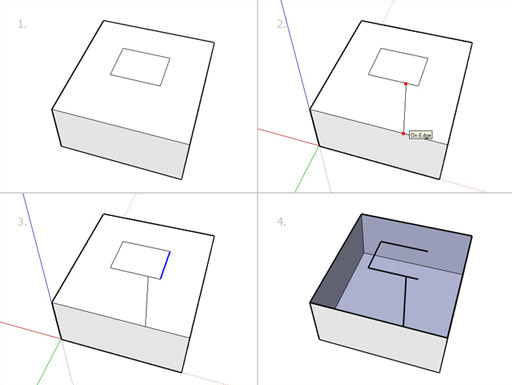
                                    edgeFaceEraseExFinalA.jpg

                                    However, if you were to erase the edge that connects both edge loops first, then you can erase the edges of the inside rectangle just fine. It apparently has to do with the order in which you erase coplanar edges. Delete edges in the following order: edges connected to 0 faces go first, then edges connected to 1 face, and finally edges connected to 2 faces.
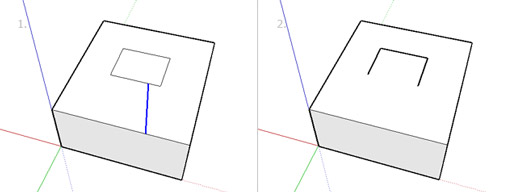
                                    edgeFaceEraseExFinalB.jpg

                                    See ya,
                                    Zach

                                    1 Antwort Letzte Antwort Antworten Zitieren 0
                                    • W Offline
                                      watkins
                                      zuletzt editiert von

                                      Dear Zach,

                                      The script deletecoplanaredges.rb failed your example too, so some recoding is needed to get a more reliable cleanup script.

                                      Regards,
                                      Bob

                                      1 Antwort Letzte Antwort Antworten Zitieren 0
                                      • GaieusG Offline
                                        Gaieus
                                        zuletzt editiert von

                                        @cerevellum said:

                                        Hi Ray and Bob,

                                        This is something I've noticed while working on my flattening script, and I still haven't figured out why it happens. The simplest way of reproducing this is to draw a box, add a rectangle to the top surface and connect it with a line to the outer edge loop. When erasing one of the edges of the rectangle that was added, both faces disappear...

                                        Ha! Beautiful! I love these "glitch hunts". And you cannot even heal the face by redrawing an edge of it until you get rid of the leftover geometry in the middle! 👍

                                        Gai...

                                        1 Antwort Letzte Antwort Antworten Zitieren 0
                                        • W Offline
                                          watkins
                                          zuletzt editiert von

                                          Dear Gaieus,

                                          Perhaps some of our script writers could come up with a more reliable clean-up script.

                                          I note from Zach's example that the line joining the inner and outer loops is bounded by the same area, while the lines forming the inner and outer loops are bounded by different areas. What makes an area/surface unique, and could this be used to decide on the order of line removal? At least deletecoplaredges.rb leaves the centre fold line in an non-coplanar surface alone, and so perhaps this would be the script to start with. A nice icon would not go amiss, say an image of a few random, crossed lines.

                                          Kind regards,
                                          Bob

                                          1 Antwort Letzte Antwort Antworten Zitieren 0
                                          • GaieusG Offline
                                            Gaieus
                                            zuletzt editiert von

                                            Bob, Zach,

                                            I have a script that creates a menu item "Remove unused edges" in the Edit menu (for the life I cannot locate the script anywhere to see the file name of it). Using the script it also deletes the top surface (so the order it deletes the lines must be wrong as well).

                                            I have noticed a couple of times that using it leads me to lose a coupleof faces (especially after complex, curved intersections).


                                            Gai...

                                            1 Antwort Letzte Antwort Antworten Zitieren 0
                                            • 1
                                            • 2
                                            • 3
                                            • 3 / 3
                                            • Erster Beitrag
                                              Letzter Beitrag
                                            Buy SketchPlus
                                            Buy SUbD
                                            Buy WrapR
                                            Buy eBook
                                            Buy Modelur
                                            Buy Vertex Tools
                                            Buy SketchCuisine
                                            Buy FormFonts

                                            Advertisement