Layout Standard templates...
-
Hey Guys,
just wondering if you have experienced this issue:
I have created my custom template and set it as my default in 'preferences' but now the standard layout options [A4 / A3 / etc] that were loaded with the program are nowhere to be seen!!!Any ideas?
Cheers,
-
Are you on mac or PC?
On mac under preferences/startup I have three options
- Prompt for Template
- Blank Template
- Use Selected Template
Maybe you have third option checked instead of first?
-
neither in the Document Set up ?
think it happened to me too.
you´ll have to refrain your template

-
thanks David, PC.
Juan, refrain your template? please explain!!!
thanks for your input.
-
Edit -> Preferences on Mac or PC are to change the template. To go around having a template selected and pick a new one just for one time, choose File->New from Template. This menu item doesn't appear if you have a default template selected.
Barry
-
erps, obviously on Mac it's LayOut->Preferences or cmd-, like all Mac apps.
Barry
-
Cant it be done bjanzen ?
-
Thanks Barry for your help.
The problem that i have is this, I have created a custom template but at times I want to use a standard A3 or A4 blank page. As you can see by the attached screen shot the standard templates that came with the program can not be found.....thanks in advance...
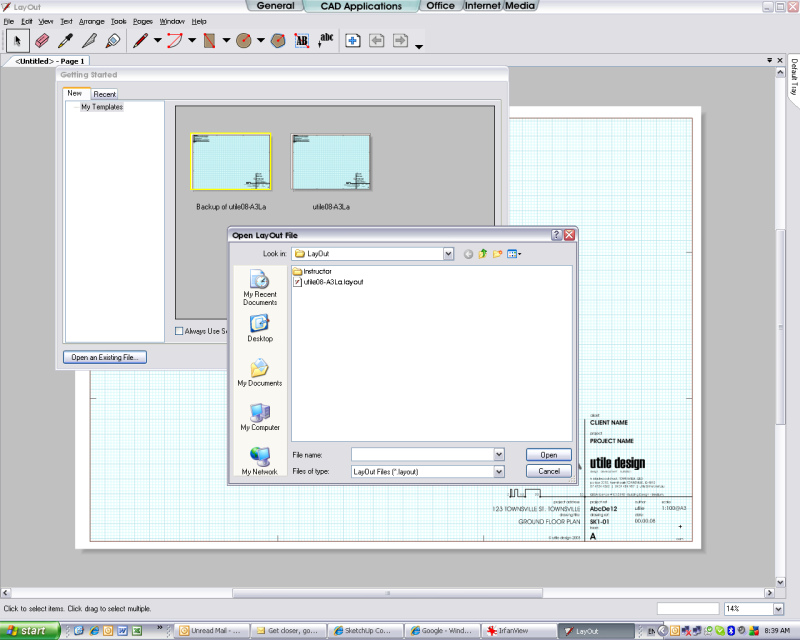
-
In LO Preferences->Folders, do you have
C:\Documents and Settings\All Users\Application Data\Google\Google SketchUp 6\LayOut\Templates
in the list of dirs to look for templates? -
Sorry jhauswirth, I've been away for a few days; will check my office machine in the morning when I'm back in the office.....
Cheers


Hello! It looks like you're interested in this conversation, but you don't have an account yet.
Getting fed up of having to scroll through the same posts each visit? When you register for an account, you'll always come back to exactly where you were before, and choose to be notified of new replies (either via email, or push notification). You'll also be able to save bookmarks and upvote posts to show your appreciation to other community members.
With your input, this post could be even better 💗
Register Login


Advertisement