sketchucation logo sketchucation
    • Login
    Oops, your profile's looking a bit empty! To help us tailor your experience, please fill in key details like your SketchUp version, skill level, operating system, and more. Update and save your info on your profile page today!
    Mac User? | Join the Rayscaper Beta for Mac Learn More

    [Plugin] Round Edge - v1.0 (by Bezier)

    Scheduled Pinned Locked Moved Plugins
    166 Posts 83 Posters 184.8k Views 83 Watching
    Loading More Posts
    • Oldest to Newest
    • Newest to Oldest
    • Most Votes
    Reply
    • Reply as topic
    Log in to reply
    This topic has been deleted. Only users with topic management privileges can see it.
    • RayOchoaR
      RayOchoa
      last edited by

      @borgman said:

      Allright, I have this BIG model (6.79mb per half) on which I want to unleash the tool. Will the filesize (and thus the controlability) suffer under it when I do so? Attached is a screencap of the model. Note that it's only half of it, and that the bridge and nacelles are addad after I'm done, which would mean a further increase in filesize. Next to that, it's probable that I will be deleting some of it's interior (yeah, it's got interior, I went completely nuts with it) to tone down the filesize.

      So, people have been saying that adding a bevel to the model would be wise. But would it be in this case? Or would the model become uncontrolable? Some advice would be appreciated πŸ˜„

      Is each half of your model a component? If not that may be why your model is suffering the big file[ness]

      CaR DeSiGnS bY mE
      http://ray-ochoa.com

      1 Reply Last reply
      Reply Quote 0
      • K
        ken114
        last edited by

        thank you fred,i am a student from china.and my english is not good enough to understand all of you said,anyway after some try,i found someway to use it
        coooooooooool πŸ˜„

        1 Reply Last reply
        Reply Quote 0
        • V
          Vicspa
          last edited by

          GREAT Plug-in Thanks

          1 Reply Last reply
          Reply Quote 0
          • thomthomT
            thomthom
            last edited by

            I was sitting yesterday with a model where I wanted to bevel the edges, but follow me wasn't very practical due to to complex shape. Then I happen to come across this plugin today. It did the job great. Only had to clean up two vertexes. Now I got a nice edge which picks up the highlights when I render in V-Ray. πŸ˜„

            Love your work man.

            Thomas Thomassen β€” SketchUp Monkey & Coding addict
            List of my plugins and link to the CookieWare fund

            1 Reply Last reply
            Reply Quote 0
            • thomthomT
              thomthom
              last edited by

              One feature request: Allow the operation to be undone.

              Thomas Thomassen β€” SketchUp Monkey & Coding addict
              List of my plugins and link to the CookieWare fund

              1 Reply Last reply
              Reply Quote 0
              • fredo6F
                fredo6
                last edited by

                Unfortunately, the only thing you can do today is to 'UNDO' right after the operation.

                But your idea is interesting, assuming the development of another macro, say, SharpEdges, where you would select the side faces and then asks for joining them (as plane intersection), removing any round junctions.

                1 Reply Last reply
                Reply Quote 0
                • B
                  BorgMan
                  last edited by

                  RayOchoa, I didn't make eacht half a component because I wanted to delete each and every line that is a result of pasting the two halves together and because of some non-symetrical parts. It's all done now, with the model being 20.9MB, but she renders quite nice πŸ˜‰

                  Fredo, do you have paypal? I would like to make a small contribution for your efforts πŸ˜„

                  More varied than the Borg, more powerful than the living dead, and better shots than Imperial Stormtroopers.

                  You've gotta love Slivers.

                  1 Reply Last reply
                  Reply Quote 0
                  • T
                    tomot
                    last edited by

                    Fredo! This is a great script. I really thought I could get along without it,
                    boy was I wrong!

                    my plugins
                    tomot

                    1 Reply Last reply
                    Reply Quote 0
                    • thomthomT
                      thomthom
                      last edited by

                      @unknownuser said:

                      Unfortunately, the only thing you can do today is to 'UNDO' right after the operation.

                      But your idea is interesting, assuming the development of another macro, say, SharpEdges, where you would select the side faces and then asks for joining them (as plane intersection), removing any round junctions.

                      If I undo right after the operation it only undo each drawing operation the script did. I'd have to press undo many times to restore the mesh.

                      Thomas Thomassen β€” SketchUp Monkey & Coding addict
                      List of my plugins and link to the CookieWare fund

                      1 Reply Last reply
                      Reply Quote 0
                      • GaieusG
                        Gaieus
                        last edited by

                        Copy the mesh before and if you don't like the result, just delete it and paste the original in place (of course it's just a workaround but in case it is not programmable...)

                        Gai...

                        1 Reply Last reply
                        Reply Quote 0
                        • fredo6F
                          fredo6
                          last edited by

                          @thomthom said:

                          If I undo right after the operation it only undo each drawing operation the script did. I'd have to press undo many times to restore the mesh.

                          Do you mean that each Undo will cancel a call to the Round Edge script, or that you need several Undos for a single Round Edge operation ? (in this latter case, this is strange, because I don't have the problem).

                          Thanks to advise

                          Fredo

                          1 Reply Last reply
                          Reply Quote 0
                          • fredo6F
                            fredo6
                            last edited by

                            @borgman said:

                            RayOchoa, I didn't make eacht half a component because I wanted to delete each and every line that is a result of pasting the two halves together and because of some non-symetrical parts. It's all done now, with the model being 20.9MB, but she renders quite nice πŸ˜‰

                            Fredo, do you have paypal? I would like to make a small contribution for your efforts πŸ˜„

                            Thanks very much for your appreciation of the script, and for your intention to reward the effort. I am not familiar with Paypal, but I do have an account at my email address fredosix@hotmail.com. Don't feel obliged, I am glad already with your kind recognition!

                            Fredo

                            1 Reply Last reply
                            Reply Quote 0
                            • K
                              KustuRA
                              last edited by

                              thank you!

                              1 Reply Last reply
                              Reply Quote 0
                              • C
                                CeBe
                                last edited by

                                That's great! Thank you Sir! πŸ˜„

                                1 Reply Last reply
                                Reply Quote 0
                                • A
                                  ar_angle
                                  last edited by

                                  Nice! Thanks!

                                  1 Reply Last reply
                                  Reply Quote 0
                                  • thomthomT
                                    thomthom
                                    last edited by

                                    @unknownuser said:

                                    @thomthom said:

                                    If I undo right after the operation it only undo each drawing operation the script did. I'd have to press undo many times to restore the mesh.

                                    Do you mean that each Undo will cancel a call to the Round Edge script, or that you need several Undos for a single Round Edge operation ? (in this latter case, this is strange, because I don't have the problem).

                                    Thanks to advise

                                    Fredo

                                    It was the latest V-Ray for SketchUp 1.00.74 that interfered with the undo. Using the original VfSU the Round Edge operation could be undone as expected. With the latest VfSU undoing would undo each step of the script operations one by one.

                                    Thomas Thomassen β€” SketchUp Monkey & Coding addict
                                    List of my plugins and link to the CookieWare fund

                                    1 Reply Last reply
                                    Reply Quote 0
                                    • P
                                      Pico
                                      last edited by

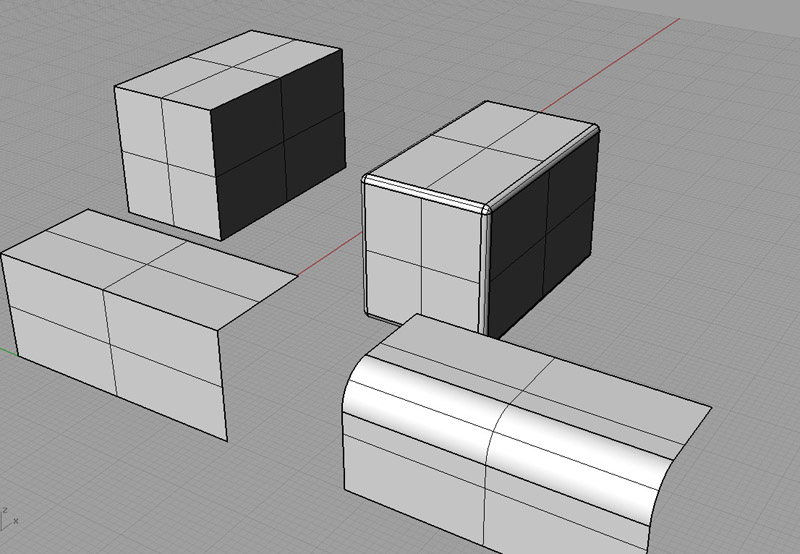
                                      SOrry for interupting but can this be done with this ruby from Fredo?
                                      I see only that corner problem (cube) thats stays sharp, has this been done?

                                      fillet.jpg

                                      1 Reply Last reply
                                      Reply Quote 0
                                      • free agentF
                                        free agent
                                        last edited by

                                        this has been an issue for me using this script too, the corners are sharp and not rounded

                                        http://i167.photobucket.com/albums/u143/FreeAgent84/bug.gif

                                        1 Reply Last reply
                                        Reply Quote 0
                                        • P
                                          Pico
                                          last edited by

                                          Then its still not fixed?
                                          One question more, can you control number of faces that will be created, like e.g. if you want to fillet an edge between 2 surfaces, can you control how many faces (3 or 4 or 5 or 10...) will make that new "smooth" egde.

                                          1 Reply Last reply
                                          Reply Quote 0
                                          • free agentF
                                            free agent
                                            last edited by

                                            yes

                                            http://i167.photobucket.com/albums/u143/FreeAgent84/bug.gif

                                            1 Reply Last reply
                                            Reply Quote 0

                                            Hello! It looks like you're interested in this conversation, but you don't have an account yet.

                                            Getting fed up of having to scroll through the same posts each visit? When you register for an account, you'll always come back to exactly where you were before, and choose to be notified of new replies (either via email, or push notification). You'll also be able to save bookmarks and upvote posts to show your appreciation to other community members.

                                            With your input, this post could be even better πŸ’—

                                            Register Login
                                            • 1
                                            • 2
                                            • 3
                                            • 4
                                            • 5
                                            • 6
                                            • 7
                                            • 8
                                            • 9
                                            • 4 / 9
                                            • First post
                                              Last post
                                            Buy SketchPlus
                                            Buy SUbD
                                            Buy WrapR
                                            Buy eBook
                                            Buy Modelur
                                            Buy Vertex Tools
                                            Buy SketchCuisine
                                            Buy FormFonts

                                            Advertisement