Custom shortcut cheatsheet
-
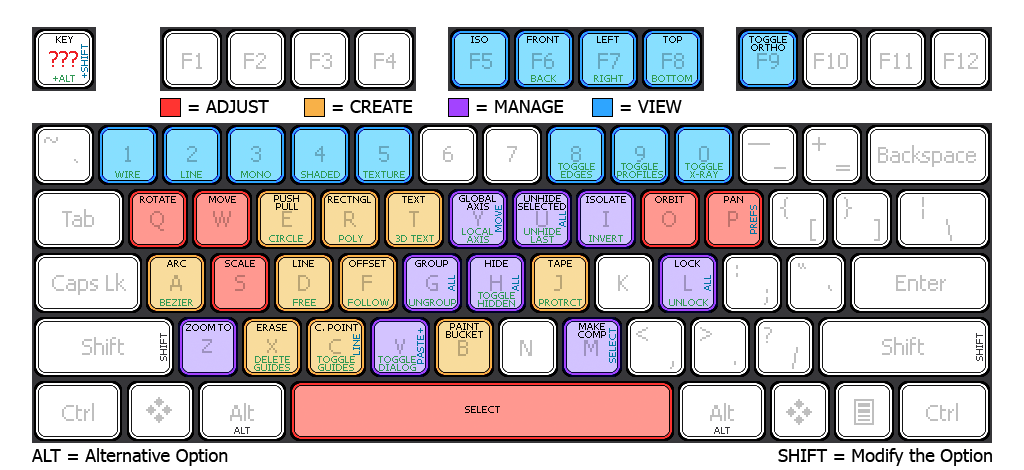
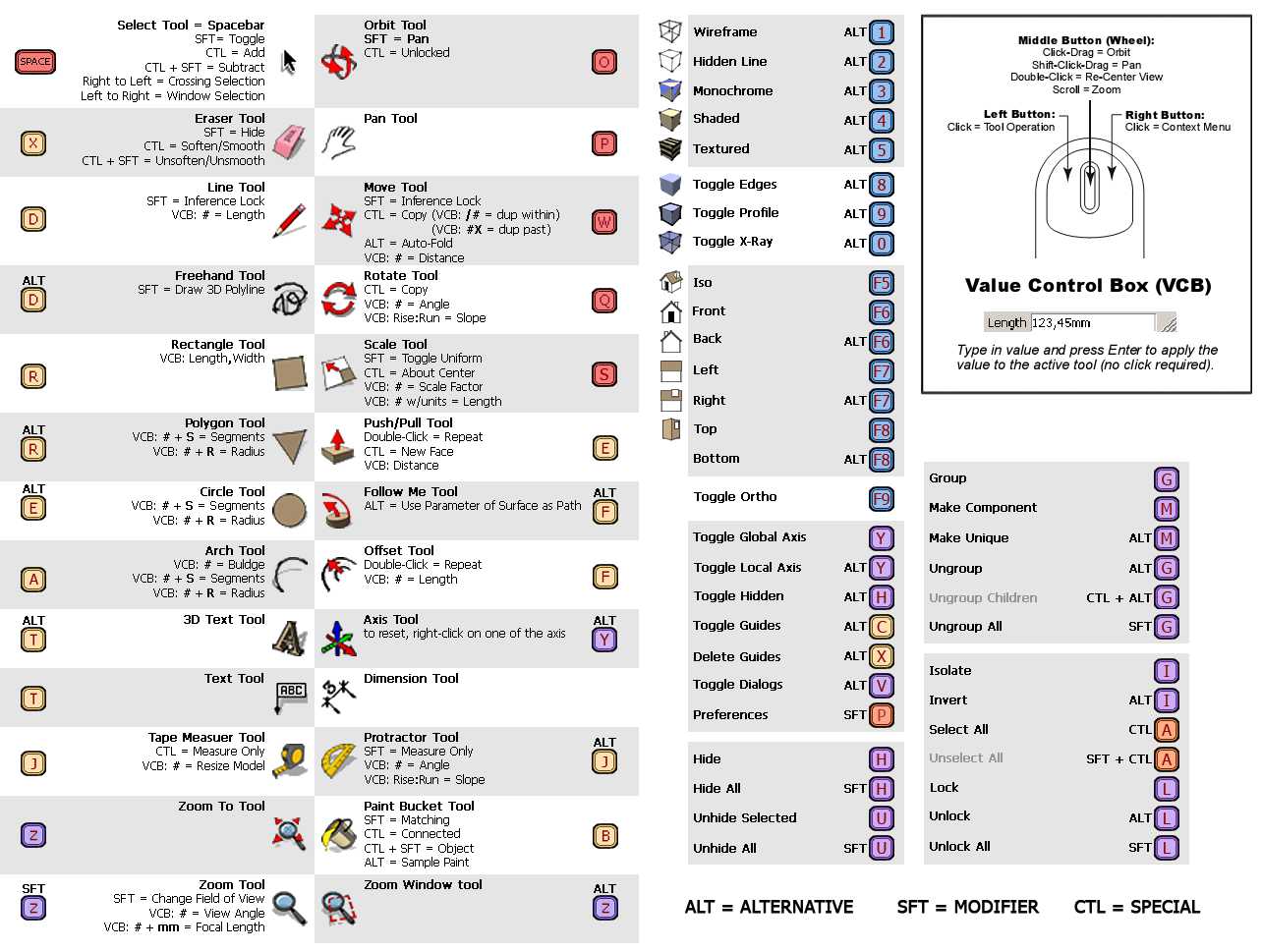
Here're my shortcut cheatsheets I use for SketchUp. It ties into several different plugins/functions. (So native SketchUp does not support all of these shortcuts - if you don't have the plugin/function, some items won't work.)
Does anyone else have custom cheatsheets?
right-click and save or view image to see complete image
-
Damm, thats really organised. I dont think id ever be able to produce something like that- theres just no system to my shortcuts at all. I dont think id be able to list all my shortcuts ither, i seem to just rember them when i ned them

Good idea though, i imagine it will pay off in the end to have a half decent system for your shorcuts.
p.s. you might want to use a slightly smaller image so that the pics fit the forum, i tink 700 across is the max size.
-
Thanks for the cheatsheet. What plugins/functions are special use shortcuts/functions that are enabled for you?
I use a timberframing ruby with its own shortcuts that are somewhat different. Below is a listing of the preferences for its functions. I want to minimise the potential conflicts with other rubies. Thanks for your help.
alpmeadow0 0 0 F6 Edit/Item/Flip Along/Component's Red
0 0 0 F7 Edit/Item/Flip Along/Component's Green
0 0 0 F8 Edit/Item/Flip Along/Component's Blue
0 0 0 F4 selectDimensionTool:
0 0 0 F3 viewZoomExtents:
0 0 0 F11 Edit/Item/TF Make Shop Drawings
0 0 0 F9 Edit/Item/Text Position/Outside Start
0 0 0 F10 Edit/Item/Text Position/Outside End
0 0 0 N selectTextTool:
0 0 0 A selectProtractorTool:
0 0 0 V selectFieldOfViewTool:
0 0 0 F5 Edit/Item/Rotate 90 around Z
0 0 0 F2 viewFront -
Alz, great cheat sheet! I wish I was patient enough to create something like that. This sparked an idea though, wouldn't it be possible to create a ruby that creates a snazzy cheat sheet like this?
// Olle
-
@spirp said:
Alz, great cheat sheet! I wish I was patient enough to create something like that. This sparked an idea though, wouldn't it be possible to create a ruby that creates a snazzy cheat sheet like this?
// Olle
If someone wants to provide a template file, inserting your personal shortcuts from SketchUp would be fairly easy to do.
-
I thought I would resurect this post because I was looking for a good template for an RGB keyboard.
So I used my keyboard shortcuts in combination with the very good template above to make a Corsair RGB profile for SketchUp...

-
Here's another keyboard shortcuts site called SketchUp Shortcuts. I tend to use it because the URL is very easy to remember.
Hello! It looks like you're interested in this conversation, but you don't have an account yet.
Getting fed up of having to scroll through the same posts each visit? When you register for an account, you'll always come back to exactly where you were before, and choose to be notified of new replies (either via email, or push notification). You'll also be able to save bookmarks and upvote posts to show your appreciation to other community members.
With your input, this post could be even better 💗
Register Login


Advertisement