[Plugin] 3d Shapes Tool (was: Pyramid Tool)
-
I've seen that script, mine is a little different, but it was useful to learn from it.
-
OK then, I just wanted to let you know...

-
////MMMMM
 ...... shapes rb.- table skript
  ... SK-FIZ (shapes)-it only drawing tool, but it
does not work with the keyboard...
Let's make that the keyboard there worked! It willbe excellent and very useful tool!


-
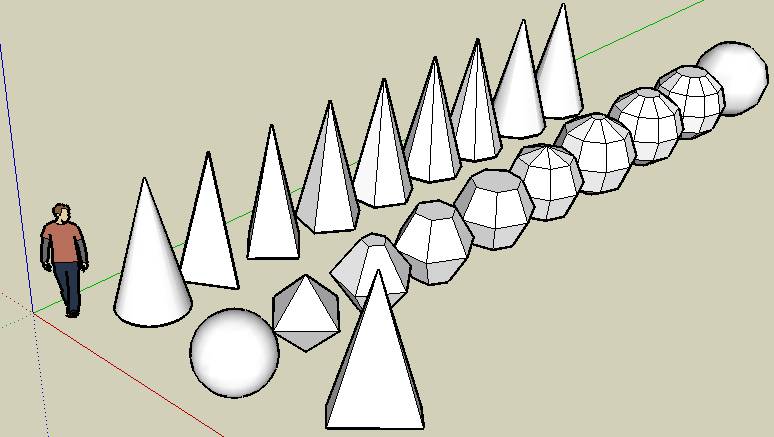
In case you haven't seen it. Here is a demo of the shapes that are in the Solids toolbar of SketchyPhysics. It should probably be split out as a separate plugin. But I have too many plugins as is.

-
Ok! This is almost identical at what i'm coding...

I've missed this in SketchyPhysics.I've seen there is some difference in how the shapes are drawn,
and I've inserted support for VCB input.however here there is the new script, now "3D Shapes Tool"
-

Looks like you are doing great. But feel free to copy anything you want out of SketchySolids. It is also based on the rotated rectangle code.
-
...
 don,t stop this work ,please!
 -
Macs, nice work.
Is there any way to allow the tools to respond to a User Defined Axis?
-
Hi Macs,
Thank you for working on this.
It is a needed and important plugin, don't stop now! -
Loving the plugin dude!
Suggestion. Once you place the shape it is hard to set the height. You need to have something to infer the height and if nothing is available it is frustrating. My solution was to add a construction line to the center of the shape after the second click.

Try adding the following line to the the ConeTool::increment_state() function.
def increment_state
	@moved = false
	@state += 1
    case @state
    when 1
		@ip1.copy! @ip
		Sketchup;;set_status_text "Click to set the radius"
		Sketchup;;set_status_text "Radius", SB_VCB_LABEL
		Sketchup;;set_status_text "Move mouse", SB_VCB_VALUE
    when 2
        @ip1.clear
###################
        Sketchup.active_model.entities.add_cline(@pts[0],@normal)
###################
        Sketchup;;set_status_text "Click to set the height"
        Sketchup;;set_status_text "Height", SB_VCB_LABEL
        Sketchup;;set_status_text "Move mouse", SB_VCB_VALUE
    when 3
        self.create_geometry
    end

end
Getting rid of the cline and having it work right with undo is a bit tricky, but if you are interested I can walk you through it.
Chris
-
This is really nice macs and very useful.
Thanks
-
@cphillips said:
Loving the plugin dude!
Suggestion. Once you place the shape it is hard to set the height. You need to have something to infer the height and if nothing is available it is frustrating. My solution was to add a construction line to the center of the shape after the second click.
[CUT]Chris
Strange.. on my system my tool works differently

when you do the second click with the cone tool it goes up
and down with the height without being locked on the surface.
I have to review the code to see if I made some mistrake invocking
some method without "self.".thank you for the suggestion on the costruction line, I'll think about it.
-
@unknownuser said:
Strange.. on my system my tool works differently
when you do the second click with the cone tool it goes up
and down with the height without being locked on the surface.
I have to review the code to see if I made some mistrake invocking
some method without "self.".thank you for the suggestion on the costruction line, I'll think about it.
I figured this out. In my case I build a lot of shapes on a big floor plane. When I draw a cone it infers the height from the floor. I don't think this is a flaw in your plugin. But the construction line is still useful in many cases.
-
....Please wait ....will be OK!
.. -
You are right!
I've adde the construction line feature ( ripped from your tool )
It will be available in the next release, thank you. -
Scripts is ready
, problems of translation(russian-english) 
-
...This is both very interesting and useful topic
…I wonder why the founders of SKETCH-UP haven’t done the 3d shapes (primitives) earlier …If we have raised such an issue and this caused that much interest, we have to finish it up…  I am not a script man, although many people say I would be capable of doing that quite a bit…unfortunately, quite poor knowledge of English and the tough schedule do not let me study RUBY in more details…I had a choice to make here: to draw or to write…I have chosen the 1st one…However, I do get the processes in scripts and can freely apply some changes for my personal convenience in my usage but not more than that…I quite like the style of painting the figures in SketchyPhysics ( Chris, I really appreciate it!) and the MACS style too… I have selected the files responsible for SHAPES building (from SketchyPhysics) and have made a decision to turn for help to one amazing Russian man Sahi (you possibly remember his name from the script “building a house”). In a few hours I got a response you can see below… …This is a Russian version and not everything works ideally, but much respect for his talent…he does not know English, but still manages to write English RUBI (imagine yourself writing RUBI in Russian or Chinese, which you do not know!!)… ..The many people the many minds, but the last thing I want is him to be remoted from the forum….thank you Sahi one more time! .....all the parameters of the letters are ascribed with the help of the keyboards…very convenient! ...MACS, I think that would be useful for you…And Chris---a comfortable supplementary for your SketchyPhysics.
-
Thanks for doing that Urgen. But I recommend this only be used for reference. There is still a fair amount of physics stuff in there. And it that could conflict with future versions of SketchyPhysics.
-
I noticed you have the same problem I did when creating spheres. I was never able to figure out why they were sometimes reversed. I wound up doing my own sphere routine.
What other shapes do you plan to support?
-
Corrected some errors
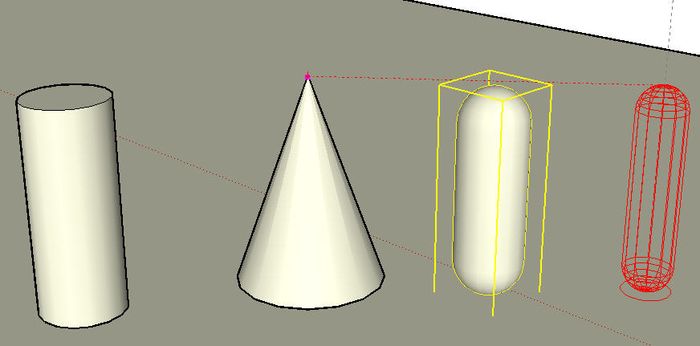
SketchyPhysics_1.zip





Advertisement