sketchucation logo sketchucation
    • 登入
    Oops, your profile's looking a bit empty! To help us tailor your experience, please fill in key details like your SketchUp version, skill level, operating system, and more. Update and save your info on your profile page today!
    🔌 Smart Spline | Fluid way to handle splines for furniture design and complex structures. Download

    [Plugin] 3d Shapes Tool (was: Pyramid Tool)

    已排程 已置頂 已鎖定 已移動 Plugins
    53 貼文 21 Posters 51.0k 瀏覽 21 Watching
    正在載入更多貼文
    • 從舊到新
    • 從新到舊
    • 最多點贊
    回覆
    • 在新貼文中回覆
    登入後回覆
    此主題已被刪除。只有擁有主題管理權限的使用者可以查看。
    • C 離線
      CPhillips
      最後由 編輯

      @macs said:

      Hello,
      During my experiments with ruby programming for SU I've produced
      this tool for drawing pyramids based on rotated rectangle tool.
      Maybe it's useful to someone...

      usage:
      Menu->Draw->Rotated Pyramid

      I think it's easy to use, but suggestions are welcome.

      Nice job! I think modeling tools like this are sorely missing from the basic Sketchup functionality.

      Do you have any interest in expanding this to support other shapes? If so I would give you any support you need and I could provide a good head start on some of the other shapes (box, cylinder, cone, sphere, capsule).

      Chris

      1 條回覆 最後回覆 回覆 引用 0
      • M 離線
        Macs
        最後由 編輯

        I've done some more work on it, completed a cone tool
        and added a toolbar. I'm progressing with work, soon a new release
        with more 3d shapes.

        Well it's a sort of toolbar for newbies 😄
        who don't know how to draw more complex shapes in few steps.
        I'm sure expert modelist know well how draw these shapes,
        perhaps it will help when there are many to draw.

        1 條回覆 最後回覆 回覆 引用 0
        • urgenU 離線
          urgen
          最後由 編輯

          @macs said:

          I've done some more work on it, completed a cone tool
          and added a toolbar. I'm progressing with work, soon a new release
          with more 3d shapes.

          Well it's a sort of toolbar for newbies 😄
          who don't know how to draw more complex shapes in few steps.
          I'm sure expert modelist know well how draw these shapes,
          perhaps it will help when there are many to draw.

          ...Marcs, it is very good and useful idea! 👍 I thought of it and wished to ask about it Chris 😕 ... Success to you... It is necessary not only to beginners... really ! 😉

          --pupil forever...------

          1 條回覆 最後回覆 回覆 引用 0
          • GaieusG 離線
            Gaieus
            最後由 編輯

            Macs,

            Before you invest much time in this project, have a look at shapes.rb (by @Last) downloadable from Didier's site here:
            http://www.crai.archi.fr/RubyLibraryDepot/Ruby/em_geo_page.htm

            It will create an item in the Draw menu.

            I'm glad however that there are more and more ruby scripter around soo keep up the good work! 👍

            Gai...

            1 條回覆 最後回覆 回覆 引用 0
            • M 離線
              Macs
              最後由 編輯

              I've seen that script, mine is a little different, but it was useful to learn from it.

              1 條回覆 最後回覆 回覆 引用 0
              • GaieusG 離線
                Gaieus
                最後由 編輯

                OK then, I just wanted to let you know... 😉

                Gai...

                1 條回覆 最後回覆 回覆 引用 0
                • urgenU 離線
                  urgen
                  最後由 編輯

                  ////MMMMM 😒 ...... shapes rb.- table skript 😕 ... SK-FIZ (shapes)-it only drawing tool, but it

                  does not work with the keyboard... 😕 Let's make that the keyboard there worked! It will

                  be excellent and very useful tool! 😄 🎉

                  --pupil forever...------

                  1 條回覆 最後回覆 回覆 引用 0
                  • C 離線
                    CPhillips
                    最後由 編輯

                    In case you haven't seen it. Here is a demo of the shapes that are in the Solids toolbar of SketchyPhysics. It should probably be split out as a separate plugin. But I have too many plugins as is.

                    http://sketchyphysics2.googlecode.com/files/SketchySolids2.gif

                    1 條回覆 最後回覆 回覆 引用 0
                    • M 離線
                      Macs
                      最後由 編輯

                      Ok! This is almost identical at what i'm coding... 😆
                      I've missed this in SketchyPhysics.

                      I've seen there is some difference in how the shapes are drawn,
                      and I've inserted support for VCB input.

                      however here there is the new script, now "3D Shapes Tool"

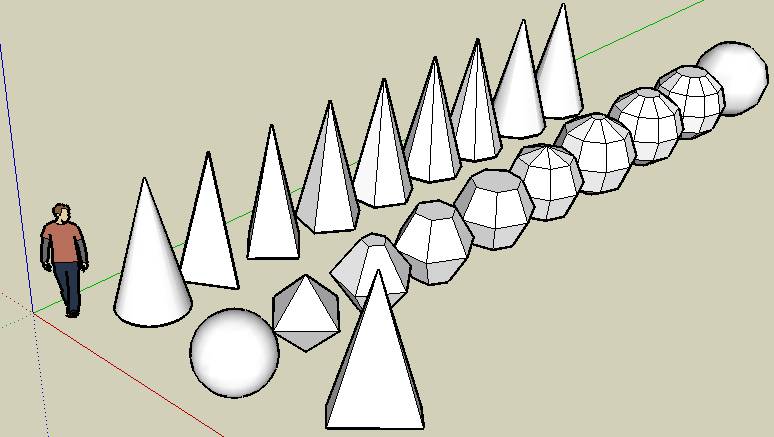
                      3DShapesTool.zip


                      toolbar.jpg


                      examples.jpg

                      1 條回覆 最後回覆 回覆 引用 0
                      • C 離線
                        CPhillips
                        最後由 編輯

                        😍

                        Looks like you are doing great. But feel free to copy anything you want out of SketchySolids. It is also based on the rotated rectangle code.

                        1 條回覆 最後回覆 回覆 引用 0
                        • urgenU 離線
                          urgen
                          最後由 編輯

                          ...👍 👍 👍 don,t stop this work ,please! 😄

                          --pupil forever...------

                          1 條回覆 最後回覆 回覆 引用 0
                          • JClementsJ 離線
                            JClements
                            最後由 編輯

                            Macs, nice work.

                            Is there any way to allow the tools to respond to a User Defined Axis?

                            John | Illustrator | Beaverton, Oregon

                            1 條回覆 最後回覆 回覆 引用 0
                            • J 離線
                              Jim
                              最後由 編輯

                              Hi Macs,

                              Thank you for working on this. 👍 It is a needed and important plugin, don't stop now!

                              Hi

                              1 條回覆 最後回覆 回覆 引用 0
                              • C 離線
                                CPhillips
                                最後由 編輯

                                Loving the plugin dude!

                                Suggestion. Once you place the shape it is hard to set the height. You need to have something to infer the height and if nothing is available it is frustrating. My solution was to add a construction line to the center of the shape after the second click.

                                http://sketchyphysics2.googlecode.com/files/3dShapesCLines.gif

                                Try adding the following line to the the ConeTool::increment_state() function.

                                
                                def increment_state
                                	@moved = false
                                	@state += 1				
                                    case @state
                                    when 1
                                		@ip1.copy! @ip
                                		Sketchup;;set_status_text "Click to set the radius"
                                		Sketchup;;set_status_text "Radius", SB_VCB_LABEL
                                		Sketchup;;set_status_text "Move mouse", SB_VCB_VALUE
                                    when 2
                                        @ip1.clear
                                ###################        
                                        Sketchup.active_model.entities.add_cline(@pts[0],@normal)
                                ###################        
                                        Sketchup;;set_status_text "Click to set the height"
                                        Sketchup;;set_status_text "Height", SB_VCB_LABEL
                                        Sketchup;;set_status_text "Move mouse", SB_VCB_VALUE
                                    when 3
                                        self.create_geometry
                                    end
                                
                                end


                                Getting rid of the cline and having it work right with undo is a bit tricky, but if you are interested I can walk you through it.

                                Chris

                                1 條回覆 最後回覆 回覆 引用 0
                                • D 離線
                                  dylan
                                  最後由 編輯

                                  This is really nice macs and very useful.

                                  Thanks 👍

                                  http://dmdarchitecture.co.uk/

                                  1 條回覆 最後回覆 回覆 引用 0
                                  • M 離線
                                    Macs
                                    最後由 編輯

                                    @cphillips said:

                                    Loving the plugin dude!

                                    Suggestion. Once you place the shape it is hard to set the height. You need to have something to infer the height and if nothing is available it is frustrating. My solution was to add a construction line to the center of the shape after the second click.
                                    [CUT]

                                    Chris

                                    Strange.. on my system my tool works differently 😞
                                    when you do the second click with the cone tool it goes up
                                    and down with the height without being locked on the surface.
                                    I have to review the code to see if I made some mistrake invocking
                                    some method without "self.".

                                    thank you for the suggestion on the costruction line, I'll think about it.

                                    1 條回覆 最後回覆 回覆 引用 0
                                    • C 離線
                                      CPhillips
                                      最後由 編輯

                                      @unknownuser said:

                                      Strange.. on my system my tool works differently 😞
                                      when you do the second click with the cone tool it goes up
                                      and down with the height without being locked on the surface.
                                      I have to review the code to see if I made some mistrake invocking
                                      some method without "self.".

                                      thank you for the suggestion on the costruction line, I'll think about it.

                                      I figured this out. In my case I build a lot of shapes on a big floor plane. When I draw a cone it infers the height from the floor. I don't think this is a flaw in your plugin. But the construction line is still useful in many cases.

                                      1 條回覆 最後回覆 回覆 引用 0
                                      • urgenU 離線
                                        urgen
                                        最後由 編輯

                                        ....Please wait ....will be OK! 😉 😄 ..

                                        --pupil forever...------

                                        1 條回覆 最後回覆 回覆 引用 0
                                        • M 離線
                                          Macs
                                          最後由 編輯

                                          You are right!
                                          I've adde the construction line feature ( ripped from your tool 😄 )
                                          It will be available in the next release, thank you.

                                          1 條回覆 最後回覆 回覆 引用 0
                                          • urgenU 離線
                                            urgen
                                            最後由 編輯

                                            Scripts is ready 😉 , problems of translation(russian-english) 🤣

                                            --pupil forever...------

                                            1 條回覆 最後回覆 回覆 引用 0
                                            • 1
                                            • 2
                                            • 3
                                            • 3 / 3
                                            • 第一個貼文
                                              最後的貼文
                                            Buy SketchPlus
                                            Buy SUbD
                                            Buy WrapR
                                            Buy eBook
                                            Buy Modelur
                                            Buy Vertex Tools
                                            Buy SketchCuisine
                                            Buy FormFonts

                                            Advertisement