Alignment of mirrored parts
-
sample misal2.skpI wrote earlier about problems aligning two mirrored parts. I finally figured out that it was useful to have both the default style and the single pixel styles available. This allows me to switch to single pixel when I am close to alignment... and then finish the job in the single pixel style.
Nevertheless, I still end up out of line.
Attached, I hope, is an image of a simplified "cardboard lips" form... two arcs coming back together... that are not quite lined up. If I am successful in attaching two files, I will send another successful version and the much more complex object I have been trying to complete.
Thanks,
John D.
Maybe? is there a way of adjusting sensitivity at the last moment? In " Preferences" could I switch to some setting where any line within four pixels gets "joined?"
-
Have you checked the replies to your earlier post?
The same thing applies here - use the inference engine to create your half your shape, make it a component, copy and paste in place then scale the copy by -1.
The last image is the two components exploded and the dividing lines deleted - you can't do this unless the parts are coplanar.
Does this do what you want?
Bob
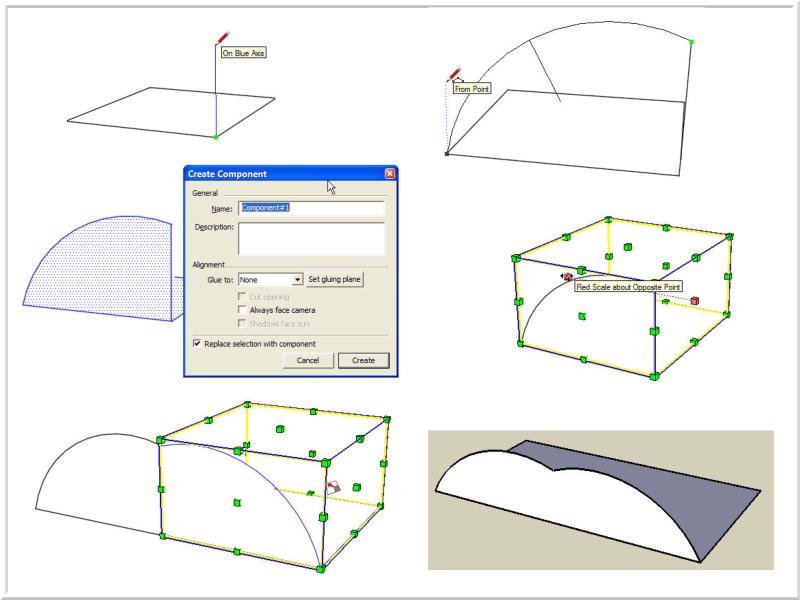
-
The image I provided here is very simple. The one's I am really interested in are of French chairs. The Thonet rocker is a classic, but I was working on a simpler "cafe" chair. It has curved braces and other things that join immediately below the seat.
So, somewhere in the process of making the parts, I got something out of line by a fraction of a degree.
I tried: Looking at the whole thing from the front view in parallel projection.
Creating a huge rectangular block that aligned with the center and "pushing" it through the contents I had already made.
I then used "intersect with model to create edges. After erasing all of the excess, I mirrored the "half chair" and "moved" everything back together.
I am getting better at this, but the parts are so close I would think they would snap together.
Thanks,
John D
Hello! It looks like you're interested in this conversation, but you don't have an account yet.
Getting fed up of having to scroll through the same posts each visit? When you register for an account, you'll always come back to exactly where you were before, and choose to be notified of new replies (either via email, or push notification). You'll also be able to save bookmarks and upvote posts to show your appreciation to other community members.
With your input, this post could be even better 💗
Register Login


Advertisement