sketchucation logo sketchucation
    • 登入
    Oops, your profile's looking a bit empty! To help us tailor your experience, please fill in key details like your SketchUp version, skill level, operating system, and more. Update and save your info on your profile page today!
    🔌 Smart Spline | Fluid way to handle splines for furniture design and complex structures. Download

    [Plugin] SketchyBevel 0.1(Updated May 11)

    已排程 已置頂 已鎖定 已移動 Plugins
    142 貼文 84 Posters 124.2k 瀏覽 84 Watching
    正在載入更多貼文
    • 從舊到新
    • 從新到舊
    • 最多點贊
    回覆
    • 在新貼文中回覆
    登入後回覆
    此主題已被刪除。只有擁有主題管理權限的使用者可以查看。
    • K 離線
      kwistenbiebel
      最後由 編輯

      The ruby works very well. 😄
      I love it that one can use it by simply right clicking the selected geometry.
      Very speedy.

      One little remark:
      The ruby seems to only bevel concave corners and not the convex ones.
      see image:
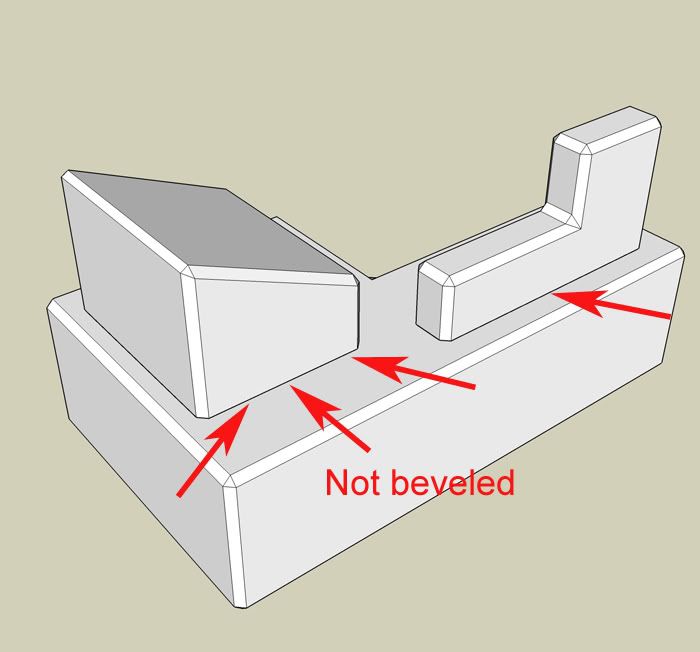
      http://i140.photobucket.com/albums/r3/kwistenbiebel1/SU/bevel2.jpg

      Besides the small hickups, this is a very fine ruby.
      Thank you Chris. 👍

      @Majid,
      I believe the issue you experience indeed has to do with the bevel value set too high.

      1 條回覆 最後回覆 回覆 引用 0
      • StinkieS 離線
        Stinkie
        最後由 編輯

        Hm. Weird ...


        untitled.jpg

        1 條回覆 最後回覆 回覆 引用 0
        • D 離線
          Daniel S
          最後由 編輯

          It dosen´t work in all the cases... but still is very useful 😍


          bevel.jpg

          1 條回覆 最後回覆 回覆 引用 0
          • StinkieS 離線
            Stinkie
            最後由 編輯

            Yup, and it certainly is a step in the right direction. 😄

            1 條回覆 最後回覆 回覆 引用 0
            • M 離線
              marcociacci
              最後由 編輯

              where is the file to download your plugin???
              ...i don't find it!!! please i need SketchyBevel!!!

              1 條回覆 最後回覆 回覆 引用 0
              • soloS 離線
                solo
                最後由 編輯

                Look at first post on 1st page one of this thread.

                http://www.solos-art.com

                If you see a toilet in your dreams do not use it.

                1 條回覆 最後回覆 回覆 引用 0
                • M 離線
                  marcociacci
                  最後由 編輯

                  @solo said:

                  Look at first post on 1st page one of this thread.

                  i click on [Plugin] SketchyBevel 0.1 but this is a link to another page!
                  ...i'm going crazy. please HELP ME!!!

                  1 條回覆 最後回覆 回覆 引用 0
                  • StinkieS 離線
                    Stinkie
                    最後由 編輯

                    Right-click (Windows) or press command and click (Mac), then download.

                    1 條回覆 最後回覆 回覆 引用 0
                    • soloS 離線
                      solo
                      最後由 編輯

                      Stinkie you have been using your mac too long that you forgot the Windoze system.

                      Left click and save in your SU plugins folder.

                      http://www.solos-art.com

                      If you see a toilet in your dreams do not use it.

                      1 條回覆 最後回覆 回覆 引用 0
                      • StinkieS 離線
                        Stinkie
                        最後由 編輯

                        lol! You're right. My humblest apologies! 💚 Also: CTRL + click, not command + click ...

                        I'm gonna trade in my 8 cores for an abacus, I think.

                        1 條回覆 最後回覆 回覆 引用 0
                        • M 離線
                          marcociacci
                          最後由 編輯

                          i feel stupid! but i'm clicking on it ( [Plugin] SketchyBevel 0.1 )
                          ...if there is another way to download it...SHOW ME PLEASE!

                          1 條回覆 最後回覆 回覆 引用 0
                          • chippwaltersC 離線
                            chippwalters
                            最後由 編輯

                            Look at the very bottom of the first post-- under the animating demo. There's an attachment called:
                            SketchyBevel.rb

                            That's what you click on. If that doesn't work for you, then tell us what browser and OS you are using.

                            Currently working with Cross-Reality technologies

                            1 條回覆 最後回覆 回覆 引用 0
                            • M 離線
                              marcociacci
                              最後由 編輯

                              THANK YOU!!!! THANK YOU!!! THANK YOU!!!
                              but before under the animating demo there wasn't this file, but the was a sentence on a yellow backgrond that i don't remember! maybe a stay a lot in front of the pc...
                              Howerer THANK YOU!!!

                              1 條回覆 最後回覆 回覆 引用 0
                              • C 離線
                                CPhillips
                                最後由 編輯

                                Like the built in Outliner tool Bevel doesnt work with "holes" in faces. You can usually work around those problems by subdividing the face with a hole.

                                Here is an example. The mesh on the left doesn't Bevel right. But add a line to break up the hole and it works. Then you can just erase the extra edges.
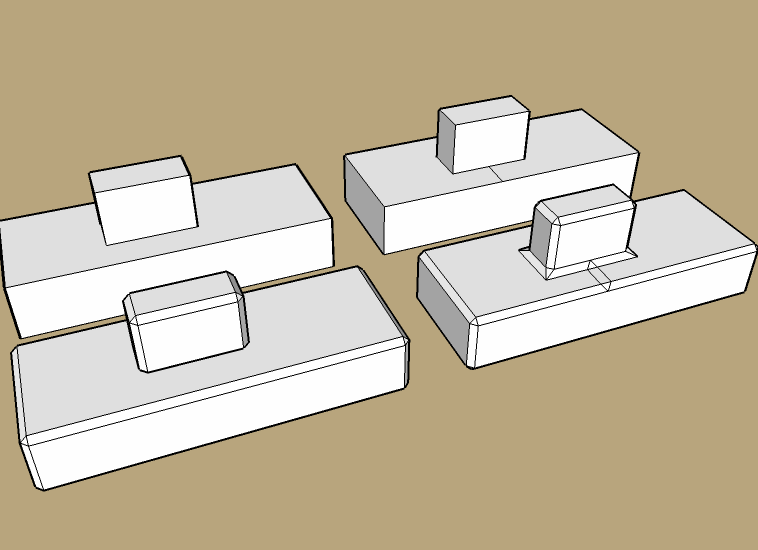
                                bevel-holes.png

                                1 條回覆 最後回覆 回覆 引用 0
                                • StinkieS 離線
                                  Stinkie
                                  最後由 編輯

                                  Thanks for the explanation, it clarifies a lot.

                                  @chippwalters said:

                                  Look at the very bottom of the first post-- under the animating demo. There's an attachment called:
                                  SketchyBevel.rb

                                  That's what you click on. If that doesn't work for you, then tell us what browser and OS you are using.

                                  Good call. Didn't realise he hadn't found the attachment.

                                  1 條回覆 最後回覆 回覆 引用 0
                                  • soloS 離線
                                    solo
                                    最後由 編輯

                                    Works like a charm, thanks for the work-around.


                                    http://img150.imageshack.us/img150/9313/bevelgt0.jpg

                                    http://www.solos-art.com

                                    If you see a toilet in your dreams do not use it.

                                    1 條回覆 最後回覆 回覆 引用 0
                                    • K 離線
                                      kwistenbiebel
                                      最後由 編輯

                                      Thanks Chris,
                                      Drawing that extra line indeed works 👍 .

                                      1 條回覆 最後回覆 回覆 引用 0
                                      • N 離線
                                        NORTH_FROST
                                        最後由 編輯

                                        Thanks! This is great,good job ❗

                                        http://www.northfrost.se

                                        1 條回覆 最後回覆 回覆 引用 0
                                        • chippwaltersC 離線
                                          chippwalters
                                          最後由 編輯

                                          Yep, this tool is seriously cool. And when you combine it with Dale's Crease tool and Jim's soon to be released Jitter-- you can do some amazing things! BTW, Dales Crease tool should be a product unto itself, it's so useful, especially in parallel projection mode.
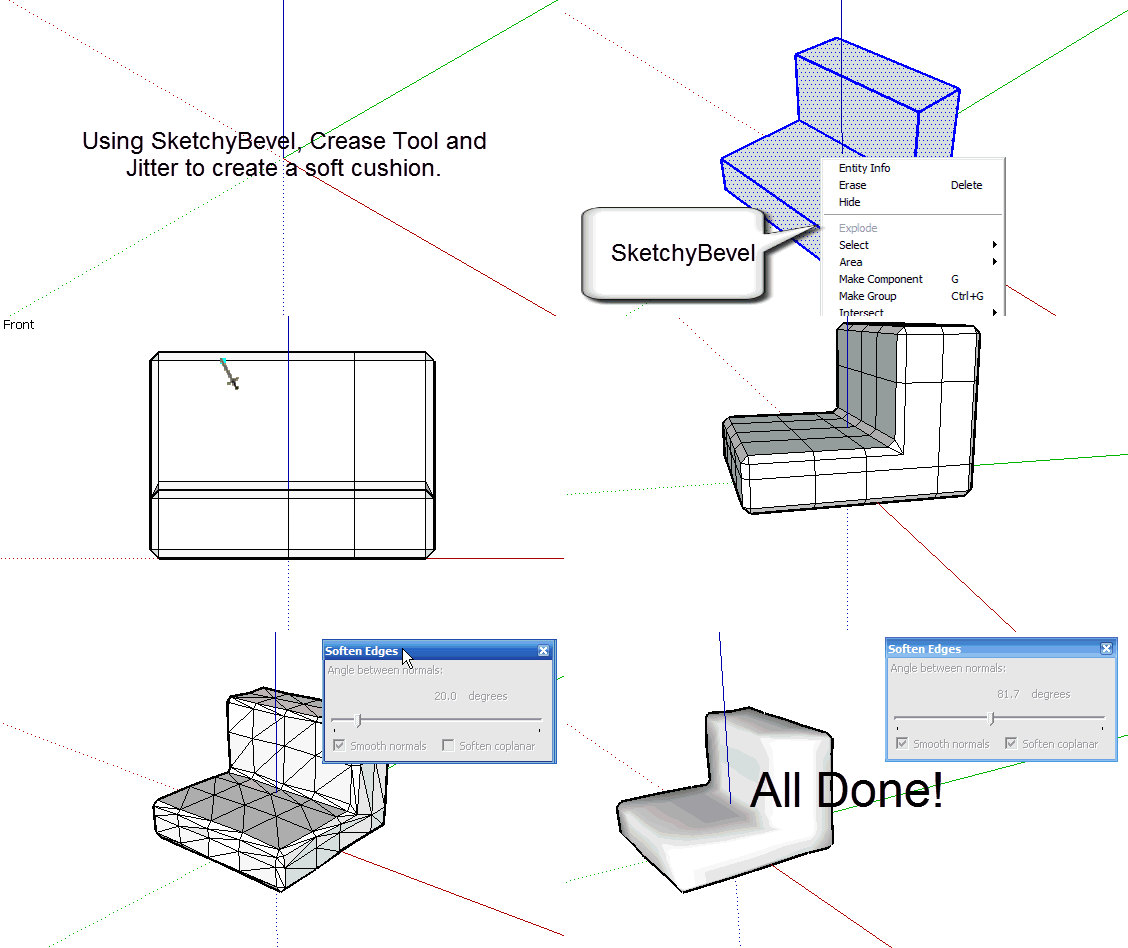
                                          http://content.screencast.com/media/e851e27c-78ce-4280-ad41-a355f9537051_4b345325-c952-4893-b165-d46826e6afd8_static_0_0_BevelSubDJitter.gif

                                          Currently working with Cross-Reality technologies

                                          1 條回覆 最後回覆 回覆 引用 0
                                          • D 離線
                                            Daniel S
                                            最後由 編輯

                                            Thank you Chris!!! Extra line is the solution ☀ ☀

                                            Daniel S

                                            PS. Not very important but when you apply the sketchybevel tool 2 times.. the plugin create a lot of extra lines that are not used and not create faces... is there a way to easily eliminate this lines?
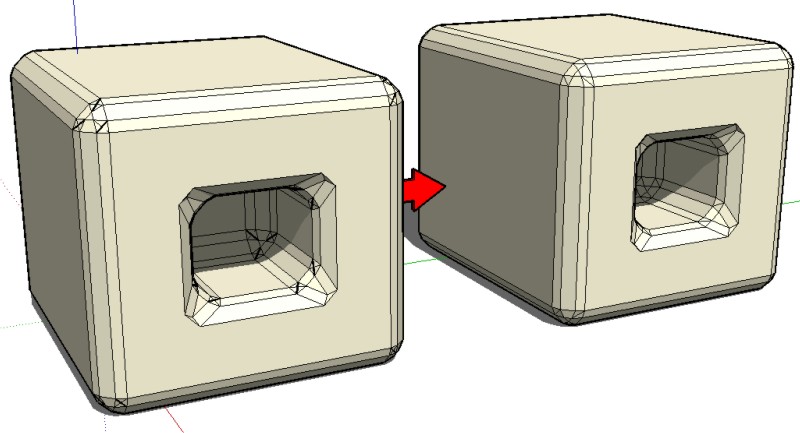

                                            Gráfico1.jpg

                                            1 條回覆 最後回覆 回覆 引用 0
                                            • 1
                                            • 2
                                            • 3
                                            • 4
                                            • 5
                                            • 6
                                            • 7
                                            • 8
                                            • 3 / 8
                                            • 第一個貼文
                                              最後的貼文
                                            Buy SketchPlus
                                            Buy SUbD
                                            Buy WrapR
                                            Buy eBook
                                            Buy Modelur
                                            Buy Vertex Tools
                                            Buy SketchCuisine
                                            Buy FormFonts

                                            Advertisement