sketchucation logo sketchucation
    • 登入
    Oops, your profile's looking a bit empty! To help us tailor your experience, please fill in key details like your SketchUp version, skill level, operating system, and more. Update and save your info on your profile page today!
    🔌 Smart Spline | Fluid way to handle splines for furniture design and complex structures. Download

    BEST landscape boulders ?

    已排程 已置頂 已鎖定 已移動 SketchUp Components, Materials & Styles
    sketchup
    43 貼文 23 Posters 17.8k 瀏覽 23 Watching
    正在載入更多貼文
    • 從舊到新
    • 從新到舊
    • 最多點贊
    回覆
    • 在新貼文中回覆
    登入後回覆
    此主題已被刪除。只有擁有主題管理權限的使用者可以查看。
    • D 離線
      Danty
      最後由 編輯

      I use lots of boulders and stone in my landscape projects.

      Yet I have been disappointed in the 3D boulders I have created or found from other sources for my SU models.

      I can model the shapes pretty well with modifying spheres and creating angular, asymmetric forms.

      The problem seems to be the textures and colors.
      Applying stone textures just ends up with very unconvincing looking stuff.

      Any boulder components out there that you like?

      Thanks,
      Danty

      1 條回覆 最後回覆 回覆 引用 0
      • Joe WoodJ 離線
        Joe Wood
        最後由 編輯

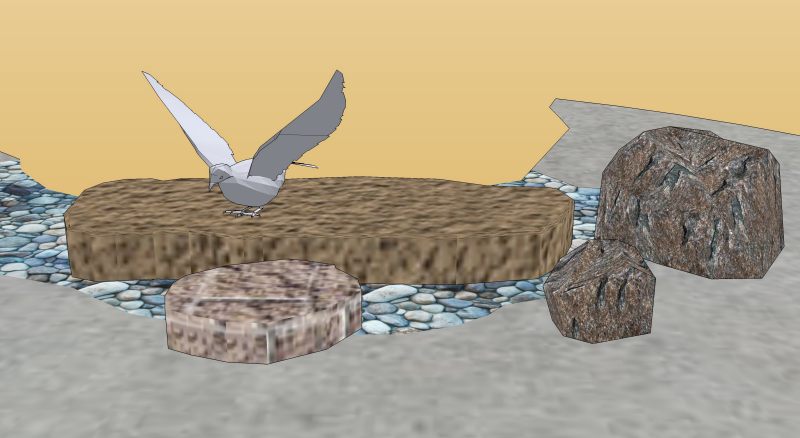
        Here's a few I've picked up along the way.

        rocks.jpg


        rocks.skp

        Joe Wood
        woodsshop.com/

        1 條回覆 最後回覆 回覆 引用 0
        • Alan FraserA 離線
          Alan Fraser
          最後由 編輯

          Try to use as large a sample image as you can...one that shows some variation of surface that will add to the form of the boulder. If you just use a low-res, seamless texture it's going to look pretty unconvincing.
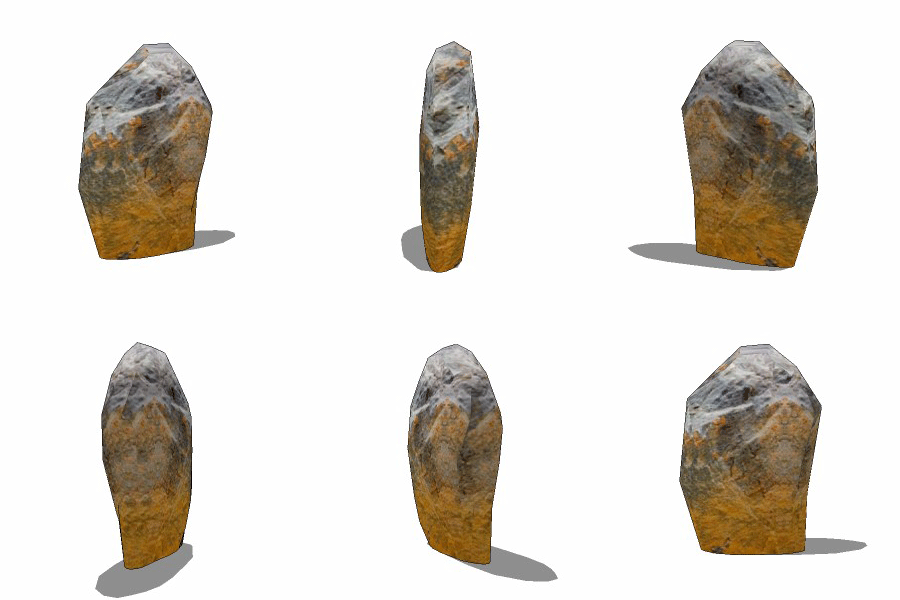

          boulder.gif

          3D Figures
          Were you required to walk 500 miles? Were you advised to walk 500 more?
          You could be entitled to compensation. Call the Pro Claimers now!

          1 條回覆 最後回覆 回覆 引用 0
          • D 離線
            Danty
            最後由 編輯

            Very nice, Joe. Thanks for the samples.

            Alan, the rock is spinning so fast it is hard to see the details of it.
            Did you create it all in SU?
            Are you making this and others like it for Form Fonts?

            Is there a tutorial or more data you can provide on how to make boulders such as this one?

            Thanks,
            Danty

            1 條回覆 最後回覆 回覆 引用 0
            • Alan FraserA 離線
              Alan Fraser
              最後由 編輯

              Yes, there are a few such boulders on FF
              http://www.formfonts.com/search.php?area=1&site=&query=boulders

              Because of copyright reasons, I tend to go and photograph rock textures myself, but if you don't have any handy, then typing rockface into a Google image search will probably yield some larger format images. I project them onto the main apects of the boulder, then turn on hidden geometry and repaint all those faces where the image has been streaked unrealistically because of the angle of projection.

              Firstly, I'll try to sample a nearby acceptable face and see what that looks like when painted onto the streaky one. If I can't get any satisfaction by that route, I bring the exploded image round, adjust its position and take another sample of that. It's not a perfect method and you do get seams, but if you are careful enough it generally works quite well.

              For the boulders on the FF, I mostly used a freebie mesh generator called Bantam3D Grass, which also had a facility to generate irregular blob meshes in obj format, but you can get pretty much the same effect by generally kicking around the higher-res standard SU sphere...pushing and pulling vertices here and there.

              BTW. Bantam Grass is a piece of abandonware, the working links to which grow scarcer by the day. If anyone tracks a copy down it might be as well posting it here for posterity. I've already done that with a freebie 3D file converter called Crossroads 3D, over in the Software forum.
              Bantam had already virtually disappeared over a year ago on this thread.
              http://groups.google.com/group/Ruby-API/browse_thread/thread/671b5c299e51c7ce
              and the working links I posted then are now dead, but it is posted in 2 zip files towards the bottom of the thread. I have got it on a CD somewhere, but it might be easier if some kind soul were to port it over here before it disappears altogether.

              3D Figures
              Were you required to walk 500 miles? Were you advised to walk 500 more?
              You could be entitled to compensation. Call the Pro Claimers now!

              1 條回覆 最後回覆 回覆 引用 0
              • M 離線
                mike d
                最後由 編輯

                here are a few that i have created and used

                mike d
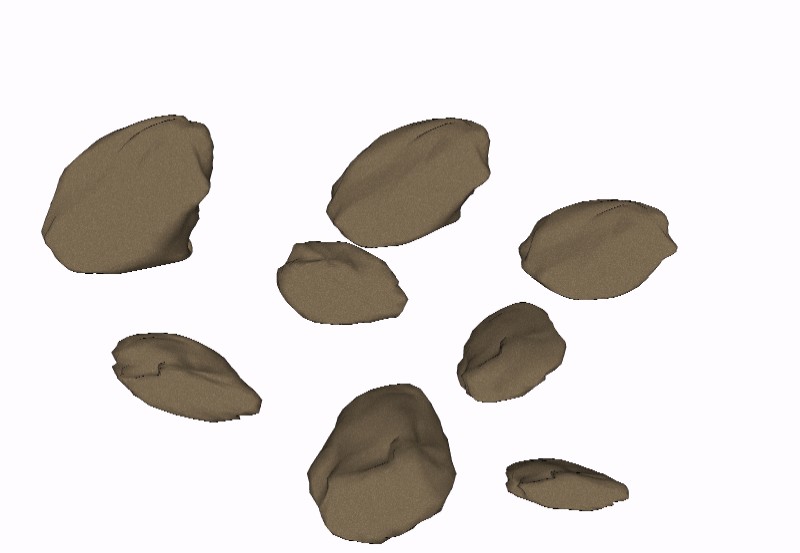
                boulders.jpg

                The grass is always GREENER on the roof.

                1 條回覆 最後回覆 回覆 引用 0
                • G 離線
                  GreyHead
                  最後由 編輯

                  Here's the Bantam Grass 3D program that Alan mentioned below. To keep under the 2Mb limit I've separated out the Help files (there is an html file and images - Bantam doesn't link to it directly so you can put it anywhere convenient).

                  Bob


                  Bantam3DGrass_7.zip


                  Bantam3DGrass_7_help.zip

                  1 條回覆 最後回覆 回覆 引用 0
                  • soloS 離線
                    solo
                    最後由 編輯

                    It really is pretty easy to create them in SU.


                    http://img395.imageshack.us/img395/3005/makingrocksql0.jpg

                    manipulate a sphere's mesh to a general free form looking shape.


                    http://img291.imageshack.us/img291/6307/makingrocks2qu9.jpg

                    Texture using two different axis (I used a seamless texture found online and made seamless in PSP)


                    http://img395.imageshack.us/img395/9612/rocksdy3.jpg

                    Unless it's for a close up shot this result should suffice in most cases.

                    http://www.solos-art.com

                    If you see a toilet in your dreams do not use it.

                    1 條回覆 最後回覆 回覆 引用 0
                    • G 離線
                      Gidon Yuval
                      最後由 編輯

                      Solo, that's realy neat.
                      One questin though: could you explain the bit about texturing using 2 different axis?
                      How do you use that? Is there a way to both instances of the texture simultaniously or do you texture seperate hemispheres with the appropriate texture?

                      If you don't know where you're going, you're never going to get there.

                      1 條回覆 最後回覆 回覆 引用 0
                      • FrederikF 離線
                        Frederik
                        最後由 編輯

                        Really nice, Solo...
                        I'm interested to learn more about how you've managed to apply the texture in SU (or perhaps you've used another application for this purpose..?? 😕 )

                        Also - would you mind sharing the two boulders - now that you've made them... 😉

                        Cheers
                        Kim Frederik

                        1 條回覆 最後回覆 回覆 引用 0
                        • soloS 離線
                          solo
                          最後由 編輯

                          Okay, firstly the example above I never saved (made it as a referance only) and the texture was oversized in kb's anyway.
                          I made a lower poly one with a lower res texture on it attached below.

                          The textures are applied in SU, infact they are nothing special, nor any unique way of application. I use two axis for projection and sometimes even 3 axis (getting them to blend is normally more tricky especially on a freeform shape)
                          If you go close up you will notice they are not smoothly blended actually, but from a distance with vegetation around and shadows they will be fine.


                          http://img143.imageshack.us/img143/7016/rockonfs2.jpg


                          a rock.skp

                          http://www.solos-art.com

                          If you see a toilet in your dreams do not use it.

                          1 條回覆 最後回覆 回覆 引用 0
                          • FrederikF 離線
                            Frederik
                            最後由 編輯

                            Thanks for sharing and taking your time to explain this, Pete!
                            Much appreciated! 😉
                            When it comes to applying textures to spheric shapes, I always seem to have difficulties... 😞
                            (and maybe you had used another application to apply the textures - like Deep Exploration... 😉 )

                            Cheers
                            Kim Frederik

                            1 條回覆 最後回覆 回覆 引用 0
                            • Alan FraserA 離線
                              Alan Fraser
                              最後由 編輯

                              By moving the image around and sampling different bits, it's possible to map even a non-tiling image like this one I just pulled off the Net onto a boulder without too many seams being evident. This was done in SU.
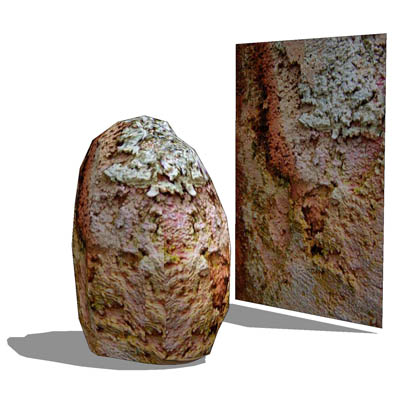

                              another rock.jpg


                              another rock.skp

                              3D Figures
                              Were you required to walk 500 miles? Were you advised to walk 500 more?
                              You could be entitled to compensation. Call the Pro Claimers now!

                              1 條回覆 最後回覆 回覆 引用 0
                              • D 離線
                                Danty
                                最後由 編輯

                                Alan -- Your last boulder model just blew me away. Now THAT is what I have had in mind as the type of boulder I would like to be turning out.
                                Would you please clarify a couple of points:

                                Sampling:  By that do you mean the technique of holding down SHIFT while clicking on the Paint Tool which then turns into an eyedropper -- "sampling" the color or texture of a face?
                                Projection:  Are you doing what Solo seems to be doing? -- projecting the textures with different axes?  I just don't get how that works.  My experience with applying colors and textures seems to simply involve selecting a face and applying the color/texture.  What step am I missing?
                                
                                So it seems your method is to create a spherical shape then explode the modified sphere so it can be edited.
                                Then you project a large format texture onto portions of the shape.
                                You keep turning it round to locate "streaks" in the texture and then use sampling to even them out.
                                Is that more or less what it consists of?
                                

                                Thanks for your patience on this subject.
                                It is definitely a skill I would like to master.

                                Danty

                                1 條回覆 最後回覆 回覆 引用 0
                                • Alan FraserA 離線
                                  Alan Fraser
                                  最後由 編輯

                                  Yes, by sampling I mean sampling the image with the Paint tool (except you hold down Alt, not Shift...I'm sure that's what you meant.)

                                  What I did with the boulder above was to line it up alongside the flatter sides of the boulder, sample it (after first making sure it was stretched big enough to overlap the extents of the rock), then paint the entire boulder. The flattish sides were obviously ok, but that technique leaves some nasty streaky bits on the sharper sides and the top.

                                  These were fixed by simply moving the image around, first by rotating it 90 degrees horizontally and lining up the pattern on it so it would blend reasonably with what was already there, then just resampling the image in its new position and painting the streaked faces. Obviously you need to turn hidden geometry on first, or you'll repaint the entire boulder instead of a single face.

                                  Lastly, I pulled the image up, rotated it and floated it above the boulder, positioning it so I got that lichen or efflorescent texture in the right position to project down and extend the stuff that was already there. It's not perfect and it takes a bit of trial and error, but the end result is good enough to pass muster.

                                  3D Figures
                                  Were you required to walk 500 miles? Were you advised to walk 500 more?
                                  You could be entitled to compensation. Call the Pro Claimers now!

                                  1 條回覆 最後回覆 回覆 引用 0
                                  • urgenU 離線
                                    urgen
                                    最後由 編輯

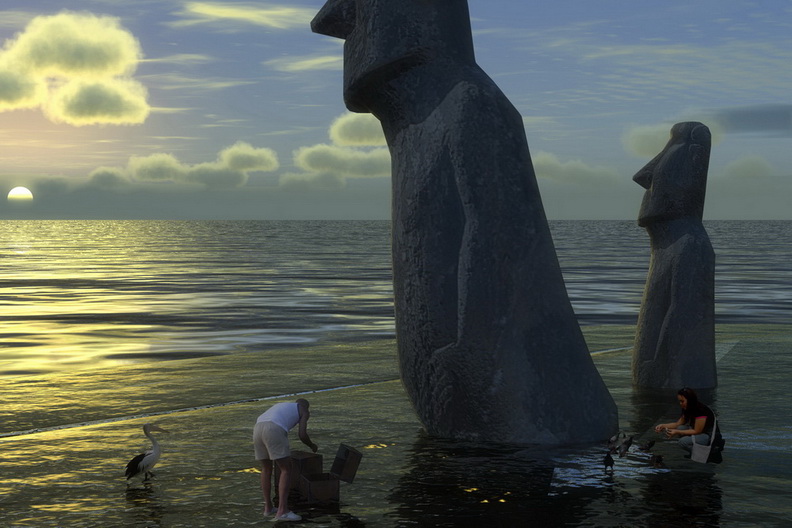
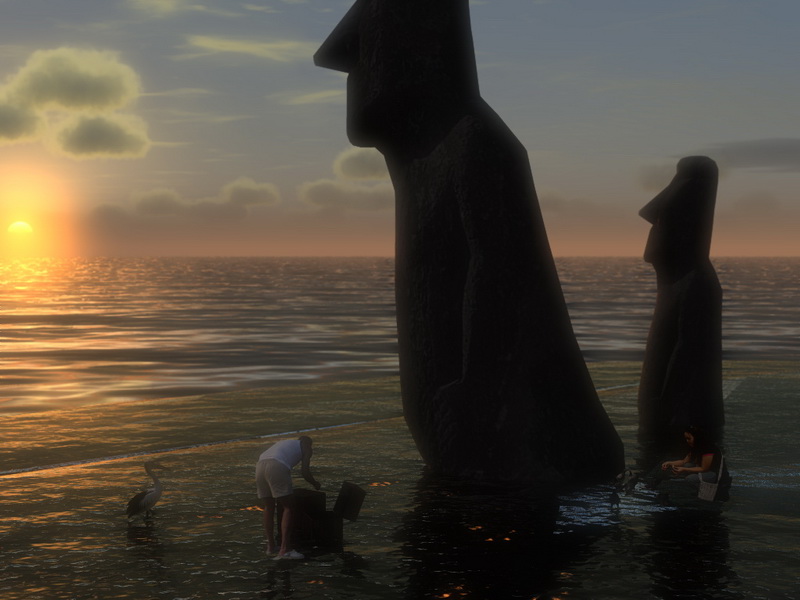
                                    Hey, guys!... These stones are able to wait... 😄 ☀ Silently... 😉

                                    http://img370.imageshack.us/img370/2510/moaivd3.jpg


                                    moai.skp

                                    --pupil forever...------

                                    1 條回覆 最後回覆 回覆 引用 0
                                    • urgenU 離線
                                      urgen
                                      最後由 編輯

                                      @blajnov said:

                                      by urgen, moai.skp+Artlantis Studio 2.0.2.1

                                      ... 👍 👍 👍 😄

                                      --pupil forever...------

                                      1 條回覆 最後回覆 回覆 引用 0
                                      • B 離線
                                        blajnov
                                        最後由 編輯

                                        by urgen, moai.skp+Artlantis Studio 2.0.2.1

                                        http://img228.imageshack.us/img228/9582/moaiutrohr1.jpg


                                        http://img228.imageshack.us/img228/9582/moaiutrohr1.ae0baed548.jpg


                                        Moai_Zakat_19_20f.jpg


                                        Moai_Zakat_19_20v.jpg

                                        1 條回覆 最後回覆 回覆 引用 0
                                        • I 離線
                                          Iglesias
                                          最後由 編輯

                                          Hello, here you are three boulders one tree and seamless Asturian grass texture.
                                          The rock texture is seamless. It is made of a photograph near the Cantabrian sea, near my home.
                                          Ejoy
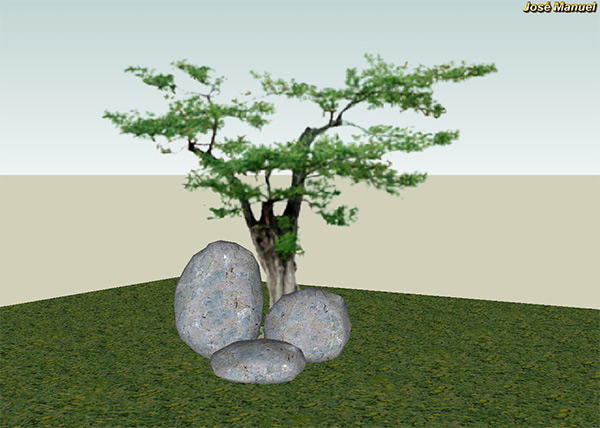

                                          boulders.jpg


                                          boulders.skp

                                          1 條回覆 最後回覆 回覆 引用 0
                                          • L 離線
                                            lapx
                                            最後由 編輯

                                            Looking for a good workflow for creating a stacked limestone wall. Any ideas would be helpful. I started off with basic shape as rectangle. Is there a ruby script to select and make square somewhat irregular at the edges?

                                            Stone in background was done by fillet block ruby and then subdivided for editing by scaling.
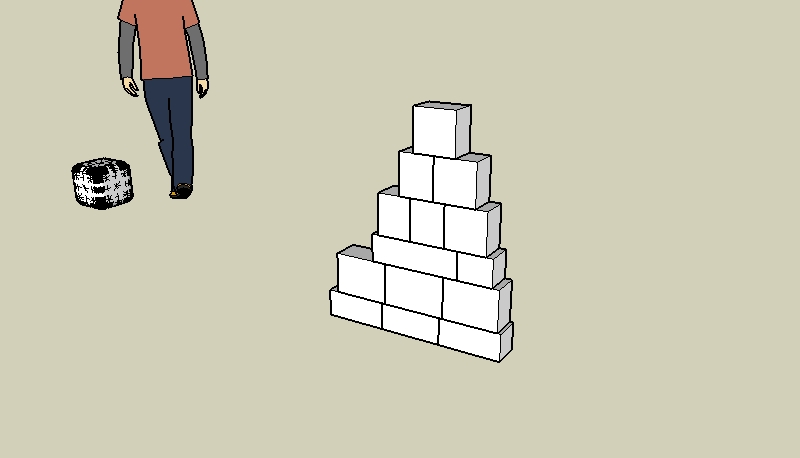

                                            STACKED-LIMESTONE.jpg

                                            1 條回覆 最後回覆 回覆 引用 0
                                            • 1
                                            • 2
                                            • 3
                                            • 1 / 3
                                            • 第一個貼文
                                              最後的貼文
                                            Buy SketchPlus
                                            Buy SUbD
                                            Buy WrapR
                                            Buy eBook
                                            Buy Modelur
                                            Buy Vertex Tools
                                            Buy SketchCuisine
                                            Buy FormFonts

                                            Advertisement